 RANGER
 CompTIA Network+ (N10-009) · chapter 18 of 29
Week 18: From anywhere
In this chapter Objectives 3.5
Objective 3.5
VPNs
Site-to-site VPN
A site-to-site VPN links two networks over the internet through an encrypted tunnel, usually IPsec between firewalls or VPN concentrators at each site. Users do nothing: traffic for the other site is encrypted automatically.
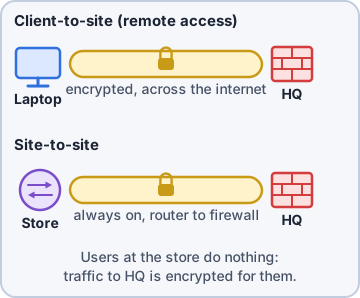
Exam tip Always-on tunnel between offices = site-to-site. One laptop connecting = client-to-site.
Client-to-site VPN
A client-to-site (remote access) VPN connects one user's device to the company network, usually with a VPN client using TLS/SSL or IPsec. Clientless VPN runs in a web browser over HTTPS: no software to install, but access is limited to web portals and published apps.
Exam tip Contractor on an unmanaged PC needs one internal web app? Clientless VPN is a tidy fit.
Split tunnel vs. full tunnel
Full tunnel: ALL traffic from the client goes through the VPN, even internet browsing, so corporate security filters it. Split tunnel: only traffic for company networks uses the VPN; internet traffic goes straight out the user's local connection. Split saves bandwidth; full gives more control and visibility.
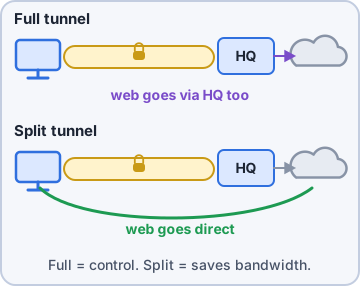
Exam tip 'Home users' video calls are clogging the HQ internet link' → consider split tunnel. 'Must inspect all traffic' → full tunnel.
Objective 3.5
Managing devices
Connection methods
Ways to manage a network device:
- SSH (TCP 22): encrypted command line. Replace Telnet (23), which is clear text.
- GUI: a web interface over HTTPS; friendly but slower for bulk changes
- API: scripts and tools make changes programmatically (automation)
- Console: direct serial/USB cable to the console port; works with no network config at all
Jump box / jump host
A jump box is a hardened server that admins connect to first, then manage devices from there. Devices only accept management from the jump box, so there is one well-watched, MFA-protected door instead of many.
Exam tip Jump box = single, hardened, logged entry point for management access.
In-band vs. out-of-band
In-band management uses the same production network as user traffic: if the network breaks, you lose access. Out-of-band (OOB) uses a separate path: a dedicated management network, a console server, or a cellular modem attached to console ports. When the core switch is down, OOB still gets you in.
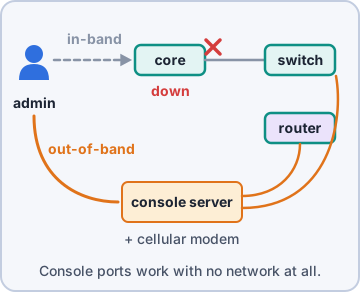
Exam tip Exam: reach a device when the production network is down → out-of-band.
Check yourself 1Buyers on the home VPN complain video calls are choppy, and the HQ internet link is saturated by their streaming. Which change helps most?
- Switch to a full tunnel
- Configure a split tunnel
- Move them to a site-to-site VPN
- Replace SSH with Telnet
Show the answer
Answer: B. Configure a split tunnel
With split tunneling, internet traffic leaves through each user's home connection instead of the HQ link.
Practice questions
Answer in your head, then open the answer. Ranger's Packet Trail has 483 questions like these for Network+, with mock exams.
Question 1A company wants its two offices to share resources over the internet. Users should not run any software; the edge firewalls should build a permanent encrypted tunnel. Which solution fits?
- Site-to-site VPN
- Client-to-site VPN
- Clientless VPN
- Jump box
Show the answer
Answer: A. Site-to-site VPN
A site-to-site VPN (usually IPsec) connects whole networks gateway to gateway, so users need no client software.
Question 2Contractors need to reach one internal web app from their own laptops, and IT won't install software on those laptops. Which remote access option fits BEST?
- Site-to-site IPsec VPN
- Clientless VPN through a browser portal
- Full-tunnel client VPN
- Out-of-band management
Show the answer
Answer: B. Clientless VPN through a browser portal
A clientless VPN uses the browser (HTTPS/TLS portal) to publish internal web apps, with nothing to install.
Question 3Remote staff on VPN complain video calls are slow. The VPN sends ALL traffic, including internet video, through headquarters. Which change would reduce the load while keeping corporate traffic in the tunnel?
- Switch to a site-to-site VPN
- Use a split tunnel
- Use a clientless VPN for all users
- Use a full tunnel
Show the answer
Answer: B. Use a split tunnel
Split tunneling sends only corporate-bound traffic through the VPN and lets internet traffic go directly out, reducing load on HQ.
Question 4A remote laptop is connected to the corporate client VPN (adapter 10.200.0.15). Its routing table is shown in the exhibit. Which tunnel mode is in use?
- Split tunnel; only 10.0.0.0/8 uses the VPN
- Full tunnel; internet traffic also uses the VPN
- Split tunnel; internet traffic exits via 192.168.1.1
- Clientless; only browser sessions use the tunnel
Show the answer
Answer: B. Full tunnel; internet traffic also uses the VPN
The VPN adapter owns a default route (0.0.0.0/0) with a lower metric than the home router's, so all traffic, including internet browsing, goes through the tunnel: a full tunnel. A split tunnel would add only corporate prefixes such as 10.0.0.0/8.
Question 5Which protocol should replace Telnet for command-line management of switches?
- HTTP on TCP 80
- SSH on TCP 22
- SNMP on UDP 161
- SSH on TCP 23
Show the answer
Answer: B. SSH on TCP 22
SSH encrypts the session, including credentials, on TCP 22. Telnet (TCP 23) sends everything in cleartext.
CompTIA, A+, Network+, Security+ and Linux+ are trademarks of CompTIA, Inc. Ranger Gamez is not affiliated with or endorsed by CompTIA. The practice questions are written to the published exam objectives; they are not real exam questions.