 RANGER
 CompTIA Security+ (SY0-701) · chapter 1 of 27
Day 1: Controls on patrol
In this chapter Objectives 1.1
Objective 1.1
Control categories: who or what does the work
What a security control is
A security control is any safeguard that lowers risk to systems, data or people. CompTIA sorts every control two ways. The category says how it is carried out: technical, managerial, operational or physical. The type says what job it does: preventive, deterrent, detective, corrective, compensating or directive. Every control gets one of each label.
Exam tip Exam trap: a question may ask for the category OR the type of the same control. Read the last line of the question to see which list it wants.
Technical and managerial
Technical controls are enforced by hardware or software: firewall rules, encryption, antivirus, an MFA prompt, OS login rules. Many books call them logical controls. Managerial controls (also called administrative) are about governing security: policies, risk assessments, security plans, onboarding rules for vendors. They set direction; they don't block a packet themselves.
- Technical: firewall ACL, disk encryption, EDR agent
- Managerial: written security policy, annual risk assessment
Exam tip Test: if the control is a document or a decision by management, it is managerial, even if a system later enforces it.
Operational and physical
Operational controls are carried out by people as part of their routine: security guards doing rounds, awareness training, a help desk following an ID-check script, daily log review. Physical controls protect places and hardware you can touch: fences, locks, bollards, badge readers, a locked server cage.
- Operational: guard checks visitor IDs, staff awareness training
- Physical: door lock, fence, lighting, server cage
Exam tip Operational = people doing it. Managerial = people deciding it. A guard on patrol is operational; the fence the guard walks along is physical.
Memory trick: who enforces it?
Ask one question: who or what enforces it? A device or software: technical. A document or management decision: managerial. A person doing a routine: operational. A barrier you can touch: physical.
Control                      Category
---------------------------  -----------
VPN requires MFA             Technical
Acceptable use policy        Managerial
Guard checks visitor badges  Operational
Locked server cage           Physical
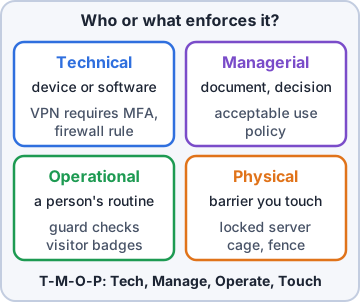
Exam tip Mnemonic: "Tech, Manage, Operate, Touch" (T-M-O-P).
Check yourself 1Kibble & Co. publishes a rule that every vendor must sign a security agreement before getting network access. What control category is this?
- Technical
- Physical
- Managerial
- Operational
Show the answer
Answer: C. Managerial
A rule set by management to govern security is a managerial control. No device enforces it and it is not a routine task performed by staff.
Objective 1.1
Control types: what job the control does
Preventive and deterrent
A preventive control stops an event before it happens: a door lock, a firewall deny rule, removing admin rights. A deterrent control discourages an attacker from trying but does not physically stop them: a warning sign about prosecution, bright lighting, a splash screen warning that activity is monitored.
Exam tip Trap: a lock is preventive (it actually blocks). A sign that threatens consequences is deterrent (it only discourages).
Detective and corrective
A detective control identifies and records an event during or after it happens: an IDS alert, log review, a motion sensor, a camera recording. A corrective control reduces the damage and restores normal operation after an event: restoring from backup, antivirus removing malware, a patch that fixes the hole that was used.
Exam tip Detective notices; corrective fixes. If the scenario says "after the incident, restore", think corrective.
Compensating and directive
A compensating control is an alternative used when the normal control is not possible or too costly: an old warehouse PC that can't be patched gets isolated on its own VLAN with extra monitoring. A directive control tells people what to do (or not do) and relies on them complying: an "Authorized personnel only" sign, a policy that says "store files only on the encrypted share".
Exam tip Compensating clue words: "can't be patched", "until", "instead of", "temporary". Directive clue words: "must", "only", "instructs".
One control, two labels
Category and type are independent. A camera is physical + detective. A firewall rule is technical + preventive. A compliance policy is managerial + directive. A guard shack at the gate is operational + preventive. Backups that recover data are technical + corrective. A backup generator that keeps power on when the utility fails is physical + compensating.
Control              Category   Type
-------------------  ---------  ------------
Loading dock camera  Physical   Detective
"Staff only" sign    Physical   Directive
Prosecution sign     Physical   Deterrent
Firewall deny rule   Technical  Preventive
Restore from backup  Technical  Corrective
VLAN, unpatched PC   Technical  Compensating
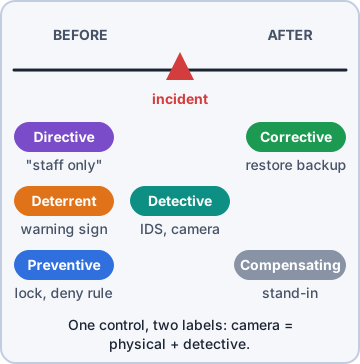
Exam tip Memory trick for types: "Please Don't Do Crimes, Compensate Directly" = Preventive, Deterrent, Detective, Corrective, Compensating, Directive.
Check yourself 2A sign on the data center door reads "Violators will be prosecuted." What control type is the sign?
- Preventive
- Deterrent
- Detective
- Directive
Show the answer
Answer: B. Deterrent
A warning about consequences discourages an intruder from trying, which is a deterrent. It is not directive, because directive signs instruct (for example "Staff only") rather than threaten consequences.
CompTIA, A+, Network+, Security+ and Linux+ are trademarks of CompTIA, Inc. Ranger Gamez is not affiliated with or endorsed by CompTIA. The practice questions are written to the published exam objectives; they are not real exam questions.