 RANGER
 CompTIA Security+ (SY0-701) · chapter 12 of 27
Month 6: Walls, gates and tunnels
In this chapter Objectives 3.2
Objective 3.2
Infrastructure considerations
Placement, zones, attack surface, connectivity
Device placement: put each control where traffic must pass it (a firewall between zones, a sensor on the link you need to watch). Security zones group systems by trust: untrusted internet, screened subnet for public servers, trusted internal, restricted (payments, ICS). Attack surface is every place an attacker could get in; shrink it by closing ports, removing services and limiting access. Connectivity: decide how zones and sites link (VPN, leased line, SD-WAN) and secure each link.
Exam tip Exam tip: "reduce the attack surface" = disable unused services and ports, remove software, limit who can connect.
Failure modes: fail-open vs fail-closed
What should a security device do when it breaks? Fail-open: traffic keeps flowing without inspection, so availability wins and security loses. Fail-closed: traffic stops, so security wins and availability loses. Choose by what matters more for that link. A payments firewall usually fails closed; an IPS on a store's only internet link might fail open so sales keep running.
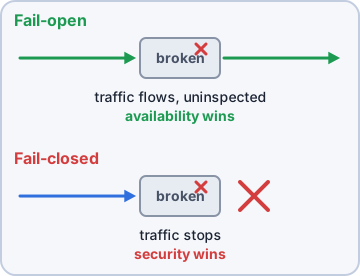
Exam tip Trap: fail-open does not mean "insecure by design". It is a deliberate availability choice. Pick based on the scenario's priority.
Device attributes: active/passive, inline/tap
An active device can act on traffic (block, drop, reset). A passive device only watches and reports. Inline devices sit in the traffic path, so every packet goes through them (an IPS, a firewall). Tap/monitor devices get a copy of traffic from a network tap or a switch port mirror (SPAN), so they can never block it (an IDS).
Internet
   |
[IPS inline, active]
   |
LAN switch -- SPAN copy --> [IDS passive]
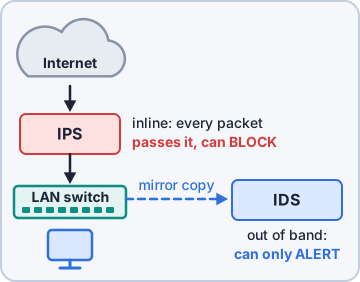
Exam tip Memory trick: IPS = In the Path, Stops. IDS = Detects, doesn't Stop.
Network appliances
Know what each one is for:
- Jump server: a hardened host admins connect to first, then reach protected systems from it. One audited path in.
- Proxy server: makes requests on behalf of clients (forward proxy) or servers (reverse proxy); can cache, filter and hide addresses.
- IPS/IDS: inspect traffic for attacks; the IPS blocks inline, the IDS alerts.
- Load balancer: spreads requests across servers for availability and scale; can offload TLS.
- Sensors: collect traffic or event data from points in the network and feed the IDS or SIEM.
Port security: 802.1X and EAP
802.1X is port-based network access control: nothing but authentication traffic passes a switch port or Wi-Fi connection until the device authenticates. Three roles: the supplicant (the client), the authenticator (the switch or access point) and the authentication server (usually RADIUS). EAP (Extensible Authentication Protocol) is the framework that carries the login inside 802.1X: EAP-TLS uses certificates on both sides; PEAP and EAP-TTLS build a TLS tunnel first.
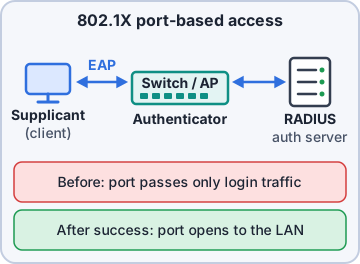
Exam tip Trap: the switch is the authenticator, not the authentication server. The RADIUS server makes the decision.
Objective 3.2
Firewalls and secure communication
Firewall types
Match the firewall to the job:
- Layer 4 firewall: filters on IP addresses, ports and protocol (TCP/UDP). Fast, but blind to the app inside.
- Layer 7 firewall: understands applications, so it can tell web browsing from a file-sharing app on the same port 443.
- NGFW (next-generation firewall): Layer 7 app awareness plus IPS, URL filtering and often user identity.
- UTM (unified threat management): one box (firewall, IPS, antivirus, web filter, VPN) for small sites.
- WAF (web application firewall): protects web apps by inspecting HTTP; blocks SQL injection and XSS.
Exam tip Exam tip: protecting a web app from SQL injection or XSS = WAF. "All-in-one for a small office" = UTM.
VPN, remote access and tunneling
A VPN builds an encrypted tunnel across an untrusted network. Remote access VPNs connect one user to the company; site-to-site VPNs connect whole networks. TLS VPNs run over port 443 and often work from a browser or light client. IPSec works at layer 3: AH gives integrity and authentication only, ESP adds encryption. Tunnel mode encrypts the whole original packet (site-to-site); transport mode protects only the payload (host to host).
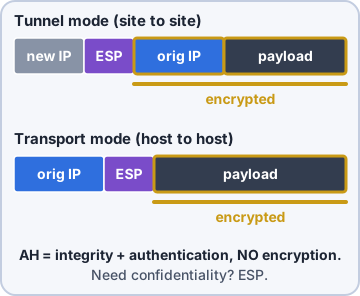
Exam tip Trap: AH does not encrypt. If the question needs confidentiality, the answer is ESP.
SD-WAN and SASE
SD-WAN (software-defined WAN) links branch sites over any mix of connections (broadband, LTE, MPLS) and picks the best path by policy, often straight to cloud apps. SASE (secure access service edge) moves security to the cloud edge, close to users wherever they are. It pairs SD-WAN-style networking with cloud security services such as a secure web gateway, CASB, zero trust network access and firewall as a service.
Exam tip Memory trick: SD-WAN is the road network. SASE is the road plus the security checkpoints, delivered from the cloud.
Selection of effective controls
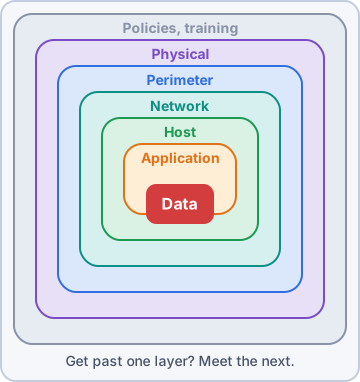
There is no one best box. Pick controls by the risk and the requirement: what are we protecting, from whom, and what breaks if the control fails? Layer them (defense in depth), make sure each control is placed where the traffic actually flows, and check its failure mode, cost and the effort to run it. A control nobody monitors is just decoration.
Check yourself 1A store's only internet link runs through an inline IPS. If the IPS crashes, sales must continue even without inspection. How should the IPS be configured?
- Fail-closed
- Fail-open
- Passive tap mode
- Active/passive cluster
Show the answer
Answer: B. Fail-open
Fail-open keeps traffic flowing when the device fails, which is what the business asked for. Fail-closed would stop all sales traffic.
Check yourself 2Dev sets up 802.1X on the store switches. Which TWO statements about the roles are correct? (Choose two.)
- The laptop requesting access is the supplicant
- The switch is the authentication server
- The RADIUS server decides whether to allow access
- The laptop is the authenticator
- EAP is used only after the port is open
Show the answer
Answers: A. The laptop requesting access is the supplicant, C. The RADIUS server decides whether to allow access
In 802.1X the client is the supplicant, the switch is the authenticator and the RADIUS server is the authentication server that makes the decision.
CompTIA, A+, Network+, Security+ and Linux+ are trademarks of CompTIA, Inc. Ranger Gamez is not affiliated with or endorsed by CompTIA. The practice questions are written to the published exam objectives; they are not real exam questions.