 RANGER
 CompTIA Security+ (SY0-701) · chapter 14 of 27
Month 6: When the lights go out
In this chapter Objectives 3.4
Objective 3.4
Staying up
High availability: load balancing vs clustering
Load balancing spreads requests across several independent servers; if one dies, the balancer stops sending it traffic. The servers do not need to know about each other. Clustering makes several servers work together as one system, aware of each other, often sharing storage, so one node takes over the service if another fails (active/passive or active/active).
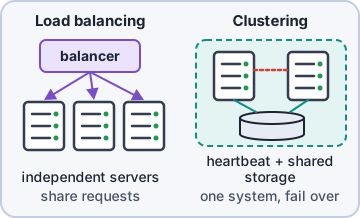
Exam tip Exam tip: "servers share storage and fail over to each other" = clustering. "Distribute incoming requests" = load balancing.
Site considerations
Recovery sites differ in readiness and cost. Hot site: fully equipped, data replicated, ready in minutes to hours (most expensive). Warm site: hardware and connectivity ready, but data and apps must be loaded; ready in hours to days. Cold site: space, power and cooling only; you bring everything (cheapest, slowest). Geographic dispersion: put sites far enough apart that one disaster (storm, flood, regional outage) cannot hit both.
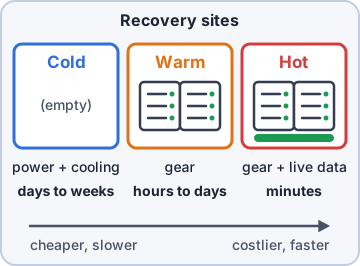
Exam tip Memory trick: hot = move in today, warm = unpack first, cold = empty room.
Platform diversity and multi-cloud
Platform diversity uses different operating systems, vendors or technologies so one vulnerability or bug cannot take down everything. Multi-cloud spreads workloads across more than one cloud provider, so a single provider's outage or failure does not stop the business. Both add resilience but also complexity and skills to maintain.
Continuity of operations and capacity planning
Continuity of operations (COOP) is the plan to keep essential functions running during a disruption, even in a reduced or manual way (paper order forms when the POS is down). Capacity planning makes sure there is enough of three things when demand jumps or a site fails: people (enough trained staff, cross-training), technology (servers, licenses, app capacity) and infrastructure (power, cooling, network bandwidth, buildings).
Objective 3.4
Testing, backups and power
Testing the plan
An untested plan is a wish. CompTIA lists four methods:
- Tabletop exercise: people talk through a scenario around a table. Cheap, no systems touched.
- Fail over: actually switch to the backup system or site to prove it works.
- Simulation: a realistic practice event (for example a simulated attack or outage) that people respond to.
- Parallel processing: run the primary and backup systems at the same time on the same work and compare results.
Exam tip Trap: a tabletop never touches production systems. If systems actually switch over, it is a failover test.
Backups
Backups are the last line against ransomware and disasters. Four choices shape every backup plan.
- Onsite/offsite: onsite restores fast; offsite (or cloud) survives a site disaster. Use both.
- Frequency: how often you back up sets the maximum data loss (ties to RPO).
- Encryption: backups hold everything; encrypt them and protect the keys.
- Snapshots: point-in-time copies of a VM or volume, quick to take and roll back.
Backups: recovery, replication, journaling
A backup only counts if it comes back, and not every copy of your data is a backup.
- Recovery: test restores regularly; a backup you cannot restore is not a backup.
- Replication: copies data to another system in near real time. Fast, but it also copies corruption or encryption by ransomware.
- Journaling: logs every change so data can be replayed or rolled back to a precise point.
Exam tip Trap: replication is not a backup by itself. If ransomware encrypts the primary, the replica gets encrypted too. Keep offline or immutable copies.
Power
A UPS (uninterruptible power supply) runs on batteries, giving clean power instantly for minutes: enough to ride out blips or shut down cleanly. A generator gives power for hours or days, but takes time to start, so the UPS bridges the gap until it does. Test the generator under load on a schedule.
Exam tip Exam tip: short outage or bridging = UPS. Long outage = generator. Real designs use both.
Check yourself 1Kibble & Co. needs a recovery site it can use within a day or so. Hardware and network links can be ready, but restoring the latest data first is acceptable. Budget is limited. Which site fits?
- Hot site
- Cold site
- Warm site
- Mobile site
Show the answer
Answer: C. Warm site
A warm site has hardware and connectivity ready but needs data and apps loaded, so it is ready in hours and costs less than a hot site.
CompTIA, A+, Network+, Security+ and Linux+ are trademarks of CompTIA, Inc. Ranger Gamez is not affiliated with or endorsed by CompTIA. The practice questions are written to the published exam objectives; they are not real exam questions.