 RANGER
 CompTIA Security+ (SY0-701) · chapter 20 of 27
Month 7: The breach on Rosa's laptop
In this chapter Objectives 4.8, 4.9
Objective 4.8
Incident response
The incident response process
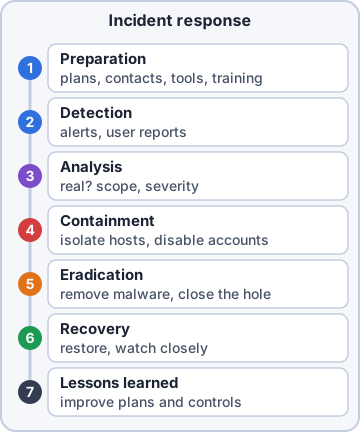
CompTIA's seven steps, in order:
- Preparation: plans, contacts, tools, training, before anything happens.
- Detection: noticing that something is wrong (alerts, user reports).
- Analysis: confirming it is a real incident, its scope and severity.
- Containment: stopping the spread (isolate hosts, disable accounts).
- Eradication: removing the cause (malware, attacker accounts, the exploited flaw).
- Recovery: restoring systems to normal and watching them closely.
- Lessons learned: a review afterward to improve plans and controls.
Exam tip Memory trick: "Pretty Dogs Always Chase Every Rubber Lizard."
Training and testing
Training makes sure everyone knows their role in the plan before an incident. Testing proves the plan works: a tabletop exercise walks the team through a scenario in discussion, with no systems touched; a simulation acts out a realistic incident (for example a fake phishing attack or a staged malware outbreak) and the team responds as if it were real.
Root cause analysis and threat hunting
Root cause analysis asks why the incident happened, not just what happened (the phishing email was the trigger, but missing attachment sandboxing was the root cause). Fix the root cause or it will happen again. Threat hunting is proactive: analysts search for signs of attackers that no alert has flagged yet, guided by threat intelligence and hypotheses.
Exam tip Trap: threat hunting starts without an alert. If an alert triggered the work, it is incident response.
Digital forensics
Handle evidence so it holds up in court:
- Legal hold: an order to preserve all data related to a case; normal deletion and retention rules are suspended.
- Chain of custody: a record of every person who handled the evidence, when and why.
- Acquisition: collecting evidence (disk images, memory dumps), most volatile first: CPU cache and memory before disk.
- Preservation: keep evidence unchanged (write blockers, hashes, secure storage).
- Reporting: document findings, methods and timeline clearly.
- E-discovery: finding and handing over electronic information for legal proceedings.
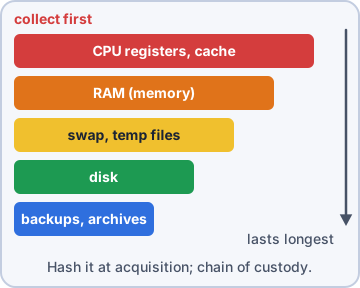
Exam tip Exam tip: hash the evidence at acquisition and again later; matching hashes prove it was not altered.
Objective 4.9
Data sources for investigations
Log data
Pick the log that holds the answer:
- Firewall logs: allowed and blocked connections (source, destination, port).
- Application logs: what the app did (logins to the shop, errors, transactions).
- Endpoint logs: activity on the device (processes started, files, USB use), often from EDR.
- OS-specific security logs: Windows Security log (4624 logon, 4625 failed logon, 4720 account created), Linux auth logs.
- IPS/IDS logs: detected or blocked attack signatures. Network logs: switches, routers, DNS, DHCP, proxies.
- Metadata: data about data (email headers, file timestamps and authors, photo location).
Other data sources
Vulnerability scans show which weaknesses an attacker could have used. Automated reports from tools summarize activity on a schedule. Dashboards give a live visual overview to spot spikes and trends. Packet captures hold the full contents of network traffic: the most detail, but large, and encrypted traffic needs decryption to read.
Exam tip Exam tip: "see exactly what data was sent" = packet capture. "who connected where" = firewall or NetFlow.
Check yourself 1The team has isolated the infected laptop from the network. Which incident response step comes NEXT?
- Detection
- Recovery
- Eradication
- Lessons learned
Show the answer
Answer: C. Eradication
After containment comes eradication: removing the malware and the attacker's foothold. Recovery follows once the cause is gone.
Practice questions
Answer in your head, then open the answer. Ranger's Cyber Patrol has 60 questions like these for Security+, with mock exams.
Question 1Files on file server FS01 are being renamed with a .kbl extension. FS01's audit entries are in the exhibit. What is the BEST immediate containment step?
- Restore FS01 from last night's backup
- Shut down FS01 immediately
- Isolate WS-0142 from the network
- Isolate WS-0088 from the network
Show the answer
Answer: C. Isolate WS-0142 from the network
Every rename comes from WS-0142, so it is encrypting the share over the network; cutting it off stops the damage while FS01 keeps serving others and stays intact for analysis. Restoring first would only get the files encrypted again.
Question 2The incident timeline in the exhibit is reviewed at the lessons-learned meeting. Which was the MOST significant process error?
- Isolating WEB-04 and DB-01 at 10:05
- Holding a lessons-learned meeting afterward
- Confirming the malware was real before acting on the EDR alert
- Reimaging before containment, scoping and evidence capture
Show the answer
Answer: D. Reimaging before containment, scoping and evidence capture
The team jumped from analysis straight to recovery: reimaging destroyed evidence and skipped containment and scoping, so the attacker's foothold on other hosts was missed. Isolating affected hosts and holding lessons learned are correct steps.
Question 3A compromised cloud VM belongs to an auto-scaling group that replaces unhealthy instances within minutes and deletes their disks. Investigators need evidence. What should the responder do FIRST?
- Protect it from termination, then capture memory and a disk snapshot
- Restore last week's image over it and compare file lists
- Reboot it into a rescue image, then copy its log files
- Terminate it at once so that auto-scaling launches a clean replacement
Show the answer
Answer: A. Protect it from termination, then capture memory and a disk snapshot
Memory and the disk vanish if the group replaces the instance, so the responder first stops termination, then acquires memory and snapshots the volume, following the order of volatility. Rebooting wipes memory, and terminating destroys everything.
Question 4The exhibit summarizes one hour of failed logons in the Windows Security log of the VPN's authentication server. Which conclusion is BEST supported?
- jlee mistyped a password 14 times, then logged in
- A name list was tried; jlee was valid and its password guessed
- A service with stale credentials for many accounts
- Password spraying against 1,180 valid employee accounts on the VPN
Show the answer
Answer: B. A name list was tried; jlee was valid and its password guessed
Nearly all failures are for names that do not exist, so the source was testing a list of guessed usernames; it then tried 14 passwords on the one real account and got in. The same external IP trying fake names rules out a user's typos.
Question 5An IDS alert fires for an exploit attempt against the shop. The analyst gathers the data in the exhibit. Which conclusion is BEST supported?
- The firewall blocked the attack before it arrived
- WEB-01 is compromised and must be reimaged now
- The attempt reached WEB-01 but shows no sign of success
- The IDS alert is a false positive; no real request was ever made
Show the answer
Answer: C. The attempt reached WEB-01 but shows no sign of success
The firewall allowed the request and the app logged an error, so the attempt was real and reached the server, but EDR shows no follow-on activity and the server is patched. That is an unsuccessful attempt to record and keep watching, not a compromise.
CompTIA, A+, Network+, Security+ and Linux+ are trademarks of CompTIA, Inc. Ranger Gamez is not affiliated with or endorsed by CompTIA. The practice questions are written to the published exam objectives; they are not real exam questions.