 RANGER
 CompTIA Security+ (SY0-701) · chapter 5 of 27
Week 3: Locks, keys and a stolen laptop
In this chapter Objectives 1.4
Objective 1.4
Keys: symmetric, asymmetric and PKI
Symmetric encryption
Symmetric encryption uses one shared secret key to encrypt and decrypt. It is fast and is used for bulk data: disks, files, VPN and HTTPS traffic once the session is set up. AES is the standard algorithm. The weakness is key distribution: both sides need the same key, and anyone who gets it can read everything. It also doesn't scale: many users means many shared keys.
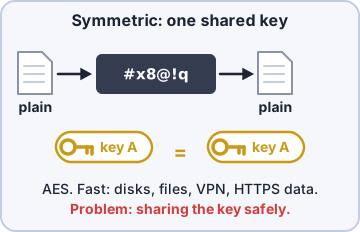
Exam tip Clue words for symmetric: "shared key", "same key", "fast", "bulk data", AES.
Asymmetric encryption
Asymmetric encryption uses a mathematically linked key pair. The public key can be shared with anyone; the private key is kept secret by its owner. Data encrypted with the public key can only be decrypted with the matching private key. It solves key distribution but is much slower, so it is used for small jobs: key exchange, digital signatures, certificates. Examples: RSA, ECC.
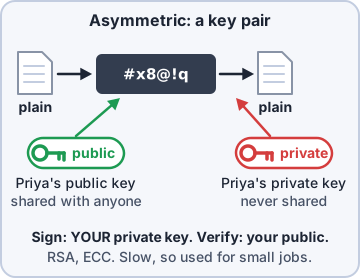
Exam tip Encrypt TO someone with THEIR public key. Sign FROM yourself with YOUR private key. You can't work out the private key from the public key.
PKI and key escrow
Public key infrastructure (PKI) is the whole system of policies, people, hardware, software and certificate authorities that creates, distributes, manages, stores and revokes digital certificates, which bind a public key to an identity. Key escrow means a trusted third party (or a protected internal store) holds a copy of decryption keys, so data can be recovered if a key is lost or an employee leaves.
Exam tip Escrow exists for legitimate recovery; the trap is assuming escrow is a vulnerability by itself. It must be tightly controlled, because whoever holds escrow can decrypt.
Objective 1.4
Key exchange, algorithms and key length
Key exchange
Key exchange is how two sides end up with the same symmetric key. Out-of-band means sending it another way (in person, by phone, by courier). In-band means over the network, protected by asymmetric crypto. Diffie-Hellman (and its elliptic-curve form, ECDHE) lets both sides compute the same shared secret without ever sending it. TLS uses this: asymmetric math to agree on a session key, then fast symmetric encryption for the data.
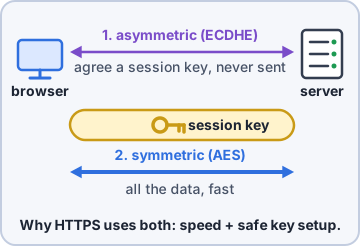
Exam tip Hybrid = asymmetric to set up the key, symmetric to move the data. That is the answer to "why does HTTPS use both?"
Algorithms and key length
The algorithm is the math (AES, RSA, ECC); the key is the secret input. Algorithms are public; only the key is secret. Longer key length means more possible keys, so brute force takes much longer. Today symmetric keys are 128 bits or more (AES-128, AES-256). RSA keys are 2048 bits or more, with 3072 increasingly recommended. ECC gets the same strength with much smaller keys (256-bit ECC is roughly RSA 3072), which suits phones and IoT.
Exam tip Trap: don't compare key lengths across types. A 256-bit AES key is very strong; a 256-bit RSA key would be useless.
Check yourself 1Why does an HTTPS session use asymmetric cryptography at the start and symmetric encryption for the rest?
- Symmetric keys can't be longer than 128 bits
- Asymmetric agrees on a key; symmetric moves data faster
- Asymmetric gives integrity and symmetric gives availability
- Symmetric encryption keeps the server's private key hidden
Show the answer
Answer: B. Asymmetric agrees on a key; symmetric moves data faster
Asymmetric crypto safely agrees on a session key without sharing a secret in advance, and symmetric encryption then protects the data much faster. This hybrid design gets the strengths of both.
Objective 1.4
Encryption levels and transport
Data at rest: from disk to record
Full-disk encryption (FDE) encrypts the entire drive, including the OS, so a stolen laptop is unreadable (BitLocker, FileVault). Partition encryption covers one partition of a disk. Volume encryption covers a logical volume or container, which can be a data volume separate from the OS. File encryption protects individual files (Windows EFS). Database encryption protects a whole database (transparent data encryption). Record encryption protects individual records or columns, such as only the card-number field.
Exam tip Pick the smallest scope that fits the scenario: "only the SSN column" = record-level; "whole laptop if stolen" = full-disk.
Transport/communication encryption
Transport encryption protects data in transit across a network: HTTPS (TLS) for web traffic, a VPN tunnel (IPsec or TLS-based) between sites or for remote users, SSH instead of Telnet, SFTP instead of FTP. FDE does nothing once data leaves the disk; transport encryption does nothing once data lands on disk. You usually need both.
Exam tip Data at rest = disk/file/database encryption. Data in transit = TLS, IPsec, SSH.
Objective 1.4
Hardware and services that guard keys
TPM and HSM
A Trusted Platform Module (TPM) is a security chip (or firmware) in a computer: it generates and stores keys, has a random number generator, holds unique keys burned in at manufacture, stores boot measurements for secure boot, and resists brute-force guessing. BitLocker keeps its key in the TPM. A hardware security module (HSM) is a dedicated, tamper-resistant appliance or card for large-scale key storage and fast crypto, often clustered with redundant power, used by CAs and payment systems.
Exam tip One laptop = TPM. A data center full of keys and certificates = HSM.
Key management system and secure enclave
A key management system (KMS) centrally manages keys through their whole life: create, store, rotate, expire, revoke, and log every use, keeping keys separate from the data they protect. Cloud providers offer KMS services. A secure enclave is a dedicated security processor built into a phone or computer, isolated from the main processor and OS, that protects secrets such as biometric data and device keys even if the OS is compromised.
Exam tip KMS = managing keys at scale (rotation, logging). Secure enclave = protecting secrets on one device, separate from the main CPU.
Objective 1.4
Obfuscation
Steganography
Obfuscation makes data hard to understand or find without necessarily encrypting it. Steganography hides data inside other data, the cover (cover text/image): a message inside the pixels of a photo, an audio file, a video, or packet fields. Encryption makes data unreadable but obvious; steganography makes it invisible. Attackers use it to slip data past data loss prevention tools.
Exam tip Clue: "hidden inside an image" = steganography, even if the hidden part is also encrypted.
Tokenization and data masking
Tokenization replaces sensitive data with a random token that has no mathematical relationship to the original; only a protected token vault can map it back. Card payments use it so merchants never store real card numbers. Data masking hides part or all of a value when it is shown or copied, such as showing a Social Security number as XXX-XX-6789, or swaps in fake data for testing, so people see only what they need.
Exam tip Trap: a token can't be decrypted (there is no key); it can only be looked up in the vault. That is how you tell tokenization from encryption.
CompTIA, A+, Network+, Security+ and Linux+ are trademarks of CompTIA, Inc. Ranger Gamez is not affiliated with or endorsed by CompTIA. The practice questions are written to the published exam objectives; they are not real exam questions.