 RANGER
 CompTIA Security+ (SY0-701) · chapter 9 of 27
Month 2: Black Friday under attack
In this chapter Objectives 2.4
Objective 2.4
Malware, part 1: how it spreads and what it wants
Virus and worm
A virus attaches to a file or program and needs a user to run it to spread (program, boot sector, script and macro viruses; fileless viruses live only in memory and use built-in tools like PowerShell). A worm spreads by itself across the network by exploiting vulnerabilities, with no user action, so it can infect thousands of machines fast.
Exam tip Key difference: virus needs a user to run something; worm self-replicates over the network.
Trojan and ransomware
A Trojan pretends to be useful software (a free game, a "codec", a cracked app) but carries a hidden malicious payload, often a remote access Trojan (RAT) backdoor. Ransomware encrypts files or systems and demands payment for the key; many groups also steal data first and threaten to publish it (double extortion).
Exam tip Best ransomware defense on the exam: tested, offline or immutable backups. Paying doesn't guarantee recovery.
Objective 2.4
Malware, part 2: watchers, hiders and time bombs
Spyware, keylogger, bloatware
Spyware secretly watches the user (browsing, screenshots, location) and sends the data out. A keylogger records keystrokes to steal passwords and messages; it can be software or a small hardware plug. Bloatware is unnecessary software preinstalled by the maker; it wastes resources and widens the attack surface with apps nobody patches.
Exam tip Bloatware usually isn't malicious by design; the risk is extra unpatched code. Remove what you don't need.
Logic bomb and rootkit
A logic bomb is code that waits for a trigger (a date, or an event like an employee being removed from payroll) and then does damage. Hard to spot because it does nothing until triggered; often planted by insiders. A rootkit hides deep in the system, often in the kernel, to conceal itself and other malware from the OS and security tools, so normal scans look clean.
Exam tip Clue for rootkit: "scans are clean but the machine still beacons" or "hidden processes". Fix: rebuild from known-good media.
Objective 2.4
Physical attacks
Brute force, RFID cloning, environmental
A physical brute force attack forces entry: breaking a window, prying a door, ramming a gate with a vehicle (which bollards stop). Radio frequency identification (RFID) cloning copies the data from an access badge with a hidden reader, sometimes just by standing close, then writes it to a blank card. Environmental attacks target the facility's supports: power, HVAC cooling, fire suppression, so systems overheat or fail.
Exam tip Defense for RFID cloning: badges with encryption and challenge-response, plus MFA (badge + PIN) at sensitive doors.
Check yourself 1Antivirus on a POS server says it's clean, but the server keeps contacting an unknown host. A memory forensics tool finds a kernel driver that hides processes. What is the MOST likely malware?
- Logic bomb
- Rootkit
- Worm
- Bloatware
Show the answer
Answer: B. Rootkit
Malware that hides itself and other processes from the OS and scanners at kernel level is a rootkit. A logic bomb waits for a trigger and doesn't, by definition, hide processes.
Objective 2.4
Network attacks
DDoS: reflected and amplified
A distributed denial-of-service (DDoS) attack floods a target from many sources, often a botnet, to hurt availability. Reflected: the attacker sends requests to third-party servers with the victim's spoofed IP, so the replies hit the victim. Amplified: the attacker picks requests whose replies are far larger than the request (DNS, NTP, memcached), multiplying the flood. Most big floods are both.
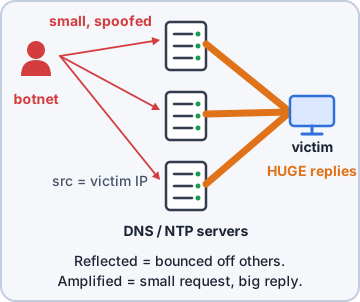
Exam tip Reflected = bounced off someone else with a spoofed source. Amplified = small request, huge reply.
DNS attacks and wireless attacks
DNS attacks include DNS poisoning (false records cached, sending users to the attacker's IP), domain hijacking (taking control of the domain registration) and URL hijacking (lookalike domains). Wireless attacks include deauthentication floods that kick users off Wi-Fi (802.11w management frame protection helps), jamming of the radio frequencies, and evil twin or rogue access points that capture traffic.
Exam tip Users typing the right name but landing on the wrong site = DNS poisoning (or a hijacked domain).
On-path, credential replay, malicious code
An on-path attack (formerly man-in-the-middle) puts the attacker between two parties to read or change traffic, for example with ARP poisoning on a LAN. Credential replay captures login data (a password hash, a token) and reuses it to log in without knowing the password; pass the hash is an example. Malicious code covers harmful scripts, macros and executables used to gain or keep access.
Exam tip Replay defenses: encryption, session tokens that change, timestamps and nonces, and Kerberos-style tickets that expire.
Objective 2.4
Application attacks
Injection, buffer overflow, replay
Injection attacks put attacker data into something that gets executed or interpreted: SQL, HTML/script (XSS), LDAP, XML, OS commands, DLLs. A buffer overflow attack sends more input than a buffer holds to crash the app or run code. A replay attack captures valid traffic, such as a session cookie or token, and sends it again to impersonate the user; that is how session hijacking works.
Exam tip Replay works without cracking anything: the attacker reuses what was already valid. Short-lived, single-use tokens break it.
Privilege escalation, forgery, directory traversal
Privilege escalation gains more rights than intended: vertical (user to admin) or horizontal (one user to another user's data). Forgery makes a server or browser send requests the user didn't intend: cross-site request forgery (CSRF) abuses a logged-in user's browser; server-side request forgery (SSRF) makes a server fetch internal resources. Directory traversal uses ../ sequences to read files outside the web root.
GET /img?file=../../../../etc/passwd
  <- directory traversal
GET /fetch?url=http://169.254.169.254/
  <- SSRF
Exam tip Clue: ../ or %2e%2e%2f in a URL = directory traversal.
Objective 2.4
Cryptographic and password attacks
Downgrade, collision, birthday
A downgrade attack forces two sides to use an older, weaker protocol or cipher (for example pushing a TLS 1.3 client back to an old, broken protocol version) so the attacker can break it. A collision is two different inputs that produce the same hash, which lets a forged file pass a hash check (MD5 and SHA-1 are vulnerable). A birthday attack uses the birthday paradox: finding any two inputs with matching hashes takes far fewer tries than matching one specific hash.
Exam tip Fix downgrades by disabling old protocols and ciphers on servers. Fix collisions by using SHA-256 or better.
Password spraying and brute force
Spraying tries one or a few common passwords against many accounts, staying under each account's lockout limit. Brute force tries many passwords against one account: online against the live login (lockouts stop it) or offline against stolen hashes at full speed (lockouts don't help; salting and key stretching do). A dictionary attack is brute force with a word list.
Exam tip Many accounts, few failures each = spraying. One account, many failures = brute force.
Check yourself 2The VPN log shows one IP trying the password "Autumn2025!" once against each of 400 different usernames. Which attack is this?
- Brute force
- Credential replay
- Birthday
- Password spraying
Show the answer
Answer: D. Password spraying
One common password tried across many accounts, staying under lockout limits, is password spraying. Brute force would hammer one account with many passwords.
Practice questions
Answer in your head, then open the answer. Ranger's Cyber Patrol has 60 questions like these for Security+, with mock exams.
Question 1The exhibit shows Windows Security events from a domain controller overnight. No changes were scheduled. Which TWO conclusions does it support? (Choose two.)
- The account shows impossible travel
- A worm spread between the domain controllers
- A new privileged account was created for persistence
- The intruder tried to erase evidence of the activity
- A password spraying attack hit many accounts
Show the answer
Answers: C. A new privileged account was created for persistence, D. The intruder tried to erase evidence of the activity
jlee's remote session created a new account, added it to Domain Admins, and that account then cleared the Security log. That is persistence through a new privileged account and an attempt to cause missing logs. No failures or second location appear.
Question 2EDR on a file server records the sequence in the exhibit within ten minutes. Which malware is MOST likely about to act?
- Ransomware
- Keylogger
- Spyware
- Logic bomb
Show the answer
Answer: A. Ransomware
Deleting shadow copies, disabling recovery and stopping backups removes every way to restore, and opening many files for writing comes next. That is the typical run-up to ransomware; spyware wants to stay quiet and keep the system working.
Question 3Users on the 10.0.5.0/24 office network report certificate warnings. The real router and DHCP server is 10.0.5.1, and the DNS server is 10.0.0.53. An affected PC shows the exhibit. Which attack is MOST likely taking place?
- DNS cache poisoning of the server at 10.0.0.53
- An on-path attack using a rogue DHCP server
- ARP poisoning of the real gateway's MAC address
- A reflected DDoS attack on the office network
Show the answer
Answer: B. An on-path attack using a rogue DHCP server
The PC got its lease, gateway and DNS server from 10.0.5.77 instead of 10.0.5.1, so a rogue DHCP server has put itself in the path of all traffic and name lookups. ARP poisoning would leave the configured gateway at 10.0.5.1.
Question 4A SIEM raises an impossible-travel alert for a Detroit-based buyer (exhibit). Kibble & Co. sends all remote traffic through a cloud VPN gateway in Frankfurt whose public egress range is 203.0.113.0/24. Which conclusion is BEST supported?
- An attacker in Frankfurt using the buyer's stolen password
- A replay of the buyer's session token by the VPN host
- A likely false positive caused by the VPN egress location
- Concurrent session usage by two different people
Show the answer
Answer: C. A likely false positive caused by the VPN egress location
The second sign-in comes from the company's own VPN egress range a minute after the buyer's laptop connected to the VPN, with MFA passed on the same device. The egress IP's location, not travel, explains it; the rule should account for that range.
Question 5After an admin rotated the svc-reports password on Monday, the account keeps locking out, as the exhibit shows. No other accounts are affected. What is the MOST likely cause?
- Password spraying against all service accounts
- Credential replay of a captured svc-reports token
- A brute-force attack on svc-reports from the internet
- A service on RPT-SRV02 still uses the old password
Show the answer
Answer: D. A service on RPT-SRV02 still uses the old password
Lockouts every 30 minutes, always from one internal server with service logon type 5, starting right after a password rotation, point to a service still set with the old password. An attack would come from other sources or hit more accounts.
CompTIA, A+, Network+, Security+ and Linux+ are trademarks of CompTIA, Inc. Ranger Gamez is not affiliated with or endorsed by CompTIA. The practice questions are written to the published exam objectives; they are not real exam questions.