 RANGER
 AWS Certified Cloud Practitioner (CLF-C02) · chapter 1 of 14
Day 1: Why move the shop?
In this chapter Objectives 1.1, 1.4
- What the cloud is, and what you get from it
- Always on, everywhere, right now
- Cloud economics
- Spending smarter in the cloud
- Cloud economics: what changes about cost
- Software licenses: BYOL or license included
- Rightsizing: pay for the size you need
- Why automate in the cloud
- Economies of scale
- Practice questions
- Chapter recap
Objective 1.1
What the cloud is, and what you get from it
Renting the kennel instead of building one
Cloud computing is the on-demand delivery of IT resources (servers, storage, databases, software) over the internet with pay-as-you-go pricing. Kibble & Co. owns its closet server like a family that built its own dog kennel. In the cloud it rents space in a giant, professionally run kennel: Amazon Web Services (AWS) owns the buildings, power and hardware, and Kibble & Co. pays only for what it uses, for as long as it uses it.
Ranger: sniffs the closet server, sneezes at the dust
Exam tip Exam wording to spot: "on demand", "pay as you go", "no up-front commitment". Those phrases describe the cloud's value proposition.
Six reasons companies move
AWS sums up the value proposition of the AWS Cloud in six advantages. Learn them as a set: the exam often describes one in plain words and asks which benefit it is.
- Trade fixed expense for variable expense: pay for what you use, not for servers you might need
- Benefit from massive economies of scale: AWS buys in bulk, so prices can be lower
- Stop guessing capacity: add or remove resources as demand changes
- Increase speed and agility: new resources in minutes, not weeks
- Stop spending money running and maintaining data centers: focus on customers instead
- Go global in minutes: deploy close to users around the world
Scalability, elasticity and agility
Scalability is the ability to grow to handle more work: bigger servers or more of them. Elasticity goes further: capacity grows and shrinks automatically to match demand, minute by minute, so the shop has extra servers on Black Friday and gives them back on Monday. Agility means you can try an idea quickly and cheaply, and throw it away if it fails, because nothing was bought up front.
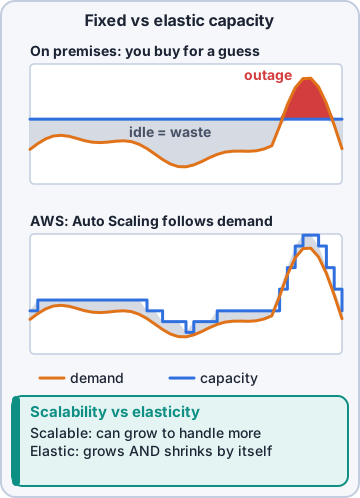
Exam tip Trap: "elastic" means automatic AND in both directions (out and back in). A system that can only be upgraded by hand is scalable, not elastic.
Check yourself 1Every November, order traffic on shop.kibbleco.example triples for four days, then drops back. Which cloud benefit lets Kibble & Co. add servers for those days and release them after?
- Economies of scale
- Elasticity
- High availability
- Global reach
Show the answer
Answer: B. Elasticity
Elasticity is capacity that follows demand automatically, up for the busy days and back down afterward, so you never pay for idle holiday servers in March.
Objective 1.1
Always on, everywhere, right now
High availability
High availability means a system keeps working when a part of it fails, because it runs in more than one place. The closet server is a single point of failure: if its power supply dies, the shop is down. In AWS, the same app can run in two or more separate data centers in the same area. One fails, the other keeps taking orders.
Dev: We'll see exactly how AWS arranges those data centers later. For now: two of everything beats one of anything.
Speed of deployment and global reach
AWS global infrastructure is a worldwide network of data centers that customers can use without building anything. That gives two benefits the exam names: speed of deployment (a test server in minutes instead of a six-week hardware order) and global reach (Kibble & Co. could serve a new Canadian or European store from nearby AWS locations without opening an office there).
Exam tip If a question says "a new market on another continent, launched next week", think global reach. "A test environment today, deleted tomorrow" is speed and agility.
Check yourself 2Dev wants to test a new product-search feature on its own servers for two days, then delete everything if customers don't like it. Which benefit of the AWS Cloud does this show best?
- High availability
- Economies of scale
- Data sovereignty
- Agility
Show the answer
Answer: D. Agility
Agility means low-cost, fast experiments: spin resources up, try the idea, and remove them with no hardware left behind.
Objective 1.4
Cloud economics
Fixed costs vs variable costs
A fixed cost stays the same no matter how much you use: the server you bought costs the same whether the shop sells ten bags of kibble or ten thousand. A variable cost rises and falls with use. Buying hardware up front is capital expenditure (CapEx); paying as you go is operational expenditure (OpEx). Moving to AWS swaps much of the fixed CapEx for variable OpEx.
Exam tip Exam pattern: "trade fixed expense for variable expense" is the cloud benefit when a question mentions avoiding large up-front purchases.
What the closet really costs
On-premises means running your own equipment in your own building. Its costs go far beyond the server's price tag. Adding them all up over the years gives the total cost of ownership (TCO).
- Hardware bought up front, and replaced every few years
- Power for the server and cooling for the room
- Floor space, racks and physical security
- Staff time for setup, patching hardware and repairs
- Software licenses and maintenance contracts
- Spare capacity bought "just in case" that sits idle most of the year
Economies of scale
Economies of scale means a bigger buyer pays less per unit. AWS buys hardware, power and networking for millions of customers, so its cost per server is lower than Kibble & Co. could ever get, and it has lowered prices many times over the years. You share in that by renting instead of buying.
Mr. Barkley: So they buy a million servers and I rent a slice of the discount. I can live with that.
Check yourself 3Which costs does Kibble & Co. stop paying directly when the shop moves from the closet server to AWS? Choose two.
- Power and cooling for the server room
- Choosing which users get access to the shop
- Replacing aging server hardware
- Writing the shop's product descriptions
- Deciding which data to keep and for how long
Show the answer
Answers: A. Power and cooling for the server room, C. Replacing aging server hardware
AWS runs the data centers, so power, cooling, space and hardware refreshes are built into AWS prices. Access, data and content stay with Kibble & Co.
Objective 1.4
Spending smarter in the cloud
Rightsizing
Rightsizing means matching the size and type of a resource to what the workload really needs, then checking again as things change. On-premises you buy big "just in case". In AWS an oversized server costs extra every hour, so you shrink it. Don't rent a horse trailer to carry one puppy.
Exam tip Rightsizing is a cost-saving step you repeat, not a one-time purchase decision. AWS Compute Optimizer and AWS Trusted Advisor (later chapters) help spot oversized resources.
Licenses: bring your own, or included
Software like Windows Server or a commercial database needs a license. With Bring Your Own License (BYOL) you reuse licenses you already own on AWS, when the license terms allow it. With license included, the license is part of the hourly price and AWS handles it. BYOL can save money if you already paid for licenses; license included is simpler and suits short or changing use. AWS License Manager helps track both.
Exam tip If a question says "the company already owns licenses and wants to reuse them", the answer is BYOL.
Automation is a cost saver
Anything people do by hand costs staff time and invites mistakes. In AWS you can automate: scripts or templates build the same setup every time, scaling happens without a person watching, and test servers can switch off at 6 p.m. by schedule. The benefits of automation: fewer errors, faster changes, repeatable results and staff freed for work that matters.
Dev: Automation is how a team of four runs a shop that never sleeps.
Ranger: yawns, very much asleep
Check yourself 4Kibble & Co. already owns paid-up licenses for its database software and the license terms allow cloud use. Which licensing approach fits best on AWS?
- License included
- Bring Your Own License (BYOL)
- Buy new perpetual licenses
- Run the database without a license
Show the answer
Answer: B. Bring Your Own License (BYOL)
BYOL reuses existing licenses on AWS when the terms allow it, avoiding paying twice. License included fits when you don't own licenses or want AWS to handle them.
Go deeper
More on the objectives in this chapter, in the same exam-ready detail.
Objective 1.4 · Aspects of cloud economics
Cloud economics: what changes about cost
CapEx to OpEx
On-premises you pay up front for servers and data centers (capital expense, CapEx) and guess how much you'll need. In the cloud you pay for what you use (operational expense, OpEx), with no long-term guessing. Fixed costs become variable costs.
Total cost of ownership
Comparing cloud to on-premises fairly means looking at total cost of ownership (TCO): not just servers but power, cooling, floor space, hardware refreshes, licenses and the staff time to rack, patch and replace things. The cloud also brings soft savings: faster time to market, less time on undifferentiated heavy lifting, and the ability to experiment cheaply.
- Direct costs: compute, storage, data transfer out
- Indirect costs avoided: facilities, hardware maintenance, idle capacity
- Operational savings: managed services do patching and backups
Exam tip The exam calls this 'stop guessing capacity' and 'trade fixed expense for variable expense'.
Objective 1.4 · Understanding the differences between licensing strategies (for example, Bring Your Own License [BYOL] model…
Software licenses: BYOL or license included
Two ways to pay for software
License included: the software license (for example Windows Server or Microsoft SQL Server on Amazon EC2 or Amazon RDS) is part of the hourly price; AWS handles it. Bring Your Own License (BYOL): you use licenses you already own, so you pay only for the infrastructure.
Choosing and tracking
BYOL can save money when you already have licenses (some require Dedicated Hosts so you can count physical sockets or cores). License included is simpler and pay-as-you-go. AWS License Manager tracks license usage and rules across accounts and on-premises so you stay compliant.
Exam tip A question about 'existing per-socket licenses' usually points to BYOL on Dedicated Hosts.
Objective 1.4 · Understanding the concept of rightsizing
Rightsizing: pay for the size you need
What it means
Rightsizing is matching instance types and sizes to what a workload actually uses. Servers are often bought too big 'just in case'; in AWS you can measure usage and move to a smaller (or bigger) size at any time.
- Look at CPU, memory, network and disk usage over time in Amazon CloudWatch
- Get suggestions from AWS Compute Optimizer and AWS Cost Explorer rightsizing recommendations
- Downsize, change instance family, or switch off idle instances
- Repeat regularly: rightsizing is ongoing
Why it's first
Rightsize before buying Savings Plans or Reserved Instances, otherwise you lock in a discount on capacity you don't need.
Exam tip Underused instance + lower bill wanted = rightsizing. Steady 24/7 usage + lower bill wanted = Savings Plans / Reserved Instances.
Objective 1.4 · Identifying benefits of automation
Why automate in the cloud
What automation gives you
In AWS almost everything can be created and changed through APIs, so it can be automated.
- Consistency: the same template builds the same environment every time (fewer human mistakes)
- Speed: new environments in minutes
- Scalability: Auto Scaling adds and removes capacity as demand changes
- Lower cost: switch things off automatically when not needed
- Repeatable recovery: rebuild an environment from code after a failure
Tools you'll see
AWS CloudFormation (infrastructure as code templates), Amazon EC2 Auto Scaling, AWS Systems Manager (patching and run commands across fleets), AWS Elastic Beanstalk (deploys your app and its infrastructure for you).
Objective 1.4 · Understanding the economies of scale (for example, cost savings)
Economies of scale
Big buyer, lower prices
AWS runs hardware for millions of customers, so it buys and operates it at a lower cost per unit than any one company could. Those savings show up as lower pay-as-you-go prices, and AWS has cut prices many times as it has grown.
Exam tip One of AWS's 'six advantages of cloud computing': benefit from massive economies of scale.
The six advantages
AWS's list, often tested as a set:
- Trade fixed expense for variable expense
- Benefit from massive economies of scale
- Stop guessing capacity
- Increase speed and agility
- Stop spending money running and maintaining data centers
- Go global in minutes
Practice questions
Answer in your head, then open the answer. Ranger's Cloud Kennel has 563 questions like these for AWS Cloud Practitioner, with mock exams.
Question 1Dev's team needs ten new web servers for a product launch. On premises, ordering and racking hardware would take six weeks. On AWS, the servers are running in minutes. Which benefit of the AWS Cloud does this show?
- Increased speed and agility
- Massive economies of scale
- Higher data durability
- Built-in fault isolation
Show the answer
Answer: A. Increased speed and agility
Provisioning in minutes instead of weeks is the speed and agility benefit: teams get resources when they need them. Economies of scale is a pricing benefit, not a speed benefit.
Question 2An online pet store gets five times its normal traffic during a holiday sale. Capacity is added automatically as visitors arrive and removed when the sale ends. Which cloud characteristic is this?
- Durability
- Elasticity
- Fault tolerance
- Data residency
Show the answer
Answer: B. Elasticity
Elasticity is the ability to add and remove resources automatically so capacity follows demand, up during the sale and down after it. Fault tolerance is about surviving failures, not changes in load.
Question 3The order website keeps working with little or no downtime when one of the servers behind it fails. Which benefit does this describe?
- Elasticity
- Agility
- High availability
- Economies of scale
Show the answer
Answer: C. High availability
High availability means a system stays accessible with minimal downtime even when parts of it fail, usually by running redundant copies across Availability Zones. Elasticity is about load changes, not failures.
Question 4A company based in Ohio wants its application to load quickly for new customers in Europe. Which capability of the AWS global infrastructure helps the most?
- Buying a larger Amazon EC2 instance in the US Region
- Adding a second Availability Zone in the same US Region
- Turning on detailed billing for the account
- Deploying the application in a Region in Europe
Show the answer
Answer: D. Deploying the application in a Region in Europe
Global reach lets a company run its application in a Region close to its users within minutes, which lowers latency. More AZs in the same US Region help availability but not the distance to Europe.
Question 5Before moving to AWS, a company bought servers sized for its busiest week of the year, and most of that capacity sat idle the rest of the time. Which advantage of cloud computing addresses this problem?
- Go global in minutes
- Stop guessing capacity
- Benefit from data encryption
- Use a single Availability Zone
Show the answer
Answer: B. Stop guessing capacity
In the cloud you provision for actual demand and adjust as it changes, so you stop guessing capacity and paying for idle servers. Global reach is a different advantage.
AWS and Amazon Web Services are trademarks of Amazon.com, Inc. or its affiliates. Ranger Gamez is not affiliated with or endorsed by Amazon. The practice questions are written to the published exam objectives; they are not real exam questions.