 RANGER
 AWS Certified Cloud Practitioner (CLF-C02) · chapter 10 of 14
Where orders are kept
In this chapter Objectives 3.4, 3.6
- Choosing a database
- NoSQL, memory and the rest of the database family
- Database migration
- Object, block and file storage
- S3 storage classes and lifecycle policies
- Hybrid storage and backups
- AWS databases at a glance
- Relational databases: RDS and Aurora
- NoSQL: Amazon DynamoDB
- In-memory: Amazon ElastiCache
- Moving databases: AWS DMS and AWS SCT
- AWS storage at a glance
- Block storage: EBS vs instance store
- File storage: EFS and FSx
- AWS Storage Gateway: on-premises access to cloud storage
- Amazon S3 Glacier archive storage
- Practice questions
- Chapter recap
Objective 3.4
Choosing a database
Run it yourself, or let AWS run it?
You can install a database yourself on an EC2-hosted database: an Amazon Elastic Compute Cloud (Amazon EC2) instance where you patch the operating system (OS), install the engine, take backups and set up failover. Or you can use an AWS managed database, where AWS handles hardware, patching, backups and high availability, and you look after your data, users and settings.
Sam: Managed means no more 2 a.m. database backups by hand. I'm listening.
Exam tip Pick EC2-hosted only when you need OS-level access or an engine or version AWS doesn't offer. "Least operational overhead" on the exam = a managed database.
Relational: Amazon RDS and Amazon Aurora
A relational database stores data in tables of rows and columns that link to each other, and you query it with Structured Query Language (SQL). Orders, customers and stock fit this shape. Amazon Relational Database Service (Amazon RDS) runs familiar engines for you, such as MySQL, PostgreSQL, MariaDB, Oracle and Microsoft SQL Server. Amazon Aurora is AWS's own MySQL- and PostgreSQL-compatible engine, built for the cloud, keeping six copies of your data across three Availability Zones (AZs).
Exam tip Trap: Aurora is compatible with MySQL and PostgreSQL only. A managed SQL Server or Oracle database = Amazon RDS.
Check yourself 1Kibble & Co.'s billing app needs Microsoft SQL Server. Sam wants AWS to handle patching and backups, and he never needs to log in to the server's OS. Which option fits best?
- Install SQL Server on an EC2 instance
- Amazon DynamoDB
- Amazon RDS for SQL Server
- Amazon Aurora
Show the answer
Answer: C. Amazon RDS for SQL Server
Amazon RDS runs SQL Server as a managed service: AWS patches and backs it up, and nobody needs OS access.
Objective 3.4
NoSQL, memory and the rest of the database family
NoSQL: Amazon DynamoDB
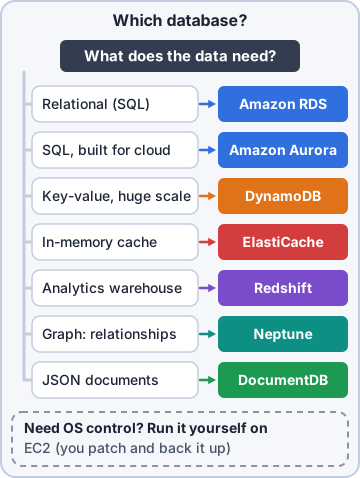
NoSQL ("not only SQL") databases skip fixed tables for flexible shapes, such as key-value pairs. Amazon DynamoDB is a serverless NoSQL key-value and document database: no servers to manage, single-digit millisecond responses at any scale, and capacity that grows with traffic. It suits shopping carts, sessions and anything with huge, spiky traffic and simple lookups by key.
Exam tip Key-value data, massive scale, serverless, millisecond speed = DynamoDB. Complex joins across many tables = relational (RDS or Aurora).
Memory-based: Amazon ElastiCache
Reading from memory is far faster than reading from disk. Amazon ElastiCache is a managed in-memory data store and cache, compatible with Valkey, Memcached and Redis OSS. Put it in front of the database so the busiest product pages come from memory in microseconds, and the database does less work.
Dev: The squeaky hedgehog page gets read a million times. Cache it once, serve it from memory.
The whole picker
Three more specialists finish the set. Amazon Redshift is a data warehouse: SQL analytics over years of history, not the shop's live orders. Amazon Neptune is a graph database for data that is all relationships ("customers who bought this also bought"). Amazon DocumentDB stores JSON (JavaScript Object Notation) documents and works with MongoDB apps. Start from the data's shape, then pick.
Check yourself 2The shop's shopping-cart data is simple key-value pairs, and traffic jumps 20x on Black Friday. Dev wants no servers to manage. Which database fits best?
- Amazon DynamoDB
- Amazon Redshift
- Amazon RDS for MySQL
- Amazon Neptune
Show the answer
Answer: A. Amazon DynamoDB
DynamoDB is serverless NoSQL key-value storage that scales automatically with millisecond responses.
Objective 3.4
Database migration
AWS DMS and AWS SCT
AWS Database Migration Service (AWS DMS) moves data into AWS while the source database stays fully usable, and keeps the copy in sync with continuous replication until you cut over. It handles same-engine moves (Oracle to Oracle) and moves between engines (Oracle to Aurora). For a change of engine, the AWS Schema Conversion Tool (AWS SCT) first converts the database's structure (schema) and code to the new engine's format.
Ranger: carries his food bowl to a new spot, one kibble at a time
Sam: That's replication.
Exam tip Same engine: DMS alone. Different engines: SCT converts the schema, then DMS moves the data. "Minimal downtime" = DMS replication.
Check yourself 3Moving the stock database from Oracle to Amazon Aurora PostgreSQL, Dev must first translate the tables and stored procedures into PostgreSQL form. Which tool does that part?
- AWS Application Migration Service
- AWS Schema Conversion Tool (AWS SCT)
- AWS Backup
- Amazon ElastiCache
Show the answer
Answer: B. AWS Schema Conversion Tool (AWS SCT)
AWS SCT converts the schema and database code from one engine to another. AWS DMS then moves the data.
Objective 3.6
Object, block and file storage
Object storage: Amazon S3
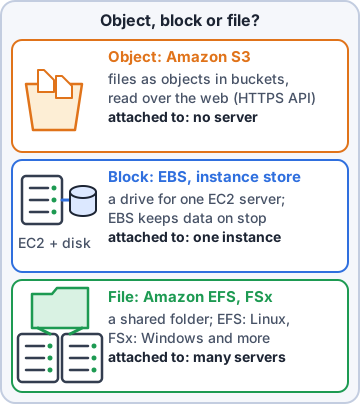
Object storage keeps each file as an object (the data plus metadata) in a flat container. Amazon Simple Storage Service (Amazon S3) stores objects in buckets, with practically unlimited space and very high durability (designed for 99.999999999%, "11 nines"). Uses: product photos, backups, logs, data lakes for analytics and static websites. You read and write whole objects over the web, not individual disk blocks.
Rosa: So every product photo is an object, and the bucket is the photo album?
Dev: A photo album with no last page.
Block storage: Amazon EBS and instance store
Block storage acts like a hard drive for a server. Amazon Elastic Block Store (Amazon EBS) volumes attach to EC2 instances in one AZ and keep their data when the instance stops; snapshots back them up to S3. An instance store is disk physically on the host: very fast but temporary, so its data is lost when the instance stops or terminates. Use it for caches and scratch data only.
Exam tip Must survive a stop? EBS. Fast scratch space you can lose? Instance store.
File storage: Amazon EFS and Amazon FSx
File storage gives many servers a shared folder at the same time. Amazon Elastic File System (Amazon EFS) is a serverless file system for Linux, using the Network File System (NFS) protocol; it grows and shrinks automatically and can be shared across AZs. Amazon FSx runs popular file systems as managed services, such as FSx for Windows File Server (with Server Message Block (SMB) and Active Directory), FSx for NetApp ONTAP and FSx for OpenZFS.
Exam tip Shared Linux files = EFS. Windows file shares = FSx for Windows File Server.
Check yourself 4Ten Linux web servers in two AZs must all read and write the same folder of product images at the same time. Which storage fits best?
- Amazon EBS volume
- Instance store
- Amazon S3 Glacier Deep Archive
- Amazon EFS
Show the answer
Answer: D. Amazon EFS
EFS is a shared file system that many Linux instances across AZs can mount at once.
Objective 3.6
S3 storage classes and lifecycle policies
The storage-class ladder
Every S3 storage class trades storage price against access. S3 Standard is for data read often. S3 Intelligent-Tiering moves objects between tiers for you when access is unknown or changing. S3 Standard-IA (Infrequent Access) and S3 One Zone-IA (one AZ only, for data you can re-create) cost less to store but charge to read. The S3 Glacier classes are for archives: Instant Retrieval (milliseconds), Flexible Retrieval (minutes to hours) and Deep Archive (hours, the lowest cost).
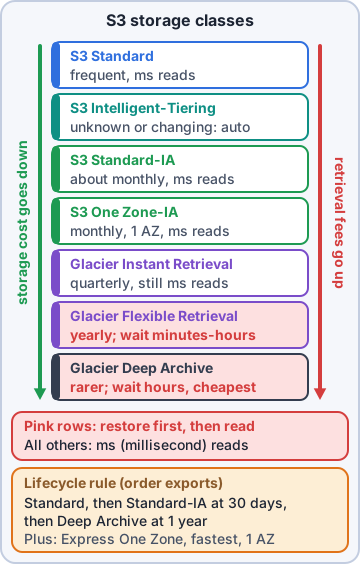
Exam tip Down the ladder: cheaper storage, higher retrieval fees. Only Glacier Flexible Retrieval and Deep Archive make you wait; the rest read in milliseconds. Unknown pattern = Intelligent-Tiering.
Lifecycle policies do the moving
A lifecycle policy (lifecycle rule) tells S3 to act on objects by age. Transition actions move objects to a cheaper class, such as Standard-IA after 30 days and Glacier Deep Archive after a year. Expiration actions delete objects you no longer need, such as old logs after 400 days. Set it once and it runs on every matching object.
Mr. Barkley: So 2019 retires to the cheap seats by itself. Good.
Exam tip Use cases: data that cools with age, logs with a retention period, compliance archives. Watch minimum storage durations on IA and Glacier classes.
Check yourself 5Nobody can predict how often the shop's marketing videos will be watched; some go viral, most don't. Dev wants S3 to optimize the cost automatically. Which storage class fits?
- S3 Intelligent-Tiering
- S3 One Zone-IA
- S3 Glacier Flexible Retrieval
- S3 Standard
Show the answer
Answer: A. S3 Intelligent-Tiering
Intelligent-Tiering watches access and moves each object between tiers automatically, with no retrieval fees.
Objective 3.6
Hybrid storage and backups
AWS Storage Gateway: a cache in the warehouse
AWS Storage Gateway connects on-premises apps to cloud storage. It runs in your building and keeps a local cache of the most-used data, so access feels fast, while the full data set lives in AWS. Types include a file gateway (file shares backed by S3), a volume gateway (block volumes) and a tape gateway (virtual tapes for existing backup software). The exam calls these cached file systems.
Rosa: So my label server keeps a fast local copy, and the real files sit safely in AWS?
Dev: Exactly.
AWS Backup: one place for every backup
AWS Backup centrally manages and automates backups across AWS services, such as EBS volumes, EC2 instances, RDS and Aurora databases, DynamoDB tables, EFS, FSx and S3. A backup plan sets the schedule and how long copies are kept, and backups can be copied to another Region or account. Use cases: one policy for the whole company, proof for auditors that backups ran, and recovery after mistakes or ransomware.
Exam tip Many services, one backup policy and report = AWS Backup. A single EBS snapshot by hand is not the same thing.
Check yourself 6Which needs are good use cases for AWS Backup? Choose two.
- One schedule that backs up RDS, DynamoDB and EFS together
- Caching hot files in the warehouse
- Copying backups to a second Region for recovery
- Converting Oracle schemas to PostgreSQL
- Serving product photos to shoppers
Show the answer
Answers: A. One schedule that backs up RDS, DynamoDB and EFS together, C. Copying backups to a second Region for recovery
AWS Backup applies central backup plans across services and can copy backups to other Regions or accounts.
Go deeper
More on the objectives in this chapter, in the same exam-ready detail.
Objective 3.4 · AWS database services
AWS databases at a glance
Managed databases
AWS runs the database software, patching, backups and high availability, so you focus on your data.
- Amazon RDS: managed relational databases (MySQL, PostgreSQL, MariaDB, Oracle, SQL Server, Db2)
- Amazon Aurora: AWS's MySQL/PostgreSQL-compatible relational database, built for the cloud
- Amazon DynamoDB: serverless NoSQL key-value database
- Amazon ElastiCache and Amazon MemoryDB: in-memory data stores (Redis OSS/Valkey, Memcached)
- Amazon DocumentDB (MongoDB-compatible), Amazon Neptune (graph), Amazon Keyspaces (Cassandra)
- Amazon Redshift: data warehouse for analytics
Managed vs self-managed
You can also install a database on EC2 yourself, but then you do the patching, backups and failover. Exam questions that say 'reduce operational overhead' point to the managed service.
Objective 3.4 · Identifying relational databases (for example, Amazon RDS, Amazon Aurora)
Relational databases: RDS and Aurora
Relational = tables and SQL
Relational databases store data in tables with fixed columns and relationships, queried with SQL. Good for transactions, orders and accounts.
RDS and Aurora
Amazon RDS runs familiar engines and handles backups, patching and Multi-AZ standby copies for high availability; read replicas add read capacity. Amazon Aurora is compatible with MySQL and PostgreSQL but faster and more resilient, storing six copies of data across three AZs, with Aurora Serverless for variable workloads.
Exam tip Multi-AZ = availability (automatic failover). Read replicas = read performance.
Objective 3.4 · Identifying NoSQL databases (for example, Amazon DynamoDB)
NoSQL: Amazon DynamoDB
What NoSQL means
NoSQL databases don't need fixed tables. Amazon DynamoDB is a key-value and document database: each item has a key and flexible attributes.
- Serverless: no servers or versions to manage
- Single-digit millisecond performance at any scale
- On-demand or provisioned capacity
- Global tables replicate across Regions
- DynamoDB Accelerator (DAX) adds an in-memory cache
When to choose it
High-traffic apps with simple lookups (shopping carts, game sessions, user profiles), unpredictable scale, and no need for complex joins.
Exam tip Complex joins and transactions across tables = relational (RDS/Aurora). Massive scale, simple key lookups = DynamoDB.
Objective 3.4 · Identifying memory-based databases (for example, Amazon ElastiCache)
In-memory: Amazon ElastiCache
What it does
Amazon ElastiCache keeps data in memory (Redis OSS, Valkey or Memcached engines) so reads take microseconds. It usually sits in front of another database as a cache: frequently read data is served from memory, taking load off the database.
- Session stores and leaderboards
- Caching database query results
- Real-time counters
Remember
Memory is fast but more expensive and (for a pure cache) temporary; the main copy of the data stays in the database. Amazon MemoryDB is the durable in-memory option when memory is the primary database.
Exam tip 'Improve read performance of a database with repeated queries' = ElastiCache.
Objective 3.4 · Identifying database migration tools (for example, AWS Database Migration Service [AWS DMS], AWS Schema…
Moving databases: AWS DMS and AWS SCT
AWS DMS
AWS Database Migration Service copies data from a source database to a target with the source staying online. It supports homogeneous migrations (Oracle to Oracle) and heterogeneous ones (Oracle to Aurora), and continuous replication to keep them in sync until cut-over.
AWS SCT
When the engines differ, the schema (tables, views, stored procedures) must be converted first. The AWS Schema Conversion Tool (and the newer DMS Schema Conversion in the console) converts the schema and flags code it can't convert automatically.
Exam tip Same engine: DMS only. Different engines: SCT (or DMS Schema Conversion) for the schema, then DMS for the data.
Objective 3.6 · AWS storage services
AWS storage at a glance
Three kinds of storage
Storage comes in three shapes, each for a different job:
- Object storage: Amazon S3 (files as objects in buckets, unlimited, accessed over HTTPS)
- Block storage: Amazon EBS volumes and instance store (disks for EC2)
- File storage: Amazon EFS (Linux, NFS) and Amazon FSx (Windows File Server, Lustre, NetApp ONTAP, OpenZFS)
Also in the list
Amazon S3 Glacier storage classes for archives; AWS Storage Gateway (hybrid access to cloud storage); AWS Backup (central backup policies across services); AWS Elastic Disaster Recovery; the AWS Snow Family for moving data offline.
Objective 3.6 · Identifying block storage solutions (for example, Amazon Elastic Block Store [Amazon EBS], instance store)
Block storage: EBS vs instance store
Amazon EBS
EBS volumes are network-attached disks for EC2 in one Availability Zone. Data persists when the instance stops. You can resize, change type (SSD gp3/io2, HDD), and take snapshots (stored in S3, copyable to other Regions).
Instance store
Instance store is a disk physically attached to the host. Very fast, included in the instance price, but temporary: the data is lost when the instance stops, terminates or the hardware fails. Use it for caches, buffers and scratch data.
Exam tip Data must survive a stop: EBS. Temporary, fastest local scratch space: instance store.
Objective 3.6 · Identifying file services (for example, Amazon Elastic File System [Amazon EFS], Amazon FSx)
File storage: EFS and FSx
Amazon EFS
Amazon EFS is a managed NFS file system for Linux that many EC2 instances (and containers, Lambda) can mount at the same time. It grows and shrinks automatically and spans multiple AZs. Infrequent Access and Archive classes lower cost.
Amazon FSx
Amazon FSx gives you popular file systems fully managed: FSx for Windows File Server (SMB, Active Directory integration), FSx for Lustre (high-performance computing), FSx for NetApp ONTAP and FSx for OpenZFS.
Exam tip Shared storage for Windows servers: FSx for Windows File Server. Shared storage for Linux instances: EFS.
Objective 3.6 · Identifying cached file systems (for example, AWS Storage Gateway)
AWS Storage Gateway: on-premises access to cloud storage
What it is
AWS Storage Gateway is a hybrid service: a virtual or hardware appliance in your data center that gives local apps standard file, volume or tape access, while storing the data in AWS. Frequently used data is cached locally for low-latency access.
- S3 File Gateway: NFS/SMB file shares backed by S3
- FSx File Gateway: local cache for FSx for Windows File Server (no longer offered to new customers)
- Volume Gateway: iSCSI block volumes backed up to AWS
- Tape Gateway: replaces physical backup tapes with virtual tapes in S3 Glacier
Exam pattern
'On-premises servers need low-latency access to data stored in S3' or 'replace our backup tapes' = Storage Gateway.
Objective 3.6 · Amazon S3 Glacier
Amazon S3 Glacier archive storage
Archive classes
S3 Glacier storage classes keep data you rarely need at very low cost:
- Glacier Instant Retrieval: milliseconds; data read about once a quarter
- Glacier Flexible Retrieval: expedited (1-5 minutes), standard (3-5 hours) or bulk (5-12 hours)
- Glacier Deep Archive: lowest cost; standard retrieval within 12 hours (bulk up to 48)
Using them
Put data there with S3 Lifecycle rules or directly. There are minimum storage durations (90 days, 180 days for Deep Archive) and retrieval charges. S3 Glacier Vault Lock / S3 Object Lock can make archives write-once-read-many for compliance.
Exam tip Regulatory records kept for years, rarely read, retrieval can wait a day = Glacier Deep Archive.
Practice questions
Answer in your head, then open the answer. Ranger's Cloud Kennel has 563 questions like these for AWS Cloud Practitioner, with mock exams.
Question 1A company wants a relational database for its orders but does not want to handle hardware, database software installation, patching or backups. Which service fits?
- Amazon DynamoDB
- Amazon Redshift
- Amazon Neptune
- Amazon RDS
Show the answer
Answer: D. Amazon RDS
Amazon Relational Database Service (Amazon RDS) is a managed relational database: AWS handles provisioning, patching, backups and more, while you manage the schema, data and access.
Question 2Which managed relational database is compatible with MySQL and PostgreSQL and keeps copies of its storage across three Availability Zones?
- Amazon Aurora
- Amazon DocumentDB
- Amazon ElastiCache
- Amazon DynamoDB
Show the answer
Answer: A. Amazon Aurora
Amazon Aurora is a MySQL- and PostgreSQL-compatible relational database built for the cloud. It stores six copies of data across three AZs and supports up to 15 read replicas.
Question 3A mobile game needs a serverless NoSQL database that stores key-value data and gives single-digit millisecond performance at any scale. Which service fits?
- Amazon RDS for MySQL
- Amazon Redshift
- Amazon Neptune
- Amazon DynamoDB
Show the answer
Answer: D. Amazon DynamoDB
Amazon DynamoDB is a serverless NoSQL key-value and document database with single-digit millisecond performance at any scale.
Question 4A website runs the same database queries thousands of times per minute. The team wants to keep frequent results in memory for microsecond reads and reduce load on the database. Which service fits?
- Amazon Aurora read replicas in another Region
- Amazon S3 Standard-IA
- Amazon ElastiCache
- AWS Database Migration Service
Show the answer
Answer: C. Amazon ElastiCache
Amazon ElastiCache is a managed in-memory data store (Valkey, Memcached, Redis OSS) used as a cache in front of databases for very fast reads.
Question 5A finance team needs to run complex analytical SQL queries across years of sales history, many terabytes in size. Which AWS service is built for this?
- Amazon Redshift
- Amazon ElastiCache
- Amazon DynamoDB
- Amazon DocumentDB
Show the answer
Answer: A. Amazon Redshift
Amazon Redshift is a data warehouse built for fast analytical (OLAP) queries over large datasets, separate from the transactional databases that run the business.
AWS and Amazon Web Services are trademarks of Amazon.com, Inc. or its affiliates. Ranger Gamez is not affiliated with or endorsed by Amazon. The practice questions are written to the published exam objectives; they are not real exam questions.