 RANGER
 AWS Certified Cloud Practitioner (CLF-C02) · chapter 9 of 14
Picking the engine
In this chapter Objectives 3.3
Objective 3.3
Amazon EC2 and instance types
Virtual servers you control
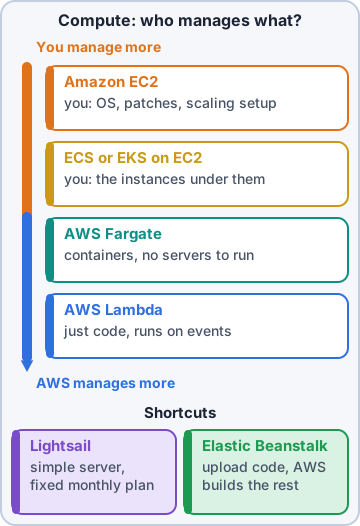
Amazon Elastic Compute Cloud (Amazon EC2) (from the shared responsibility chapter) rents virtual servers called instances. You pick the operating system from an Amazon Machine Image (AMI), choose the size, and manage everything from the OS up. EC2 suits apps that need full control, special software or a lift-and-shift move from on premises.
Instance families: pick the shape
EC2 instance types are grouped into families, each tuned for a kind of work.
- General purpose: balanced central processing unit (CPU), memory and networking; web servers, small databases, code repositories
- Compute optimized: fast processors; batch processing, media encoding, game servers, scientific modeling
- Memory optimized: lots of memory (random access memory, RAM); in-memory databases, real-time analysis of large data sets
- Storage optimized: very fast local storage for heavy reads and writes; data warehousing, large transactional databases, log processing
- Accelerated computing: graphics processors (GPUs) or other accelerators; machine learning, graphics
Check yourself 1Kibble & Co.'s marketing team wants to process large data sets entirely in memory for real-time analytics. Which EC2 instance family fits best?
- Compute optimized
- Storage optimized
- Memory optimized
- Accelerated computing
Show the answer
Answer: C. Memory optimized
Memory optimized instances are built for workloads that keep large data sets in memory, like in-memory databases and real-time analytics.
Objective 3.3
Containers and serverless
Containers: ECS, EKS and ECR
A container packages an app with everything it needs so it runs the same anywhere. To run many containers you need an orchestrator. Amazon Elastic Container Service (Amazon ECS) is AWS's own, simple orchestrator. Amazon Elastic Kubernetes Service (Amazon EKS) runs Kubernetes, the popular open-source orchestrator, managed by AWS. Amazon Elastic Container Registry (Amazon ECR) stores your container images.
Exam tip Already using Kubernetes, or want to stay portable with it? EKS. Want the simplest AWS-native containers? ECS.
Serverless: Fargate and Lambda
Serverless means no servers for you to provision or manage, automatic scaling, and paying only for use. AWS Fargate is serverless compute for containers: run ECS or EKS tasks without managing EC2 instances. AWS Lambda (from shared responsibility) runs functions in response to events, such as a new order or a file upload, and bills by requests and run time. Lambda functions run for up to 15 minutes each.
Dev: Lambda for the order-confirmation code. It runs only when someone orders. Zero orders, zero cost.
Shortcuts: Lightsail, Elastic Beanstalk, Batch
Amazon Lightsail: simple virtual servers, storage and networking bundled at a predictable monthly price; good for small websites and beginners. AWS Elastic Beanstalk: upload your web app code and it handles capacity, load balancing, scaling and health monitoring while you keep access to the resources. AWS Batch: runs large numbers of batch jobs, choosing and scaling the compute for you.
Exam tip Trap: Elastic Beanstalk still creates EC2 instances you can see; it just sets them up for you. Lambda has no instances at all.
Check yourself 2Sam wants to run the shop's containers on Amazon ECS without provisioning, patching or scaling any EC2 instances. Which option fits?
- Amazon Lightsail
- Amazon ECR
- Amazon EC2 Dedicated Hosts
- AWS Fargate
Show the answer
Answer: D. AWS Fargate
Fargate is serverless compute for containers: ECS or EKS runs the tasks and AWS manages the underlying servers.
Objective 3.3
Auto scaling and load balancing
Auto scaling = elasticity
Amazon EC2 Auto Scaling adds instances when demand rises (scale out) and removes them when it falls (scale in), within a minimum and maximum you set. It also replaces unhealthy instances. This is the elasticity from Day 1, built for real. AWS Auto Scaling extends the idea to other resources, such as DynamoDB tables and ECS services.
Exam tip Exam: "automatically adjust capacity to demand" = auto scaling = elasticity. Adding a bigger server by hand is scaling up (vertical), not elastic.
Load balancers spread the work
Elastic Load Balancing (ELB) sends incoming traffic across many targets, such as instances in several Availability Zones (AZs). It runs health checks and stops sending traffic to failed targets, so customers only reach healthy servers. Types: Application Load Balancer (web traffic; can route by the path in the web address, or URL), Network Load Balancer (very high performance for any Transmission Control Protocol (TCP) or User Datagram Protocol (UDP) traffic), Gateway Load Balancer (for third-party network appliances).
Ranger: herds three puppies to three different food bowls
Sam: That's a load balancer.
Rightsizing compute
Picking the engine isn't a one-time choice. AWS Compute Optimizer looks at real usage and recommends better instance types and sizes, so an oversized server can shrink: rightsizing from Day 1 in action. Teams also move work along the slider over time, from EC2 to containers to serverless, as they modernize.
Check yourself 3Which are purposes of a load balancer? Choose two.
- Spread incoming traffic across instances in multiple AZs
- Store copies of web pages at edge locations
- Stop sending traffic to targets that fail health checks
- Encrypt data at rest on Amazon Elastic Block Store (Amazon EBS) volumes
- Register domain names for the shop
Show the answer
Answers: A. Spread incoming traffic across instances in multiple AZs, C. Stop sending traffic to targets that fail health checks
Load balancers distribute traffic across healthy targets, often in several AZs, which raises availability.
Go deeper
More on the objectives in this chapter, in the same exam-ready detail.
Objective 3.3 · AWS compute services
AWS compute services
Choosing compute
AWS offers compute at every level of control:
- Amazon EC2: virtual servers; full control of the OS
- Amazon EC2 Auto Scaling and Elastic Load Balancing: scale out and spread traffic
- AWS Lambda: run code on events, no servers, pay per request and duration
- Amazon ECS and Amazon EKS: run containers (EKS = Kubernetes); with AWS Fargate you don't manage the servers under them
- AWS Elastic Beanstalk: upload your app; it builds the environment
- Amazon Lightsail: simple virtual servers at a fixed monthly price
- AWS Outposts: AWS compute in your data center
- AWS Batch: run batch jobs
Quick matching
Full control or legacy software = EC2. Event-driven, short tasks = Lambda. Containers without managing servers = Fargate. Simple website for a small business = Lightsail. Developers who just want to deploy = Elastic Beanstalk.
Practice questions
Answer in your head, then open the answer. Ranger's Cloud Kennel has 563 questions like these for AWS Cloud Practitioner, with mock exams.
Question 1A video company runs batch jobs that encode video and keep the processors busy almost all the time, with modest memory needs. Which Amazon EC2 instance family type fits best?
- Compute optimized
- Memory optimized
- Storage optimized
- General purpose with burstable CPU credits
Show the answer
Answer: A. Compute optimized
Compute optimized instances give high-performance processors for CPU-bound work such as media encoding, batch processing, scientific modeling and dedicated game servers.
Question 2A company runs a large in-memory database and real-time analytics on huge datasets held in RAM. Which EC2 instance type category suits it?
- Compute optimized
- Memory optimized
- Accelerated computing
- Storage optimized with local NVMe disks
Show the answer
Answer: B. Memory optimized
Memory optimized instances deliver fast performance for workloads that process large datasets in memory, such as in-memory databases and real-time big data analytics.
Question 3A workload needs very high, sequential read and write access to large datasets on local storage, such as a data warehouse or a distributed file system. Which EC2 instance category is designed for this?
- Storage optimized
- Memory optimized
- Compute optimized
- General purpose with balanced resources
Show the answer
Answer: A. Storage optimized
Storage optimized instances are built for workloads with high sequential read and write access to very large datasets on local storage, delivering many low-latency I/O operations per second.
Question 4A research team trains deep learning models that need GPUs. Which EC2 instance category should it use?
- Compute optimized
- Storage optimized
- Memory optimized with large RAM sizes
- Accelerated computing
Show the answer
Answer: D. Accelerated computing
Accelerated computing instances use hardware accelerators such as GPUs for machine learning training, graphics and other highly parallel math.
Question 5A company needs instances for a small web server and a code repository, with a balance of compute, memory and networking. Which EC2 category fits?
- General purpose
- Accelerated computing
- Storage optimized
- Memory optimized for in-memory databases
Show the answer
Answer: A. General purpose
General purpose instances balance compute, memory and networking, which suits web servers, code repositories and many everyday applications.
AWS and Amazon Web Services are trademarks of Amazon.com, Inc. or its affiliates. Ranger Gamez is not affiliated with or endorsed by Amazon. The practice questions are written to the published exam objectives; they are not real exam questions.