 RANGER
 AWS Certified Cloud Practitioner (CLF-C02) · chapter 8 of 14
Where the cloud lives
In this chapter Objectives 3.2, 3.1
- Regions, Availability Zones and edge locations
- High availability and multiple Regions
- Ways to access and provision AWS
- Deployment models and operating tools
- Cloud deployment and service models
- Console, CLI, SDK or infrastructure as code?
- Cloud, hybrid or on-premises
- Why use more than one Region
- Edge locations: closer to your users
- AWS global infrastructure
- AWS SDKs: AWS inside your code
- Practice questions
- Chapter recap
Objective 3.2
Regions, Availability Zones and edge locations
Regions
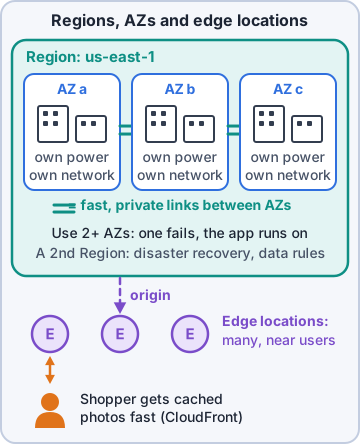
An AWS Region is a separate geographic area, such as us-east-1 (N. Virginia) or eu-west-1 (Ireland). Each Region is isolated from the others, and your data stays in the Region you choose unless you move it. You pick a Region based on four things: compliance and data sovereignty (laws about where data must live), latency (closeness to your users), which services are available there, and price, which can differ by Region.
Availability Zones
Each Region has multiple Availability Zones (AZs). An AZ is one or more separate data centers with their own redundant power, networking and connectivity. AZs in a Region are physically apart, far enough that a flood or fire in one shouldn't hit another, and linked by fast, private, low-latency network links. Key exam fact: AZs don't share single points of failure.
Dev: A Region is a city. AZs are separate kennels across town, each with its own power and water.
Edge locations, Local Zones and Outposts
Edge locations are sites in many more cities than there are Regions. They serve content and Domain Name System (DNS) answers close to users, for services like Amazon CloudFront and Amazon Route 53. AWS Local Zones put selected AWS services closer to large cities for very low latency. AWS Outposts brings AWS-built hardware into your own building for workloads that must stay on premises.
Exam tip Relationship: a Region contains multiple AZs; each AZ contains one or more data centers; edge locations sit outside Regions, near users.
Check yourself 1Which statement about Availability Zones is correct?
- An AZ is a single server rack
- All AZs in a Region share one power supply
- Each AZ has independent power and networking
- AZs are the same thing as edge locations
Show the answer
Answer: C. Each AZ has independent power and networking
AZs are built so a failure in one doesn't take down another: separate power, networking and connectivity, linked by low-latency private links.
Objective 3.2
High availability and multiple Regions
High availability with multiple AZs
To make the shop highly available, run it in at least two AZs. Put web servers in each, with a load balancer sending customers to the healthy ones, and run the database with a standby copy in another AZ (Amazon Relational Database Service (Amazon RDS) Multi-AZ). If one AZ has a problem, the other keeps taking orders. Remember the closet server from Day 1? This is the fix.
Exam tip Single AZ = a single point of failure. "Highly available" on the exam almost always means "spread across multiple AZs".
When to use multiple Regions
Most workloads are fine in one Region with several AZs. Use more than one Region when you need:
- Disaster recovery: a copy far away in case a whole area is hit (AWS Elastic Disaster Recovery can help)
- Business continuity: keep operating through a major regional event
- Low latency for end users on other continents
- Data sovereignty: a country's data must stay in that country
Why edge locations help
An Amazon CloudFront distribution, a content delivery network (CDN), keeps copies (caches) of product images and pages at edge locations. A shopper in Seattle gets photos from a nearby edge location instead of from Virginia. Benefits: lower latency, less load on the shop's servers, and a layer of distributed denial of service (DDoS) protection at the edge.
Rosa: So the pictures of the squeaky hedgehog load faster for my cousin in Seattle?
Dev: Exactly. The hedgehog is cached.
Check yourself 2Kibble & Co. opens an online store for customers in Germany. Local law requires their personal data to be stored in the European Union. What should Dev do?
- Add more AZs in us-east-1
- Serve the data from edge locations only
- Turn on Shield Advanced
- Deploy that store in an AWS Region inside the EU
Show the answer
Answer: D. Deploy that store in an AWS Region inside the EU
Data stays in the Region you choose. A Region inside the EU meets the data sovereignty requirement.
Objective 3.1
Ways to access and provision AWS
Console, CLI, SDKs and APIs
Every action in AWS is an application programming interface (API) call. You can make those calls several ways:
- AWS Management Console: the website. Great for learning, exploring and one-time tasks
- AWS Command Line Interface (AWS CLI): typed commands; easy to script and repeat
- AWS software development kits (SDKs): libraries that let apps call AWS in languages like Python, Java or JavaScript
- Calling the APIs directly: what all of the above do underneath
Infrastructure as code
Infrastructure as code (IaC) means describing your resources in a text file (a template) and letting a service build them. AWS CloudFormation reads a template and creates, updates or deletes the whole stack the same way every time. Templates can be reviewed, version-controlled and reused in another Region in minutes.
Exam tip Decision rule: one-time or exploratory task = console. Repeatable, consistent, many environments = IaC (CloudFormation) or scripts with the CLI/SDK.
One-time operations or repeatable processes?
Ask: will we do this again? A one-time look at a bill or a quick test is fine in the console. Anything you repeat (new environments, recovery after a failure, the same setup in another Region) should be a repeatable process: a script or a template. Repeatable means fewer mistakes, faster recovery and a record of exactly what was built.
Dev: If you did it twice by hand, the third time it's a template.
Check yourself 3Dev wants the shop's full setup created identically in test, staging and production, and rebuilt quickly in another Region if needed. Which approach fits best?
- Build each environment by hand in the AWS Management Console
- Describe the setup in AWS CloudFormation templates
- Ask AWS Support to build each environment
- Copy screenshots of the first build into a wiki
Show the answer
Answer: B. Describe the setup in AWS CloudFormation templates
Infrastructure as code with CloudFormation builds the same stack every time, in any Region, from a reviewed template.
Objective 3.1
Deployment models and operating tools
Cloud, hybrid, on-premises
Three deployment models. Cloud (cloud-native, all-in): everything runs in the cloud. Hybrid: some systems stay on premises and connect to cloud resources, like Kibble & Co. keeping Rosa's label server in the warehouse while the shop runs in AWS. On-premises (sometimes called private cloud): everything runs in your own data center, perhaps with cloud-style virtualization and automation tools.
Exam tip Some systems on site + some in AWS, connected = hybrid. AWS Outposts and AWS Storage Gateway are hybrid tools.
Tools for operating what you built
Once things run, a few services help operate them.
- AWS Systems Manager: see and manage your servers at scale (patching, running commands, inventory)
- AWS Service Catalog: a menu of approved, preconfigured products teams can launch themselves
- Service Quotas: view and request increases to limits on resources per account and Region
- AWS Elastic Beanstalk: upload code and let AWS provision the servers, load balancing and scaling (more next chapter)
Check yourself 4The warehouse label server stays in the Kibble & Co. building while the shop and database run in AWS, connected over a private link. Which deployment model is this?
- Cloud
- On-premises
- Hybrid
- Multi-Region
Show the answer
Answer: C. Hybrid
A mix of on-premises systems and cloud resources working together is the hybrid deployment model.
Go deeper
More on the objectives in this chapter, in the same exam-ready detail.
Objective 3.1 · Types of cloud deployment models
Cloud deployment and service models
Service models
How much of the stack you manage depends on the model:
- IaaS (infrastructure as a service): you get virtual servers, storage and networks and manage the OS up (Amazon EC2)
- PaaS (platform as a service): you deploy code; the platform runs it (AWS Elastic Beanstalk)
- SaaS (software as a service): a finished application you just use, such as web email or an online office suite
- Serverless: no servers to manage at all, pay per request (AWS Lambda)
Deployment models
Cloud (all in AWS), hybrid (some on-premises, connected to AWS), on-premises / private cloud (in your own data center, possibly with AWS hardware like AWS Outposts).
Objective 3.1 · Deciding between options such as programmatic access (for example, APIs, SDKs, CLI), the AWS Management…
Console, CLI, SDK or infrastructure as code?
The ways to use AWS
Everything in AWS is an API; the tools are different front ends to it.
- AWS Management Console: web interface. Best for learning, one-off tasks and looking around
- AWS CLI: commands in a terminal. Best for scripts and repeatable admin tasks
- AWS SDKs: libraries for Python, Java, JavaScript and more. Best when your application calls AWS
- Infrastructure as code (IaC): AWS CloudFormation templates (or the AWS CDK) describe whole environments. Best for repeatable, version-controlled deployments
- AWS CloudShell: a browser terminal with the CLI already set up
Choosing
Repeatable and consistent across many environments = IaC. Automating from an app = SDK. Quick scripted task = CLI. Exploring or a single change = Console.
Objective 3.1 · Identifying deployment models (for example, cloud, hybrid, on-premises)
Cloud, hybrid or on-premises
Three models
Where the workloads physically run:
- Cloud (cloud-native / all-in): everything runs in AWS
- Hybrid: on-premises systems connected to AWS (for example over AWS Site-to-Site VPN or AWS Direct Connect), common during migrations or when some systems must stay
- On-premises (private cloud): your own data center; AWS can extend into it with AWS Outposts (AWS racks in your building)
Exam clues
'Keep some workloads on-premises for latency or regulation, but use AWS for the rest' = hybrid. 'Run AWS services inside our own data center' = AWS Outposts.
Objective 3.2 · Use of multiple Regions
Why use more than one Region
Reasons
A Region is a separate geographic area with multiple Availability Zones. Most workloads run in one Region, but several Regions help with:
- Disaster recovery: survive the loss of a whole Region
- Latency: serve users from a Region close to them
- Data residency/compliance: keep each country's data in its own Region
- Global applications: for example DynamoDB global tables, S3 Cross-Region Replication, Route 53 routing users to the nearest Region
Things to remember
Regions are isolated: resources don't automatically copy between them, prices can differ by Region, and not every service exists in every Region.
Exam tip Choosing a Region: compliance first, then latency to users, service availability and price.
Objective 3.2 · Benefits of edge locations
Edge locations: closer to your users
What they are
Edge locations are hundreds of small sites in cities around the world, separate from Regions. They cache and serve content close to users.
- Amazon CloudFront: content delivery network (CDN) that caches websites, images and video at the edge
- Amazon Route 53: DNS answered from edge locations
- AWS Global Accelerator: routes traffic onto the AWS network at the nearest edge for better performance
- AWS Shield / AWS WAF protection at the edge
Benefits
Lower latency for users far from your Region, less load on your origin servers, and DDoS protection at the edge.
Exam tip Global users complain the site is slow: CloudFront. Edge location ≠ Availability Zone.
Objective 3.2 · AWS global infrastructure (for example, AWS Regions, Availability Zones)
AWS global infrastructure
The pieces
AWS's infrastructure is built in layers:
- Region: a geographic area (for example us-east-1, N. Virginia) with at least three Availability Zones
- Availability Zone (AZ): one or more data centers with independent power, cooling and networking, close enough for low latency but far enough apart to avoid shared disasters
- Edge locations: CDN and DNS points of presence in many cities
- Local Zones: AWS compute in large metro areas for single-digit-millisecond latency
- Wavelength Zones: AWS inside 5G carrier networks
- AWS Outposts: AWS racks in your own data center
High availability
Run copies of your app in at least two AZs behind a load balancer so one data center failing doesn't take you down. Use multiple Regions for disaster recovery.
Exam tip Survive a data center failure = multiple AZs. Survive a regional disaster = multiple Regions.
Objective 3.1 · AWS SDKs
AWS SDKs: AWS inside your code
What they are
AWS SDKs are code libraries (Python Boto3, JavaScript, Java, .NET, Go, PHP, Ruby, C++ and more) that let your application call AWS services, for example upload a file to S3 or write an item to DynamoDB. They handle authentication (signing requests), retries and errors.
Exam tip Your app needs to call AWS = SDK. A person running commands = CLI. Building environments from templates = CloudFormation.
Practice questions
Answer in your head, then open the answer. Ranger's Cloud Kennel has 563 questions like these for AWS Cloud Practitioner, with mock exams.
Question 1A new office manager needs to look up one setting on an account once, by pointing and clicking in a web browser. She has never written a script. Which way of accessing AWS fits best?
- An AWS CloudFormation template
- A program written with an AWS SDK
- An AWS CLI script run on a schedule
- The AWS Management Console
Show the answer
Answer: D. The AWS Management Console
The AWS Management Console is the browser-based, point-and-click way to use AWS, which suits a one-time check by someone who does not script. Templates, SDKs and CLI scripts pay off when work must be automated or repeated.
Question 2A team wants to describe its whole environment (network, servers, database) in a text file, then create identical copies of it for test and production. Which AWS service is built for this?
- AWS Config with conformance packs
- Amazon CloudWatch
- AWS CloudTrail
- AWS CloudFormation
Show the answer
Answer: D. AWS CloudFormation
AWS CloudFormation is AWS's infrastructure as code (IaC) service: you write a template once and it creates the same stack of resources every time. Config, CloudWatch and CloudTrail watch resources; they do not build them.
Question 3A developer is writing a Java application that must upload files to Amazon S3 from inside the program's own code. What should the developer use?
- An AWS SDK for the language
- The AWS Management Console
- An AWS CloudFormation stack
- The AWS Console Mobile App
Show the answer
Answer: A. An AWS SDK for the language
AWS SDKs give programming languages (Java, Python, JavaScript and others) ready-made libraries that call AWS APIs, so application code can work with S3 directly. The console and mobile app are for humans, and CloudFormation provisions infrastructure.
Question 4A systems administrator likes working in a terminal window. He wants to type commands to create and list AWS resources and save those commands in shell scripts. Which tool should he use?
- AWS Management Console
- AWS Trusted Advisor
- AWS CLI
- AWS Elastic Beanstalk
Show the answer
Answer: C. AWS CLI
The AWS Command Line Interface (AWS CLI) lets you control AWS services with typed commands, and those commands can be saved in scripts. The console is graphical, and the other two are services, not access tools.
Question 5A startup runs every workload on AWS and owns no servers or data center of its own. Which deployment model is this?
- Cloud
- Hybrid
- On-premises
- Private cloud in a colocation facility
Show the answer
Answer: A. Cloud
A cloud (sometimes called cloud-native or all-in) deployment runs all parts of the application in the cloud. Hybrid mixes cloud and on-premises, and on-premises keeps everything on your own hardware.
AWS and Amazon Web Services are trademarks of Amazon.com, Inc. or its affiliates. Ranger Gamez is not affiliated with or endorsed by Amazon. The practice questions are written to the published exam objectives; they are not real exam questions.