 RANGER
 AWS Certified Cloud Practitioner (CLF-C02) · chapter 7 of 14
Guard dogs
In this chapter Objectives 2.4, 2.2
Objective 2.4
Guards at the edge
AWS Shield: stop the flood
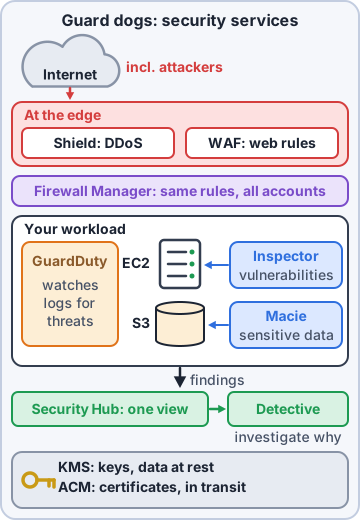
A distributed denial of service (DDoS) attack floods a site with junk traffic from many machines so real customers can't get in. AWS Shield protects against DDoS. Shield Standard is on automatically for every AWS customer at no extra cost and blocks common network-level floods. Shield Advanced is a paid upgrade with stronger protection for things like CloudFront and load balancers, 24/7 access to the AWS Shield Response Team, and cost protection if an attack makes your resources scale up.
AWS WAF: filter the web requests
AWS WAF is a web application firewall: it inspects web requests (Hypertext Transfer Protocol: HTTP, and its secure version, HTTPS) and blocks the bad ones using rules you choose, such as Structured Query Language (SQL) injection (sneaking database commands into a form field), cross-site scripting, requests from certain countries or Internet Protocol (IP) addresses, or too many requests from one source (rate limiting). It protects things like Amazon CloudFront, load balancers and application programming interfaces (APIs).
Exam tip Flood of traffic = Shield. Malicious web requests (SQL injection, bad bots, rate limits) = WAF. They work well together.
AWS Firewall Manager: one rulebook for every account
Companies often have many AWS accounts. AWS Firewall Manager lets a security team set firewall rules once and apply them across all accounts in AWS Organizations: AWS WAF rules, Shield Advanced protections, security group policies and more. New accounts get the rules automatically.
Priya: Next year we'll have separate accounts for test and production. Firewall Manager keeps their rules matched.
Check yourself 1Someone sends thousands of requests with SQL injection strings to the shop's search page. Which service should Priya use to block those requests?
- AWS Shield Standard
- Amazon Inspector
- AWS Artifact
- AWS WAF
Show the answer
Answer: D. AWS WAF
AWS WAF inspects web requests and blocks patterns like SQL injection, with rate-based rules for floods from one source.
Objective 2.4
Guards inside the yard
Amazon GuardDuty: sniff out threats
Amazon GuardDuty is an intelligent threat detection service. It continuously analyzes sources like CloudTrail events, virtual private cloud (VPC) Flow Logs (traffic records from your network) and Domain Name System (DNS) query logs, using machine learning and threat intelligence, and raises findings such as an instance talking to a known crypto-mining server or a sign-in from an unusual place. Turn it on; there are no agents to install.
Ranger: sniffs the air, nose twitching
Priya: GuardDuty is basically Ranger, with machine learning.
Inspector, Macie and Detective
Three more specialists, each with one job.
- Amazon Inspector: automatically scans Amazon EC2 instances, container images and Lambda functions for software vulnerabilities and unintended network exposure
- Amazon Macie: uses machine learning to discover sensitive data, such as personal information, in Amazon Simple Storage Service (Amazon S3), and flags buckets that are public or unencrypted
- Amazon Detective: helps investigate a finding by linking logs into a visual timeline to find the root cause
AWS Security Hub: one dashboard
AWS Security Hub collects findings from GuardDuty, Inspector, Macie, Firewall Manager and partner tools in one place, and runs automated checks against security best-practice standards. It's where Priya starts her morning.
Exam tip Threats in logs = GuardDuty. Software holes = Inspector. Sensitive data in S3 = Macie. Root cause = Detective. Everything in one view = Security Hub.
Check yourself 2Priya needs to find which S3 buckets contain customer names and addresses, the personal information covered by privacy rules. Which service fits?
- Amazon GuardDuty
- Amazon Macie
- Amazon Inspector
- Amazon Detective
Show the answer
Answer: B. Amazon Macie
Macie uses machine learning to discover and report sensitive data, like personal information, stored in Amazon S3.
Objective 2.2
How customers secure resources on AWS
Layers, not one tool
Customers secure AWS resources in layers, each covered by a service. That's the security pillar's "apply security at all layers" in practice.
- At the edge: AWS Shield against floods, AWS WAF against bad requests
- On the workloads: Amazon Inspector finds unpatched software and exposed ports
- In activity: Amazon GuardDuty watches logs for threats
- Across all of it: AWS Security Hub gathers findings and checks standards
- Underneath: Identity and Access Management (IAM) least privilege, encryption, CloudTrail logging
Check yourself 3Which services help Kibble & Co. find security problems in its own AWS workloads? Choose two.
- Amazon Inspector
- AWS Artifact
- Amazon GuardDuty
- AWS Pricing Calculator
- AWS Organizations consolidated billing
Show the answer
Answers: A. Amazon Inspector, C. Amazon GuardDuty
Inspector finds vulnerabilities on compute; GuardDuty detects threats in activity and network logs.
Objective 2.4
Advisors, marketplaces and where to read more
AWS Trusted Advisor
AWS Trusted Advisor inspects your account and recommends improvements in categories including cost optimization, performance, security, fault tolerance, service limits and operational excellence. Security checks include security groups open to the world, S3 bucket permissions, multi-factor authentication (MFA) on the root user and exposed access keys. Every account gets all service limit checks plus a selected set of security and fault tolerance checks; higher Support plans unlock the full set.
Exam tip Trusted Advisor gives best-practice recommendations about YOUR account. It isn't a threat detector (GuardDuty) or a vulnerability scanner (Inspector).
Third-party tools from AWS Marketplace
AWS Marketplace is a digital catalog of software from independent vendors that runs on or works with AWS, including security products: firewalls, antivirus, log analysis and identity tools. You subscribe in a few clicks and the charges appear on your AWS bill. Useful when a team already knows and trusts a particular vendor.
Where AWS security information lives
AWS publishes a lot of free security guidance. Know which place is for what.
- AWS Security Center: AWS's security and compliance hub on aws.amazon.com, with best practices and bulletins
- AWS Security Blog: posts on new security features and how-tos
- AWS Knowledge Center: answers to the most common questions customers ask AWS Support
- AWS documentation and the Well-Architected security pillar for deeper guidance
Priya: I read the Security Blog with my coffee. Ranger reads it with his snout.
Check yourself 4Kibble & Co. wants to keep using the same antivirus vendor it uses on premises, billed through its AWS account. Where should Sam look?
- AWS Artifact
- AWS Security Hub
- AWS Marketplace
- AWS Knowledge Center
Show the answer
Answer: C. AWS Marketplace
AWS Marketplace lists third-party security products you can subscribe to, with charges on the AWS bill.
Go deeper
More on the objectives in this chapter, in the same exam-ready detail.
Objective 2.4 · Security capabilities that AWS provides
AWS security services at a glance
Protect
Services that block attacks and keep secrets safe:
- AWS WAF: web application firewall (blocks SQL injection, cross-site scripting, bad IPs) for CloudFront, ALB and API Gateway
- AWS Shield: DDoS protection (Standard is automatic and free; Advanced adds 24/7 response and cost protection)
- AWS Firewall Manager: central firewall rules across accounts
- Security groups and network ACLs: network traffic rules
- AWS KMS, AWS Secrets Manager: keys and secrets
Detect and respond
Services that find problems and help you investigate:
- Amazon GuardDuty: intelligent threat detection from logs (unusual API calls, crypto-mining, compromised instances)
- Amazon Inspector: scans EC2, container images and Lambda for software vulnerabilities and network exposure
- Amazon Macie: finds sensitive data (PII) in S3
- AWS Security Hub: one dashboard of findings and best-practice checks
- Amazon Detective: investigates the root cause of findings
Exam tip Vulnerabilities in software = Inspector. Threats in activity = GuardDuty. Sensitive data in S3 = Macie.
Objective 2.4 · Security-related documentation that AWS provides
Where AWS publishes security guidance
Documentation to know
AWS publishes a lot of free security guidance. The exam expects you to know where to look:
- AWS Knowledge Center: answers to the most common questions
- AWS Security Center and the AWS Security Blog
- AWS Well-Architected Framework, especially the Security pillar
- AWS Prescriptive Guidance and the AWS Security Reference Architecture
- Each service's documentation has a Security chapter
- AWS Artifact for compliance reports
- AWS Marketplace for third-party security products
Reporting problems
Suspected abuse of AWS resources (spam, attacks from an AWS IP) goes to the AWS Trust & Safety team (abuse report). Vulnerabilities found in AWS services go to AWS's vulnerability reporting process.
Objective 2.4 · Understanding the use of AWS services for identifying security issues (for example, AWS Trusted Advisor)
Finding security issues: Trusted Advisor and friends
AWS Trusted Advisor
Trusted Advisor checks your account against AWS best practices in six categories: cost optimization, performance, security, fault tolerance, service limits (service quotas) and operational excellence. Security checks include open security group ports, root account MFA, S3 bucket permissions and IAM use.
- Basic and Developer support: core security checks and service quotas
- Business support and higher: the full set of checks
Other finders
Amazon Inspector (vulnerabilities), Amazon GuardDuty (threats), IAM Access Analyzer (resources shared outside your account), AWS Config rules (misconfigurations), AWS Security Hub (collects all of them and runs security standards).
Exam tip 'Which service gives recommendations to reduce cost and improve security?' = Trusted Advisor.
Practice questions
Answer in your head, then open the answer. Ranger's Cloud Kennel has 563 questions like these for AWS Cloud Practitioner, with mock exams.
Question 1An Amazon S3 bucket disappeared overnight. Priya needs to know which user deleted it and when. Which service should she check?
- Amazon CloudWatch
- AWS CloudTrail
- AWS Config
- Amazon Inspector
Show the answer
Answer: B. AWS CloudTrail
AWS CloudTrail records API calls in the account: who acted, what action, which resource, when and from where. That answers "who deleted the bucket?"
Question 2Sam wants an alert when the CPU use of the shop's web servers stays above 80% for ten minutes. Which service should he use?
- Amazon CloudWatch
- AWS CloudTrail
- AWS Config
- AWS Artifact
Show the answer
Answer: A. Amazon CloudWatch
Amazon CloudWatch collects metrics such as CPU use and runs alarms that notify or act when a threshold is crossed.
Question 3Priya needs to see what a security group's inbound rules looked like last Tuesday, before someone changed them. Which service shows this?
- Amazon CloudWatch
- AWS Trusted Advisor
- Amazon GuardDuty
- AWS Config
Show the answer
Answer: D. AWS Config
AWS Config records the configuration of resources over time, so you can see past settings and what changed.
Question 4Kibble & Co. wants every Amazon EBS volume checked continuously and flagged if it is not encrypted. Which service is designed for this?
- AWS CloudTrail, using event history
- AWS Trusted Advisor, using a custom check
- AWS Config, using a rule
- Amazon Inspector, using a vulnerability scan
Show the answer
Answer: C. AWS Config, using a rule
AWS Config rules evaluate resource settings against your policies and mark resources compliant or noncompliant.
Question 5Auditors want Kibble & Co. to keep a record of all management API activity for one year. CloudTrail event history only shows the last 90 days. What should Kibble do?
- Create a trail that delivers the log files to an Amazon S3 bucket
- Turn on detailed monitoring in Amazon CloudWatch for every instance
- Deploy an AWS Config conformance pack
- Raise the event history limit in Service Quotas
Show the answer
Answer: A. Create a trail that delivers the log files to an Amazon S3 bucket
A CloudTrail trail delivers events to an S3 bucket you choose, where they can be kept as long as needed. Event history alone shows only 90 days.
AWS and Amazon Web Services are trademarks of Amazon.com, Inc. or its affiliates. Ranger Gamez is not affiliated with or endorsed by Amazon. The practice questions are written to the published exam objectives; they are not real exam questions.