 RANGER
 AWS Certified Cloud Practitioner (CLF-C02) · chapter 5 of 14
Lock the front door
In this chapter Objectives 2.3
Objective 2.3
The root user
The master key
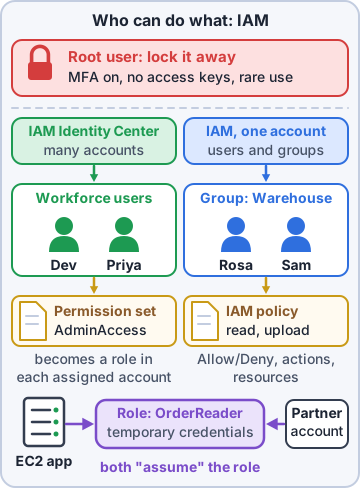
Opening an AWS account creates the root user: the account's email address and password, with complete, unrestricted access to every service, resource and billing setting. No permission policy can limit it inside its own account. If someone steals it, they own the account. So you lock it away and use it only for the few jobs that require it.
Priya: The root user is the master key to the whole building. You don't carry it to lunch.
Protecting the root user
These steps achieve root user protection. They come up on the exam as "which actions protect the root user?"
- Use a long, unique password
- Turn on multi-factor authentication (MFA): a second proof, such as a code from an authenticator app or a hardware security key
- Don't create root access keys; delete any that exist
- Create an administrator for daily work (in AWS IAM Identity Center or AWS Identity and Access Management (IAM)) and stop using root
- Keep the account email and contact details current so recovery works
Jobs only the root user can do
A short list of tasks needs root credentials: account-level and last-resort jobs.
- Change the account's root email address, root password or root access keys
- Close the AWS account (or reopen it shortly after)
- Restore permissions when the only IAM administrator locked themselves out
- Activate IAM access to the Billing and Cost Management console, and some other billing and tax tasks
- Register as a seller in the Reserved Instance Marketplace; turn on MFA Delete for an Amazon Simple Storage Service (Amazon S3) bucket
- Edit or delete an S3 bucket policy that denies everyone
Exam tip Creating users, launching servers and reading bills (once IAM access is on) do NOT need root. If a task is everyday work, root is the wrong answer.
Check yourself 1Which task requires signing in as the AWS account root user?
- Creating a new IAM user for Rosa
- Launching an Amazon EC2 instance
- Closing the AWS account
- Viewing CloudTrail event history
Show the answer
Answer: C. Closing the AWS account
Closing the account is one of the few root-only tasks. Daily work like creating users or launching servers should never use root.
Objective 2.3
IAM: users, groups, roles and policies
Who's who in IAM
AWS Identity and Access Management (IAM) controls who can sign in (authentication) and what they can do (authorization) in an account.
- IAM user: one person or app with long-term credentials (password and/or access keys)
- IAM group: a set of users that share permissions, such as "warehouse-staff". Groups can't be signed in to.
- IAM role: an identity with no long-term password; whoever is allowed to assume it gets temporary credentials. Used by AWS services (an EC2 instance), users and other accounts
- Policy: a JavaScript Object Notation (JSON) document that allows or denies actions on resources
Reading a policy
A policy statement says Effect (Allow or Deny), Action (which application programming interface (API) calls), Resource (which things) and optionally Condition (when). Everything is denied until something allows it, and an explicit Deny always beats an Allow.
{
 "Effect": "Allow",
 "Action": "s3:GetObject",
 "Resource":
  "arn:aws:s3:::kibbleco-orders-example/*"
}
Exam tip The long name in Resource is an Amazon Resource Name (ARN), AWS's unique ID for a resource.
Managed, custom and inline policies
AWS managed policies are written and updated by AWS for common jobs (for example, read-only access). Customer managed policies are custom policies you write once and attach to many users, groups or roles. Inline policies are embedded in one identity and die with it. Attach policies to groups, not to each user, so a new hire just joins a group.
Check yourself 2Rosa's three new warehouse staff need the same read-only access to the stock reports. What follows least privilege and is easiest to manage?
- Give each person the AdministratorAccess policy
- Share one IAM user login among the three
- Let them use the root user, read-only
- Put them in a group with a read-only policy for the reports
Show the answer
Answer: D. Put them in a group with a read-only policy for the reports
A group with a narrowly scoped policy gives each person only what they need, and new staff just join the group.
Objective 2.3
Credentials and how they're stored
Least privilege
The principle of least privilege means granting only the permissions needed for a task, for only as long as needed. It limits the damage from a stolen login or a mistake. Review permissions regularly and remove what nobody uses; IAM shows when each permission was last used.
Exam tip Exam pattern: "most secure way to give access" almost always = least privilege, a role or group, never root or AdministratorAccess.
Passwords, password policies and MFA
A password policy sets rules for IAM users' passwords: minimum length, required character types, expiry and reuse limits. Add MFA so a stolen password isn't enough. MFA options include passkeys and security keys (hardware or built into a phone or laptop), virtual authenticator apps that show a code, and hardware tokens that show a time-based one-time password (TOTP).
You: My help desk MFA tickets finally make sense. It was all training.
Access keys
Access keys let programs call AWS from the AWS Command Line Interface (AWS CLI), software development kits (SDKs) or application programming interfaces (APIs). A key pair is an access key ID plus a secret access key. Never put them in code or share them; rotate them; delete unused ones. Better still, give apps an IAM role, which hands out short-lived credentials automatically.
Storing secrets: Secrets Manager vs Parameter Store
Apps need database passwords and API keys. Don't hard-code them. AWS Secrets Manager stores secrets encrypted and can rotate them automatically on a schedule, such as a database password every 30 days. AWS Systems Manager Parameter Store (part of AWS Systems Manager) stores configuration values and secrets as encrypted parameters, simply and at low or no cost, but without built-in automatic rotation.
Exam tip Need automatic rotation of database credentials? Secrets Manager. Need a simple place for config values and a few secrets? Parameter Store.
Check yourself 3The shop's database password must be rotated automatically every 30 days without code changes. Which service fits best?
- AWS Secrets Manager
- AWS Systems Manager Parameter Store
- An IAM password policy
- AWS Artifact
Show the answer
Answer: A. AWS Secrets Manager
Secrets Manager stores secrets encrypted and rotates them on a schedule, including database credentials.
Objective 2.3
Sign-in options and identity types
AWS IAM Identity Center
AWS IAM Identity Center (formerly AWS Single Sign-On) is the recommended way to give a workforce access to AWS. Staff sign in once at one portal and get the AWS accounts and business apps they're assigned. Access comes from permission sets, not IAM groups: a permission set bundles policies, and Identity Center turns it into an IAM role in each account it is assigned to. It can use its own user directory or connect to an existing one.
Federated identity
With federation, users sign in with an identity provider (IdP) the company already uses, such as Microsoft Active Directory or another company directory. AWS trusts the IdP and hands out temporary credentials, so nobody needs a separate IAM user. Standards like Security Assertion Markup Language (SAML) 2.0 and OpenID Connect (OIDC) carry the trust. AWS Directory Service can run a managed Microsoft Active Directory in AWS.
Cross-account roles and customer logins
A cross-account IAM role lets a trusted user in one AWS account assume a role in another account, with temporary credentials and no extra password. For the shop's customers (not staff), Amazon Cognito adds sign-up and sign-in to web and mobile apps.
Exam tip Staff into AWS accounts = IAM Identity Center. Customers into your app = Amazon Cognito. Another AWS account's users = cross-account role.
Check yourself 4Which are authentication methods for getting into AWS? Choose two.
- Signing in through IAM Identity Center with the company directory
- Attaching an AWS managed policy to a group
- Using MFA with a security key after the password
- Turning on AWS Config rules
- Tagging resources with an owner
Show the answer
Answers: A. Signing in through IAM Identity Center with the company directory, C. Using MFA with a security key after the password
IAM Identity Center (often federated) and MFA both prove identity. Policies, Config and tags deal with permissions or resources, not sign-in.
Go deeper
More on the objectives in this chapter, in the same exam-ready detail.
Objective 2.3 · Identifying authentication methods in AWS (for example, multi-factor authentication [MFA], IAM Identity…
How people and apps sign in to AWS
Authentication options
Each way of signing in fits a different kind of user.
- Root user: the email that created the account. Turn on MFA, don't use it day to day, and lock away its credentials
- IAM users: long-term username/password and access keys (for CLI/SDK); prefer to avoid for people
- Multi-factor authentication (MFA): a second factor such as an authenticator app, a passkey/security key or a hardware token
- AWS IAM Identity Center: single sign-on for many accounts with one sign-in; the recommended way for workforce users
- IAM roles: temporary credentials; apps on EC2 or Lambda assume a role instead of storing keys
- Cross-account IAM roles: a user in account A assumes a role in account B, so nobody needs a second username
Remember
Temporary credentials (roles, Identity Center) beat long-term access keys. Rotate any access keys that must exist, and never put them in code.
Exam tip App on EC2 needs to read S3: attach an IAM role to the instance, don't store access keys on it.
Objective 2.3 · Understanding the types of identity management (for example, federated)
Identity management: local vs federated
Where identities live
IAM identities are created and stored in AWS. Federated identities live in an outside identity provider (IdP) such as Microsoft Entra ID, Okta or Google Workspace, and AWS trusts that IdP. Users sign in once with their company account (single sign-on) and get temporary AWS access.
- Workforce federation: IAM Identity Center connected to your IdP (SAML 2.0 / SCIM)
- Customer (app user) identities: Amazon Cognito handles sign-up and sign-in for your web and mobile apps, including social logins
Why federate
One place to add and remove people: when someone leaves, disabling their company account removes their AWS access too. No separate AWS passwords to manage.
Exam tip Employees: IAM Identity Center. Your app's customers: Amazon Cognito.
Objective 2.3 · AWS Resource Access Manager (AWS RAM)
AWS RAM: sharing resources between accounts
What it does
AWS Resource Access Manager shares AWS resources you own with other AWS accounts or your whole organization instead of duplicating them: for example VPC subnets, Transit Gateways, Route 53 Resolver rules or License Manager configurations. The owner keeps control; other accounts can use the shared resource.
Exam tip Several accounts need to launch instances into one central VPC's subnets = share the subnets with AWS RAM.
Practice questions
Answer in your head, then open the answer. Ranger's Cloud Kennel has 563 questions like these for AWS Cloud Practitioner, with mock exams.
Question 1When Kibble & Co. created its AWS account, one identity was created automatically with complete access to every service and resource. What is it called?
- An IAM user named Administrator
- The account root user
- The IAM Identity Center administrator
- The account's billing contact
Show the answer
Answer: B. The account root user
Creating an AWS account creates the root user, signed in with the account email and password, with unrestricted access. It should be locked away and protected with MFA.
Question 2Dev needs to do daily administration in Kibble & Co.'s AWS account. What does AWS recommend?
- Sign in as the root user and keep its password safe
- Create root user access keys and use the AWS CLI
- Share one IAM user among the IT team
- Use an administrative user created in IAM Identity Center
Show the answer
Answer: D. Use an administrative user created in IAM Identity Center
AWS recommends an administrative user in AWS IAM Identity Center (or IAM) for daily tasks, keeping the root user for root-only tasks.
Question 3Which single step adds the most protection to the root user's sign-in?
- Change the account name
- Create root access keys as a backup
- Attach an IAM policy to the root user
- Turn on multi-factor authentication (MFA)
Show the answer
Answer: D. Turn on multi-factor authentication (MFA)
MFA requires a second proof besides the password, so a stolen password alone can't be used to sign in as root.
Question 4Maya is securing Kibble & Co.'s new AWS account. Which three actions help protect the root user? Choose three.
- Turn on MFA for the root user
- Share the root password with two admins as a backup
- Delete any access keys for the root user
- Create root access keys for scripts
- Use a strong password and stop using root for daily work
- Attach a policy that denies all actions to the root user
Show the answer
Answers: A. Turn on MFA for the root user, C. Delete any access keys for the root user, E. Use a strong password and stop using root for daily work
Protect the root user with a strong password and MFA, remove its access keys, and use other identities for daily work.
Question 5Kibble & Co.'s AWS account is a standalone account, not part of AWS Organizations. Which task requires signing in as the root user?
- Creating an IAM user for a new hire
- Launching an Amazon EC2 instance
- Closing the AWS account
- Viewing the bill once IAM billing access is on
Show the answer
Answer: C. Closing the AWS account
For a standalone account, closing the account is one of the few tasks that requires root user credentials.
AWS and Amazon Web Services are trademarks of Amazon.com, Inc. or its affiliates. Ranger Gamez is not affiliated with or endorsed by Amazon. The practice questions are written to the published exam objectives; they are not real exam questions.