 RANGER
 Microsoft Azure Fundamentals (AZ-900) · chapter 14 of 14
Watching the sky
In this chapter Objectives 3.4
Objective 3.4
Azure Advisor and Azure Service Health
Azure Advisor
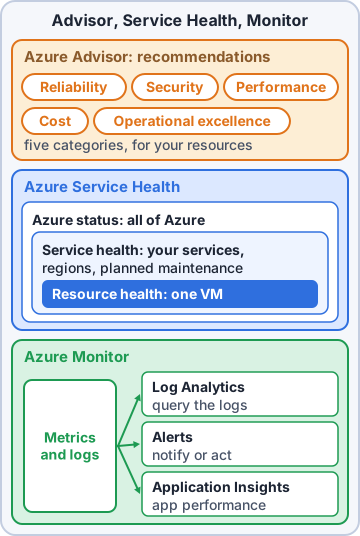
Azure Advisor reviews your Azure resources and gives personalized, actionable recommendations, in the portal or through an application programming interface (API), and can notify you when new ones appear. Recommendations fall into five categories:
- Reliability: keep apps running, for example by adding zone redundancy
- Security: recommendations from Defender for Cloud
- Performance: make apps faster
- Operational excellence: better processes, workflows and deployment practices
- Cost: cut waste, such as idle virtual machines (VMs) or unused disks
Exam tip Advisor = 'what should I improve?' It recommends; it doesn't track live outages or change resources by itself.
Azure Service Health
Azure Service Health tells you about the health of Azure itself, through three views that go from wide to narrow:
- Azure status: every Azure service in every region, worldwide; the public status page
- Service Health: just the services and regions you use: service issues (outages), planned maintenance, and health and security advisories. You can set alerts on these
- Resource Health: the health of your individual resources, such as one VM, including its past availability
Mr. Barkley: So Service Health answers 'was it Microsoft?'
Dev: And it keeps a history, handy for writing up incidents.
Exam tip Microsoft outage in my region = Service Health. Is my one VM healthy = Resource Health. Everything, everywhere = Azure status.
Check yourself 1Mr. Barkley wants an email whenever Microsoft has an outage or schedules maintenance affecting the regions Kibble & Co. uses. Which service fits?
- Azure Advisor
- The Azure status page
- Azure Service Health alerts
- Application Insights availability tests
Show the answer
Answer: C. Azure Service Health alerts
Service Health covers issues, maintenance and advisories for the services and regions you use, and can send alerts about them.
Objective 3.4
Azure Monitor
One platform for metrics and logs
Azure Monitor collects, analyzes and acts on monitoring data from Azure, on premises and other clouds. It gathers two main kinds of data: metrics (numbers over time, like central processing unit (CPU) percentage) and logs (records of events, like errors and sign-ins). Data comes from applications, operating systems, Azure resources, subscriptions and the tenant. You view it in charts, dashboards and workbooks.
Log Analytics
Log Analytics is the tool in the Azure portal where you write and run queries against log data that Azure Monitor collects into a Log Analytics workspace. Queries use Kusto Query Language (KQL). Run a quick filter, or dig deep and chart the results.
AppRequests
| where Success == false
| summarize count() by bin(TimeGenerated,5m)
Azure Monitor alerts
Azure Monitor alerts tell you when a condition is found in monitoring data, so you can act before users notice. Alerts can watch metrics (CPU above 85% for 10 minutes), log search results, or the activity log (someone deleted a VM). When an alert fires, an action group decides what happens: email, text message, push or voice notification, or automation such as Azure Functions, Logic Apps or a webhook.
Priya: So next time my phone buzzes before the customers' phones do?
Dev: That's the whole point of an alert.
Application Insights
Application Insights, a feature of Azure Monitor, is application performance monitoring (APM) for apps in Azure, on premises or in another cloud. It tracks request rates, response times and failure rates, calls to dependencies like databases and APIs, page views and load times. It can also send synthetic test requests (availability tests) to check the app responds even when nobody is using it.
Exam tip Monitor = the platform. Log Analytics = query the logs (KQL). Alerts + action groups = tell me and act. Application Insights = how is my app doing.
Check yourself 2The shop's developers want response times, failure rates and slow database calls for their web app. Which feature fits?
- Application Insights
- Resource Health
- Azure Advisor performance recommendations
- Azure Policy
Show the answer
Answer: A. Application Insights
Application Insights is Azure Monitor's application performance monitoring: requests, response times, failures and dependency calls.
Objective 3.4
Whole-exam review: getting ready for AZ-900
The exam at a glance
Microsoft Azure Fundamentals (AZ-900) is a 45-minute exam; Microsoft says most of its exams have 40 to 60 questions. Scores run from 1 to 1,000 and you pass at 700, a scaled score rather than 70% of the questions. Three skill areas: cloud concepts (25-30%), Azure architecture and services (35-40%), and Azure management and governance (30-35%). No hands-on labs.
You: So a weak area can be balanced by a strong one?
Dev: Right. You pass on the whole score, not per section.
Exam tip There's no penalty for guessing, and multi-part questions usually give a point per correct part. Never leave anything blank.
Question types and pacing
Expect multiple choice, multiple response ('Choose two'), drag-and-drop matching and series of yes/no statements. That's under a minute per question, so keep moving.
- Read the last line first: what is it really asking?
- Watch for deciding words: 'least administrative effort', 'most cost-effective', 'must survive a regional outage'
- In yes/no series, judge each statement on its own; some series can't be revisited once you move on
- Mark tough questions for review and come back with the time left
- Try Microsoft's free practice assessment and the exam sandbox before test day
Look-alike pairs
Most wrong answers on AZ-900 are the right tool for a different job. The pairs to keep apart:
- Azure Policy (resource rules) vs Azure RBAC, role-based access control (what users can do) vs resource locks (stop deletes)
- Advisor (recommendations) vs Service Health (Azure's outages) vs Monitor (your telemetry)
- Pricing calculator (planned Azure) vs TCO (total cost of ownership) calculator (on premises vs Azure) vs Cost Management (actual spend)
- Blob (objects by URL) vs Files (SMB/NFS shares); GRS (failover first) vs RA-GRS (read anytime)
- Entra ID (cloud identity) vs Entra Domain Services (managed domain); Arc (manage in place) vs Migrate (move)
Ranger: paws at the Policy vs RBAC line twice
You: Yes, Ranger. That one's on every practice test.
Check yourself 3On exam day you meet a question that says 'Choose two.' Which tactics are sound? Choose two.
- Judge each option as true or false on its own
- Leave it blank if unsure, to avoid losing points
- Select exactly two options
- Select three options to improve your odds
- Skip it, since multiple-response questions aren't scored
Show the answer
Answers: A. Judge each option as true or false on its own, C. Select exactly two options
Evaluate each option independently, then select exactly the number asked. Microsoft doesn't deduct points for wrong answers, so never leave one blank.
Practice questions
Answer in your head, then open the answer. Ranger's Sky Desk has 482 questions like these for Azure Fundamentals, with mock exams.
Question 1Maya wants a free, personalized list of best-practice suggestions to improve the reliability, security, performance and cost of the resources Pawsome Pets already runs. Which service gives this?
- The Azure pricing calculator
- Azure Resource Manager
- Azure Advisor
- Microsoft Purview
Show the answer
Answer: C. Azure Advisor
Azure Advisor evaluates your Azure resources and makes personalized recommendations to improve reliability, security, performance, operational excellence and cost.
Question 2Dev opens the Azure Advisor dashboard. Which two are Advisor recommendation categories? Choose two.
- Compliance
- Reliability
- Scalability
- Operational excellence
- Governance
Show the answer
Answers: B. Reliability, D. Operational excellence
Advisor's five categories are Reliability, Security, Performance, Operational excellence and Cost.
Question 3Pawsome Pets' test VM has averaged 3% CPU for a month. Which Azure Advisor category would most likely flag it, and with what suggestion?
- Reliability: add a second VM in another zone
- Cost: resize or shut down the underutilized VM
- Security: enable MFA for the VM's users
- Performance: move to a larger VM size
Show the answer
Answer: B. Cost: resize or shut down the underutilized VM
Advisor's Cost category finds ways to reduce spending, such as right-sizing or shutting down underutilized VMs.
Question 4Sam exports the Azure Advisor list in the exhibit. Mr. Barkley wants the item that lowers the monthly bill. Which recommendation is it?
- Use availability zones for vm-pp-web
- Enable MFA on accounts with owner permissions
- Upgrade the storage account to a newer API version
- Right-size or shut down vm-pp-test
Show the answer
Answer: D. Right-size or shut down vm-pp-test
Right-sizing or shutting down an underused VM is a Cost recommendation. Zones are Reliability, MFA is Security, and service upgrades are Operational excellence.
Question 5Maya wants one percentage that summarizes how well Pawsome Pets follows Microsoft's best-practice recommendations for its resources, tracked over time. What should she look at?
- The Azure Policy compliance percentage
- The SLA percentage of each service
- The budget used percentage in Cost Management
- The Advisor score
Show the answer
Answer: D. The Advisor score
The Advisor score is an overall percentage, broken down by category, that shows how well your resources follow Advisor's best practices. You can track daily, weekly and monthly trends.
Microsoft, Azure, Intune and Windows are trademarks of the Microsoft group of companies. Ranger Gamez is not affiliated with or endorsed by Microsoft. The practice questions are written to the published exam objectives; they are not real exam questions.