 RANGER
 Microsoft Azure Fundamentals (AZ-900) · chapter 13 of 14
Click, type or template?
In this chapter Objectives 3.3
Objective 3.3
Ways to manage Azure
The Azure portal
The Azure portal is the web-based console at portal.azure.com. You can build, manage and monitor everything from simple web apps to complex deployments with clicks, build custom dashboards for an organized view, and set accessibility options. It's designed for resiliency: it runs in every Azure datacenter, and Microsoft updates it continuously with no downtime for maintenance. Great for learning, exploring and one-off tasks.
Azure Cloud Shell
Azure Cloud Shell is a browser-based shell you open from the portal or at shell.azure.com. You're already signed in, and the tools are preinstalled, so there's nothing to set up. Choose Bash or PowerShell. To keep files between sessions you can attach an Azure file share, or run a quick ephemeral session with no storage at all.
Priya: So I could fix something from a borrowed laptop, or even my phone's browser?
Dev: Signed in and ready. Just be careful what you type.
Azure CLI and Azure PowerShell
Both are command-line tools that can do anything the portal can, but in scripts you can repeat. Azure CLI (command-line interface) uses az commands and is popular with Bash users. Azure PowerShell uses cmdlets, verb-noun commands from the Az module, and suits PowerShell users. Both run on Windows, macOS and Linux, inside Cloud Shell or installed locally. For the exam they're functionally equivalent: pick the one your team knows.
az group create --name rg-test \
  --location eastus

New-AzResourceGroup -Name rg-test \
  -Location eastus
Exam tip Cloud Shell is where you run commands, not a third tool. Azure CLI and Azure PowerShell are the tools; Bash and PowerShell are the shells.
Check yourself 1Priya needs to run a few az commands from a borrowed laptop where she can't install anything. Which option fits best?
- Install the Azure CLI on the laptop
- Azure Cloud Shell in the browser
- Azure Arc
- An ARM template
Show the answer
Answer: B. Azure Cloud Shell in the browser
Cloud Shell runs in the browser, is already signed in, and has the Azure CLI and Azure PowerShell preinstalled.
Objective 3.3
Azure Resource Manager and infrastructure as code
Azure Resource Manager
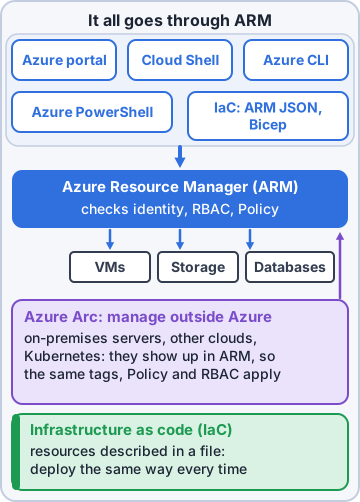
Azure Resource Manager (ARM) is Azure's deployment and management service. Every request, whether it comes from the portal, Azure CLI, Azure PowerShell, the REST application programming interfaces (APIs) or the software development kits (SDKs), goes through ARM. ARM authenticates and authorizes it, then passes it to the right Azure service. That's why every tool gets consistent results, and why role-based access control (RBAC), tags, locks and policies apply the same way whichever tool you use.
Infrastructure as code
Infrastructure as code (IaC) means describing your infrastructure in code files instead of clicking it together. The files live in source control, get reviewed like any other code, and build the same environment the same way every time, so dev, test and production match. Fewer mistakes, faster rebuilds, and a history of every change.
Sam: So my 112 clicks become one file, and staging can't forget the firewall rule.
Dev: Same file, same result. Every time.
ARM templates and Bicep
ARM templates are JavaScript Object Notation (JSON) files that describe the resources you want. They're declarative: you state what you want, not the steps to build it, and ARM works out the order, deploying independent resources in parallel. Deploying the same template again gives the same result. Templates can be split into modules and run scripts during deployment. Bicep is a simpler language for the same job that compiles into ARM templates.
Exam tip Azure's own IaC options: ARM templates and Bicep. Third-party tools such as Terraform also work, because they call ARM too.
Check yourself 2Dev wants test, staging and production built identically from files kept in source control. Which approach fits?
- Build each environment in the Azure portal by hand
- Ask Azure Advisor to copy one environment to another
- Put a ReadOnly lock on each resource group
- Infrastructure as code with Bicep or ARM templates
Show the answer
Answer: D. Infrastructure as code with Bicep or ARM templates
IaC files are declarative and repeatable, so every environment is built the same way and changes are tracked in source control.
Objective 3.3
Azure Arc
Azure management, anywhere
Azure Arc extends Azure's management to resources outside Azure: on premises, at the edge, or in other clouds. Once a server or cluster is Arc-enabled, it shows up in Azure Resource Manager like an Azure resource. You can see it in the portal, organize it with resource groups and tags, govern it with Azure Policy, control access with RBAC, and monitor and protect it with Azure Monitor and Defender for Cloud.
Rosa: So my servers stay by the printers but show up in Dev's portal?
Dev: Right where they are, managed from here.
Ranger: sits by the label printer, guarding it
What Arc can manage
Azure Arc can bring these into Azure management:
- Servers: physical or virtual, Windows or Linux
- Kubernetes clusters, wherever they run
- Azure data services, such as SQL Managed Instance, running on your own Kubernetes
- SQL Server instances outside Azure
- Virtual machines on VMware vSphere and System Center Virtual Machine Manager (SCVMM)
Sam: Even the old Kubernetes cluster?
Dev: Even that. Same policies, same dashboards, same RBAC.
Exam tip Hybrid or multicloud + 'manage with Azure tools' = Azure Arc. Arc doesn't move anything into Azure; it stays where it is. Moving it = Azure Migrate.
Check yourself 3Kibble & Co. wants Azure Policy and Azure Monitor to cover servers that must stay in the warehouse. Which service makes that possible?
- Azure Migrate
- Azure File Sync
- Azure Arc
- Azure Cloud Shell
Show the answer
Answer: C. Azure Arc
Arc projects on-premises servers into Azure Resource Manager, so Policy, RBAC, tags and Monitor can manage them where they sit.
Practice questions
Answer in your head, then open the answer. Ranger's Sky Desk has 482 questions like these for Azure Fundamentals, with mock exams.
Question 1Rosa doesn't write scripts. She wants to check the warehouse app's resources and change a setting by pointing and clicking in a web browser. Which tool fits?
- Azure PowerShell
- The Azure portal
- The Azure CLI
- A Bicep file
Show the answer
Answer: B. The Azure portal
The Azure portal is a web-based, unified console with a graphical interface, an alternative to command-line tools for building, managing and monitoring resources.
Question 2Maya wants one screen that shows the shop's web app health, this month's cost tile and the warehouse VM's CPU chart side by side every morning. What should she build?
- A custom dashboard in the Azure portal
- An Azure Policy initiative
- A resource group named Dashboard
- An ARM template that outputs the numbers
Show the answer
Answer: A. A custom dashboard in the Azure portal
In the Azure portal you can create custom dashboards for an organized view of the resources and charts that matter to you.
Question 3Mr. Barkley asks whether the Azure portal goes offline for maintenance windows, like Pawsome Pets' old hosting panel did. What should Dev tell him?
- No; it updates continuously with no maintenance downtime
- Yes, every Sunday night for updates
- Yes, but only in regions without availability zones
- Only if the subscription has no support plan
Show the answer
Answer: A. No; it updates continuously with no maintenance downtime
The Azure portal is built for resiliency and continuous availability. It has a presence in every Azure datacenter and updates continuously with no downtime for maintenance.
Question 4Rosa uses a Chromebook at the warehouse. What does she need to install to manage resources in the Azure portal?
- Nothing beyond a supported web browser
- The Azure CLI
- The Az PowerShell module
- Azure Arc's Connected Machine agent
Show the answer
Answer: A. Nothing beyond a supported web browser
The Azure portal is web-based: you sign in from a browser and manage resources through a graphical interface, with nothing to install.
Question 5Sam built three VMs for one store by clicking through the portal. Now he must build the same setup for 12 more stores, identically. Why is the portal a poor fit for this?
- The portal can create only three VMs per subscription
- Resources created in the portal can't be tagged or moved afterward
- Repeating many manual clicks is slow and hard to keep consistent
- The portal can't create resources in more than one region at a time
Show the answer
Answer: C. Repeating many manual clicks is slow and hard to keep consistent
For repeatable, consistent environments, use scripts (Azure CLI or PowerShell) or infrastructure as code (ARM templates or Bicep) instead of manual clicks.
Microsoft, Azure, Intune and Windows are trademarks of the Microsoft group of companies. Ranger Gamez is not affiliated with or endorsed by Microsoft. The practice questions are written to the published exam objectives; they are not real exam questions.