 RANGER
 Microsoft Azure Fundamentals (AZ-900) · chapter 12 of 14
Who's paying for all this?
In this chapter Objectives 3.1, 3.2
Objective 3.1
What drives the bill
Factors that affect costs
In Azure you pay for what you use, so many things move the bill:
- Resource type: each service has its own meters; size, tier and redundancy change the rate
- Consumption: pay-as-you-go for what you use, or commit up front with Azure Reservations (1 or 3 years) for big discounts
- Geography: prices differ between regions
- Network traffic: most data coming into Azure is free; data going out (egress) and between regions is billed
- Subscription type: free accounts and some offers include credits
- Azure Marketplace: third-party products bought there add their own charges
- Maintenance: leftovers, like the disks or internet protocol (IP) addresses of a deleted virtual machine (VM), keep billing
Exam tip A stopped (deallocated) VM stops compute charges, but its disks still bill. Delete leftovers you don't need.
Pricing calculator and TCO calculator
The Azure pricing calculator estimates the cost of resources you plan to build: pick services, region, tier, billing option (pay-as-you-go or reserved) and support options, and it shows a monthly estimate you can save and share. The Total Cost of Ownership (TCO) calculator answers a different question: what would our on-premises servers, storage, networking and labor cost compared with running the same in Azure?
Dev: I priced the new order tracker before building it. The estimate is the start; the real bill follows real usage.
Exam tip Planned Azure resources = pricing calculator. On-premises vs Azure = TCO calculator. Both only estimate; neither creates or bills anything.
Check yourself 1Before building a new order-tracking app, Maya wants a monthly estimate for two VMs, a storage account and a database in the East US region. Which tool fits?
- Cost analysis in Microsoft Cost Management
- The TCO calculator
- The Azure pricing calculator
- Azure Advisor
Show the answer
Answer: C. The Azure pricing calculator
The pricing calculator estimates the monthly cost of Azure resources you plan to provision, with your choice of region, tier and billing options.
Objective 3.1
Cost management and tags
Microsoft Cost Management
Microsoft Cost Management (in the portal under Cost Management + Billing) shows what you've actually spent and what you're forecast to spend. Cost analysis breaks costs down by subscription, resource group, service, region or tag. Budgets set a spending limit for a scope and alert people when actual or forecast spending crosses thresholds you choose. You can also schedule cost data exports.
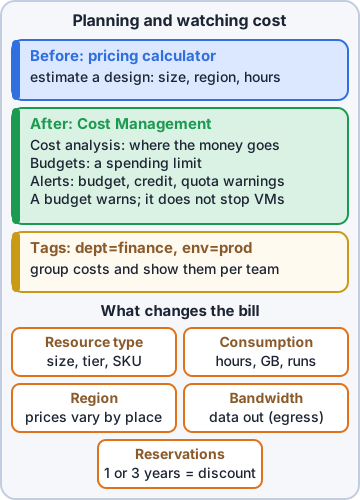
Three kinds of cost alerts
Cost Management alerts come in three types:
- Budget alerts: spending reached a threshold of a budget you set
- Credit alerts: your Azure credit (a prepaid commitment) is being used up; for Enterprise Agreement customers
- Department spending quota alerts: a department reached its fixed spending quota; for Enterprise Agreement customers
Exam tip A budget alerts; it doesn't stop resources by itself. To act automatically, connect the budget to an action group that runs automation.
Tags
A tag is a name-value pair you attach to a resource, resource group or subscription, such as dept: grooming. Tags help with cost reporting (who spent what), operations (which app is this?), security (how sensitive is this data?) and automation (shut down everything tagged env: test at night). Resources don't inherit tags from their resource group by default; Azure Policy can add or require them.
env      : production
dept     : grooming
owner    : sam.kowalski
costcode : PP-104
Rosa: So it's a price tag that says whose price it is.
Dev: Exactly. Unlabeled boxes get lost in your warehouse. Untagged resources get lost on the bill.
Check yourself 2Mr. Barkley wants the monthly bill split between the grooming and retail departments. What should Dev do first?
- Move every resource into one shared resource group
- Tag resources by department, then group cost analysis by tag
- Run the TCO calculator again at the end of every single month
- Put a ReadOnly lock on each subscription
Show the answer
Answer: B. Tag resources by department, then group cost analysis by tag
Tags label each resource with its department, and cost analysis can group and filter costs by tag.
Objective 3.2
Azure Policy
Rules for resources
Azure Policy lets you create, assign and manage rules, called policy definitions, and then evaluates your resources against them. A policy can deny a non-compliant deployment, audit and flag it, or modify it, for example by adding a missing tag. Examples: 'only US regions are allowed', 'only these VM sizes', 'every resource needs a costcode tag'. Azure includes many built-in definitions, so you rarely start from scratch.
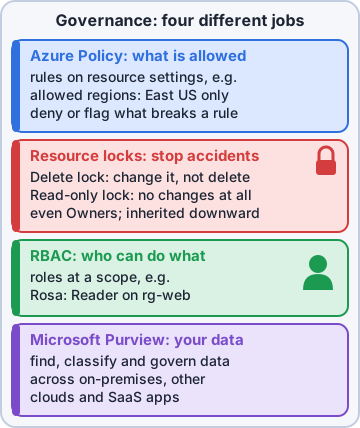
Initiatives, scope and remediation
An initiative groups related policy definitions so you can assign them together, such as a set of security rules. You assign policies and initiatives at a management group, subscription or resource group, and child scopes inherit them. The compliance view shows which resources break which rules, and many policies can remediate existing resources, not just block new ones.
Sam: So an 'allowed locations: US only' policy means my 14 VMs abroad never would have deployed?
Dev: Denied at the door.
Exam tip Azure Policy = what resources may look like (their settings). Azure role-based access control (RBAC) = what users may do. The exam loves this pair.
Check yourself 3Kibble & Co. wants any deployment outside US regions blocked automatically, in every subscription. Which tool fits?
- Azure Policy
- Azure role-based access control
- A resource lock
- Microsoft Cost Management
Show the answer
Answer: A. Azure Policy
An Azure Policy definition such as 'Allowed locations', assigned at a management group, denies non-compliant deployments in every subscription below it.
Objective 3.2
Resource locks and Microsoft Purview
Resource locks
A resource lock prevents accidental deletion or change, even by someone with Owner rights. There are two kinds:
- CanNotDelete (shown as Delete in the portal): people can read and modify the resource, but not delete it
- ReadOnly: people can read the resource, but not change or delete it, as if everyone were a Reader
Maya: The orders database gets a delete lock today.
Ranger: sits on the server rack like a paperweight
Exam tip Locks apply to a subscription, resource group or resource and are inherited downward. To change or delete a locked resource, someone must remove the lock first.
Microsoft Purview
Microsoft Purview is a family of data governance, risk and compliance solutions that help you see and govern data across your whole estate: on premises, multiple clouds and software as a service (SaaS) apps like Microsoft 365. It discovers and maps your data (the Data Map and Unified Catalog), classifies sensitive data like customer emails or card numbers, tracks data lineage (where data came from and where it went), and helps meet regulations with tools such as data loss prevention, retention and audit.
Priya: So Purview could tell us which of Pawsome's databases hold customer addresses?
Dev: That's exactly its kind of question.
Exam tip Purview governs the data itself: where sensitive data is and how it's used. Azure Policy governs resource settings. Locks stop deletes.
Check yourself 4Maya wants nobody, not even an Owner, to delete the production orders database by mistake, while the team can still update it. What should she apply?
- A ReadOnly lock
- A Reader role assignment for the team
- An Azure Policy that requires a costcode tag
- A CanNotDelete (Delete) lock
Show the answer
Answer: D. A CanNotDelete (Delete) lock
A CanNotDelete lock allows reads and changes but blocks deletion for everyone, until someone deliberately removes the lock.
Check yourself 5Kibble & Co. must find every place customer card numbers are stored, across Azure, on premises and Microsoft 365, and see where that data flows. Which service fits?
- An Azure Policy initiative
- Microsoft Purview
- Resource locks
- Azure Advisor
Show the answer
Answer: B. Microsoft Purview
Purview maps and classifies data across on-premises, multicloud and SaaS sources, and shows data lineage.
Practice questions
Answer in your head, then open the answer. Ranger's Sky Desk has 482 questions like these for Azure Fundamentals, with mock exams.
Question 1Dev builds the same VM size with the same disks in East US and in Brazil South for a test. The Brazil South VM costs noticeably more per hour. What explains the difference?
- Azure prices vary by region because power, labor, taxes and fees differ by location
- The Brazil South VM sits in an availability zone, and zones double the price
- Brazil South uses a premium SLA tier that East US doesn't offer
- Inbound data to Brazil South is billed, while inbound data to East US is free
Show the answer
Answer: A. Azure prices vary by region because power, labor, taxes and fees differ by location
Geography is a cost factor: the cost of power, labor, taxes and fees differs between locations, so the same resource can have a different price in each Azure region.
Question 2Pawsome Pets uploads 2 TB of old product photos into Azure Blob Storage, and customers later download photos from the shop. Which data transfer is generally free?
- The customers' downloads out of Azure
- Copying data from a US region to a region in Asia
- Every transfer, because blob storage includes unlimited bandwidth
- The upload of data into the Azure datacenter
Show the answer
Answer: D. The upload of data into the Azure datacenter
Some inbound data transfers (into Azure datacenters) are free, while outbound data transfers are priced by billing zone. That's why downloads, not uploads, drive bandwidth cost.
Question 3Sam deleted a test VM in the portal last week, but this month's costs still show charges in the same resource group for a disk and a public IP address. What is the most likely cause?
- The VM's managed disk and public IP weren't deleted with it
- Azure keeps billing a deleted VM's compute until the end of the month
- Deleted VMs go to a recycle bin that is billed for 30 days
- The resource group itself has a monthly fee once it holds a VM
Show the answer
Answer: A. The VM's managed disk and public IP weren't deleted with it
Maintenance is a cost factor: provisioning a VM also creates storage and networking resources, and deleting the VM doesn't always remove them. Find and delete orphaned disks and IPs to stop paying for them.
Question 4Pawsome Pets wants a preconfigured firewall appliance from a third-party vendor, sold through Azure Marketplace. How is it billed?
- Azure resource costs plus the vendor's charges, set by the vendor
- Only the vendor's license; the Azure VM it runs on is free
- Only Azure resource costs, since all Marketplace products are free
- A flat Microsoft fee that's the same for every Marketplace product
Show the answer
Answer: A. Azure resource costs plus the vendor's charges, set by the vendor
With Azure Marketplace you may pay for the Azure services you use and for the third-party vendor's services or expertise. The vendor sets its own billing structure.
Question 5The order database VM runs 24/7. The team knows it will need the same VM size in the same region for three years and wants the biggest discount. Which option fits best?
- Azure Spot Virtual Machines
- Pay-as-you-go pricing
- An Azure savings plan for compute
- A 3-year Azure reservation for that VM size
Show the answer
Answer: D. A 3-year Azure reservation for that VM size
Reservations suit stable, predictable workloads: you commit to specific capacity for one or three years and get discounted pricing. A savings plan is the better pick when usage shifts among compute services.
Microsoft, Azure, Intune and Windows are trademarks of the Microsoft group of companies. Ranger Gamez is not affiliated with or endorsed by Microsoft. The practice questions are written to the published exam objectives; they are not real exam questions.