 RANGER
 Microsoft Azure Fundamentals (AZ-900) · chapter 11 of 14
Keys, rooms and guard dogs
In this chapter Objectives 2.4
Objective 2.4
Azure role-based access control
Who, what, where
Azure role-based access control (Azure RBAC) decides who can do what to which Azure resources. Access is granted with a role assignment, which joins three things: a security principal (who: a user, group, service principal or managed identity), a role definition (what: a set of allowed actions, such as read or write) and a scope (where the access applies).
Exam tip Azure Resource Manager checks RBAC on every request, so it applies the same way in the portal, the Azure command-line interface (CLI), PowerShell or a template.
Built-in roles
Azure has many built-in roles, and you can create custom ones. The four general roles to know:
- Owner: full access to manage everything, including giving access to others
- Contributor: create and manage all resources, but can't grant access
- Reader: view everything, change nothing
- User Access Administrator: manage who has access, nothing else
Exam tip Can change resources but can't give access = Contributor. Can give access = Owner or User Access Administrator.
Scope and inheritance
You assign roles at a scope: a management group, a subscription, a resource group or a single resource. Access is inherited downward: Reader on a subscription means Reader on every resource group and resource in it. So assign roles at the narrowest scope that does the job, and assign them to groups rather than individuals, so access follows team membership.
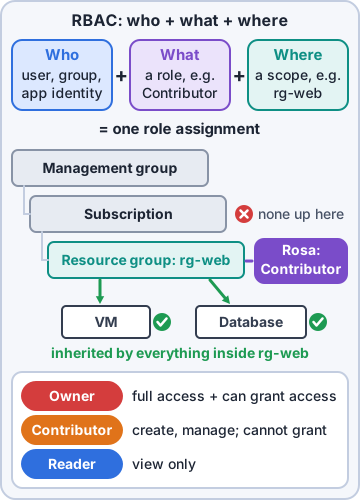
Dev: The photo team gets Contributor on rg-photos. Not Owner on the whole subscription.
Exam tip RBAC is additive: a user's access is the sum of their role assignments. Reader on the subscription plus Contributor on one resource group = can change that group.
Check yourself 1The photo team must create and manage resources in the rg-photos resource group only, without being able to give anyone else access. Which assignment fits?
- Owner on the subscription
- Reader on rg-photos
- User Access Administrator on rg-photos
- Contributor on rg-photos
Show the answer
Answer: D. Contributor on rg-photos
Contributor allows managing resources but not granting access, and assigning it at the resource group limits it to rg-photos.
Objective 2.4
Zero Trust and defense in depth
Zero Trust
Zero Trust assumes nothing is safe just because it's inside the company network: every request is checked as if it came from an open network. The old 'castle and moat' model trusted anything inside the walls. Zero Trust has three principles:
- Verify explicitly: authenticate and authorize using every available signal: identity, location, device health, the app, data and anomalies
- Use least privilege access: give just enough access, just in time, and no more
- Assume breach: limit the blast radius by segmenting access, encrypt end to end, and use analytics to spot threats
Exam tip Never trust, always verify. Conditional Access and RBAC are Zero Trust in action.
Defense in depth
Defense in depth stacks layers of protection, so if one layer fails, the next slows the attacker and protects the data at the center. Microsoft's model has seven layers, outside in:
- Physical security: locked, guarded datacenter buildings
- Identity and access: single sign-on (SSO), multifactor authentication (MFA), Conditional Access, audited sign-ins
- Perimeter: distributed denial of service (DDoS) protection and perimeter firewalls
- Network: limit traffic between resources; deny by default
- Compute: secure virtual machines (VMs): patch them, close unused ports
- Application: build apps without security flaws; keep secrets out of code
- Data: the prize every other layer protects; control access to it
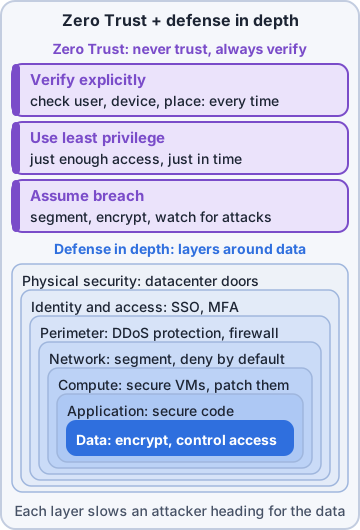
Rosa: Like my warehouse: fence, gate badge, locked cage, then the safe.
How they fit together
Defense in depth is the layered design; Zero Trust is the mindset applied at every layer. Verify each request at the identity layer, give the least access at the compute and data layers, and plan as if one layer has already been breached. Physical security is Microsoft's job in Azure datacenters; most of the inner layers are shared or yours, depending on the service type.
You: So Conditional Access is Zero Trust at the identity layer, and RBAC is least privilege at the resource layer.
Dev: Exactly. You just passed my quiz.
Check yourself 2In the defense-in-depth model, which layer is the one all the others exist to protect?
- Data
- Perimeter
- Network
- Physical security
Show the answer
Answer: A. Data
Data sits at the center. Every outer layer, from physical security to application, is there to slow attackers on the way to it.
Check yourself 3Which statement best describes Zero Trust?
- Trust any device once it joins the corporate network
- Never trust, always verify every request
- Use one strong firewall at the edge of the network
- Give admins permanent Owner access to save time
Show the answer
Answer: B. Never trust, always verify every request
Zero Trust verifies every request explicitly, grants least privilege and assumes a breach, wherever the request comes from.
Objective 2.4
Microsoft Defender for Cloud
What it is
Microsoft Defender for Cloud is a cloud-native application protection platform (CNAPP): one service to strengthen and protect your workloads. It's built into Azure, and it also covers on-premises and hybrid machines (through Azure Arc) and other clouds such as Amazon Web Services (AWS) and Google Cloud Platform (GCP) through connectors. Its jobs come down to three words: assess, secure, defend.
Posture and protection
Defender for Cloud covers three areas:
- Cloud security posture management (CSPM): continuously checks your setup against security benchmarks and gives a secure score with prioritized recommendations, like 'enable MFA' or 'restrict public access'
- Cloud workload protection (CWP): Defender plans for servers, storage, databases, containers and more that detect threats and raise security alerts
- DevSecOps: finds security problems in code and pipelines before they reach production
Dev: A secure score is a to-do list with a grade attached. Let's raise the grade.
Exam tip Recommendations raise the secure score (posture). Defender plans add threat detection and alerts (protection). Foundational CSPM is free.
Check yourself 4Mr. Barkley wants one place that shows how secure Kibble & Co.'s Azure setup is, with a prioritized list of fixes, and that also covers the warehouse's on-premises servers. Which service fits?
- Microsoft Entra ID
- Azure role-based access control
- Microsoft Defender for Cloud
- Microsoft Entra Conditional Access
Show the answer
Answer: C. Microsoft Defender for Cloud
Defender for Cloud assesses security posture with a secure score and recommendations, and covers on-premises machines through Azure Arc.
Practice questions
Answer in your head, then open the answer. Ranger's Sky Desk has 482 questions like these for Azure Fundamentals, with mock exams.
Question 1Read the exhibit of identity needs at Kibble & Co. Which assignment of Microsoft Entra services fits all three?
- 1 Entra Domain Services, 2 Entra ID, 3 Entra Connect
- 1 Entra ID, 2 Entra Domain Services, 3 Entra Connect
- 1 Entra ID, 2 Entra Connect, 3 Entra Domain Services
- 1 Entra Connect, 2 Entra Domain Services, 3 Entra ID
Show the answer
Answer: B. 1 Entra ID, 2 Entra Domain Services, 3 Entra Connect
Entra ID handles cloud sign-in, Entra Domain Services gives legacy apps LDAP, NTLM and Kerberos, and Entra Connect syncs on-premises AD accounts into Entra ID.
Question 2Sam is planning a Microsoft Entra Domain Services managed domain for the old billing app. Which statement about the managed domain is true?
- It replaces the need for Microsoft Entra ID
- It is a stand-alone domain, not an extension of on-premises AD
- It can be reached only from on-premises networks
- Dev must deploy domain controller VMs for it
Show the answer
Answer: B. It is a stand-alone domain, not an extension of on-premises AD
A managed domain is a stand-alone domain managed by Microsoft that gets its users from Microsoft Entra ID; it isn't an extension of an on-premises domain, though trusts can be set up.
Question 3Priya wants staff to sign in once and then reach Microsoft 365, the inventory SaaS app and the HR app without signing in again. Which feature provides this?
- Microsoft Defender for Cloud
- Azure role-based access control
- Multifactor authentication (MFA)
- Single sign-on (SSO)
Show the answer
Answer: D. Single sign-on (SSO)
Single sign-on lets a user sign in once with one identity and reach many applications without signing in again.
Question 4Which sign-in method counts as multifactor authentication?
- A username plus a password
- A password plus the answer to a personal security question
- A password plus a code from the Authenticator app
- Two different passwords
Show the answer
Answer: C. A password plus a code from the Authenticator app
MFA needs two or more different kinds of proof: something you know, something you have, or something you are. A password plus a code from your phone combines know and have.
Question 5Rosa unlocks her laptop with a fingerprint as part of MFA. Which MFA factor category is a fingerprint?
- Something you have
- Something you are
- Something you know
- Somewhere you are
Show the answer
Answer: B. Something you are
MFA factors are something you know (password), something you have (phone, key) and something you are (biometrics such as a fingerprint or face).
Microsoft, Azure, Intune and Windows are trademarks of the Microsoft group of companies. Ranger Gamez is not affiliated with or endorsed by Microsoft. The practice questions are written to the published exam objectives; they are not real exam questions.