 RANGER
 Microsoft Azure Fundamentals (AZ-900) · chapter 10 of 14
One badge for every door
In this chapter Objectives 2.4
Objective 2.4
Directory services in Azure
Microsoft Entra ID
Microsoft Entra ID (formerly Azure Active Directory) is Microsoft's cloud-based identity and access management service. It stores users, groups and app registrations; signs people in to Microsoft 365, the Azure portal and thousands of software as a service (SaaS) apps; and protects those sign-ins. Microsoft runs it worldwide, so there are no servers for you to manage. Each organization gets its own instance, called a tenant, and every Azure subscription trusts one tenant.
What Entra ID does
Four jobs to know:
- Authentication: verifies identity to grant access, with features like self-service password reset (SSPR), multifactor authentication and smart lockout
- Single sign-on: one identity and one sign-in for many apps
- Application management: register and manage cloud and on-premises apps, plus the My Apps portal for users
- Device management: register devices so tools like Microsoft Intune can manage them and access can depend on device health
Priya: Self-service password reset alone would cut that 41% way down.
Hybrid identity
Many companies, Kibble & Co. included, still run Active Directory Domain Services (AD DS) on their own servers. Microsoft Entra Connect synchronizes users and groups from on-premises AD DS to Entra ID, so people use one identity for both on-premises and cloud apps. Change a password or disable a user on premises, and it flows to the cloud.
Microsoft Entra Domain Services
Some older apps can't use modern cloud sign-in. They expect a classic Windows domain: domain join, Group Policy, Lightweight Directory Access Protocol (LDAP) lookups and Kerberos or NT LAN Manager (NTLM) authentication. Microsoft Entra Domain Services provides these as a managed domain: Microsoft deploys, patches and backs up the domain controllers, and you just use them. Users and groups sync one way from Entra ID into the managed domain, so people keep the same credentials.
Sam: Pawsome's ancient inventory app wants LDAP. With Domain Services, I don't babysit domain controllers.
Exam tip Entra ID alone doesn't do domain join, Group Policy, LDAP or Kerberos for old apps. Need those without running domain controllers? Entra Domain Services.
Check yourself 1Pawsome's old inventory app must run on a domain-joined virtual machine (VM) and use Kerberos, but nobody wants to build or patch domain controllers in Azure. Which service fits?
- Microsoft Entra Connect
- Microsoft Entra Domain Services
- Azure role-based access control
- Microsoft Entra Conditional Access
Show the answer
Answer: B. Microsoft Entra Domain Services
Entra Domain Services provides a managed domain with domain join, Group Policy, LDAP and Kerberos/NTLM, and Microsoft runs the domain controllers.
Objective 2.4
Authentication methods
Authentication vs authorization
Authentication (AuthN) proves who you are. Authorization (AuthZ) decides what you're allowed to do once you're in. Entra ID handles authentication; tools like Azure role-based access control (RBAC), coming tomorrow, handle authorization in Azure.
Exam tip Mnemonic: authentication = identity card at the door; authorization = which rooms your card opens.
Single sign-on
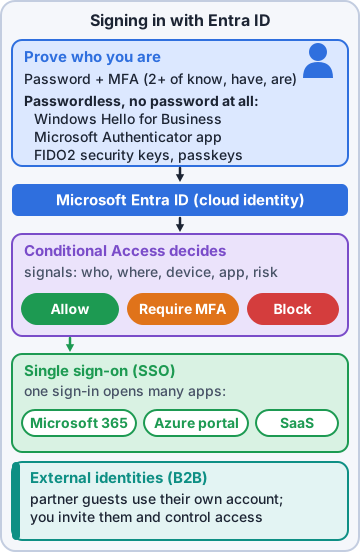
Single sign-on (SSO) lets a user sign in once and use many apps with one identity. Fewer passwords mean fewer forgotten passwords and reset tickets, and IT has one account to disable when someone leaves. The catch: SSO is only as strong as that one sign-in, so pair it with a strong authentication method.
Multifactor authentication
Multifactor authentication (MFA) asks for two or more different kinds of proof: something you know (a password or personal identification number, PIN), something you have (a phone or security key) and something you are (a fingerprint or face). A stolen password alone is no longer enough. Microsoft Entra multifactor authentication supports methods such as Microsoft Authenticator app approvals, codes by text or voice call, and hardware tokens.
Exam tip Two passwords is NOT MFA: both are something you know. The factors must be different kinds.
Passwordless
Passwordless sign-in removes the password and uses something you have plus something you are or know. It's more secure and easier for users. Three options Microsoft highlights:
- Windows Hello for Business: a face, fingerprint or PIN tied to the user's own PC
- Microsoft Authenticator app: approve the sign-in on your phone with your face, fingerprint or PIN
- FIDO2 security keys (passkeys): a USB or near-field communication (NFC) key built on the Fast Identity Online 2 (FIDO2) standard
Ranger: boops the laptop's fingerprint reader with his nose
You: Sorry, Ranger. Your nose isn't enrolled.
Check yourself 2Which sign-in counts as multifactor authentication?
- A password plus a code from a phone app
- A password and the answer to a security question
- Two different passwords, one after the other
- A PIN followed by a password
Show the answer
Answer: A. A password plus a code from a phone app
A password is something you know; the phone that receives or generates the code is something you have. Two different kinds = MFA.
Objective 2.4
External identities
Who counts as external
External identities are people, devices or services outside your organization: partners, vendors, suppliers and customers. Microsoft Entra External ID lets them sign in with identities they already have, such as their own work account, a Google or Facebook account, or a one-time passcode sent by email, so you don't create and look after passwords for them.
Priya: No more vendor passwords on sticky notes. I may cry.
Ranger: licks Priya's hand, supportively
Partner and customer scenarios
The main ways to work with external identities:
- Business-to-business (B2B) collaboration: invite partners as guest users in your directory. They sign in with their own credentials, and you control what they can reach
- B2B direct connect: a two-way trust with another Microsoft Entra organization, used for Microsoft Teams shared channels; no guest account is created
- Customer sign-in: sign-up and sign-in for customers of your own apps, run from a separate external tenant. (The older Azure Active Directory B2C isn't sold to new customers since May 2025.)
Exam tip Partner uses their own account to reach your apps = B2B collaboration (guest user). Your customers signing in to your app = External ID in an external tenant.
Check yourself 3The grooming-supply vendor's staff need to reach Kibble & Co.'s ordering portal using their own company accounts. What's the best approach?
- Create Kibble & Co. accounts and email them passwords
- Share the help desk's admin login with the vendor
- Add the vendor to Microsoft Entra Domain Services
- Invite them as B2B collaboration guest users
Show the answer
Answer: D. Invite them as B2B collaboration guest users
B2B collaboration lets partners sign in with their own identities as guests, while Kibble & Co. controls what they can access.
Objective 2.4
Microsoft Entra Conditional Access
If this, then that
Conditional Access is the policy engine in Entra ID. After the first sign-in step, it gathers signals about the attempt, makes a decision and enforces it. Policies read like if-then statements: if a user in Finance signs in from an unfamiliar country, then require MFA. Conditional Access needs a Microsoft Entra ID P1 or P2 license.
- Signals: the user and their groups, location (internet protocol, or IP, address), device and whether it's compliant, the app being opened, and real-time sign-in risk
- Decisions: allow access, block it, or allow it only after a requirement such as MFA or a compliant device
When it helps
Conditional Access lets you add friction only where risk is higher. Typical policies: require MFA only outside the office network, allow some apps only from managed, compliant devices, block sign-ins from countries you never operate in, and block legacy sign-in methods that can't do MFA. On the exam, 'based on location, device, app or risk' points to Conditional Access.
Mr. Barkley: So at the office I just sign in, and at the beach my phone asks me to approve?
Priya: Exactly. Same you, different conditions.
Check yourself 4Maya wants MFA required only when staff sign in from outside the office network. Which feature does this?
- Single sign-on
- Microsoft Entra Domain Services with Group Policy
- Microsoft Entra Conditional Access
- Microsoft Entra Connect
Show the answer
Answer: C. Microsoft Entra Conditional Access
Conditional Access uses signals such as location to decide when to require MFA, so office sign-ins stay simple.
Practice questions
Answer in your head, then open the answer. Ranger's Sky Desk has 482 questions like these for Azure Fundamentals, with mock exams.
Question 1Priya explains Microsoft Entra ID (formerly Azure Active Directory) to the new help desk hire. Which description is correct?
- Active Directory Domain Services installed on an Azure VM
- A managed domain that applies Group Policy to domain-joined VMs
- Microsoft's cloud-based identity and access management service
- A service that encrypts data in storage accounts
Show the answer
Answer: C. Microsoft's cloud-based identity and access management service
Microsoft Entra ID is Microsoft's cloud identity and access management service. It handles sign-in, single sign-on, app access and device identity for Azure, Microsoft 365 and other apps.
Question 2Kibble & Co. wants staff in its on-premises Active Directory to sign in to Azure and Microsoft 365 with the same accounts. What synchronizes those identities to the cloud?
- Azure File Sync
- Microsoft Entra External ID
- Microsoft Entra Domain Services
- Microsoft Entra Connect
Show the answer
Answer: D. Microsoft Entra Connect
Microsoft Entra Connect synchronizes users and groups from on-premises Active Directory to Microsoft Entra ID so people use one identity everywhere.
Question 3Pawsome Pets' old billing app needs Kerberos, LDAP and domain-joined VMs in Azure, but Dev doesn't want to deploy or patch domain controllers. Which service fits?
- Active Directory Domain Services on Azure VMs
- Microsoft Entra External ID
- Microsoft Entra Domain Services
- Microsoft Entra ID on its own
Show the answer
Answer: C. Microsoft Entra Domain Services
Microsoft Entra Domain Services provides managed domain join, Group Policy, LDAP and Kerberos/NTLM without you running domain controllers. It suits lifting legacy apps into Azure.
Question 4Sam asks how users get into a Microsoft Entra Domain Services managed domain. Which statement is true?
- Changes in the managed domain write back to on-premises AD
- Entra Connect must be installed inside the managed domain
- Users and groups sync one way from Entra ID into the managed domain
- Changes sync both ways between Entra ID and the managed domain
Show the answer
Answer: C. Users and groups sync one way from Entra ID into the managed domain
Users, groups and credential hashes sync one way from Microsoft Entra ID into the managed domain. There is no sync from the managed domain back to Entra ID.
Question 5Priya lists what Microsoft Entra ID gives the help desk. Which are Entra ID capabilities? Choose two.
- Single sign-on to cloud and SaaS apps
- Self-service password reset for users
- Encryption of VM managed disks
- Hosting of public DNS zones
- Group Policy objects applied to domain-joined VMs
Show the answer
Answers: A. Single sign-on to cloud and SaaS apps, B. Self-service password reset for users
Microsoft Entra ID provides authentication features such as self-service password reset and MFA, single sign-on, application management and device management.
Microsoft, Azure, Intune and Windows are trademarks of the Microsoft group of companies. Ranger Gamez is not affiliated with or endorsed by Microsoft. The practice questions are written to the published exam objectives; they are not real exam questions.