 RANGER
 Microsoft Azure Fundamentals (AZ-900) · chapter 9 of 14
Three copies or six?
In this chapter Objectives 2.3
Objective 2.3
Redundancy options
Copies in the primary region
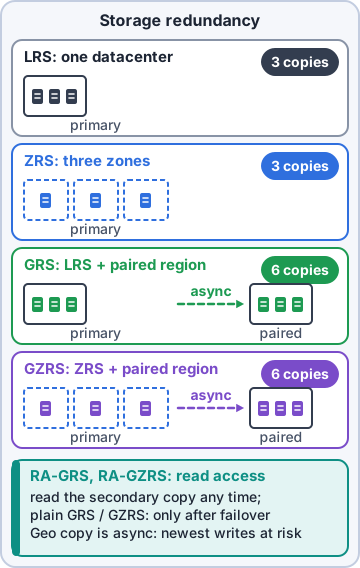
Azure Storage always stores multiple copies of your data so a failed drive or server doesn't lose it. Two choices keep all copies in the primary region:
- Locally redundant storage (LRS): three copies in one datacenter. Cheapest; survives a failed disk or rack, not a disaster that takes out the datacenter. At least 11 nines (99.999999999%) durability a year
- Zone-redundant storage (ZRS): three copies spread across three availability zones in the region. Data stays available even if a whole zone goes down. At least 12 nines
Copies in a second region
The geo options add three more copies in a secondary region hundreds of miles away, usually the primary region's pair: six copies in total. Data is copied to the secondary region asynchronously.
- Geo-redundant storage (GRS): LRS in the primary region plus LRS in the secondary region
- Geo-zone-redundant storage (GZRS): ZRS in the primary region plus LRS in the secondary region. The most protection: survives a zone outage and a regional disaster
Exam tip GRS and GZRS are designed for at least 16 nines of durability. Their secondary copies can't be read until a failover, unless you choose a read-access option.
Read access: RA-GRS and RA-GZRS
With plain GRS or GZRS, the secondary copies exist for recovery only: you can't read them until a failover makes the secondary region the new primary. Read-access geo-redundant storage (RA-GRS) and read-access geo-zone-redundant storage (RA-GZRS) let apps read from the secondary region at any time through a separate secondary endpoint, so reads keep working while the primary region is down.
Rosa: So RA stands for Really Available?
Dev: Read Access. But yours is easier to remember.
Exam tip Because geo copying is asynchronous, the secondary can lag behind the primary: the newest writes may not be there yet.
Picking one
Ask two questions. First, what must the data survive: a failed disk or rack (LRS), a whole zone going down (ZRS), or a regional disaster (GRS or GZRS)? Second, must apps keep reading it during a regional outage (add RA-)? More protection costs more, so match the option to the data. One catch: the archive tier works only in LRS, GRS and RA-GRS accounts, not zone-redundant ones.
Mr. Barkley: So the flood question has an answer. And a price tag.
Dev: Every answer in the cloud has a price tag. This one's worth reading.
Check yourself 1Order history must survive the loss of a whole Azure region, the reporting app must keep reading it during that outage, and the primary region copies must survive a zone failure. Which option fits?
- ZRS
- GRS
- RA-GZRS
- LRS
Show the answer
Answer: C. RA-GZRS
GZRS spreads the primary copies across zones and adds a secondary region; the RA- version lets apps read the secondary at any time.
Check yourself 2Which option keeps three copies of the data in a single datacenter, and nothing more?
- Zone-redundant storage (ZRS)
- Locally redundant storage (LRS)
- Geo-redundant storage (GRS)
- Read-access geo-redundant storage (RA-GRS)
Show the answer
Answer: B. Locally redundant storage (LRS)
LRS keeps three copies inside one datacenter in the primary region. It's the lowest-cost option.
Objective 2.3
Options for moving files
AzCopy
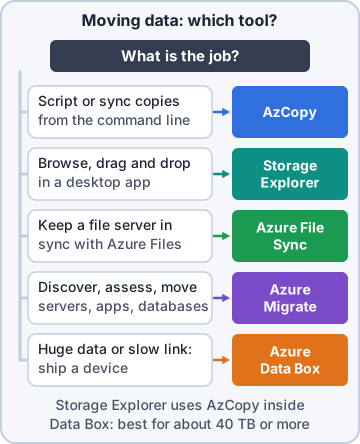
AzCopy is a command-line utility for copying blobs or files to or from a storage account, or between storage accounts. Because it's a command, you can script it and schedule it. It can also synchronize in one direction, making the destination match the source; it doesn't sync both ways.
azcopy copy 'C:\exports' '<URL>' --recursive
Azure Storage Explorer
Azure Storage Explorer is a free standalone app for Windows, macOS and Linux with a graphical interface. You browse storage accounts like folders and upload, download or move blobs and files with clicks. Under the hood it uses AzCopy for transfers. Handy for people who'd rather not type commands.
Priya: That's the one going on the help desk laptops.
Azure File Sync
Azure File Sync keeps Windows file servers and an Azure Files share in sync, in both directions. The local server works like a fast cache: users keep their mapped drives and shortcuts. With cloud tiering, rarely used files are kept only in Azure and leave a pointer behind, freeing local disk space, while frequently used files stay local. You can sync several servers to one share, and if a server fails, just install File Sync on a new one.
Exam tip Two-way sync that keeps an on-premises Windows file server = Azure File Sync. Scripted copy or one-way sync = AzCopy. Point and click = Storage Explorer.
Check yourself 3Rosa wants staff to keep using the warehouse file server and its mapped drive, while the files are also kept in Azure and old files stop filling the server's disk. Which tool fits?
- AzCopy
- Azure Storage Explorer
- Azure Data Box
- Azure File Sync
Show the answer
Answer: D. Azure File Sync
File Sync keeps the local Windows file server and an Azure Files share in sync both ways, and cloud tiering moves rarely used files off the local disk.
Objective 2.3
Migration options
Azure Migrate
Azure Migrate is a hub for moving to Azure. From one place you discover what you run on premises, assess whether it's ready for Azure and what it would cost there, and migrate it. It covers servers, databases, web apps and virtual desktops, and it brings together integrated tools such as Azure Database Migration Service and Azure Data Box, plus partner tools.
Maya: Before we move anything, I want a list of what's still in Pawsome's back room and what it would cost in Azure.
Dev: That's Azure Migrate's first job.
Azure Data Box
When the network is too slow, ship the data. Azure Data Box is a rugged, encrypted device Microsoft sends you. Copy data onto it, ship it back, and Microsoft uploads it to your storage account. Current devices hold 120 TB or 525 TB (the older model held 80 TB); Data Box Disk covers smaller jobs. It also works in reverse, to export data out of Azure.
- One-time moves of lots of data, like media libraries or backups
- Sites with little or no network bandwidth
- Exporting data from Azure, for disaster recovery or a move back on premises
Sam: Sixty terabytes over our line: weeks. A box on a truck: days.
Exam tip Lots of data + slow network = Data Box. 'Discover and assess first' = Azure Migrate.
Check yourself 4Before moving anything, Maya wants a list of Pawsome's remaining on-premises servers and an estimate of what they'd cost to run in Azure. Which service fits?
- Azure Migrate
- Azure Data Box
- AzCopy
- Azure File Sync
Show the answer
Answer: A. Azure Migrate
Azure Migrate discovers on-premises servers, assesses their readiness and estimates Azure costs, then helps migrate them.
Practice questions
Answer in your head, then open the answer. Ranger's Sky Desk has 482 questions like these for Azure Fundamentals, with mock exams.
Question 1Dev is designing order messages for Azure Queue Storage. What is the maximum size of one message?
- 64 MB
- 1 GB
- 4 MB
- 64 KB
Show the answer
Answer: D. 64 KB
Each Queue Storage message can be up to 64 KB, and a queue can hold millions of them. Larger payloads go in Blob Storage with a reference in the message.
Question 2Sam asks Priya about Azure Files shares. Which statement is true?
- Azure Files stores data as NoSQL entities
- A share can be mounted by only one VM at a time, like a data disk
- Files are reachable only through the REST API
- A share can be mounted at once by cloud VMs and on-premises PCs
Show the answer
Answer: D. A share can be mounted at once by cloud VMs and on-premises PCs
Azure Files shares can be mounted concurrently by cloud and on-premises machines over SMB or NFS, which makes them easy replacements for on-premises file servers.
Question 3Dev is deciding what to keep in Blob Storage. Which needs is Blob Storage designed for? Choose two.
- Mapping a drive letter over SMB
- Streaming video and audio
- Storing backups and archive data
- Providing the boot volume for a VM
- Passing messages between parts of an app
Show the answer
Answers: B. Streaming video and audio, C. Storing backups and archive data
Microsoft lists serving images and documents, streaming video and audio, storing backups and archives, and storing data for analysis as Blob Storage uses.
Question 4Read the exhibit. Which assignment of Azure Storage services fits all four Pawsome Pets data needs?
- 1 Blob, 2 Files, 3 Queue, 4 Disks
- 1 Files, 2 Blob, 3 Queue, 4 Disks
- 1 Blob, 2 Disks, 3 Queue, 4 Files
- 1 Blob, 2 Files, 3 Table, 4 Disks
Show the answer
Answer: A. 1 Blob, 2 Files, 3 Queue, 4 Disks
Long-term exports are unstructured objects (Blob), shared folders are Azure Files, work signals are Queue Storage, and a VM's OS drive is a managed disk.
Question 5Which blob access tier has the lowest storage cost, but keeps data offline so it must be rehydrated before it can be read?
- Archive
- Cool
- Cold
- Hot
Show the answer
Answer: A. Archive
The archive tier is offline and has the lowest storage cost but the highest retrieval cost; blobs must be rehydrated to an online tier first, which can take hours.
Microsoft, Azure, Intune and Windows are trademarks of the Microsoft group of companies. Ranger Gamez is not affiliated with or endorsed by Microsoft. The practice questions are written to the published exam objectives; they are not real exam questions.