 RANGER
 Microsoft Azure Fundamentals (AZ-900) · chapter 8 of 14
The pet-photo mountain
In this chapter Objectives 2.3
Objective 2.3
Azure Storage services
The storage account
An Azure storage account is the container for your Azure Storage data: blobs, files, queues and tables all live inside one. It gives that data a unique namespace you can reach over Hypertext Transfer Protocol (HTTP) or HTTP Secure (HTTPS) from anywhere in the world, and it's where you pick settings that apply to everything inside it, such as performance, redundancy and the default access tier. Pawsome Pets keeps everything in one account called pawsomepetsdata.
Sam: One account for everything. Bold choice.
Dev: Not wrong, just crowded. Let's see what's in it.
Five services, five jobs
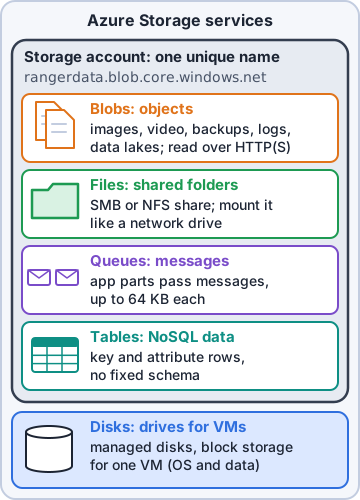
Azure Storage has several services. Pick by the shape of the data and how it's used:
- Azure Blob Storage: huge amounts of unstructured data (photos, video, backups, logs), reached by web address (URL)
- Azure Files: fully managed file shares that computers mount with Server Message Block (SMB) or Network File System (NFS)
- Azure Queue Storage: large numbers of messages, up to 64 KB each, so parts of an app can pass work along
- Azure Table Storage: NoSQL (non-relational) key-attribute data in tables; structured, schemaless and inexpensive
- Azure Disk Storage: managed disks, the block-level volumes that Azure virtual machines (VMs) use as their drives
Exam tip Objects = Blob. Shared drive = Files. Messages = Queue. Key-attribute data = Table. VM drive = Disk.
Blobs up close
Blob stands for binary large object. Blobs sit in containers inside the account, a bit like folders. There are three blob types: block blobs for everyday text and binary files such as photos, append blobs for data that only gets added to, like logs, and page blobs for random read/write files such as the virtual hard disk (VHD) files behind VM disks. Every blob has its own URL, for example https://pawsomepetsdata.blob.core.windows.net/photos/biscuit.jpg.
Ranger: tilts head at biscuit.jpg Woof?
You: Biscuit is a corgi. Customer photo. A very important blob.
Files or Blob? The classic mix-up
Both hold files, so which one? Azure Files behaves like a network drive: many computers can mount the same share at the same time and open files by path, so older apps that expect a file server just work. Blob Storage is object storage that apps and browsers reach through a URL or an application programming interface (API), built to scale to enormous amounts of data. Rule of thumb: people and older apps that map a drive want Files; websites and apps storing millions of objects want Blob.
Exam tip Azure Files shares can be mounted at the same time by Windows, Linux and macOS machines. 'Lift and shift a file share' on the exam means Azure Files.
Check yourself 1Pawsome's web app hands 'resize this photo' jobs to a background worker, one message at a time. Which Azure Storage service fits that hand-off?
- Azure Table Storage
- Azure Queue Storage
- Azure Files
- Azure Disk Storage
Show the answer
Answer: B. Azure Queue Storage
Queue Storage holds messages so one part of an app can drop off work and another part can pick it up later, at its own pace.
Objective 2.3
Storage account options and types
Standard or Premium
When you create a storage account you choose its performance. Standard is the default, cost-effective choice for most data. Premium uses solid-state drives (SSDs) for consistently low latency and high transaction rates, and costs more per gigabyte. You also choose the account's redundancy (how many copies, and where; that's tomorrow's topic) and, for blobs, a default access tier.
Sam: Premium for the photo app's busy database files, Standard for everything else?
Dev: Now you're thinking like the bill.
The account types
Microsoft recommends four storage account types:
- Standard general-purpose v2: blobs (including Azure Data Lake Storage), files, queues and tables. Recommended for most scenarios
- Premium block blobs: block and append blobs that need high transaction rates, small objects or low latency
- Premium file shares: Azure Files only, for enterprise or high-performance apps; supports SMB and NFS shares
- Premium page blobs: page blobs only
Exam tip Default answer: Standard general-purpose v2. It's also the only type that offers every redundancy option; Premium types offer only locally redundant (LRS) and zone-redundant (ZRS) storage.
Names and endpoints
A storage account name must be unique across all of Azure, 3 to 24 characters long, using only lowercase letters and numbers. The name becomes part of each service's endpoint, the address apps use to reach it. That's why Pawsome_Pets would be rejected, and why someone else may already own 'pets'.
pawsomepetsdata.blob.core.windows.net
pawsomepetsdata.file.core.windows.net
pawsomepetsdata.queue.core.windows.net
pawsomepetsdata.table.core.windows.net
Sam: I tried to name a test account 'kibble'. Taken. 'kibbleco'? Taken. I'm now kibbleco7x2.
Check yourself 2Dev creates a storage account for Kibble & Co.'s exports. Which name will Azure accept, if nobody else has taken it?
- Kibble-Co-Exports
- kibble_co_exports
- kibblecoexports01
- kc
Show the answer
Answer: C. kibblecoexports01
Storage account names are 3-24 characters of lowercase letters and numbers only, and must be unique across Azure.
Objective 2.3
Storage tiers
Four access tiers
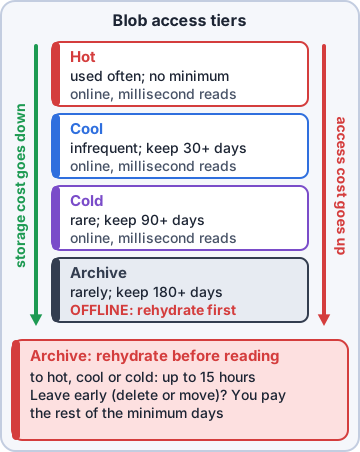
Blob data can sit in an access tier that matches how often it's used. The trade-off: the cooler the tier, the cheaper it is to store data, but the more each read costs.
- Hot: data used often. Highest storage cost, lowest access cost
- Cool: data used now and then; keep it at least 30 days
- Cold: data rarely used that still needs fast reads; keep it at least 90 days
- Archive: data rarely used that can wait hours to read; keep it at least 180 days. Lowest storage cost, highest cost to read
Online and offline
Hot, cool and cold are online tiers: reads take milliseconds. Archive is offline: you can't read or change an archived blob until you rehydrate it to an online tier, which can take up to 15 hours. Moving or deleting a blob before its tier's minimum (30 days cool, 90 cold, 180 archive) adds an early deletion charge for the remaining days.
Exam tip Tiers apply to block blobs. An account's default tier can be hot, cool or cold, never archive; archive is set on individual blobs.
Let rules move the data
Nobody wants to retier two million photos by hand. Lifecycle management policies move blobs to cooler tiers, or delete them, based on rules such as 'not modified for 30 days'. Dev's plan for Pawsome: new photos start hot, move to cool after 30 days, and go to archive after a year; grooming records are archived for their seven-year retention.
Dev: Set the rule once and the old photos walk themselves to the back shelf.
Ranger: trots to the back shelf to check
Check yourself 3Grooming records must be kept for seven years for audits and are almost never read. When someone does ask, waiting a day is fine. Which tier costs the least?
- Hot
- Cool
- Cold
- Archive
Show the answer
Answer: D. Archive
Archive has the lowest storage cost and suits data kept for years and rarely read, as long as waiting hours to rehydrate is acceptable.
Practice questions
Answer in your head, then open the answer. Ranger's Sky Desk has 482 questions like these for Azure Fundamentals, with mock exams.
Question 1Pawsome Pets needs to store millions of product photos and serve them to its website. Which Azure Storage service fits best?
- Azure Disk Storage
- Azure Queue Storage
- Azure Blob Storage
- Azure Table Storage
Show the answer
Answer: C. Azure Blob Storage
Blob Storage is object storage for massive amounts of unstructured data, such as images and documents, and can serve files directly to a browser.
Question 2Rosa's team wants a shared folder in Azure that their Windows PCs map as a network drive over SMB. Which service fits?
- Azure Table Storage
- Azure Files
- Azure Queue Storage
- Azure Blob Storage
Show the answer
Answer: B. Azure Files
Azure Files offers fully managed file shares reached over SMB or NFS, so Windows, Linux and macOS clients can mount them like a network drive.
Question 3The Pawsome Pets website must hand each new order to a back-end worker reliably as a small message, even when the worker is busy. Which service fits?
- Azure Queue Storage
- Azure Table Storage
- Azure Files
- Azure Disk Storage
Show the answer
Answer: A. Azure Queue Storage
Queue Storage holds large numbers of messages that one part of an app adds and another processes later, so the web tier and the worker don't have to run at the same pace.
Question 4Dev wants to store pet profiles as key and attribute data with no fixed schema, at low cost, without running a database server. Which Azure Storage service fits?
- Azure Files
- Azure Table Storage
- Azure Blob Storage
- Azure Queue Storage
Show the answer
Answer: B. Azure Table Storage
Table Storage is a NoSQL key/attribute store for structured, schemaless data. Blob, Files and Queue storage hold files or messages instead.
Question 5Sam needs block-level storage volumes to attach to the shop's Azure VMs as their drives. Which service provides them?
- Azure Files shares
- Azure Blob Storage containers
- Azure managed disks
- Azure Table Storage
Show the answer
Answer: C. Azure managed disks
Azure Disk Storage provides block-level volumes managed by Azure and attached to VMs, much like physical disks in an on-premises server.
Microsoft, Azure, Intune and Windows are trademarks of the Microsoft group of companies. Ranger Gamez is not affiliated with or endorsed by Microsoft. The practice questions are written to the published exam objectives; they are not real exam questions.