 RANGER
 Microsoft Azure Fundamentals (AZ-900) · chapter 7 of 14
Engines and roads
In this chapter Objectives 2.2
Objective 2.2
Compute types: VMs, containers and functions
Virtual machines
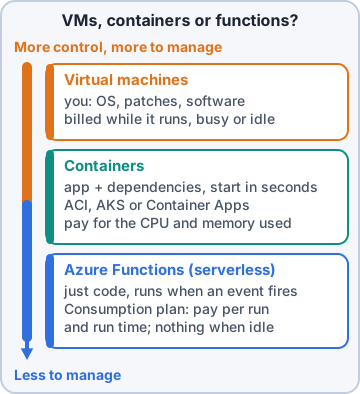
Azure Virtual Machines (VMs) are virtualized servers, offered as infrastructure as a service (IaaS). Like a physical server, you control the operating system (OS) and installed software, and you still manage patching and configuration inside the VM. VMs fit when you need total control of the OS, custom software, or custom hosting configurations. You can create one quickly from an image: a template that already includes an OS and often other tools.
Containers
Containers are a lighter virtualization environment: many run on one physical or virtual host, and you don't manage an OS for each container. They're built to be created, scaled out and stopped quickly, and restart fast after a crash. Docker is a popular container engine, and Azure supports it.
- Azure Container Instances: the fastest, simplest way to run a container in Azure; platform as a service (PaaS), no VMs to manage
- Azure Container Apps: also PaaS, with built-in load balancing and scaling
- Azure Kubernetes Service (AKS): orchestration that manages the lifecycle of a fleet of containers
Functions
Azure Functions is event-driven, serverless compute: no VMs or containers for you to keep running. An event (a web request, a timer, a message from another Azure service) wakes the function, it does a short job, and its resources are released when it finishes, so Azure charges only for the compute time used. Functions are stateless by default; Durable Functions are stateful and track earlier activity.
Comparing the three
Containers suit microservices: split a site into parts (front end, back end, storage) and scale or update each one on its own. Side by side:
- VMs: most control, you manage the OS, and they must keep running to serve your app
- Containers: lightweight and fast to start and scale, no OS per container to manage
- Functions: wake on events, scale automatically, billed only while running
Gus: And our order-texts thing is a function. I'm learning!
Exam tip Full OS control or custom installs = VM. Package an app to start and scale fast = containers. Short task triggered by an event = Functions.
Check yourself 1Sam needs to run one small container for a quick price-import job, as fast and simply as possible, with no VMs or orchestration to manage. Which service fits?
- Azure Kubernetes Service (AKS)
- Azure Virtual Machine Scale Sets
- Azure Container Instances
- Azure Virtual Desktop
Show the answer
Answer: C. Azure Container Instances
Azure Container Instances is the fastest, simplest way to run a container in Azure: a PaaS service with no VMs to manage. Upload the container and it runs.
Objective 2.2
VM options and what a VM needs
Virtual Machine Scale Sets
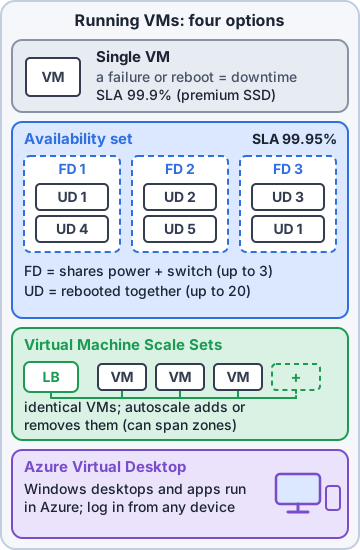
Azure Virtual Machine Scale Sets let you create and manage a group of identical, load-balanced VMs. Without them you'd keep every VM's configuration in sync by hand, watch usage, and add or remove VMs yourself. Scale sets centralize configuration, scale out or in automatically based on demand or a schedule, and work with load balancing to spread traffic.
Availability sets
Availability sets make VMs more resilient inside a region, so one maintenance event or hardware failure can't take down every VM. Azure spreads the VMs across update domains (groups rebooted together during planned maintenance, one domain at a time) and fault domains (groups that share a power source and network switch). A set can have up to 3 fault domains and 20 update domains. Availability sets cost nothing extra; you pay for the VMs.
Exam tip Update domain = planned maintenance. Fault domain = power or network failure. In regions with availability zones, zone-based designs give broader isolation.
Azure Virtual Desktop
Azure Virtual Desktop is a desktop and application virtualization service. Users securely reach Windows desktops and apps from many devices and locations, while the desktops and data stay in Azure, which means less data on local devices. It integrates with Microsoft Entra ID for identity and access, and supports both single-session and multi-session Windows.
Priya: So the store managers' shared PC could just be a cloud desktop?
Sam: Same desktop from any store, and nothing on the laptop to lose if it walks off.
What a VM needs
When you create a VM, you choose its resources:
- Size: its purpose, number of processor cores (virtual CPUs, or vCPUs) and amount of random access memory (RAM)
- Storage disks: hard disk drives, solid-state drives (SSDs) and so on
- Networking: a virtual network, a public Internet Protocol (IP) address and port configuration
Exam tip Size names carry clues. Standard_D2s_v5: D = general-purpose family, 2 = vCPUs, s = Premium SSD support, v5 = hardware generation.
Objective 2.2
Application hosting options
Three ways to host an app
To host an app in Azure you can use VMs (maximum control of the hosting environment, and the most familiar), containers (isolate and manage each part of the app separately), or Azure App Service: PaaS that hosts web apps, background jobs, mobile back ends and web application programming interfaces (APIs) in your choice of language, without managing infrastructure. App Service includes automatic scaling and high availability.
Azure App Service
App Service hosts apps reached over HTTP (Hypertext Transfer Protocol), on Windows or Linux, with automated deployments from GitHub, Azure DevOps or any Git repo. Web apps can use ASP.NET, ASP.NET Core, Java, Ruby, Node.js, PHP or Python. It hosts four app styles:
- Web apps: websites and web applications
- API apps: web APIs built on REST (representational state transfer), with Swagger support
- WebJobs: a program or script that runs alongside your app, on a schedule or a trigger
- Mobile apps: a back end for iOS and Android apps
Exam tip "Host a website without managing servers" = App Service (PaaS). "Full control of the hosting OS" = VM.
Check yourself 2The inventory app must run on Windows Server VMs. Sam wants identical, load-balanced VMs that add instances automatically on busy days. What should he use?
- Azure Virtual Machine Scale Sets
- An availability set across fault domains
- Azure Virtual Desktop
- One larger VM with more RAM
Show the answer
Answer: A. Azure Virtual Machine Scale Sets
Scale Sets manage a group of identical, load-balanced VMs and scale out or in automatically based on demand or a schedule.
Check yourself 3Which two of these do you choose as resources when you create an Azure VM? Choose two.
- A size (vCPUs and RAM)
- A management group
- Storage disks
- An Azure Virtual Desktop host pool
- A region pair
Show the answer
Answers: A. A size (vCPUs and RAM), C. Storage disks
Creating a VM means choosing its size (cores and RAM), its storage disks, and its networking (virtual network, public IP address, ports).
Objective 2.2
Virtual networks, subnets, peering and endpoints
Azure virtual networks
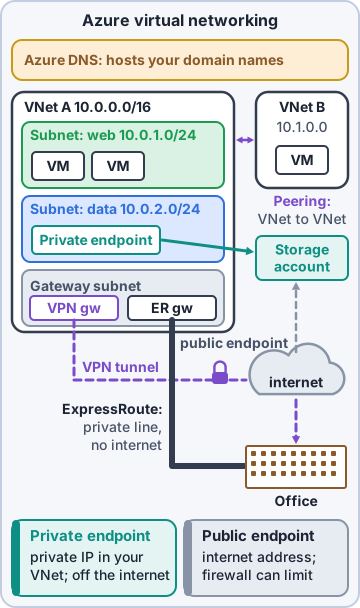
An Azure virtual network (VNet) lets Azure resources such as VMs, web apps and databases talk to each other, to users on the internet, and to your on-premises computers. Think of it as an extension of your own network into Azure. Its key capabilities:
- Isolation and segmentation
- Internet communications
- Communicate between Azure resources
- Communicate with on-premises resources
- Route network traffic
- Filter network traffic
- Connect virtual networks
Subnets, routing and filtering
When you set up a VNet you define a private IP address space that isn't routable on the internet, then divide it into subnets, each with part of the range. Inbound internet traffic needs a public IP address or a public load balancer. Route tables and user-defined routes (UDRs) control where traffic goes. Network security groups (NSGs) hold inbound and outbound rules that allow or block traffic by source, destination, port and protocol.
Virtual network peering
Virtual network peering connects two VNets directly. Traffic between peered networks is private and travels on the Microsoft backbone network, never entering the public internet. The VNets can be in different regions, so you can build a global interconnected network: Kibble & Co.'s VNet in East US can peer with a Pawsome Pets VNet in West US.
Exam tip Peering = VNet to VNet over Microsoft's backbone. VPN Gateway and ExpressRoute = Azure to your own sites.
Public and private endpoints
Azure networking supports two kinds of endpoints. A public endpoint has a public IP address and can be reached from anywhere in the world. A private endpoint exists inside a virtual network and has a private IP address from that VNet's address space, so the service is reached privately. Pawsome's reports database should get a private endpoint.
Priya: And the remote desktop wide open to the internet?
Dev: Closed today. An NSG rule blocks it.
Exam tip Public endpoint = public IP, reachable worldwide. Private endpoint = private IP from your VNet's range.
Check yourself 4Pawsome's reports database must be reachable only from inside the Kibble VNet, using an IP address from that VNet's range. What does it need?
- A public endpoint
- An Azure DNS alias record
- ExpressRoute Global Reach
- A private endpoint
Show the answer
Answer: D. A private endpoint
A private endpoint lives inside a virtual network and gets a private IP address from that VNet's address space, so the database is reached privately.
Objective 2.2
Reaching the stores: VPN Gateway and ExpressRoute
Azure VPN Gateway
A virtual private network (VPN) is an encrypted tunnel through another network, usually the internet. Azure VPN Gateway is a type of virtual network gateway, deployed in a dedicated subnet of a VNet. All data is encrypted inside a private tunnel as it crosses the internet. It connects:
- On-premises datacenters (or stores) to a VNet: site-to-site
- Individual devices to a VNet: point-to-site
- VNets to other VNets: network-to-network
VPN Gateway details
Each VNet can have only one VPN gateway, but one gateway can connect many locations. Gateways are policy-based (static IP addresses decide which packets go through each tunnel) or route-based (IP routing picks the tunnel; preferred, and needed for point-to-site, multisite and VNet-to-VNet). By default a gateway runs as two instances, active/standby; active/active, zone-redundant gateways and VPN as ExpressRoute failover add resilience.
Azure ExpressRoute
Azure ExpressRoute extends your on-premises network into the Microsoft cloud over a private connection from a connectivity provider, called an ExpressRoute circuit. It doesn't go over the public internet, so it offers more reliability, faster speeds, consistent latency and higher security. It uses Border Gateway Protocol (BGP) for dynamic routing, has built-in redundancy, and ExpressRoute Global Reach connects your own sites through Microsoft's network.
Exam tip Even with ExpressRoute, DNS queries, certificate revocation list checks and Azure Content Delivery Network requests still go over the public internet.
Objective 2.2
Azure DNS
Azure DNS
Azure DNS hosts your Domain Name System (DNS) domains on Azure's global network of name servers, using anycast so the closest server answers each query. It's built on Azure Resource Manager, so Azure role-based access control (RBAC), activity logs and resource locks protect your records. It supports private DNS domains for custom names inside VNets, and alias records that follow an Azure resource whose IP address changes.
Gus: So Azure DNS answers "where is pawsomepets.example?" from the closest server.
Dev: Yes. Renewing the name is still a registrar's job.
Exam tip You can't buy a domain name with Azure DNS. Buy it through App Service domains or a third-party registrar, then host its records in Azure DNS.
Check yourself 5Kibble & Co.'s warehouse needs a connection to Azure that never crosses the public internet, with consistent latency for large nightly data transfers. What fits best?
- Azure ExpressRoute
- A site-to-site VPN through VPN Gateway
- A point-to-site VPN from one laptop
- Virtual network peering
Show the answer
Answer: A. Azure ExpressRoute
ExpressRoute is a private connection through a connectivity provider. It bypasses the public internet, giving consistent latency and higher security.
Practice questions
Answer in your head, then open the answer. Ranger's Sky Desk has 482 questions like these for Azure Fundamentals, with mock exams.
Question 1Sam must move Pawsome Pets' old inventory program to Azure. It needs a custom Windows service installed and full admin access to the operating system. Which compute type fits?
- Azure Functions
- Azure Virtual Machines
- Azure App Service
- Azure Container Instances
Show the answer
Answer: B. Azure Virtual Machines
Virtual machines are IaaS: you control the whole operating system and can install anything on it. Functions, containers and App Service hide the OS from you.
Question 2Dev wants code to run only when a new order message arrives, without managing any servers, and to pay only while the code runs. Which compute option fits?
- Virtual Machine Scale Sets
- Azure Virtual Machines
- Azure Virtual Desktop
- Azure Functions
Show the answer
Answer: D. Azure Functions
Azure Functions is event-driven and serverless: code runs in response to triggers like a queue message, Azure scales it, and on the Consumption plan you pay only while it executes.
Question 3Rosa asks why Dev's containers start in seconds while a VM takes minutes. What is the main reason?
- Containers run only on dedicated bare-metal servers
- Containers always run in their own availability zone
- Containers share the host OS kernel instead of booting a full guest OS
- Containers leave out the app's libraries and dependencies to stay small
Show the answer
Answer: C. Containers share the host OS kernel instead of booting a full guest OS
VMs virtualize hardware and each boots its own operating system. Containers virtualize the operating system: they share the host kernel, so they're lighter and start much faster.
Question 4Dev lists what he likes about Azure Functions for Pawsome Pets' order alerts. Which statements are true? Choose two.
- Dev must patch the guest operating system each month
- Dev must run a container orchestrator for it
- Each function needs its own virtual machine created first
- Code runs in response to events such as HTTP calls, timers or messages
- The platform scales the function out as demand grows
Show the answer
Answers: D. Code runs in response to events such as HTTP calls, timers or messages, E. The platform scales the function out as demand grows
Azure Functions runs code when an event fires and scales automatically with demand. There are no servers or orchestrators for you to manage.
Question 5Dev's order-approval workflow in Azure Functions must remember which step it reached between calls. What does Azure Functions offer for this?
- Moving the code to an availability set
- Running the function inside Azure Virtual Desktop
- Stateless functions with a longer timeout
- Durable Functions, which keep state across steps
Show the answer
Answer: D. Durable Functions, which keep state across steps
Functions are stateless by default, but Durable Functions keep context across steps so workflows can pause and resume. That avoids building the workflow on VMs.
Microsoft, Azure, Intune and Windows are trademarks of the Microsoft group of companies. Ranger Gamez is not affiliated with or endorsed by Microsoft. The practice questions are written to the published exam objectives; they are not real exam questions.