 RANGER
 Microsoft Azure Fundamentals (AZ-900) · chapter 6 of 14
Boxes inside boxes
In this chapter Objectives 2.1
Objective 2.1
Resources and resource groups
Resources
A resource is the basic building block of Azure. Anything you create, provision or deploy is a resource: virtual machines (VMs), virtual networks, databases, storage accounts, Azure AI services. Pawsome Pets' inventory VM is a resource, and so are its disk, its network interface and its public IP address.
Resource groups
A resource group is a grouping of resources. The rules to know:
- Every resource must be in exactly one resource group at a time
- Some resources can be moved to a different resource group
- Resource groups can't be nested inside other resource groups
- Resource groups can't be renamed after they're created
What happens to the group happens to everything in it
Actions applied to a resource group affect every resource inside it. Delete a resource group and everything in it is deleted. Grant someone access to the group and they get access to all its resources. That's useful: put a temporary test environment in its own group and delete the whole group when you're done, or give each project its own group so each team sees only its own resources.
Sam: So deleting stuff-rg to get rid of the test VMs...
Gus: ...would delete the website too. Good thing I never cleaned up.
Exam tip Trap: resource groups can't be nested, and deleting a group deletes everything inside it. There are no hard rules for how to structure them.
Check yourself 1Gus wants to remove three test VMs. They sit in stuff-rg with the live website. What happens if he deletes the resource group stuff-rg?
- Only the resources nobody has used lately are deleted
- Everything in it is deleted, including the website
- Its resources move to a default resource group
- Azure refuses to delete any group with resources
Show the answer
Answer: B. Everything in it is deleted, including the website
Deleting a resource group deletes every resource in it. Separate groups for test and production would make cleanup safe.
Objective 2.1
Subscriptions and management groups
Subscriptions
Using Azure requires a subscription: a unit of management, billing and scale. A subscription gives access to Azure services and links to an Azure account, an identity in Microsoft Entra ID. An account can have several subscriptions but needs only one. Each subscription is two kinds of boundary:
- Billing boundary: Azure generates separate billing reports and invoices for each subscription
- Access control boundary: access-management policies apply at the subscription level
Why add more subscriptions
Create extra subscriptions to separate:
- Environments: sandbox, development, test and production
- Teams and workloads: each project gets its own, so its costs are easy to track
- Billing: for example, production workloads in one subscription and development and testing in another
Exam tip Need a separate invoice or different access rules? Think subscription, not resource group.
Management groups
With many subscriptions, management groups sit above them. Put subscriptions in a management group and apply governance (access, policies, compliance rules) once; every subscription inside inherits it. Management groups nest up to six levels deep, not counting the root level or the subscription level. Each Microsoft Entra tenant has one top-level Tenant Root Group. A directory supports up to 10,000 management groups.
Exam tip Each management group and each subscription can have only one parent.
The hierarchy
Top to bottom: management groups contain subscriptions, which contain resource groups, which contain resources. Settings flow down: a policy on a management group, such as "VMs only in US regions", applies to every subscription, resource group and resource beneath it, and owners below can't override it. One Azure role-based access control (RBAC) assignment on a management group gives access all the way down.
Tenant Root Group
+- Kibble & Co. (management group)
   +- Kibble-Prod (subscription)
   +- Pawsome Pets (management group)
      +- Pawsome-Prod (subscription)
      |  +- rg-website (resource group)
      |     +- web app (resource)
      +- Pawsome-Dev (subscription)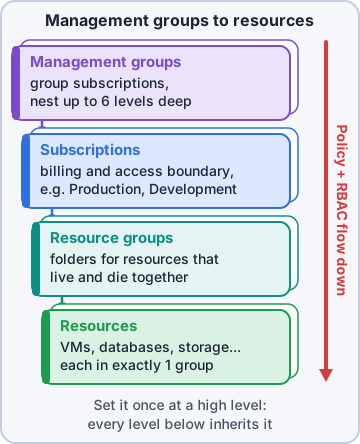
Mr. Barkley: Boxes inside boxes. Like the warehouse.
Rosa: Except my boxes don't inherit policies. I wish they did.
Check yourself 2Mr. Barkley wants Pawsome Pets' Azure costs on a separate invoice from Kibble & Co.'s. What should Maya create for Pawsome?
- A separate resource group
- A new availability zone
- A second Tenant Root Group
- A separate subscription
Show the answer
Answer: D. A separate subscription
A subscription is a billing boundary: Azure produces separate billing reports and invoices for each subscription.
Check yourself 3A policy is assigned to the Pawsome Pets management group. Which resources does it apply to?
- Only the management group object itself
- All subscriptions, resource groups and resources below it
- Only resources created after the policy was assigned
- Only resources whose owners choose to accept the policy
Show the answer
Answer: B. All subscriptions, resource groups and resources below it
Governance applied to a management group is inherited by everything beneath it: its subscriptions, their resource groups and their resources.
Practice questions
Answer in your head, then open the answer. Ranger's Sky Desk has 482 questions like these for Azure Fundamentals, with mock exams.
Question 1Mr. Barkley wants to sell pet supplies in mainland China and asks how Azure is offered there. Which description is accurate?
- It is a normal public region any subscription can select
- It is an Azure Government region run by screened US persons
- Microsoft runs the datacenters directly, like any public region
- Microsoft partners with 21Vianet, which operates the datacenters
Show the answer
Answer: D. Microsoft partners with 21Vianet, which operates the datacenters
Azure in China is a sovereign cloud: Microsoft doesn't directly maintain the datacenters there, and 21Vianet operates them. Azure Government is the separate sovereign cloud for US government use.
Question 2Sam tries to create a VM with a special GPU size for Pawsome Pets' image tool, but the size isn't offered in the region he picked. What is the most likely reason?
- Some services and VM sizes are available only in certain regions
- The resource group was created in a different region
- GPU sizes appear only after the VM joins an availability set
- Each subscription can deploy to only one region
Show the answer
Answer: A. Some services and VM sizes are available only in certain regions
Azure services and VM sizes roll out region by region, so a feature can exist in one region and not another. Subscriptions and resource groups don't restrict which region a resource uses.
Question 3When Priya set up Microsoft Entra ID for Pawsome Pets, she wasn't asked to pick a region, but creating a VM asks for one every time. Why the difference?
- Identity services run only in sovereign regions
- Some services, such as Entra ID, are global and not tied to one region
- VMs need a region only when they use availability zones
- Entra ID is deployed to the subscription's default region automatically
Show the answer
Answer: B. Some services, such as Entra ID, are global and not tied to one region
Most resources, like VMs, are created in a region you choose. A few services, such as Microsoft Entra ID, Azure DNS and Azure Front Door, are global and aren't deployed to a single region.
Question 4In a new-hire class, Priya asks the team to define an Azure region. Which answer is correct?
- A group of subscriptions billed together
- Datacenters in one area linked by a low-latency network
- A logical folder that holds related resources
- A set of countries that share the same data residency and privacy laws
Show the answer
Answer: B. Datacenters in one area linked by a low-latency network
A region is a geographic area containing one or more datacenters linked by a low-latency network. Regions sit inside geographies, which act as data-residency boundaries.
Question 5Sam's two database VMs need the lowest possible network latency between them, and Maya accepts that a datacenter-wide outage could stop both. Which placement fits?
- Each VM in a different availability zone
- Each VM in a different subscription
- Both VMs in one availability set
- Each VM in a different region
Show the answer
Answer: C. Both VMs in one availability set
VMs in an availability set sit close together in one datacenter, so latency between them is lower than across zones. The tradeoff is that a datacenter-wide failure can stop them all.
Microsoft, Azure, Intune and Windows are trademarks of the Microsoft group of companies. Ranger Gamez is not affiliated with or endorsed by Microsoft. The practice questions are written to the published exam objectives; they are not real exam questions.