 RANGER
 CompTIA A+ Core 1 (220-1201) · chapter 1 of 15
Week 1: The laptop bench
In this chapter Objectives 1.1, 1.2, 3.1
Objective 1.1
Inside a laptop: what you can replace
Read the service manual first
Laptop parts are packed tight and differ by model. The maker's service manual shows the screw order and which parts are field-replaceable and which are soldered. Before you open anything: AC adapter out, then disconnect the internal battery, and wear an ESD strap.
- Battery: internal (most modern laptops) or external/removable (older)
- Replace with the exact part number: voltage, size and protection circuit must match
- Lithium-ion batteries wear out: fewer minutes per charge as charge cycles add up
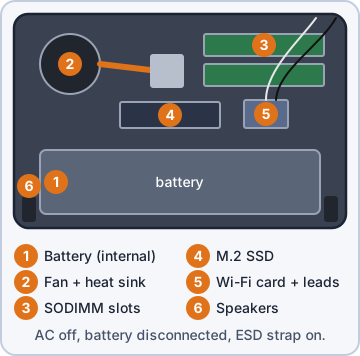
Exam tip A battery that holds little charge is worn. A battery that bulges is swollen: stop using it at once (troubleshooting, objective 5.4).
Checking battery health
Windows can build a battery report. Compare full charge capacity with design capacity. If full charge is well under design (e.g. under ~60-80%), the battery is worn and runtime will be short. Many vendors also have a diagnostic in firmware.
C:\> powercfg /batteryreport
DESIGN CAPACITY        56,000 mWh
FULL CHARGE CAPACITY   30,800 mWh   (55%)
CYCLE COUNT            918
Exam tip Health % = full charge capacity / design capacity. Here 30,800 / 56,000 = 55%.
Keyboards and keys
A single key can often be swapped: pop off the keycap and its small hinge/clip. A whole keyboard connects with a thin ribbon cable in a ZIF (zero insertion force) connector: flip up the latch, slide the cable out. Some keyboards come off from the top; on many thin laptops the keyboard is riveted into the palm rest (top cover), so you replace the whole assembly.
Exam tip Keyboard dead after a repair? Reseat the ribbon cable and close the ZIF latch fully before ordering parts.
Check yourself 1Mr. Barkley's laptop dies after an hour. Its battery report shows a design capacity of 50,000 mWh and a full charge capacity of 24,000 mWh. What does this tell you?
- The AC adapter is failing
- The battery is swollen and unsafe
- Windows needs a new power plan
- The battery is worn (48% health)
Show the answer
Answer: D. The battery is worn (48% health)
Health = full charge capacity / design capacity: 24,000 / 50,000 = 48%. Well under design capacity means a worn battery and short runtime. Replace it with the exact part number.
Memory (RAM) in laptops
Upgradeable laptops use SODIMM modules (small outline DIMM), in a slot at an angle that clicks down. Match the DDR generation (DDR4 and DDR5 SODIMMs are keyed differently and do not fit each other). Many thin laptops use soldered LPDDR memory with no slot: it cannot be upgraded.
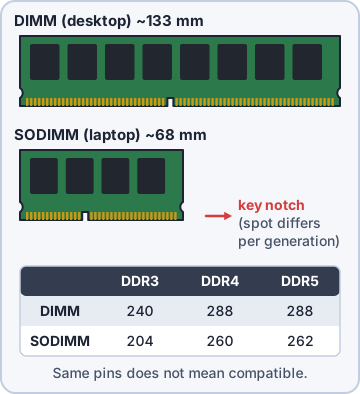
Exam tip Trap: "add a DIMM to a laptop". DIMMs are desktop modules. Laptops take SODIMMs, or no module at all if RAM is soldered.
Storage: HDD and SSD
Laptops use 2.5-inch SATA drives (7 mm or 9.5 mm thick) or M.2 cards. An M.2 slot can be SATA, NVMe (PCIe), or both: check the manual. The common laptop size is M.2 2280 (22 mm wide, 80 mm long). Swapping an HDD for an SSD is the best speed upgrade for an old laptop.
- Back up or clone the data before you swap a drive
- A 7 mm 2.5-inch drive fits a 9.5 mm bay (sometimes with a spacer)
- NVMe drive in a SATA-only M.2 slot = not detected
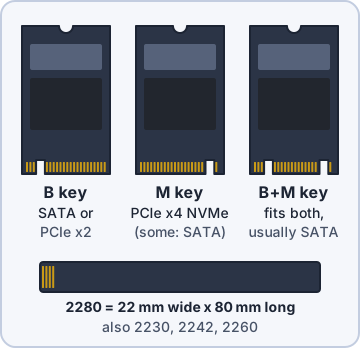
Exam tip M.2 is a size and connector, not a speed. "M.2" does not mean NVMe.
Wireless cards
Wi-Fi and Bluetooth usually share one small M.2 card (often 2230, E-key). Some business laptops add a WWAN card for cellular data. Swap a card to fix a dead radio or to upgrade (e.g. to a Wi-Fi 6E card for 6 GHz). The card connects to antenna leads; it has no antenna of its own.
Exam tip After any card swap, reconnect the antenna leads. Missing leads = very weak signal even next to the access point.
Check yourself 2Rosa's laptop has one empty memory slot, and its service manual lists DDR5 memory. Which module should you order?
- DDR5 DIMM
- DDR5 SODIMM
- DDR4 SODIMM
- DDR5 RDIMM
Show the answer
Answer: B. DDR5 SODIMM
Laptops take the small SODIMM form factor, and the generation must match the slot: DDR5 here. DDR4 and DDR5 SODIMMs are keyed differently, so they can't be swapped.
Wi-Fi antenna connectors and placement
Laptop Wi-Fi antennas sit in the lid, around the display: high up and away from metal in the base. Thin cables run through the hinge to tiny snap-on connectors on the card (often labeled main/aux or 1/2). Keep them routed in their channels so the hinge does not pinch them.
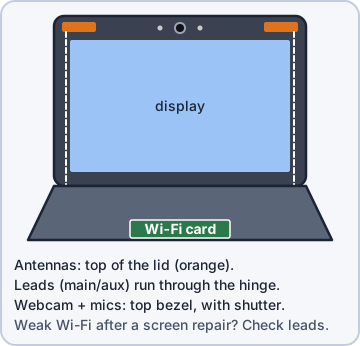
Exam tip Weak Wi-Fi only after a screen or hinge repair? Suspect a pinched or unplugged antenna lead.
Camera/webcam and microphone
The webcam sits in the top bezel of the lid, usually with the microphones next to it. Both use a small cable through the hinge. Before you blame hardware, check the simple things: a closed privacy shutter (black picture), a camera/mic kill switch or F-key, the mic mute key light, and OS privacy settings that block apps.
Exam tip Black image but the camera is listed in Device Manager? Look for the physical shutter first.
Physical privacy and security components
Biometrics: a fingerprint reader or an IR face camera lets users sign in with "something you are" (e.g. Windows Hello). Near-field scanner features: an NFC reader in the palm rest reads a badge or smart card tapped within a few centimeters ("something you have"). Add a privacy screen filter against shoulder surfing and a cable lock slot against theft.
Exam tip Fingerprint = something you are. Badge tapped on NFC reader = something you have.
Check yourself 3After you replace a laptop's screen, its Wi-Fi signal is very weak, even right next to the access point. Other laptops nearby are fine. What should you check FIRST?
- The wireless card's driver version
- The access point's channel width
- The power plan's wireless setting
- The antenna leads in the hinge
Show the answer
Answer: D. The antenna leads in the hinge
The Wi-Fi antennas sit in the lid, and their thin leads run through the hinge to the card. Weak signal right after screen work usually means a lead got pinched or wasn't snapped back on.
Objective 1.2
Connecting accessories to mobile devices
Wired connection methods
USB (Type-A) is the classic flat plug. USB-C is small, reversible, and can carry data, power (USB Power Delivery, up to 240 W) and video. microUSB was the standard on older Android phones; miniUSB is older still (cameras, GPS units). Lightning is Apple's 8-pin reversible connector on older iPhones and iPads; newer models use USB-C.
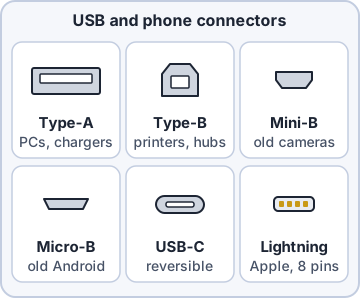
Exam tip USB-C is the connector shape. Speed and features depend on the port and cable behind it.
Wireless connection methods
NFC works at a few centimeters: tap to pay, tap a badge, tap to pair. Bluetooth is a short-range PAN (about 10 m for common devices) for headsets, keyboards and speakers. Tethering shares a phone's cellular data with one device over USB, Bluetooth or Wi-Fi; a hotspot turns the phone into a small Wi-Fi access point for several devices.
Exam tip Hotspot/tethering use the phone's data plan. Some plans limit or block hotspot use.
Accessories
A stylus may be passive (works like a fingertip) or active (has electronics, may need pairing and a charge). Headsets connect by 3.5 mm jack, USB or Bluetooth. Speakers can be wired or Bluetooth. An external webcam (USB) gives better video than the lid camera when a laptop is docked with the lid shut.
Exam tip Active stylus not writing? Check its battery and pairing first.
Docking station vs. port replicator
A docking station turns a laptop into a desktop: one connection (often USB-C/Thunderbolt, or a proprietary dock connector) gives power/charging, several monitors, wired Ethernet, USB, audio, and sometimes expansion bays. A port replicator is simpler: it just copies (replicates) the laptop's ports to one box so cables stay plugged in.
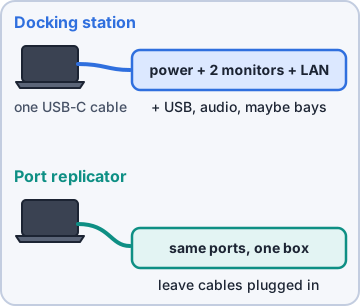
Exam tip Need more features (charging, extra displays, expansion)? Docking station. Just the same ports in one place? Port replicator.
Trackpad, drawing pad, track point
A trackpad (touchpad) senses finger movement and gestures; it can be disabled by an F-key or setting, which is a common "my mouse is dead" ticket. A drawing pad (graphics tablet) uses a pen for designers. A track point is the small pointing stick in the middle of some keyboards.
Exam tip Touchpad not working on a laptop? Check the touchpad on/off key before reinstalling drivers.
Check yourself 4Rosa is at a trade show with no Wi-Fi. She wants her laptop AND her tablet online using her phone's cellular data. What should she turn on?
- Bluetooth pairing
- The phone's hotspot
- NFC on both devices
- USB tethering
Show the answer
Answer: B. The phone's hotspot
A hotspot turns the phone into a small Wi-Fi access point, so several devices can share its cellular data at once. It uses her data plan, so she should turn it off when done.
Objective 3.1
The screen in the lid
LCD panel types: IPS, TN, VA
An LCD uses liquid crystals that do not make light: a backlight shines through them. Three panel types: TN (twisted nematic) is fast and cheap but has poor viewing angles and color. IPS (in-plane switching) has the best color and wide viewing angles. VA (vertical alignment) sits between: strong contrast/deep blacks, slower than TN.
Exam tip Graphic designer wants accurate color from any angle? IPS. Cheapest fast panel? TN.
OLED and mini-LED
OLED pixels make their own light, so there is no backlight: perfect blacks, thin panels, but a risk of burn-in from static images. Mini-LED is still an LCD, but the backlight is thousands of tiny LEDs in local dimming zones, giving high brightness and better contrast than a normal LCD.
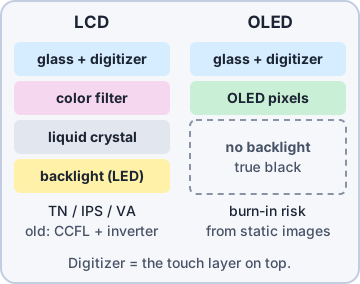
Exam tip Mini-LED = LCD with a better backlight. OLED = no backlight at all.
Backlights and the inverter
Older LCDs used a CCFL (fluorescent tube) backlight. CCFL needs high-voltage AC, so an inverter board converts the laptop's DC to AC. A failed inverter or CCFL gives a very dim image you can only see with a flashlight. Modern LED-backlit LCDs do not use an inverter.
Exam tip Image visible only with a flashlight = backlight/inverter problem, not the GPU.
Touch screen / digitizer
The digitizer is the transparent layer that turns touch or pen input into coordinates. On some devices it can be replaced alone; on many it is fused to the glass and display, so you replace the whole assembly. Cracked glass, dead zones or "ghost touches" point to the digitizer.
Exam tip Image fine but touch dead in one area = digitizer, not the LCD.
Display attributes
Resolution is pixels across x down (1920x1080 FHD, 2560x1440 QHD, 3840x2160 4K UHD). Pixel density (PPI) is pixels per inch: the same resolution looks sharper on a smaller screen. Refresh rate (Hz) is redraws per second: 60 Hz office, 120-240 Hz smoother. Color gamut is the range of colors shown, given as % of sRGB, DCI-P3 or Adobe RGB.
SPEC SHEET  Kibble laptop K14
Panel      14" IPS, anti-glare
Resolution 2560 x 1600   (~216 PPI)
Refresh    120 Hz
Gamut      100% sRGB / 78% DCI-P3
Touch      No
Exam tip Use the panel's native resolution for the sharpest image.
Check yourself 5Rosa wants to plug her laptop into two monitors, wired Ethernet and power with ONE cable at her warehouse desk. Which accessory fits BEST?
- Port replicator
- USB hub
- Docking station
- KVM switch
Show the answer
Answer: C. Docking station
A docking station gives power, multiple displays, network and USB through one connection. That is the "laptop becomes a desktop" job.
Practice questions
Answer in your head, then open the answer. Ranger's Help Desk has 436 questions like these for A+ Core 1, with mock exams.
Question 1A sales rep's laptop has one empty memory slot, and the rep wants more RAM. Which module form factor should the technician order?
- DIMM
- SODIMM
- mSATA
- M.2 2280
Show the answer
Answer: B. SODIMM
Laptops that take memory upgrades use small outline DIMMs (SODIMMs). A full-size DIMM is the tempting pick, but it is the desktop module and is physically too long.
Question 2A technician removes the bottom panel of a thin ultrabook to add RAM but finds no memory slots, only memory chips on the system board. What should the technician tell the user?
- A SODIMM can be installed in the empty M.2 slot
- The RAM is soldered on and cannot be upgraded
- More memory can be unlocked in the UEFI settings
- A USB flash drive with ReadyBoost will add system RAM
Show the answer
Answer: B. The RAM is soldered on and cannot be upgraded
Many thin laptops use memory soldered to the system board, so capacity is fixed when the laptop is bought. ReadyBoost can sound like a workaround, but it is a disk cache, not RAM.
Question 3A user wants a slow laptop to boot faster. Using the spec sheet in the exhibit, which upgrade gives the BEST storage performance?
- Replace the HDD with a 2.5-inch SATA SSD
- Install an mSATA SSD
- Add an M.2 2280 NVMe SSD in the M.2 slot
- Replace the HDD with a 7200 rpm hybrid SSHD
Show the answer
Answer: C. Add an M.2 2280 NVMe SSD in the M.2 slot
The spec sheet lists an empty M.2 M-key slot that supports PCIe NVMe, the fastest option. A 2.5-inch SATA SSD would help, but SATA tops out well below NVMe speeds.
Question 4A technician is about to replace the SSD inside a laptop. Which step should come FIRST?
- Boot into UEFI and disable the TPM chip first
- Remove AC power and the internal battery
- Remove the display assembly from the hinges
- Put the laptop into sleep mode before opening it
Show the answer
Answer: B. Remove AC power and the internal battery
Before touching internal parts, remove every power source, including the internal battery connector, and use ESD precautions. Sleep mode is the tempting shortcut, but the system board is still powered.
Question 5A technician must replace a laptop keyboard. The service manual shows the keyboard is riveted to the palm rest. What should the technician order?
- A standalone keyboard and adhesive to attach it
- Replacement keycaps for the failed keys
- The top cover assembly with the keyboard
- A new keyboard ribbon cable and ZIF connector
Show the answer
Answer: C. The top cover assembly with the keyboard
When the keyboard is riveted or heat-staked to the palm rest, the replacement part is the whole top cover assembly. Gluing a loose keyboard in is a common bad fix.
CompTIA, A+, Network+, Security+ and Linux+ are trademarks of CompTIA, Inc. Ranger Gamez is not affiliated with or endorsed by CompTIA. The practice questions are written to the published exam objectives; they are not real exam questions.