 RANGER
 CompTIA A+ Core 1 (220-1201) · chapter 2 of 15
Week 2: Phones on the warehouse floor
In this chapter Objectives 1.3, 2.2
Objective 1.3
Mobile network connectivity
Cellular data: 3G, 4G, 5G
Phones get data from the carrier's cell network. 3G is old and being shut down by most carriers. 4G (LTE) is the common baseline. 5G adds much more speed and lower latency: low-band (wide coverage), sub-6 GHz/mid-band, and mmWave (very fast, very short range, blocked by walls). You can enable/disable cellular data per phone, or per app, to save data.
Exam tip Cellular data on/off is a quick fix test: off = phone uses only Wi-Fi.
Wi-Fi and hotspot on a phone
With Wi-Fi on, the phone prefers known Wi-Fi networks over cellular. A hotspot shares the phone's cellular connection as a Wi-Fi network for laptops nearby. Set a strong WPA2/WPA3 password and turn the hotspot off when not used: it drains the battery and the data plan.
Exam tip "Airplane mode" turns off all radios. Wi-Fi and Bluetooth can then be turned back on alone.
SIM and eSIM
The SIM (subscriber identity module) card holds the subscriber identity (IMSI) that ties the phone to a carrier account. Swap SIMs to move a number to a new phone. An eSIM is built into the phone and loaded with a carrier profile by QR code or app: no card to lose, and one phone can hold several profiles (e.g. work and personal lines).
Exam tip No service after a phone swap? Check the SIM is seated/activated or the eSIM profile was transferred.
Check yourself 1Rosa's 5G phones are very fast in the parking lot but slow inside the metal warehouse. What is the MOST likely reason?
- Their eSIM profiles expire inside buildings
- Indoors the phones switch to airplane mode
- High-band 5G can't get through walls
- The carrier shut down 3G service
Show the answer
Answer: C. High-band 5G can't get through walls
mmWave (high-band) 5G is very fast but very short range, and walls and metal block it. Indoors, the phones should lean on the warehouse Wi-Fi.
Bluetooth pairing, step by step
CompTIA lists the pairing steps in order. Know them as a sequence:
- 1. Enable Bluetooth on the phone/laptop
- 2. Enable pairing (discoverable mode) on the accessory, often a long press
- 3. Find a device for pairing in the Bluetooth list and select it
- 4. Enter the appropriate PIN code (or confirm the matching code)
- 5. Test connectivity: play audio, scan a barcode, type a key
Exam tip A PBQ may ask you to order these steps. Pairing mode on the accessory comes before searching on the phone.
Location services
GPS services use satellites: accurate (a few meters) outdoors, weak indoors, and they take power. Cellular location services estimate position from nearby cell towers (and Wi-Fi networks): works indoors, less precise. Users can allow location per app. Corporate MDM can use location to find a lost device.
Exam tip Map app wrong only inside the warehouse? GPS needs sky view; tower/Wi-Fi location fills in indoors.
Mobile device management (MDM)
MDM lets IT manage phones centrally. Corporate-owned devices are fully managed. BYOD (bring your own device) phones are the user's; MDM manages only a work profile/container so IT can wipe work data, not personal photos. Policy enforcement: require a PIN, encryption, OS version, block jailbroken/rooted phones, remote lock/wipe. Corporate applications are pushed from the MDM app catalog.
Exam tip BYOD + "wipe only company data" = selective/work-profile wipe through MDM.
Synchronization and data caps
Phones sync mail, calendar and contacts with the company mail server (e.g. through an Exchange-style account) and files with cloud storage. Sync uses data. Learn to recognize data caps: large cloud uploads (photos, videos) over cellular can blow a plan. Set sync to "Wi-Fi only" for big business apps and photo backup.
Exam tip Surprise data overage? Look for cloud/photo sync and hotspot use over cellular first.
Check yourself 2A picker used his whole monthly data plan in one week. He takes lots of photos of damaged pallets. What should you check FIRST?
- Photo backup sync settings
- Whether GPS location services are on
- The Bluetooth scanner's pairing code
- The MDM screen-lock PIN policy
Show the answer
Answer: A. Photo backup sync settings
Cloud photo and video backup over cellular is a classic cause of surprise overages. Set big syncs to "Wi-Fi only", and check hotspot use too.
Objective 2.2
Wireless networking technologies
The three Wi-Fi bands
2.4 GHz: longest range, best through walls, but crowded (Bluetooth, microwaves) and only 3 non-overlapping 20 MHz channels. 5 GHz: many more channels, faster, shorter range. 6 GHz (Wi-Fi 6E and Wi-Fi 7): a huge clean band with lots of wide channels, shortest range, and only newer devices can use it.
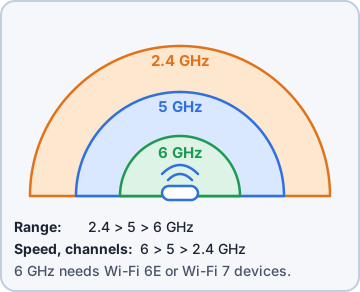
Exam tip Range: 2.4 > 5 > 6 GHz. Speed and free channels: 6 > 5 > 2.4 GHz.
Channels, widths and regulations
Each band is split into channels (center frequencies). In the US, 2.4 GHz uses channels 1-11; only 1, 6 and 11 do not overlap. Channel width trades speed for room: 20, 40, 80, 160 MHz, and 320 MHz with Wi-Fi 7 in 6 GHz. Wider = faster but fewer channels and more interference. Regulations (e.g. the FCC in the US) set allowed channels and power per country; some 5 GHz channels need DFS to avoid radar.
2.4 GHz (US), 20 MHz wide
ch 1   2412 MHz  |####|
ch 6   2437 MHz        |####|
ch 11  2462 MHz              |####|
Channels between them overlap neighbors
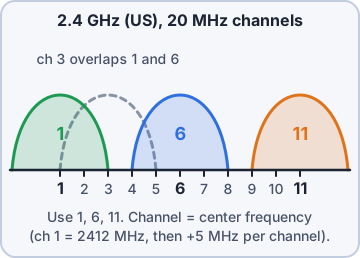
Exam tip Busy office on 2.4 GHz? Use 1, 6, 11 and 20 MHz widths. Use 40-160 MHz on 5/6 GHz.
802.11 standards
Know the letter, the Wi-Fi name, the bands and the rough max speed:
Std      Name     Band(s) GHz   Max (theory)
802.11a  -        5             54 Mbps
802.11b  -        2.4           11 Mbps
802.11g  -        2.4           54 Mbps
802.11n  Wi-Fi 4  2.4/5         600 Mbps
802.11ac Wi-Fi 5  5             ~6.9 Gbps
802.11ax Wi-Fi 6  2.4/5         ~9.6 Gbps
802.11ax Wi-Fi 6E 2.4/5/6       ~9.6 Gbps
802.11be Wi-Fi 7  2.4/5/6       ~46 Gbps
Exam tip Only 6E and 7 use 6 GHz. 802.11ac is 5 GHz only. MIMO arrived with n; MU-MIMO with ac.
Bluetooth
Bluetooth is a short-range PAN in the 2.4 GHz band. Common devices reach about 10 m (Class 2); Bluetooth Low Energy (BLE) saves power for sensors, beacons and wearables. Devices must be paired once, then they reconnect automatically.
Exam tip Bluetooth shares 2.4 GHz with Wi-Fi. Heavy 2.4 GHz Wi-Fi can make Bluetooth audio stutter.
NFC and RFID
NFC (near-field communication, 13.56 MHz) works at about 4 cm: tap to pay, badge readers, quick pairing. RFID (radio-frequency identification) reads tags, often passive (no battery, powered by the reader's signal), from centimeters to several meters: inventory, pallets, access badges. NFC is a short-range form of RFID that can talk both ways.
Exam tip Warehouse tracks pallets passing a dock door = RFID. Phone tap payment = NFC.
Check yourself 3Rosa's team uses personal phones for work email. She wants IT able to erase company data if a phone is lost, without touching personal photos. What should IT use?
- A full factory reset policy
- Location services with GPS only
- A shared hotspot for all pickers
- MDM with a BYOD work profile
Show the answer
Answer: D. MDM with a BYOD work profile
BYOD devices are managed through a work profile/container. MDM can then do a selective wipe of only corporate data and apps.
Practice questions
Answer in your head, then open the answer. Ranger's Help Desk has 436 questions like these for A+ Core 1, with mock exams.
Question 1A traveler arrives at a hotel and says the phone has no cellular service or Wi-Fi. The status bar shows a small plane icon. What should the technician tell the user to do?
- Reinsert the SIM card
- Turn off airplane mode
- Reset the network settings
- Turn on location services
Show the answer
Answer: B. Turn off airplane mode
Airplane mode turns off the cellular and wireless radios. Turning it off brings back cellular and Wi-Fi.
Question 2On a flight, a user must keep the phone's cellular radio off but wants to use the in-flight Wi-Fi. What should the user do?
- Disable cellular data only and leave airplane mode off
- Turn on the mobile hotspot
- Enable data roaming
- Enable airplane mode, then turn Wi-Fi back on
Show the answer
Answer: D. Enable airplane mode, then turn Wi-Fi back on
Airplane mode turns off the cellular radio, and phones let you turn Wi-Fi and Bluetooth back on separately while it stays on.
Question 3A user got a new phone with no SIM card tray. The carrier emailed a QR code to activate the line. What should the user do?
- Move the physical SIM card from the old phone
- Turn on the hotspot to register with the carrier
- Scan the QR code to join the carrier's Wi-Fi hotspot
- Scan the QR code to download the eSIM profile
Show the answer
Answer: D. Scan the QR code to download the eSIM profile
An eSIM is a built-in, programmable SIM. The carrier gives a QR code or app to download the subscriber profile to it.
Question 4A user's phone broke, and the user wants to use their phone number on a spare unlocked phone right away. Both phones use physical SIM cards. What should the technician do?
- Restore a cloud backup to the spare phone
- Enroll the spare phone in MDM
- Move the SIM card to the spare phone
- Turn on the spare phone's hotspot
Show the answer
Answer: C. Move the SIM card to the spare phone
The SIM identifies the subscriber to the carrier. Moving it to a compatible unlocked phone moves the phone number and service.
Question 5A user's phone status bar shows "LTE" instead of "5G" in a rural area. Which cellular generation is the phone using?
- 3G
- 5G
- 2G
- 4G
Show the answer
Answer: D. 4G
LTE (Long Term Evolution) is the 4G cellular standard. Phones drop back to it when 5G coverage is not available.
CompTIA, A+, Network+, Security+ and Linux+ are trademarks of CompTIA, Inc. Ranger Gamez is not affiliated with or endorsed by CompTIA. The practice questions are written to the published exam objectives; they are not real exam questions.