 RANGER
 CompTIA A+ Core 1 (220-1201) · chapter 3 of 15
Week 3: Cables in the ceiling
In this chapter Objectives 3.2, 2.8
Objective 3.2
Network cables
Twisted pair: UTP, STP and categories
Ethernet copper has 4 twisted pairs; the twists cancel interference. UTP (unshielded) is standard in offices. STP (shielded) adds foil/braid for noisy places (motors, machinery) and must be grounded. Copper Ethernet runs up to 100 m.
Cat    Speed       Max length
Cat 5e 1 Gbps      100 m
Cat 6  10 Gbps     37-55 m
       (1 Gbps)    100 m
Cat 6a 10 Gbps     100 m
Cat 8  25/40 Gbps  30 m (data center)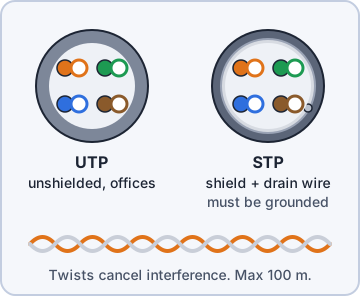
Exam tip 10 Gbps over a full 100 m run? Cat 6a, not Cat 6.
Direct burial and plenum-rated
Direct burial cable (UTP or STP) has a tough, water-resistant jacket so it can be buried in the ground without conduit, e.g. to a gate camera. Plenum-rated cable has a fire-resistant, low-smoke jacket for plenum spaces (air-handling areas above drop ceilings or under raised floors). Normal PVC gives off toxic smoke that the air system would spread.
Exam tip Above a drop ceiling used for air return? Fire code says plenum-rated.
T568A and T568B
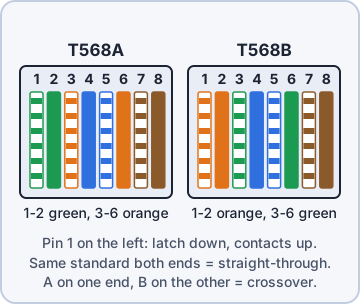
Two wiring standards for RJ45 pin order. They swap the orange and green pairs. Use the same standard on both ends for a straight-through cable (B is most common). A on one end and B on the other makes a crossover cable (old PC-to-PC links; modern ports auto-detect with Auto-MDI-X).
Pin  T568A         T568B
1    white/green   white/orange
2    green         orange
3    white/orange  white/green
4    blue          blue
5    white/blue    white/blue
6    orange        green
7    white/brown   white/brown
8    brown         brown
Exam tip Blue and brown never move. Only orange and green trade places.
Coaxial
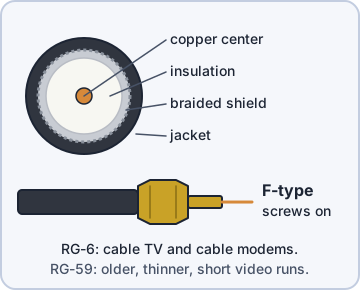
Coax has one center conductor, insulation, a braided shield and a jacket. RG-6 is used for cable TV and cable internet (cable modems), with F-type screw-on connectors. RG-59 is an older, thinner type for short video runs.
Exam tip Cable modem input = RG-6 coax with an F-type connector.
Fiber: single-mode vs. multimode
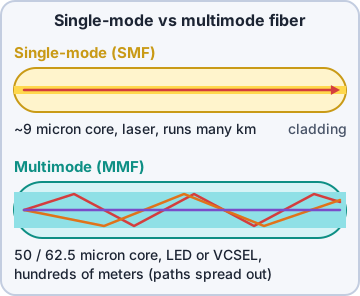
Optical fiber carries light, so it ignores electrical interference and is hard to tap. Single-mode has a tiny core (~9 micron), uses lasers, and runs many kilometers: building-to-building and ISP links. Multimode has a wider core (50/62.5 micron), cheaper LED/VCSEL light, and runs hundreds of meters: inside a building or data center.
Exam tip Longest distance = single-mode. "Multi" mode bounces many light paths, which limits distance.
Check yourself 1Dev needs to link the HQ building to the warehouse 4 km away. Which cable should he use?
- Cat 6a shielded twisted pair
- Multimode fiber
- RG-6 coax
- Single-mode fiber
Show the answer
Answer: D. Single-mode fiber
Single-mode fiber uses a laser and a tiny core, so it runs many kilometers. That makes it the choice for building-to-building and ISP links.
Objective 3.2
Peripheral, video and drive cables
USB 2.0, USB 3.0 and Thunderbolt
USB 2.0 (High-Speed) = 480 Mbps, up to 5 m. USB 3.0 (SuperSpeed, now called USB 3.2 Gen 1) = 5 Gbps, about 3 m, blue inserts on Type-A. Later: 10 Gbps (Gen 2), 20 Gbps (Gen 2x2), 40 Gbps (USB4). Thunderbolt joins PCIe data, DisplayPort video and power: TB 1/2 used the Mini DisplayPort plug (10/20 Gbps); TB 3 and 4 use USB-C at 40 Gbps and can daisy-chain devices.
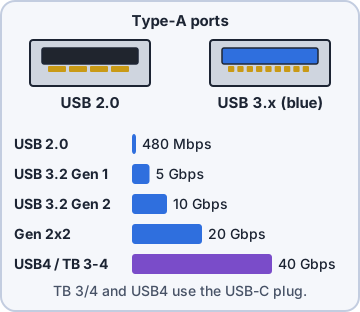
Exam tip Same USB-C plug can be USB 2.0 or Thunderbolt 4. Look for the lightning-bolt logo.
Serial (RS-232)
Serial ports send one bit at a time over RS-232, using a 9-pin DB9 (technically DE-9) connector. Still found on network gear console ports, label printers, barcode scanners and lab equipment. Modern laptops use a USB-to-serial adapter.
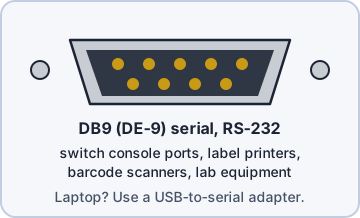
Exam tip Configure a switch through its console port: serial (DB9 or RJ45-style console cable).
Video cables
HDMI: digital video plus audio, TVs/projectors/monitors (2.0 = 18 Gbps, 2.1 = 48 Gbps). DisplayPort: digital video + audio, PC monitors, supports daisy-chaining (MST); latches. DVI: digital (DVI-D), analog (DVI-A) or both (DVI-I); no audio. VGA: analog only, blue 15-pin 3-row DE-15 connector, image gets fuzzy at high resolutions. USB-C carries video via DisplayPort Alt Mode or Thunderbolt.
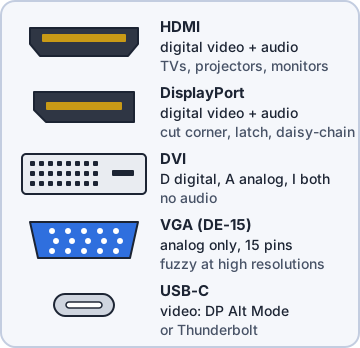
Exam tip No sound on the monitor speakers? VGA and DVI carry no audio. HDMI and DisplayPort do.
Hard drive cables: SATA and eSATA
Internal SATA drives use a thin 7-pin data cable (SATA III = 6 Gbps) plus a separate 15-pin SATA power cable. eSATA is external SATA with a shielded, sturdier connector (up to 2 m). It carries no power (except the rare eSATAp combo port) and is largely replaced by USB 3.x and Thunderbolt.
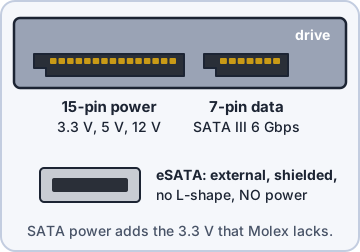
Exam tip eSATA drive needs its own power supply; plain eSATA has no power pins.
Adapters
Adapters convert one connector or signal to another: USB-C to HDMI, DisplayPort to HDMI, DVI-to-HDMI (both digital, passive), USB-to-Ethernet, USB-to-serial, Lightning to 3.5 mm. Digital-to-analog (e.g. HDMI to VGA) needs an active converter with a chip, not a simple adapter.
Exam tip Laptop has only USB-C, projector only HDMI? A USB-C to HDMI adapter (DP Alt Mode).
Check yourself 2The boardroom's old projector has only a VGA input. The new laptop has only HDMI. What do you need to connect them?
- An active HDMI-to-VGA converter
- A simple pin-to-pin HDMI-to-VGA cable
- A DVI-to-HDMI adapter
- A USB-to-serial adapter
Show the answer
Answer: A. An active HDMI-to-VGA converter
HDMI is digital and VGA is analog. Going from digital to analog needs an active converter with a chip, not a simple passive adapter.
Objective 3.2
Connector types
Copper network connectors
RJ45 (8P8C): Ethernet, 8 pins. RJ11 (6P2C, up to 4 used): phone lines and DSL, smaller than RJ45. F-type: screw-on coax connector for cable modems/TV. A punchdown block is where wires terminate in a closet or patch panel: 66 blocks (older phone) and 110 blocks (data, Cat 5e and up).
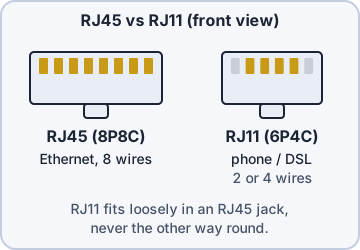
Exam tip Phone/DSL = RJ11 (2 or 4 wires). Ethernet = RJ45 (8 wires). RJ11 fits loosely in an RJ45 jack, not the reverse.
Fiber connectors: ST, SC, LC
ST (straight tip): round, bayonet twist-lock. SC (subscriber/standard connector): square, push-pull snap. LC (Lucent/little connector): small form factor, often duplex pairs, common on modern switches and SFP modules.
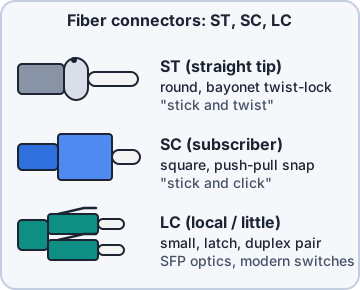
Exam tip Memory: ST = "stick and twist", SC = "stick and click", LC = "little connector".
Device connectors
USB-C: reversible 24-pin, current standard for phones, laptops and docks. MicroUSB: small, one-way, older Android phones. MiniUSB: bigger than micro, older cameras and controllers. Lightning: Apple 8-pin reversible. Molex: 4-pin peripheral power from the PSU (+12 V and +5 V) for old drives, fans and adapters.
Exam tip Molex is a power connector, not a data connector.
Check yourself 3A switch's SFP module takes a small fiber connector that snaps in, usually as a duplex pair. Which connector is it MOST likely?
- ST
- SC
- LC
- F-type
Show the answer
Answer: C. LC
LC (little connector) is the small form factor fiber connector, often in duplex pairs. It is the common choice on modern switches and SFP modules.
Objective 2.8
Network tools
Making a cable: stripper and crimper
A cable stripper removes the outer jacket without nicking the pairs. Untwist, arrange in T568B order, trim flat, slide into the RJ45 plug fully. The crimper presses the plug pins into the wires and locks the jacket strain relief.
Exam tip Crimper = puts connectors ON the cable end. Punchdown tool = pushes wires INTO a block or keystone jack.
Punchdown tool
A punchdown tool seats each wire into the IDC (insulation-displacement) slots of a 110 block, 66 block, patch panel or keystone jack, and trims the extra wire. Use the right blade for the block type.
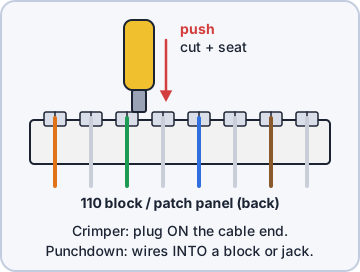
Exam tip Patch panel back side = punched down. Front side = RJ45 patch cords.
Testing: cable tester and loopback plug
A cable tester checks each wire: continuity, opens, shorts, miswires, split pairs (wiremap). Advanced certifiers also measure length and crosstalk. A loopback plug sends a port's transmit back into its own receive so you can test a NIC, switch port or serial port without another device.
Exam tip Testing the port itself? Loopback plug. Testing the cable run? Cable tester.
Finding and watching: toner probe, tap, Wi-Fi analyzer
A toner probe (tone generator + inductive probe) traces an unlabeled cable: clip the tone onto one end, listen for it at the patch panel. A network tap sits inline and copies all traffic to a monitoring tool. A Wi-Fi analyzer shows nearby networks, signal strength (dBm), channels and overlap so you can pick clear channels and find dead spots.
SSID            CH   BAND   SIGNAL
Kibble-Staff     6   2.4    -48 dBm
Neighbor-Guest   6   2.4    -55 dBm
Cafe-Free        7   2.4    -62 dBm
Kibble-Staff    44   5      -57 dBm
Exam tip Signal: -30 dBm excellent, -67 dBm fine for voice/video, -80 dBm barely usable. Closer to 0 is stronger.
Check yourself 4You are terminating new Cat 6 runs on the back of a patch panel in the packing room closet. Which tool do you need?
- Crimper
- Punchdown tool
- Toner probe
- Loopback plug
Show the answer
Answer: B. Punchdown tool
Patch panels and keystone jacks use IDC slots. The punchdown tool seats and trims each wire.
Practice questions
Answer in your head, then open the answer. Ranger's Help Desk has 436 questions like these for A+ Core 1, with mock exams.
Question 1A technician has cut a length of Cat 6 cable and arranged the wires in T568B order. Which tool attaches the RJ45 connector?
- Punchdown tool
- Toner probe
- Loopback plug
- Crimper
Show the answer
Answer: D. Crimper
A crimper presses the RJ45 connector's pins into the wires and locks the connector onto the cable jacket.
Question 2Before terminating a cable, a technician needs to remove the outer jacket without nicking the twisted pairs inside. Which tool should be used?
- Punchdown tool
- Cable stripper
- Cable tester
- Network tap
Show the answer
Answer: B. Cable stripper
A cable stripper cuts and removes the jacket to a set depth so the conductors inside are not damaged.
Question 3None of the cables at a patch panel are labeled, and a technician needs to find which one runs to wall jack 214. Which tool should the technician use?
- Loopback plug
- Wi-Fi analyzer
- Crimper
- Toner probe
Show the answer
Answer: D. Toner probe
A toner puts a tone on the cable at the wall jack, and the probe finds that cable at the patch panel by sound.
Question 4A technician is terminating a new cable run on the back of a patch panel with 110-style IDC connectors. Which tool seats the wires and trims the excess?
- Crimper
- Punchdown tool
- Cable tester
- Toner probe
Show the answer
Answer: B. Punchdown tool
A punchdown tool pushes each wire into the IDC slot of a 110 block, patch panel, or keystone jack and cuts off the extra.
Question 5A technician wants to confirm that a NIC port on a workstation is working, without connecting it to the network. Which tool should be used?
- Toner probe
- Network tap
- Loopback plug
- Cable stripper
Show the answer
Answer: C. Loopback plug
A loopback plug routes the port's transmit pins back to its receive pins, so a diagnostic can check that the port works.
CompTIA, A+, Network+, Security+ and Linux+ are trademarks of CompTIA, Inc. Ranger Gamez is not affiliated with or endorsed by CompTIA. The practice questions are written to the published exam objectives; they are not real exam questions.