 RANGER
 CompTIA A+ Core 1 (220-1201) · chapter 4 of 15
Week 4: Ports and the server closet
In this chapter Objectives 2.1, 2.3
Objective 2.1
TCP, UDP and the ports to know
TCP vs. UDP
TCP is connection-oriented: three-way handshake (SYN, SYN-ACK, ACK), sequencing, acknowledgments and retransmission. Reliable, a bit slower: web, email, file transfer, remote access. UDP is connectionless: no handshake, no acknowledgments, no resend. Fast and light: DNS queries, DHCP, VoIP, video streaming, online games.
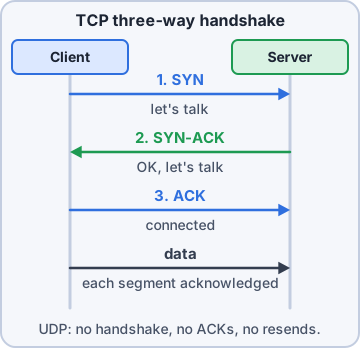
Exam tip Reliable and ordered = TCP. Fast, "fire and forget", lost data not resent = UDP.
File transfer and remote access
FTP uses TCP 20 (data) and 21 (control); sends credentials in cleartext. SSH TCP 22: encrypted command line (also SFTP/SCP). Telnet TCP 23: remote command line in cleartext; replace with SSH. RDP TCP 3389 (UDP 3389 too): Windows Remote Desktop graphical sessions.
Exam tip Secure replacement for Telnet = SSH (22). Remote Windows desktop = RDP (3389).
Email ports
SMTP TCP 25 sends mail (client to server, server to server). POP3 TCP 110 downloads mail to one device and usually deletes it from the server. IMAP TCP 143 keeps mail on the server and syncs folders across many devices.
Exam tip Mail on phone + laptop + tablet all in sync? IMAP, not POP3. Secure variants (IMAPS 993, POP3S 995) are not on this list.
Web, names and addresses
HTTP TCP 80: web in cleartext. HTTPS TCP 443: web encrypted with TLS. DNS port 53: UDP for normal lookups, TCP for zone transfers and large replies. DHCP UDP 67 (server) and 68 (client) hands out IP settings.
Exam tip DHCP is UDP only (67/68). DNS uses both UDP and TCP 53.
Windows networking and directories
NetBIOS over TCP/IP (NetBT) ports 137-139: legacy Windows name service (UDP 137), datagram (UDP 138) and session (TCP 139). SMB/CIFS TCP 445: Windows file and printer sharing directly over TCP. LDAP TCP/UDP 389: query and update directory services such as user accounts in a domain directory.
20/21  TCP       FTP
22     TCP       SSH
23     TCP       Telnet
25     TCP       SMTP
53     UDP/TCP   DNS
67/68  UDP       DHCP
80     TCP       HTTP
110    TCP       POP3
137-9  UDP/TCP   NetBIOS/NetBT
143    TCP       IMAP
389    TCP/UDP   LDAP
443    TCP       HTTPS
445    TCP       SMB/CIFS
3389   TCP/UDP   RDP
Exam tip Mapped drive to \\server\share failing through a firewall? Check TCP 445.
Check yourself 1Marketing cannot map \\fs01\marketing from the store network. The firewall between the sites allows only TCP 80, 443 and 3389. Which port must be opened?
- TCP 389
- UDP 67
- TCP 445
- TCP 22
Show the answer
Answer: C. TCP 445
Windows file and printer sharing (SMB/CIFS) runs directly over TCP 445. Mapping a drive to \\server\share through a firewall needs that port open.
Objective 2.3
Services provided by networked hosts
Core server roles
DNS server: turns names into IP addresses. DHCP server: leases IP address, mask, gateway and DNS settings automatically. NTP server: keeps every clock in sync (UDP 123); wrong time breaks logins and certificates. AAA (authentication, authorization, accounting): one server checks who you are, what you may do and logs what you did, e.g. RADIUS or TACACS+ for Wi-Fi and VPN logins.
Exam tip Kerberos/domain logins fail when clocks drift: think NTP.
File, print, mail, web, database, logs
Fileshare server: central shared folders with permissions. Print server: manages queues and drivers for many printers. Mail server: sends (SMTP) and stores (IMAP/POP3) email. Web server: serves sites over HTTP/HTTPS. Database server: stores structured data for apps (inventory, orders). Syslog server: collects log messages from routers, switches, firewalls and servers in one place (UDP 514).
Exam tip Central place for all device logs = syslog server.
Internet appliances
Spam gateway: filters incoming mail for spam, phishing and malware before the mail server. UTM (unified threat management): one box with firewall, IPS, antivirus, content and URL filtering, VPN. Load balancer: spreads requests across several servers for speed and uptime. Proxy server: makes web requests on behalf of clients, for caching, filtering and logging.
Exam tip Online shop slow on sale day; add servers behind a load balancer.
Legacy/embedded systems and IoT
Legacy/embedded systems run fixed-purpose hardware for years and are hard to patch. SCADA (supervisory control and data acquisition) runs industrial equipment: conveyor belts, HVAC, power. Isolate it on its own network. IoT devices (thermostats, cameras, smart locks, sensors) are easy to add but often weakly secured: change default passwords, update firmware, and put them on a separate VLAN.
Exam tip Old controller cannot be patched? Segment it; do not put it on the open network.
Check yourself 2Mr. Barkley reads email on his phone, laptop and tablet and wants read/unread status and folders to match everywhere. Which protocol and port should his account use?
- IMAP on TCP 143
- POP3 on TCP 110
- SMTP on TCP 25
- LDAP on TCP 389
Show the answer
Answer: A. IMAP on TCP 143
IMAP keeps messages on the server and syncs state across every device.
Practice questions
Answer in your head, then open the answer. Ranger's Help Desk has 436 questions like these for A+ Core 1, with mock exams.
Question 1A help desk technician needs an encrypted command-line session to a Linux server. Which port must the server's firewall allow?
- 22
- 23
- 3389
- 443
Show the answer
Answer: A. 22
SSH uses TCP port 22 and encrypts the whole session. Telnet (23) also gives a command line, but it sends everything in cleartext.
Question 2An old branch switch only supports Telnet for remote management. Which statement about this protocol is correct?
- It uses TCP 22 and sends credentials in plaintext
- It uses TCP 23 and sends credentials in plaintext
- It uses TCP 23 and encrypts the whole session
- It uses TCP 3389 and encrypts only the password
Show the answer
Answer: B. It uses TCP 23 and sends credentials in plaintext
Telnet uses port 23 and sends everything, including usernames and passwords, in cleartext. That is why SSH on port 22 replaced it.
Question 3A user can receive email in a desktop mail client but every message sent stays in the Outbox. A recent firewall change blocked one outbound port. Which port is MOST likely blocked?
- 110
- 143
- 25
- 389
Show the answer
Answer: C. 25
SMTP (port 25) sends mail between servers and from clients. POP3 and IMAP only retrieve mail, which is why receiving still works.
Question 4A user reads email on a phone, a laptop, and a desktop and wants folders and read/unread status to match on all three. Which protocol and port should the mail client use?
- IMAP on port 143
- POP3 on port 110
- SMTP on port 25
- LDAP on port 389
Show the answer
Answer: A. IMAP on port 143
IMAP keeps messages and folders on the server, so every device sees the same mailbox. POP3 is the tempting choice, but it is designed to download mail to a single device.
Question 5A small office uses a legacy mail setup in which one PC downloads messages from the server and stores them locally. Which port does this retrieval protocol use?
- 143
- 25
- 445
- 110
Show the answer
Answer: D. 110
POP3 uses port 110 and downloads mail to the client, usually deleting the server copy.
CompTIA, A+, Network+, Security+ and Linux+ are trademarks of CompTIA, Inc. Ranger Gamez is not affiliated with or endorsed by CompTIA. The practice questions are written to the published exam objectives; they are not real exam questions.