 RANGER
 CompTIA A+ Core 1 (220-1201) · chapter 5 of 15
Week 5: Names, numbers and tunnels
In this chapter Objectives 2.4, 2.6
Objective 2.6
IP addressing for a small office
IPv4, subnet mask and gateway
An IPv4 address is 32 bits, written as four octets (192.168.10.25). The subnet mask (255.255.255.0 = /24) shows which part is the network and which is the host. Devices on the same network talk directly; anything else goes to the default gateway, the router's address on the local network.
C:\> ipconfig
Ethernet adapter Ethernet:
   IPv4 Address. . . . . : 192.168.10.25
   Subnet Mask . . . . . : 255.255.255.0
   Default Gateway . . . : 192.168.10.1
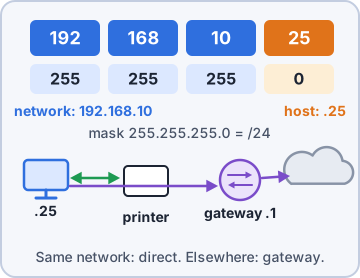
Exam tip Can reach local printers but not the internet? Check the default gateway.
Private vs. public addresses
Private IPv4 ranges (RFC 1918) are used inside networks and are not routed on the internet: 10.0.0.0/8, 172.16.0.0-172.31.255.255 (/12), 192.168.0.0/16. The SOHO router uses NAT to share one public address (assigned by the ISP, unique on the internet) among all inside devices.
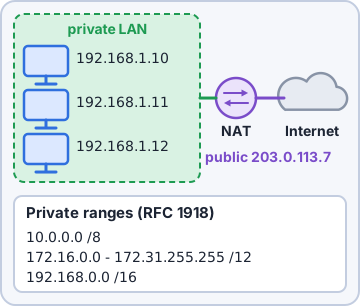
Exam tip Trap: 172.32.x.x is public. The private 172 range ends at 172.31.
APIPA
If a device is set for DHCP but no DHCP server answers, Windows assigns itself an APIPA address: 169.254.x.x with mask 255.255.0.0, and no gateway. It can talk only to other APIPA hosts on the same link: "limited connectivity".
IPv4 Address. . . . . : 169.254.88.12
Subnet Mask . . . . . : 255.255.0.0
Default Gateway . . . :
Exam tip 169.254 = "I asked for DHCP and nobody answered." Check the cable, VLAN, and DHCP server.
Static vs. dynamic
Dynamic addressing (DHCP) is automatic and right for most clients. Static addresses are typed in by hand and never change: use them for routers, servers, printers and network gear that others must always find. A static IP needs the right mask, gateway and DNS too, and must be outside the DHCP pool (or excluded) to avoid conflicts.
Exam tip Duplicate IP warning after setting a static address? It is inside the DHCP scope.
IPv6
IPv6 addresses are 128 bits, written as 8 groups of 4 hex digits: 2001:0db8:0000:0000:0000:ff00:0042:8329. Shorten by dropping leading zeros in a group and replacing one run of all-zero groups with :: (2001:db8::ff00:42:8329). Key types: fe80::/10 link-local (auto, every interface), ::1 loopback, 2000::/3 global unicast. No NAT needed and no broadcast.
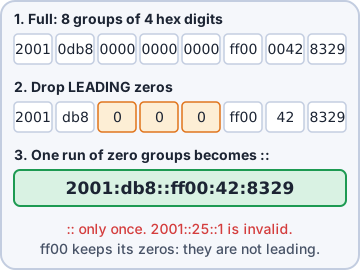
Exam tip :: may appear only once in an address. Link-local fe80:: is IPv6's version of "always there locally".
Check yourself 1Which of these IPv4 addresses is a PUBLIC address?
- 10.40.2.15
- 172.20.8.1
- 192.168.50.7
- 172.32.5.10
Show the answer
Answer: D. 172.32.5.10
The private 172 range runs from 172.16.0.0 to 172.31.255.255. 172.32.5.10 is outside it, so it is a public address.
Objective 2.4
DNS, DHCP, VLANs and VPNs
DNS record types
A maps a name to an IPv4 address. AAAA maps a name to an IPv6 address. CNAME is an alias: a name that points to another name (shop.kibbleco.example to web1.kibbleco.example). MX names the mail server(s) for a domain, with a priority (lower = preferred). TXT holds free text, mainly used for verification and email security.
Zone kibbleco.example (@ = the domain)
@      MX    10 mail1.kibbleco.example.
mail1  A     203.0.113.25
mail1  AAAA  2001:db8::25
shop   CNAME web1.kibbleco.example.
@      TXT   "v=spf1 ip4:203.0.113.25 -all"
Exam tip Four A's = AAAA = IPv6 (4x bigger address). Mail = MX.
TXT for spam management: SPF, DKIM, DMARC
SPF lists the servers allowed to send mail for the domain. DKIM publishes a public key so receivers can check the digital signature on each message. DMARC tells receivers what to do when SPF/DKIM checks fail (none, quarantine, reject) and where to send reports. All three live in TXT records.
Exam tip SPF = who may send. DKIM = message signed. DMARC = policy + reports when they fail.
DHCP: scope, leases, reservations, exclusions
A scope is the range of addresses DHCP can hand out for a subnet, plus options (mask, gateway, DNS). A lease is a loan of an address for a set time; clients renew at about 50% of the lease. A reservation always gives the same IP to a device's MAC address, great for printers. An exclusion removes addresses from the scope so DHCP never hands them out (for static devices).
Scope 192.168.10.0/24
 Range        .100 - .250
 Lease        8 days
 Exclusions   .100 - .109 (servers)
 Reservation  .120 -> 3C:52:82:1A:4F:07
              (label printer)
 Option 003   Router .1
 Option 006   DNS .10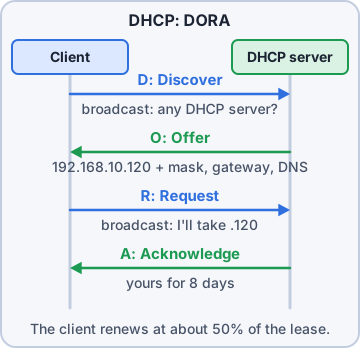
Exam tip DHCP order "DORA": Discover, Offer, Request, Acknowledge.
VLAN
A VLAN (virtual LAN) splits one physical switch into several separate logical networks (broadcast domains). Kibble puts staff PCs, guest Wi-Fi, cameras/IoT and the warehouse scanners on different VLANs: better security and less broadcast traffic. Traffic between VLANs must pass through a router or layer 3 switch.
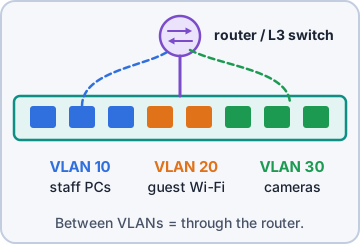
Exam tip Same switch, devices cannot talk until routed? They are on different VLANs.
VPN
A VPN (virtual private network) builds an encrypted tunnel across the internet. Client-to-site (remote access): a laptop at home joins the office network. Site-to-site: routers/firewalls join two offices permanently, e.g. the stores to HQ. Data inside the tunnel is private even on public Wi-Fi.
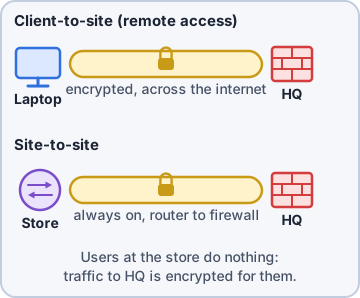
Exam tip Remote worker needs file shares from home securely = VPN.
Check yourself 2Rosa's label printer keeps getting a new IP address from DHCP and users lose it. Which solution lets it stay on DHCP but always get the same address?
- Shorten the DHCP lease time
- Create a DHCP reservation for its MAC address
- Add a CNAME record that points at the printer name
- Put the printer on its own site-to-site VPN tunnel
Show the answer
Answer: B. Create a DHCP reservation for its MAC address
A reservation ties one IP to one MAC address, so the printer always gets the same address from DHCP.
Practice questions
Answer in your head, then open the answer. Ranger's Help Desk has 436 questions like these for A+ Core 1, with mock exams.
Question 1A new file server at 10.1.4.20 needs a DNS entry so users can reach it by name over IPv4. Which record type should be created?
- A
- AAAA
- MX
- CNAME
Show the answer
Answer: A. A
An A record maps a hostname to an IPv4 address. AAAA is the IPv6 version.
Question 2A server is being given a new IPv6 address, 2001:db8:10::25. Which DNS record maps its name to this address?
- A
- TXT
- AAAA
- MX
Show the answer
Answer: C. AAAA
AAAA (quad-A) records map hostnames to 128-bit IPv6 addresses.
Question 3External senders report that email to the company bounces after a DNS migration. Which record tells other mail servers where to deliver mail for the domain?
- CNAME
- AAAA
- TXT
- MX
Show the answer
Answer: D. MX
Mail exchanger (MX) records list the mail servers that accept email for a domain, in preference order.
Question 4A company wants shop.example.com to point to the name its hosted e-commerce provider gave it, stores.vendor.net, whose IP addresses change often. Which record should be created?
- CNAME
- A
- MX
- TXT
Show the answer
Answer: A. CNAME
A canonical name (CNAME) record makes one name an alias for another, so it follows the vendor's IP changes automatically.
Question 5The company starts sending newsletters through a new marketing service, and many recipients' servers reject them as unauthorized. Which DNS change BEST fixes this?
- Add an MX record pointing to the marketing service
- Add the service's servers to the SPF TXT record
- Create a CNAME record for the newsletter sender
- Set the DMARC policy to reject all messages
Show the answer
Answer: B. Add the service's servers to the SPF TXT record
Sender Policy Framework (SPF) is a TXT record that lists which servers may send mail for the domain. DKIM signs messages, but SPF is what authorizes a new sending service.
CompTIA, A+, Network+, Security+ and Linux+ are trademarks of CompTIA, Inc. Ranger Gamez is not affiliated with or endorsed by CompTIA. The practice questions are written to the published exam objectives; they are not real exam questions.