 RANGER
 CompTIA A+ Core 1 (220-1201) · chapter 6 of 15
Week 6: Opening the new store
In this chapter Objectives 2.5, 2.7
Objective 2.7
Internet connection types and network types
Fiber, cable and DSL
Fiber (to the premises): fastest and most reliable, often symmetrical (e.g. 1 Gbps up and down), very low latency. Cable (DOCSIS over the TV coax): fast downloads, slower uploads, bandwidth shared with neighbors. DSL uses phone lines: asymmetric (ADSL), slower, and speed drops with distance from the provider's central office (roughly 5.5 km/18,000 ft max).
Exam tip DSL far from the central office = slow. Shared cable segment = slow at peak hours.
Satellite, cellular and WISP
Satellite: works almost anywhere with sky view. Traditional geostationary satellites are far away, so latency is high (~600 ms+ round trip): bad for VoIP and gaming. Newer low-earth-orbit service has much lower latency. Rain can fade the signal. Cellular (4G/5G): fast to set up, good as backup, may have data caps. WISP (wireless ISP): fixed antennas aimed at a provider tower, common in rural areas, needs line of sight.
Exam tip Highest latency of the list = (geostationary) satellite.
Network types: LAN, WLAN, PAN
A LAN (local area network) is one building or site, connected by switches. A WLAN is a wireless LAN (Wi-Fi). A PAN (personal area network) is around one person, a few meters: Bluetooth headset, smartwatch.
Exam tip Phone + earbuds + watch = PAN.
Network types: MAN, WAN, SAN
A MAN (metropolitan) spans a city: linking Kibble's HQ and stores across town. A WAN (wide area) spans regions or countries; the internet is the biggest WAN. A SAN (storage area network) is a dedicated high-speed network that gives servers block-level access to shared storage (Fibre Channel or iSCSI).
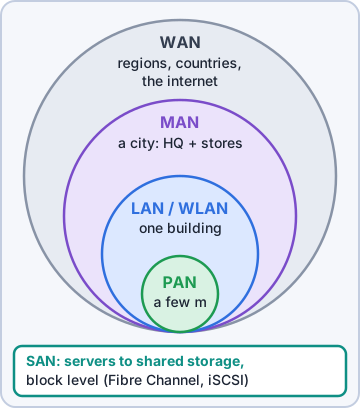
Exam tip SAN = storage at block level for servers. Not to be confused with NAS (file-level share).
Check yourself 1Sam wants Kibble's servers to reach shared storage at block level over their own dedicated high-speed network. What is this called?
- NAS
- MAN
- WLAN
- SAN
Show the answer
Answer: D. SAN
A SAN (storage area network) is a dedicated network, using Fibre Channel or iSCSI, that gives servers block-level access to shared storage.
Objective 2.5
Networking hardware
Router, switch, access point
A router forwards traffic between networks using IP addresses: it is the default gateway and does NAT at a SOHO. An access point (AP) connects wireless clients to the wired network (it bridges Wi-Fi to Ethernet). A SOHO "wireless router" is a router, switch, AP and firewall in one box.
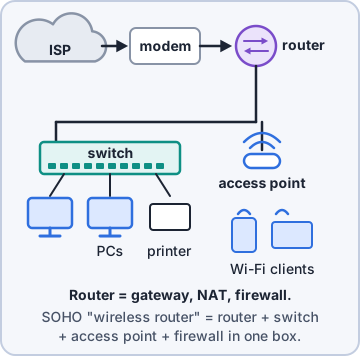
Exam tip Between networks (IP) = router. Within one network (MAC) = switch. Wireless to wired = AP.
Switches: managed and unmanaged
A switch connects devices in one LAN and forwards frames by MAC address, port to port. An unmanaged switch is plug-and-play with no settings: fine for a small office. A managed switch can be configured: VLANs, port security, QoS, port mirroring, link aggregation, monitoring (SNMP).
Exam tip Need VLANs? You need a managed switch.
Patch panel and firewall
A patch panel is where permanent cable runs from the walls are punched down; short patch cords connect its front ports to the switch. It makes moves and changes easy. A firewall filters traffic by rules (IP, port, protocol, application) between trusted and untrusted networks. It can be a hardware box or software on a host.
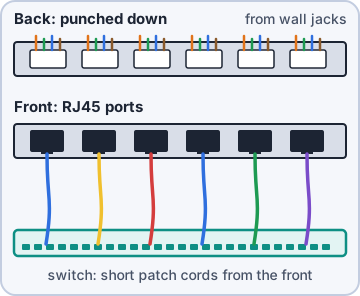
Exam tip Patch panel has no electronics; it just organizes cable runs.
Power over Ethernet (PoE)
PoE sends power over the Ethernet cable to APs, IP cameras and VoIP phones. A PoE switch powers its ports directly. A PoE injector adds power to one cable from a regular switch. Watch the switch's total power budget.
Std        Name   Max per port
802.3af    PoE    15.4 W
802.3at    PoE+   30 W
802.3bt T3 PoE++  60 W
802.3bt T4 PoE++  90 W
(power measured at the switch)
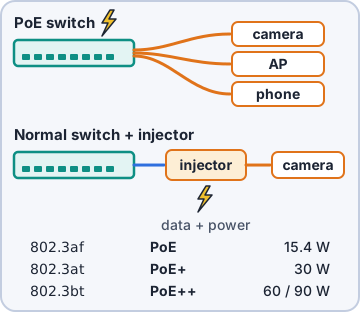
Exam tip One camera on a non-PoE switch? A PoE injector, not a new switch.
Cable modem, DSL modem, ONT
Each internet type has its own "demarc" box. A cable modem connects coax (F-type, DOCSIS) to Ethernet. A DSL modem connects the phone line (RJ11) to Ethernet; filters on phones keep voice and data apart. An ONT (optical network terminal) converts the provider's fiber into Ethernet at the customer site.
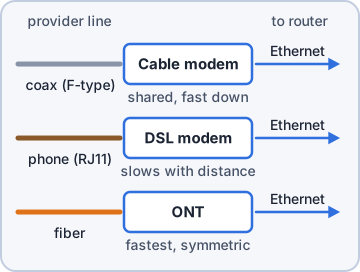
Exam tip Fiber to the store ends at an ONT, not a "modem".
NIC and MAC address
The NIC (network interface card) connects a host to the network: built-in, add-on card or USB. Each has a physical MAC address: 48 bits in hex, like 3C:52:82:1A:4F:07. The first half (OUI) identifies the manufacturer. Switches learn MACs; DHCP reservations use them.
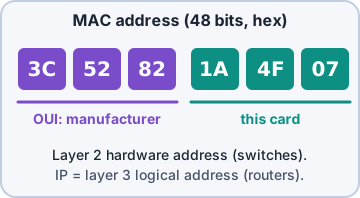
Exam tip MAC = 48-bit hardware address (layer 2). IP = logical address (layer 3).
Check yourself 2The Pine Hollow store has one new IP camera on the ceiling and an existing switch with no PoE. What is the MOST cost-effective way to power the camera?
- Replace the switch with a PoE+ switch
- Run a Molex power cable to the camera
- Install a PoE injector for that cable
- Use a cable modem in front of the switch
Show the answer
Answer: C. Install a PoE injector for that cable
An injector adds PoE to a single run from a non-PoE switch, the cheapest fix for one device.
Practice questions
Answer in your head, then open the answer. Ranger's Help Desk has 436 questions like these for A+ Core 1, with mock exams.
Question 1A small office needs a device that connects its internal network to the ISP's network and forwards traffic between them based on IP addresses. Which device is this?
- Unmanaged switch
- Patch panel
- Router
- Access point
Show the answer
Answer: C. Router
Routers connect different networks and forward packets based on IP addresses. Switches work within one network.
Question 2An IT team needs to set up VLANs and port mirroring and monitor port statistics on the access switches. Which type of switch is required?
- Unmanaged switch
- Managed switch
- Cable modem
- PoE injector
Show the answer
Answer: B. Managed switch
Managed switches can be configured for VLANs, port mirroring, and monitoring. Unmanaged switches are plug-and-play only.
Question 3A dentist's front desk needs four more wired ports for two PCs and two printers. Nobody on staff can configure network gear. Which device is the simplest fit?
- Managed switch
- Unmanaged switch
- Firewall
- Wireless access point
Show the answer
Answer: B. Unmanaged switch
An unmanaged switch is plug-and-play, which suits a small office that just needs more ports.
Question 4A warehouse has wired Ethernet but needs to let handheld scanners connect wirelessly to the same network. Which device should be installed?
- Access point
- Patch panel
- Unmanaged switch
- Network tap
Show the answer
Answer: A. Access point
An access point bridges wireless clients onto the wired LAN.
Question 5In a wiring closet, every office wall jack is cabled to the back of a rack-mounted unit full of jacks, and short cables connect its front to the switch. What is this unit called?
- Punchdown tool
- Managed switch
- Port replicator
- Patch panel
Show the answer
Answer: D. Patch panel
A patch panel terminates the building's permanent cabling so technicians can move connections with short patch cables.
CompTIA, A+, Network+, Security+ and Linux+ are trademarks of CompTIA, Inc. Ranger Gamez is not affiliated with or endorsed by CompTIA. The practice questions are written to the published exam objectives; they are not real exam questions.