 RANGER
 CompTIA A+ Core 1 (220-1201) · chapter 7 of 15
Week 7: Memory and storage upgrades
In this chapter Objectives 3.3, 3.4
Objective 3.3
RAM characteristics
Form factors: DIMM and SODIMM
DIMM (dual inline memory module) is the full-length stick for desktops and servers. SODIMM (small outline DIMM) is about half the length, for laptops, mini PCs and some all-in-ones. Notches in the edge (keying) stop you from inserting the wrong type.
Module        Pins
DDR3 DIMM     240
DDR4 DIMM     288
DDR5 DIMM     288 (DDR4 notch differs)
DDR4 SODIMM   260
DDR5 SODIMM   262
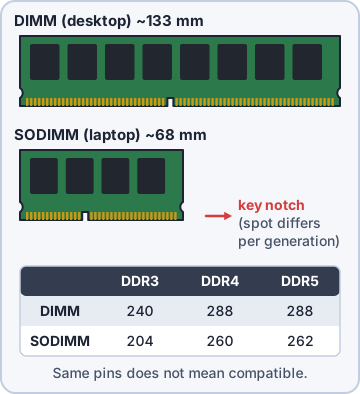
Exam tip Same pin count does not mean compatible: DDR4 and DDR5 DIMMs are both 288-pin but keyed differently.
DDR iterations
Each DDR (double data rate) generation is faster, uses lower voltage and is not compatible with the others: a board supports one generation. DDR3 (1.5 V, up to ~2133 MT/s), DDR4 (1.2 V, ~2133-3200 MT/s), DDR5 (1.1 V, 4800 MT/s and up). DDR5 puts its power management (PMIC) on the module and splits each module into two 32-bit subchannels.
Exam tip Trap: DDR5 "on-die ECC" is internal to the chips. It is NOT the same as ECC RAM.
ECC vs. non-ECC
ECC (error-correcting code) memory stores extra bits so it can detect and correct single-bit errors on the fly. Used in servers and workstations where silent data corruption is unacceptable. It needs a CPU and motherboard that support ECC. Non-ECC is standard in desktops and laptops: cheaper and slightly faster. Servers often use registered (buffered) ECC modules too.
Exam tip Server crashes with memory errors, and the data must be right? ECC RAM, if the board supports it.
Channel configurations
The memory controller reads several channels at once. Single-channel: one path. Dual-channel: two matched modules in the right slots (often same color, e.g. A2 and B2) double the bandwidth. Triple/quad-channel on workstation and server boards. Use matched pairs (same size and speed) and follow the board manual for slot order.
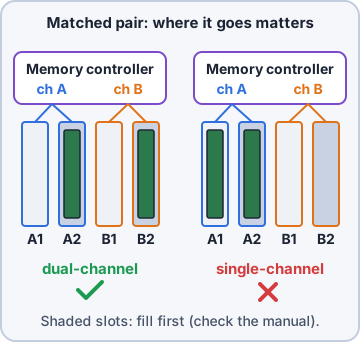
Exam tip Two sticks in the same channel (e.g. A1+A2) = single-channel speed. Use the manual's slots.
Check yourself 1The file server crashed with a memory error, and its data must never be silently corrupted. Which RAM feature helps MOST?
- DDR5 on-die ECC
- Dual-channel memory
- ECC memory
- A higher-speed module
Show the answer
Answer: C. ECC memory
ECC memory stores extra bits so it can detect and correct single-bit errors on the fly. Servers use it where data must be right; the board and CPU must support it.
Objective 3.4
Storage devices
Hard drives: speeds and sizes
HDDs store data on spinning platters read by a moving head. Spindle speed sets performance: 5,400 rpm (laptops, cheap), 7,200 rpm (desktops), 10,000 and 15,000 rpm (servers). Form factors: 3.5-inch (desktops/servers, most capacity) and 2.5-inch (laptops, some servers).
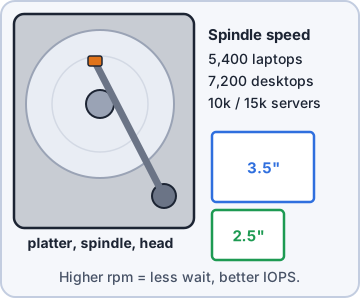
Exam tip Higher rpm = less wait for data to spin under the head, so better IOPS.
SSD interfaces: SATA, SAS, PCIe, NVMe
SSDs have no moving parts. SATA SSDs are capped by SATA III at 6 Gbps (~550 MB/s). SAS is the enterprise interface (12-22.5 Gbps, dual-ported, hot-swap) in servers. PCIe connects the drive straight to PCIe lanes; NVMe is the protocol built for flash over PCIe. An NVMe drive on PCIe 4.0 x4 reads about 7 GB/s.
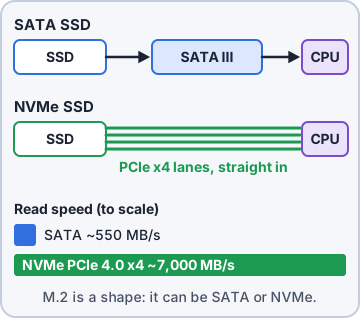
Exam tip NVMe is a protocol on PCIe. SATA is a different, slower interface. Both can come as M.2.
SSD form factors: M.2 and mSATA
M.2 cards are named by size: 2280 = 22 mm wide, 80 mm long (also 2230, 2242, 2260). Keys: M key (PCIe x4/NVMe, and some SATA), B key (SATA or PCIe x2), B+M fits both (usually SATA). mSATA is an older, smaller card using the SATA interface, found in older laptops.
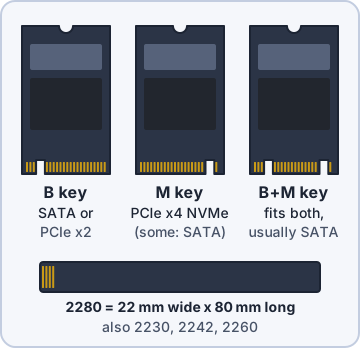
Exam tip Check the slot: an M-key PCIe-only slot will not run an M.2 SATA drive, and vice versa.
RAID 0, 1 and 5
RAID 0 (striping): 2+ drives, fastest, all capacity, no fault tolerance: one drive dies, all data lost. RAID 1 (mirroring): 2 drives, identical copies, survives 1 failure, 50% usable. RAID 5 (striping with parity): 3+ drives, survives 1 drive failure, usable = (n-1) x drive size.
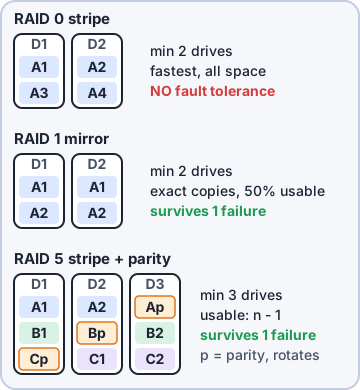
Exam tip RAID is not a backup. It protects against drive failure, not deletion, ransomware or fire.
RAID 6 and 10
RAID 6 (double parity): 4+ drives, survives 2 drive failures, usable = (n-2). RAID 10 (1+0, a stripe of mirrors): 4+ drives (even number), fast and fault tolerant, 50% usable; survives one failure per mirror pair.
Lvl Min Survives Usable  4 x 4 TB
0   2   0        n       16 TB
1   2   1        1 drive 4 TB *
5   3   1        n-1     12 TB
6   4   2        n-2     8 TB
10  4   1/pair   n/2     8 TB
* a 2-drive mirror
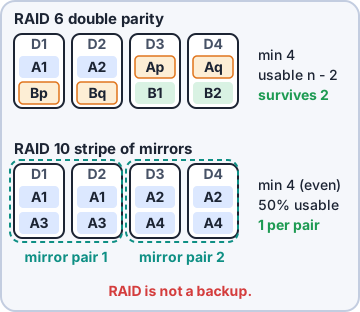
Exam tip Two drives may fail at once? RAID 6. Need speed + redundancy for a database? RAID 10.
Removable and optical storage
Flash drives (USB thumb drives): portable, often blocked by policy for security. Memory cards: SD (SDHC up to 32 GB, SDXC up to 2 TB), microSD for phones and cameras. Optical drives: CD (~700 MB), DVD (4.7 GB single layer, 8.5 GB dual layer), Blu-ray (25 GB single, 50 GB dual). Mostly used now for legacy media and archives.
Exam tip Blu-ray holds the most of the optical discs; DVD dual-layer is 8.5 GB.
Check yourself 2The file server needs an array of four 8 TB drives that keeps working even if TWO drives fail at the same time. Which RAID level should you choose?
- RAID 0
- RAID 5
- RAID 1
- RAID 6
Show the answer
Answer: D. RAID 6
RAID 6 uses double parity: with four 8 TB drives it gives 16 TB usable and survives two drive failures.
Practice questions
Answer in your head, then open the answer. Ranger's Help Desk has 436 questions like these for A+ Core 1, with mock exams.
Question 1A technician receives a memory module for a desktop PC, but the module is only about half the length of the board's memory slots. Which form factor was shipped by mistake?
- SODIMM
- mSATA
- M.2 2280
- DIMM
Show the answer
Answer: A. SODIMM
A SODIMM (small outline DIMM) is the short laptop and mini-PC memory module, roughly half the length of a desktop DIMM. The desktop board needs a full-size DIMM of the right DDR generation.
Question 2A technician tries to install a DDR4 module in a desktop with DDR5 slots. The module will not seat. Why?
- DDR4 must go in the second channel first
- The module must be installed with the system powered on
- The key notch is in a different position for each DDR generation
- DDR5 slots accept only registered ECC modules
Show the answer
Answer: C. The key notch is in a different position for each DDR generation
Each DDR iteration has its notch in a different place, so a module from the wrong generation cannot be inserted. The generations are not compatible.
Question 3A database server must detect and correct single-bit memory errors automatically. Which type of RAM should be installed?
- Non-ECC
- ECC
- SODIMM
- Dual-channel
Show the answer
Answer: B. ECC
Error-correcting code (ECC) RAM stores extra check bits so it can fix single-bit errors. Servers use it for reliability.
Question 4A user buys ECC memory for a consumer gaming desktop to make it more reliable. What should the technician check FIRST?
- Whether the memory is a SODIMM
- Whether the PSU has a 4+4 pin CPU connector
- Whether Secure Boot is enabled
- Whether the motherboard and CPU support ECC
Show the answer
Answer: D. Whether the motherboard and CPU support ECC
ECC only works when the CPU and motherboard support it. Many consumer platforms do not, and some will not boot with certain ECC modules.
Question 5A technician installs two identical memory modules in a desktop that supports dual-channel memory. How should the modules be placed to enable dual-channel?
- In two adjacent slots on the same channel
- One module in a slot and one in the M.2 socket
- In any two slots, because the BIOS sorts it out
- In the slots the manual lists, one per channel
Show the answer
Answer: D. In the slots the manual lists, one per channel
Dual-channel needs one module on each channel. Motherboard manuals list the slots to use, often color-coded.
CompTIA, A+, Network+, Security+ and Linux+ are trademarks of CompTIA, Inc. Ranger Gamez is not affiliated with or endorsed by CompTIA. The practice questions are written to the published exam objectives; they are not real exam questions.