 RANGER
 CompTIA A+ Core 1 (220-1201) · chapter 8 of 15
Week 8: Build day
In this chapter Objectives 3.5, 3.6
Objective 3.5
Motherboards and connectors
Motherboard form factors
Form factor sets size, mounting holes and number of slots, and must match the case and PSU. ATX: 12 x 9.6 in (305 x 244 mm), up to 7 expansion slots. microATX (mATX): 9.6 x 9.6 in (244 x 244 mm), up to 4 slots, fits most ATX cases. Mini-ITX (ITX): 6.7 x 6.7 in (170 x 170 mm), 1 slot, for small PCs like a register.
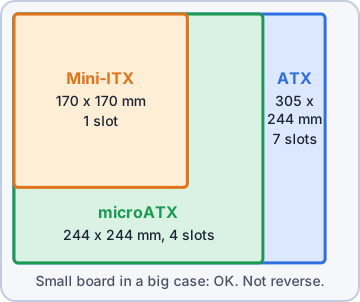
Exam tip Smaller boards fit bigger cases (mATX in ATX), not the other way around.
Expansion slots: PCI and PCIe
PCI is the old 32-bit shared parallel bus (133 MB/s): legacy cards only. PCIe (PCI Express) uses serial point-to-point lanes: slots come in x1, x4, x8, x16. Each version doubles per-lane speed: PCIe 3.0 ~1 GB/s, 4.0 ~2 GB/s, 5.0 ~4 GB/s per lane per direction. A smaller card works in a bigger slot (x1 card in x16 slot).
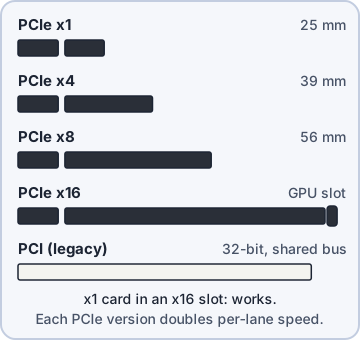
Exam tip Video cards go in the x16 slot wired to the CPU (usually the top one).
Storage connectors: SATA, eSATA, M.2
Boards have several SATA 7-pin ports for drives and optical drives (6 Gbps each). Some older boards have an eSATA port on the rear panel for external drives. M.2 slots take NVMe/SATA SSDs (and Wi-Fi cards in E-key slots). Using some M.2 slots can disable SATA ports that share lanes: check the manual.
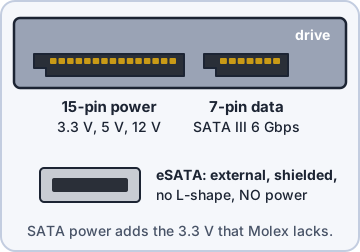
Exam tip SATA drive missing after adding an M.2 SSD? The M.2 slot may share lanes with that SATA port.
Power connectors and headers
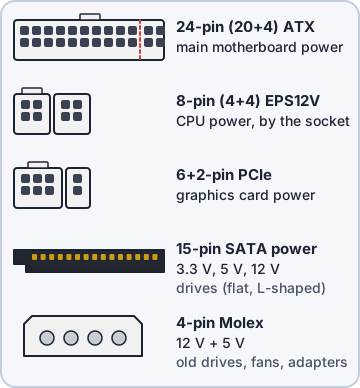
Power connectors on the board: 24-pin ATX main power and 4/8-pin ATX12V (EPS) CPU power near the socket. Headers are pin rows for case cables: front panel (power switch, reset, power and drive LEDs), USB 2.0/3.x front ports, front audio, fan headers (3-pin DC, 4-pin PWM), RGB lighting, and TPM.
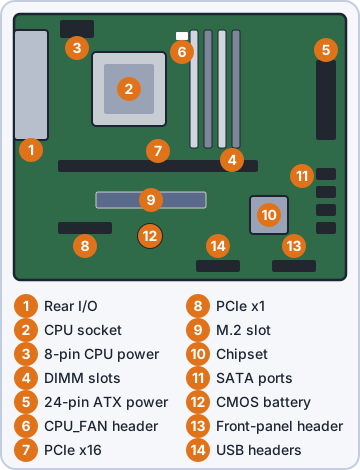
Exam tip Front power button does nothing? Check the front-panel header pins (PWR_SW) first.
CPU sockets and compatibility
The CPU must match the board's socket and chipset. Intel uses LGA (land grid array): the pins are in the socket on the board (e.g. LGA 1700, LGA 1851). AMD used PGA for AM4 (pins on the CPU) and moved to LGA with AM5. Multisocket boards hold two or more CPUs: servers and high-end workstations. A BIOS update may be needed for a newer CPU on the same socket.
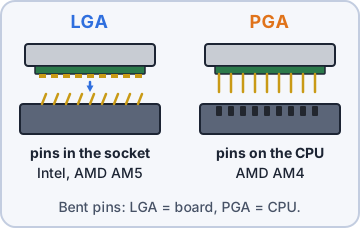
Exam tip Bent pins: on LGA they are in the board socket; on PGA they are on the CPU.
Check yourself 1After you add an M.2 SSD to the workstation, one SATA drive disappears. Its cable is fine. What is the MOST likely cause?
- The power supply can't run both drives at once
- The M.2 slot shares lanes with that port
- SATA drives stop working when UEFI mode is on
- The new SSD needs a separate 8-pin EPS cable
Show the answer
Answer: B. The M.2 slot shares lanes with that port
On many boards, using some M.2 slots disables SATA ports that share the same lanes. The manual lists which ports turn off; move the drive to another port.
CPU architecture and core configurations
x86 is 32-bit; x64 (x86-64) is 64-bit and can use far more than 4 GB of RAM. Desktops and most laptops are x64. ARM is a RISC design: power-efficient, used in phones, tablets and a growing number of laptops; apps must be built for ARM or emulated. Core configurations: multicore (several cores per CPU), hyper-threading/SMT (2 threads per core), and hybrid designs with performance and efficiency cores.
Exam tip 32-bit OS sees about 4 GB of RAM max. Need more? x64 CPU and OS.
Expansion cards
Video card (GPU): extra display outputs and 3D/compute power; often needs 6/8-pin or 16-pin PCIe power. Sound card: better audio, more channels. Capture card: records video from cameras or consoles (HDMI in) for streaming and editing. NIC card: adds or upgrades networking (10 GbE, fiber SFP+, extra ports). Install the driver after the card.
Exam tip Marketing wants to record a camera's HDMI output on the PC = capture card.
Cooling
A heat sink draws heat from the CPU through metal fins. Thermal paste fills tiny gaps between CPU and heat sink (pea-size dot, reapply if removed). Thermal pads do the same for VRMs, memory and SSDs, often in laptops. Fans move air: front intake, rear/top exhaust. Liquid cooling (often an AIO: pump, tubes, radiator) moves heat to a radiator; check the pump and leaks.
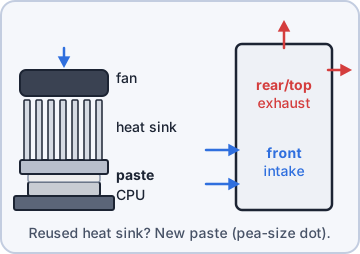
Exam tip Reused a heat sink without new paste? Expect overheating and throttling.
Objective 3.5
BIOS/UEFI, virtualization and encryption
BIOS vs. UEFI and boot options
UEFI replaced legacy BIOS: mouse-driven menus, GPT disks over 2 TB, faster boot, Secure Boot. Settings live in flash; a CMOS battery keeps the clock. Boot options set the boot order (SSD, USB, network/PXE) and UEFI vs. legacy (CSM) mode. USB permissions can disable USB ports or USB boot so nobody boots another OS from a flash drive.
UEFI SETUP > Boot
 Boot Mode ........ [UEFI]
 Boot Option #1 ... [Windows Boot Manager]
 Boot Option #2 ... [UEFI: USB Drive]
 Network (PXE) .... [Disabled]
 USB Boot ......... [Disabled]
 Secure Boot ...... [Enabled]
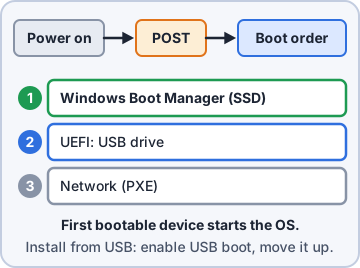
Exam tip To boot an installer from USB, enable USB boot and move it up the boot order.
Passwords, Secure Boot and TPM features
A BIOS (supervisor/admin) password is needed to change firmware settings. A boot (user/power-on) password is needed to start the computer at all. Secure Boot (UEFI) only runs bootloaders signed with trusted keys, blocking boot-level malware (rootkits). TPM security features are switched on in firmware (often "PTT" on Intel, "fTPM" on AMD) for BitLocker and Windows 11.
Exam tip Stop users changing boot order = BIOS/supervisor password. Stop anyone booting the PC = boot password.
Fans and temperature monitoring
Firmware shows temperature monitoring for CPU and system, fan speeds and voltages, and can set alarms or shutdown thresholds. Fan considerations: choose fan curves (silent vs. performance), set which header is the CPU fan (some boards refuse to boot or warn with no CPU fan detected), and PWM vs. DC control.
Exam tip "CPU Fan Error" at boot: fan not plugged into CPU_FAN, or fan failed.
Check yourself 2You reuse the old heat sink on a new CPU. Now the PC runs hot and slows itself down. What was MOST likely skipped?
- Enabling Secure Boot
- Moving the CPU fan cable to SYS_FAN
- Installing a capture card
- Applying new thermal paste
Show the answer
Answer: D. Applying new thermal paste
Thermal paste fills tiny gaps between the CPU and the heat sink. A reused heat sink without fresh paste moves heat poorly, so the CPU overheats and throttles.
Virtualization support
Running VMs well needs CPU hardware virtualization enabled in firmware: Intel VT-x or AMD-V (SVM), plus SLAT (EPT/RVI). VT-d/AMD-Vi (IOMMU) lets a VM use a physical device directly. Often disabled by default; a hypervisor will refuse to start VMs until you enable it.
Exam tip Hypervisor says "virtualization not available"? Enable VT-x/AMD-V in UEFI.
Encryption hardware: TPM and HSM
A TPM (Trusted Platform Module) is a chip (or firmware) on the motherboard that stores encryption keys, measures the boot process, and unlocks full-disk encryption like BitLocker only if the system has not been tampered with. Windows 11 requires TPM 2.0. An HSM (hardware security module) is a separate device or card that creates, stores and uses many keys at high speed: for servers, certificate authorities and payments.
Exam tip One PC's disk encryption key = TPM. Thousands of keys for a payment server = HSM.
Objective 3.6
Power supplies
Input voltage
Wall power is AC. North America uses 110-120 VAC (60 Hz); much of Europe/Asia uses 220-240 VAC (50 Hz). Most PSUs are auto-switching (100-240 V). Some older PSUs have a manual voltage selector switch: set 115 V and plug into 230 V and you can destroy the PSU.
Exam tip Taking a PC abroad? Check the label for 100-240 V; only change the plug if so.
Output rails: 3.3 V, 5 V, 12 V
The PSU converts AC to DC rails. 12 V: the heavy lifter for CPUs, GPUs, fans, drive motors. 5 V: USB, drive logic, older parts. 3.3 V: chipsets, RAM and some M.2/PCIe parts. Molex gives 12 + 5 V; SATA power adds 3.3 V.
Wire color  Voltage
Yellow      +12 V
Red         +5 V
Orange      +3.3 V
Black       Ground
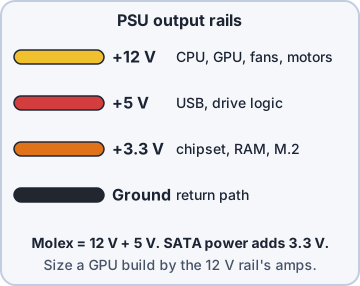
Exam tip Most power in a modern PC is on the 12 V rail. Compare its amp rating when sizing for a GPU.
20+4 pin connector, modular and redundant PSUs
The main 20+4 pin connector fits modern 24-pin boards, and the 4 pins detach for older 20-pin boards. A modular PSU lets you attach only the cables you need: better airflow, tidier builds (semi-modular has the main cables fixed). A redundant PSU setup has two or more hot-swappable units in a server; if one fails, the other carries the load.
Exam tip Server must stay up when a PSU dies = redundant hot-swap power supplies.
Wattage and energy efficiency
Add up component power (CPU TDP, GPU board power, drives, fans) and add 20-30% headroom. Too small = random shutdowns under load. Energy efficiency is shown by the 80 PLUS rating: an efficient PSU wastes less power as heat.
80 PLUS (115 V)  20%  50%  100%
Bronze           82%  85%  82%
Gold             87%  90%  87%
Platinum         90%  92%  89%
Titanium *       92%  94%  90%
* also 90% at 10% load
Exam tip Wattage is the max it can supply; the PC draws only what it needs.
Check yourself 3Priya wants nobody to be able to change the boot order on the register PCs, but staff must still be able to turn them on without a password. What should you configure?
- A boot (power-on) password
- A BIOS (supervisor) password
- Secure Boot with a new signing key
- A TPM PIN for BitLocker
Show the answer
Answer: B. A BIOS (supervisor) password
The supervisor/BIOS password protects the firmware settings only; the PC still boots normally.
Practice questions
Answer in your head, then open the answer. Ranger's Help Desk has 436 questions like these for A+ Core 1, with mock exams.
Question 1A customer wants a very small home theater PC that fits under a TV. Which motherboard form factor fits BEST?
- microATX
- ITX
- ATX
- Multisocket server board
Show the answer
Answer: B. ITX
ITX boards (such as mini-ITX, 17 x 17 cm) are the smallest of the three and fit compact cases.
Question 2A technician has a microATX motherboard and a full-size ATX case. Will the board fit?
- Yes, it uses a subset of the ATX mounting holes
- Only with an ITX adapter plate
- No, microATX needs a microATX case
- Only if the case has a power supply with a 20-pin connector
Show the answer
Answer: A. Yes, it uses a subset of the ATX mounting holes
microATX is a smaller version of ATX and lines up with ATX standoff positions. A full ATX board will not fit a microATX case, though.
Question 3A customer wants to move an old 32-bit PCI sound card into a new motherboard that has only PCIe and M.2 slots. What should the technician tell the customer?
- It will work in a PCIe x1 slot with no adapter or driver
- It can be installed in the M.2 slot
- It will work in a PCIe x16 slot
- It will not fit; a PCIe or USB audio device is needed
Show the answer
Answer: D. It will not fit; a PCIe or USB audio device is needed
Legacy PCI and PCIe use different slots and signaling. A PCI card needs a PCI slot, so a newer device is the practical fix.
Question 4After building a PC, the technician finds that the case's power button and front USB ports do nothing. Where should these cables be connected?
- eSATA ports
- Unused PCIe x1 slot
- M.2 socket
- Motherboard headers
Show the answer
Answer: D. Motherboard headers
Front-panel switches, LEDs, USB and audio connect to pin headers on the motherboard. The manual shows each header's pinout.
Question 5A technician installs an M.2 SSD in the second M.2 slot. Afterward, a SATA hard drive that was working disappears. Based on the exhibit, what is the cause?
- Secure Boot disabled the SATA controller
- The M.2 SSD has a different DDR type
- M.2_2 shares bandwidth with SATA5 and SATA6
- The SATA drive now needs a Molex power connector
Show the answer
Answer: C. M.2_2 shares bandwidth with SATA5 and SATA6
The manual notes that using M.2_2 disables SATA5/SATA6. Moving the hard drive to SATA1-4 will bring it back.
CompTIA, A+, Network+, Security+ and Linux+ are trademarks of CompTIA, Inc. Ranger Gamez is not affiliated with or endorsed by CompTIA. The practice questions are written to the published exam objectives; they are not real exam questions.