 RANGER
 CompTIA Network+ (N10-009) · chapter 1 of 29
Day 1: Where the packets live
In this chapter Objectives 1.1
Objective 1.1
The OSI model, layer by layer
Seven layers, one trip
The OSI (Open Systems Interconnection) reference model splits network communication into 7 layers. Each layer does one job, serves the layer above and relies on the layer below. Nobody "runs" OSI; it is a shared vocabulary. When Dev says "it is a Layer 2 problem" every engineer knows to look at MACs, switches and frames, not at cables or apps.
#  Layer         PDU      Examples
7  Application   Data     HTTP, DNS, SMTP
6  Presentation  Data     encryption, ASCII
5  Session       Data     dialogs, RPC
4  Transport     Segment  TCP, UDP, ports
3  Network       Packet   IP, ICMP, routers
2  Data link     Frame    MAC, switches
1  Physical      Bits     cables, hubs
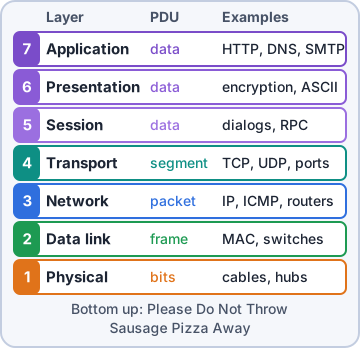
Exam tip Bottom-up memory trick: "Please Do Not Throw Sausage Pizza Away" (Physical, Data link, Network, Transport, Session, Presentation, Application).
Layer 1 - Physical
The physical layer moves raw bits as signals: voltage on copper, pulses of light in fiber, radio waves in Wi-Fi. It defines cables, connectors, pinouts, signal timing and the devices that only repeat signals: hubs, repeaters, media converters. Layer 1 problems: unplugged or damaged cable, wrong pinout, no link light, interference, attenuation (signal fading over distance).
Exam tip A hub is Layer 1: it repeats bits out every port and understands no addresses. Exam loves "which device operates at Layer 1?"
Layer 2 - Data link
The data link layer packages bits into frames and delivers them on the local network using MAC addresses (48-bit, burned into each NIC; the first half is the vendor OUI). Switches, bridges, NICs and access points live here. The frame trailer holds an FCS (frame check sequence, a CRC): the receiver recomputes it and discards damaged frames. Layer 2 detects errors; it does not fix them. VLAN tags (802.1Q) are added here too.
Exam tip Two sublayers: LLC (Logical Link Control, talks up to Layer 3) and MAC (Media Access Control, talks to the medium).
Layer 3 - Network
The network layer gives every host a logical address (IP) and moves packets between different networks. Routers and Layer 3 switches read the destination IP and pick the next hop from a routing table. Also here: ICMP (ping, traceroute errors), fragmentation, and the IP TTL that drops looping packets. Layer 2 gets a frame across one link; Layer 3 gets a packet across the whole trip.
Exam tip MAC = who you are on this wire (Layer 2). IP = where you live on the internetwork (Layer 3). Routers change the MAC header at every hop; the IP addresses stay.
Layer 4 - Transport
The transport layer connects one application to another using port numbers and chops data into segments (TCP) or datagrams (UDP). TCP is connection-oriented and reliable: three-way handshake (SYN, SYN-ACK, ACK), sequence numbers, acknowledgments, retransmissions and windowing for flow control. UDP is connectionless: no handshake, no retransmits, very low overhead. Good for DNS lookups, VoIP and streaming.
Exam tip Trap: "reliable" in the stem means TCP. "Fast, low overhead, can tolerate loss" means UDP.
Layer 5 - Session
The session layer sets up, manages and tears down the conversation (session) between two applications. It handles things like who talks when, checkpoints so a long transfer can resume, and closing a dialog cleanly. Examples you may see: RPC (remote procedure call), NetBIOS session service and the control channels that start and stop a call or a file transfer.
Exam tip If a question says "establishes, maintains and terminates connections between applications", the answer is Session (Layer 5).
Layer 6 - Presentation
The presentation layer makes data readable to the other side: character encoding (ASCII, Unicode), data formats (JPEG, MPEG), compression and encryption/decryption. For the exam, when a question asks which layer encrypts or formats data for the application, pick Presentation. In real life SSL/TLS spans several layers, but CompTIA places encryption at Layer 6.
Exam tip Memory hook: Presentation = how the data is "presented" (translated, compressed, encrypted).
Layer 7 - Application
The application layer is where network services meet software: HTTP/HTTPS, DNS, SMTP, FTP, SSH, SNMP, DHCP. It is the interface programs use to reach the network. Firewalls that inspect URLs or app commands and load balancers that route by URL work at Layer 7.
Exam tip Trap: the application layer is NOT the program itself. Chrome and Outlook are apps; HTTP and SMTP are the Layer 7 protocols they use.
Objective 1.1
Encapsulation and thinking in layers
Encapsulation: wrapping the data
When you send data, each layer on the way down adds its own header: TCP adds ports (segment), IP adds addresses (packet), Ethernet adds MACs plus an FCS trailer (frame), then the NIC sends bits. The receiver does de-encapsulation, peeling one header off per layer on the way up. Each layer only reads its own header, like nested envelopes.
Sender wraps on the way down:
L7-5  [Data]
L4    [TCP|Data]              segment
L3    [IP|TCP|Data]           packet
L2    [Eth|IP|TCP|Data|FCS]   frame
L1    0101101001...           bits
Receiver unwraps the same, L1 up to L7.
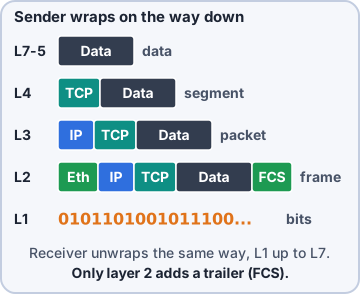
Exam tip Only Layer 2 adds a trailer (the FCS). Header names on the exam: segment (L4), packet (L3), frame (L2), bits (L1).
Which box works at which layer?
Know where each device makes its decisions. A device works at the highest layer whose information it uses.
- Hub, repeater, cable, media converter: Layer 1
- Switch, bridge, NIC, access point: Layer 2 (MAC)
- Router, Layer 3 switch: Layer 3 (IP)
- Basic firewall: Layers 3-4 (IP + port)
- Next-generation firewall, proxy, Layer 7 load balancer: up to Layer 7 (app data)
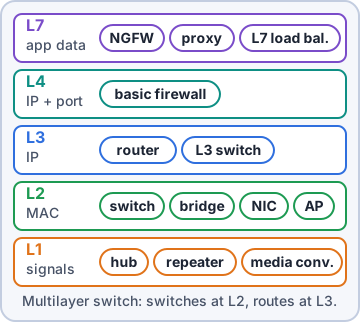
Exam tip A "multilayer switch" switches frames at Layer 2 and routes packets at Layer 3.
Troubleshooting by layer
Pros pick a direction and walk the layers. Bottom-up: link light, cable, then MAC/ARP, then IP/ping, then ports, then the app. Top-down: start at the app when the network looks fine. Divide and conquer: start in the middle with ping (Layer 3); if ping works, layers 1-3 are probably fine, so go up.
Exam tip Ping working proves Layers 1-3 to that host. It proves nothing about TCP ports or the web service.
Check yourself 1Users report a slow file share. The switch shows rising FCS/CRC error counters on the server port. At which OSI layer are these errors detected?
- Physical
- Network
- Data link
- Transport
Show the answer
Answer: C. Data link
The FCS is in the Layer 2 frame trailer; the receiving NIC or switch recomputes the CRC and drops bad frames. The cause is often Layer 1 (cable, interference), but the check happens at Layer 2.
Check yourself 2Which OSI layer uses port numbers to deliver data to the correct application on a host?
- Session
- Transport
- Network
- Application
Show the answer
Answer: B. Transport
Layer 4 (TCP/UDP) uses source and destination ports, for example 443 for HTTPS. Layer 3 gets the packet to the right host; Layer 4 gets it to the right app.
Practice questions
Answer in your head, then open the answer. Ranger's Packet Trail has 483 questions like these for Network+, with mock exams.
Question 1A switch learns which device is on each port by reading source MAC addresses and then forwards frames only to the matching port. At which OSI layer is the switch making this decision?
- Layer 1 - Physical
- Layer 4 - Transport
- Layer 3 - Network
- Layer 2 - Data link
Show the answer
Answer: D. Layer 2 - Data link
MAC addresses and frames belong to the Data link layer, so MAC-based forwarding is a Layer 2 function. Layer 3 forwarding uses IP addresses, which is what a router does.
Question 2A firewall rule permits traffic only to destination port 443 and tracks each TCP session's sequence of handshakes. Which OSI layer holds the port information this rule matches?
- Layer 5 - Session
- Layer 7 - Application
- Layer 3 - Network
- Layer 4 - Transport
Show the answer
Answer: D. Layer 4 - Transport
TCP and UDP port numbers live in the Transport layer header. Layer 3 holds IP addresses, and the Session layer manages dialogs between applications rather than port numbers.
Question 3A legacy mainframe application sends text encoded in EBCDIC, and the receiving web service expects ASCII. A gateway is added to translate the character encoding before delivery. Which OSI layer function does this gateway perform?
- Layer 6 - Presentation
- Layer 2 - Data link
- Layer 5 - Session
- Layer 7 - Application
Show the answer
Answer: A. Layer 6 - Presentation
The Presentation layer formats data for the application, including character encoding translation, encryption and compression. The Application layer is where the service interacts with the user or program, not where data formats are converted.
Question 4A video conferencing platform sets up a dialog between two endpoints, keeps it in sync with checkpoints during a long call, and tears it down cleanly when the meeting ends. Which OSI layer is responsible for this?
- Layer 6 - Presentation
- Layer 5 - Session
- Layer 4 - Transport
- Layer 3 - Network
Show the answer
Answer: B. Layer 5 - Session
The Session layer establishes, manages, synchronizes and terminates dialogs between applications. The Transport layer moves segments reliably or unreliably but does not manage the overall application conversation.
Question 5A user has no link light on their NIC. The technician swaps the patch cable, which had a crushed connector, and the link comes up. At which OSI layer was the problem?
- Layer 2 - Data link
- Layer 3 - Network
- Layer 7 - Application
- Layer 1 - Physical
Show the answer
Answer: D. Layer 1 - Physical
Cables, connectors and electrical signals are Physical layer components, so a crushed connector is a Layer 1 fault. Layer 2 problems involve frames and MAC addressing, which can't happen without a working link.
CompTIA, A+, Network+, Security+ and Linux+ are trademarks of CompTIA, Inc. Ranger Gamez is not affiliated with or endorsed by CompTIA. The practice questions are written to the published exam objectives; they are not real exam questions.