 RANGER
 CompTIA Network+ (N10-009) · chapter 2 of 29
Day 2: The gear in the closet
In this chapter Objectives 1.2
Objective 1.2
Physical and virtual appliances
Physical vs virtual appliances
Every network function can come as a physical appliance (dedicated hardware in a rack) or a virtual appliance (the same software running as a VM or container on a hypervisor or in the cloud). Physical: predictable performance, special chips (ASICs) for line-rate forwarding. Virtual: fast to deploy, easy to clone and scale, and lives right next to cloud workloads. Kibble & Co. runs a physical firewall at HQ and a virtual one in the cloud.
Exam tip Running network functions as virtual appliances in place of hardware is called NFV (network functions virtualization). You will see it again with cloud.
Router
A router connects different networks and forwards packets by destination IP address (Layer 3) using its routing table. Each router interface is its own network and its own broadcast domain, so routers stop broadcasts. Kibble's edge router links HQ to the ISP; inside, Layer 3 switches route between VLANs.
Exam tip Router = between networks (IP). Switch = within a network (MAC). "Separates broadcast domains" points to a router.
Switch
A switch forwards frames inside one network by MAC address (Layer 2). It learns which MAC lives on which port from source addresses and builds a MAC address table. Unknown destinations and broadcasts are flooded out all ports in the VLAN. Every switch port is its own collision domain. A Layer 3 (multilayer) switch can also route between VLANs.
Exam tip Switches break up collision domains; routers (and VLANs) break up broadcast domains.
Firewall
A firewall permits or denies traffic by rules. A basic firewall filters on IP addresses, protocol and ports (Layers 3-4) and is usually stateful: it remembers sessions so return traffic is allowed automatically. A next-generation firewall (NGFW) also identifies applications and users and can inspect content up to Layer 7. Firewalls usually sit at the edge between trusted and untrusted zones.
Exam tip Rules are read top to bottom; first match wins; there is an implicit deny at the end.
IDS vs IPS
An IDS (intrusion detection system) watches a copy of traffic (from a SPAN/mirror port or tap) and alerts on attacks; it is out of band, so it cannot stop them. An IPS (intrusion prevention system) sits inline, so it can block malicious traffic as it passes. Both detect using signatures (known patterns) or anomaly/behavior baselines.
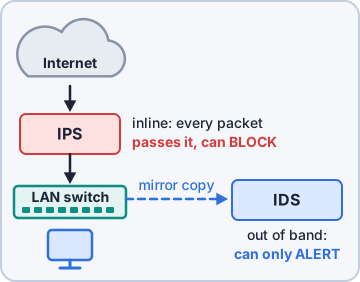
Exam tip IDS = detect and alert (passive). IPS = prevent and block (inline). Trap: an inline IPS that fails can drop traffic, so plan fail-open or fail-closed.
Load balancer
A load balancer spreads client requests across a pool of servers behind one virtual address. It runs health checks and stops sending to dead servers, so it adds both capacity and fault tolerance. Methods: round robin, least connections, weighted. Layer 4 balancers use IP/port; Layer 7 balancers can route by URL or cookie and offload TLS.
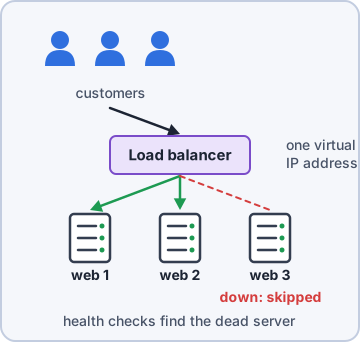
Exam tip Kibble's online shop sits behind a load balancer with three web servers. One crashes, customers never notice.
Proxy
A proxy makes requests on behalf of someone else. A forward proxy sits in front of users: it filters URLs, caches content and hides internal addresses when staff browse the web. A reverse proxy sits in front of servers: internet users talk to it, and it passes requests to internal servers (often with caching and TLS offload).
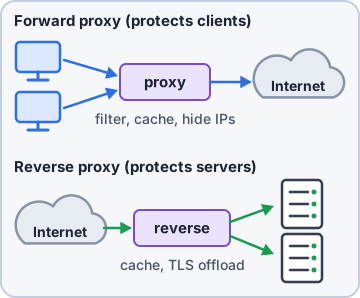
Exam tip Forward proxy protects/controls clients. Reverse proxy protects/fronts servers.
NAS vs SAN
NAS (network-attached storage) is a storage device on the regular network that shares files using SMB or NFS. Users see folders. A SAN (storage area network) is a dedicated high-speed network that gives servers block-level storage, using Fibre Channel or iSCSI. The server sees a raw disk and formats it itself.
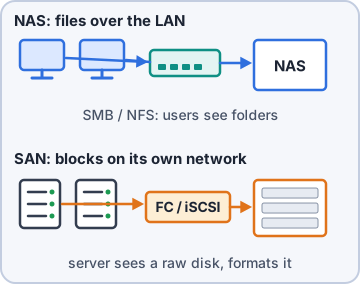
Exam tip NAS = files over the LAN. SAN = blocks over a dedicated network. "Server needs a raw disk volume" points to SAN.
Wireless: access points and controllers
A wireless access point (AP) bridges Wi-Fi clients onto the wired network (Layer 2). A wireless LAN controller (WLC) centrally manages many APs: one place for SSIDs, security, channel and power plans, firmware and roaming. APs managed this way are "lightweight"; APs configured one by one are "autonomous" (more in the warehouse build).
Exam tip Ten or more APs to manage the same way? Think controller.
Objective 1.2
Applications and functions
Content delivery network (CDN)
A CDN is a group of servers spread around the world that cache copies of content (images, video, scripts) close to users. The user gets content from the nearest edge server: lower latency, less load on the origin server, and better resilience to traffic spikes. Kibble's shop images load from a CDN so a sale does not melt the web servers.
Exam tip Stem says "users far away load the site slowly" or "reduce load on origin server": think CDN.
Virtual private network (VPN)
A VPN builds an encrypted tunnel across an untrusted network such as the internet. Site-to-site: two firewalls/routers connect whole offices (HQ to the stores), users never notice. Client-to-site (remote access): software on a laptop connects one user to HQ. Split tunnel sends only company traffic through the tunnel; full tunnel sends everything. Common protocols: IPsec, SSL/TLS.
Exam tip Full tunnel = more control and inspection. Split tunnel = less load on HQ bandwidth.
Quality of service (QoS)
QoS decides who goes first when a link is busy. Traffic is classified and marked (DSCP in the IP header, CoS in the 802.1Q tag), then queued so voice and video get priority and low latency/jitter, while backups wait. QoS cannot create bandwidth; it only manages congestion.
Exam tip Choppy VoIP calls during big uploads? The fix the exam wants is usually QoS prioritizing voice.
Time to live (TTL)
TTL appears in two places. IP TTL: a hop counter in every packet; each router subtracts 1, and at 0 the packet is dropped and an ICMP "time exceeded" is sent back. It stops routing loops from circling forever, and traceroute uses it. DNS TTL: how many seconds a resolver may cache a record before asking again.
C:\> tracert 8.8.8.8
 1  <1 ms  10.10.0.1    TTL 1 dies
 2   9 ms  100.64.2.1   TTL 2 dies
 3  12 ms  203.0.113.9  ...
Exam tip Lower a DNS TTL a day before you change a record so caches pick up the new address quickly.
Check yourself 1Kibble's security lead wants a device that will automatically drop known exploit traffic headed to the web servers, not just log it. What should be deployed?
- An IDS on a SPAN port
- A forward proxy
- An inline IPS
- A load balancer
Show the answer
Answer: C. An inline IPS
An IPS sits inline, so it can block malicious packets in real time. An IDS on a SPAN port only sees a copy of the traffic and can only alert.
Check yourself 2A database server needs a raw block-level volume it can format itself, over a dedicated storage network. Which solution fits?
- NAS sharing over SMB
- SAN using Fibre Channel
- CDN edge cache
- Reverse proxy cluster with caching
Show the answer
Answer: B. SAN using Fibre Channel
A SAN presents block storage (LUNs) to servers over a dedicated network such as Fibre Channel or iSCSI. NAS shares files, not raw blocks.
Practice questions
Answer in your head, then open the answer. Ranger's Packet Trail has 483 questions like these for Network+, with mock exams.
Question 1The security team wants a device placed inline between the firewall and the core switch that will automatically drop traffic matching known attack signatures. Which appliance should be deployed?
- IDS
- IPS
- Load balancer
- Proxy server
Show the answer
Answer: B. IPS
An IPS sits inline and can block or drop malicious traffic as it happens. An IDS only detects and alerts; it doesn't stop the traffic itself.
Question 2A company's single web server is overwhelmed during sales events. The team adds three identical servers and needs incoming requests spread across them, with failed servers removed from rotation. Which appliance should they add?
- Content delivery network
- Layer 3 switch
- Load balancer
- Proxy server
Show the answer
Answer: C. Load balancer
A load balancer spreads client requests across a pool of servers and uses health checks to stop sending traffic to failed members. A forward proxy acts for internal clients, not for a server pool.
Question 3Management wants all employee web browsing to go through a single server that caches frequently visited pages and blocks URLs by category. Which appliance meets this need?
- Wireless LAN controller
- Load balancer
- Forward proxy
- Network-attached storage
Show the answer
Answer: C. Forward proxy
A forward proxy makes web requests on behalf of clients, which lets it cache responses and filter URLs. A load balancer sits in front of servers, not in front of users.
Question 4A small accounting office wants shared storage that staff can map as a network drive over SMB using the existing Ethernet network, without a separate storage fabric. Which solution BEST fits?
- SAN
- DAS over Fibre Channel
- NAS
- CDN
Show the answer
Answer: C. NAS
NAS provides file-level storage over the regular LAN using protocols like SMB and NFS. A SAN provides block-level storage, usually over a dedicated storage network.
Question 5A database cluster needs high-performance block-level storage that the servers see as local disks. The storage will connect through a dedicated Fibre Channel network. Which solution is being described?
- NFV
- CDN
- NAS
- SAN
Show the answer
Answer: D. SAN
A SAN gives servers block-level access to storage over a dedicated network such as Fibre Channel or iSCSI. NAS gives file-level access over the regular LAN.
CompTIA, A+, Network+, Security+ and Linux+ are trademarks of CompTIA, Inc. Ranger Gamez is not affiliated with or endorsed by CompTIA. The practice questions are written to the published exam objectives; they are not real exam questions.