 RANGER
 CompTIA Network+ (N10-009) · chapter 10 of 29
Weeks 9-10: Warehouse build, Wi-Fi and the closet
In this chapter Objectives 2.3, 2.4
Objective 2.3
Wireless: bands, channels and names
Frequency options: 2.4, 5 and 6 GHz
2.4 GHz: longest range and best through walls, but crowded (microwaves, Bluetooth) with only 3 non-overlapping channels. 5 GHz: many more channels and higher speeds, shorter range. 6 GHz (Wi-Fi 6E/7): a large, clean band with wide channels and the shortest range; requires WPA3. Band steering lets the AP push dual-band clients off 2.4 GHz onto 5 or 6 GHz to spread the load.
Exam tip Old scanners only support 2.4 GHz? Keep 2.4 on, but band steer the newer clients to 5/6 GHz.
Channels, channel width and non-overlapping channels
Neighboring APs must use different channels or they interfere. In the US, the 2.4 GHz non-overlapping 20 MHz channels are 1, 6 and 11. Channel width: bonding channels to 40, 80 or 160 MHz (320 in Wi-Fi 7) raises throughput but leaves fewer non-overlapping channels and picks up more noise. In busy sites use 20 MHz on 2.4 GHz and 20 or 40 MHz on 5 GHz.
2.4 GHz (20 MHz)    5 GHz (40 MHz)
AP1  ch 1           AP1  ch 36
AP2  ch 6           AP2  ch 44
AP3  ch 11          AP3  ch 149
AP4  ch 1 *         AP4  ch 157
* reuse ch 1 only far from AP1
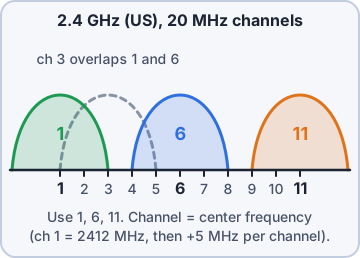
Exam tip Trap: channels 1 and 3 overlap. In 2.4 GHz only 1, 6, 11 are clear of each other.
Regulatory impacts: 802.11h
Each country's regulator decides which channels and how much transmit power are allowed, so APs must be set to the correct country. Some 5 GHz channels are shared with weather and military radar. 802.11h adds DFS (dynamic frequency selection: the AP listens for radar and moves off the channel) and TPC (transmit power control: lowers power to the minimum needed).
Exam tip AP randomly changes 5 GHz channel near an airport? DFS (802.11h) detected radar. Use non-DFS channels if that hurts.
SSID, BSSID and ESSID
The SSID is the network name users see ("Kibble-Staff"). The BSSID is the MAC address of one AP radio serving that SSID; it identifies one basic service set (one AP cell). When many APs broadcast the same SSID with the same security, they form an extended service set, named by the ESSID, and clients can roam between APs without reconnecting.
Exam tip One name, many APs = ESSID. Need to tell which AP a client is on? Look at the BSSID.
Network types
How wireless devices connect.
- Infrastructure mode: clients connect through an AP. The normal office and warehouse setup.
- Ad hoc: devices connect directly to each other with no AP (IBSS). Temporary, small.
- Point to point: a directional wireless bridge between exactly two sites, e.g. two buildings.
- Mesh: APs link to each other wirelessly; only some need a cable. Self-healing; good where cabling is hard.
Exam tip Outdoor yard where you cannot run cable to every AP? Mesh. Building-to-building link? Point to point with directional antennas.
Objective 2.3
Wireless: security, antennas and AP types
Encryption: WPA2 vs WPA3
WPA2 uses AES (CCMP) encryption. Its weak spot is WPA2-Personal: an attacker who captures the 4-way handshake can run an offline dictionary attack on the passphrase. WPA3 replaces the PSK handshake with SAE (Simultaneous Authentication of Equals), which resists offline guessing and gives forward secrecy, makes Protected Management Frames mandatory, and offers a 192-bit Enterprise mode. Never use WEP, WPA or TKIP.
Exam tip Best choice on the exam for new deployments: WPA3. For old clients that cannot do WPA3, WPA2 with AES (not TKIP).
Authentication: PSK vs Enterprise
PSK (Personal): everyone shares one passphrase. Easy, but if one person leaves you must change it on every device. Enterprise uses 802.1X: each user or device authenticates with its own credentials or certificate through an EAP method, checked by a RADIUS server. You can revoke one person without touching anyone else, and logs show who connected.
Exam tip Business with a directory and many staff = Enterprise (802.1X/RADIUS). Home or tiny shop = PSK.
Guest networks and captive portals
A guest network is a separate SSID mapped to its own VLAN that reaches only the internet, never internal subnets; client isolation stops guests from seeing each other. A captive portal is the web page that appears before access is granted: accept the terms, enter a code or log in. Kibble's drivers will get "Kibble-Guest" with a portal and a bandwidth cap.
Exam tip Captive portal = control and accept terms, not strong encryption. Pair it with an isolated VLAN.
Antennas: omnidirectional vs directional
An omnidirectional antenna radiates in all directions horizontally, like a donut: right for ceiling APs covering a room or open area. A directional antenna (patch, Yagi, parabolic dish) focuses energy in one direction for longer range: long warehouse aisles, outdoor yards and point-to-point links between buildings.
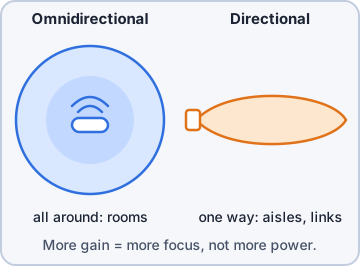
Exam tip Higher gain = more focused, not more total power. A directional antenna "trades width for distance".
Autonomous vs lightweight APs
An autonomous AP is standalone: it holds its own config and is managed one by one. Fine for 1-3 APs. A lightweight AP is managed by a wireless LAN controller (on site or in the cloud), usually via CAPWAP. The controller pushes SSIDs, security and firmware, and tunes channels and power automatically. Large sites like the warehouse use lightweight APs.
Exam tip 40 APs and you want one change to apply everywhere? Lightweight APs plus a controller.
Check yourself 1Kibble wants each warehouse worker to join Wi-Fi with their own directory login so one account can be disabled without affecting others. What should be configured?
- WPA3-Enterprise with 802.1X
- WPA3-Personal with SAE
- WPA2-Personal with AES
- Open SSID with captive portal
Show the answer
Answer: A. WPA3-Enterprise with 802.1X
Enterprise mode authenticates each user through 802.1X and RADIUS, so accounts are individual and can be revoked one at a time. Personal modes use one shared passphrase.
Objective 2.4
Physical installation: closets and racks
MDF and IDF locations
The MDF (main distribution frame) is the central wiring room: the ISP demarc, core switches, routers and the links out to every IDF. An IDF (intermediate distribution frame) is a smaller closet closer to users, on each floor or wing, holding access switches and patch panels, with an uplink (often fiber) back to the MDF. IDFs keep copper runs under the 100 m limit.
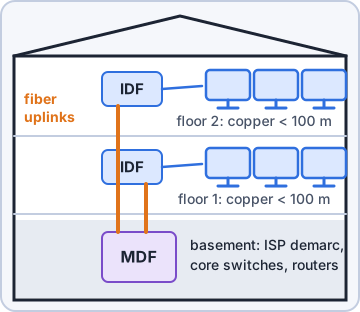
Exam tip Kibble HQ: MDF in the basement. Warehouse: one IDF per end of the building, fiber back to the MDF.
Rack size
Racks are measured in rack units: 1U = 1.75 inches (44.45 mm) of height. A full-height rack is typically 42U, 19 inches wide. Choose 2-post (light network gear) or 4-post (deep servers, UPS), and check depth, weight rating and room for growth. A 2U switch takes two units.
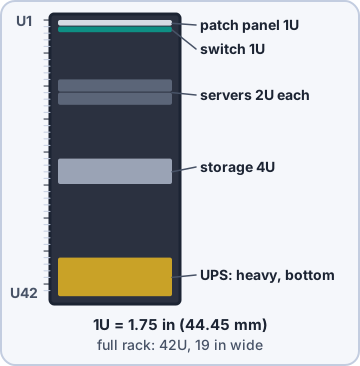
Exam tip Plan the rack elevation (diagram) before mounting: heavy UPS at the bottom, patch panels next to the switches.
Airflow: port-side intake vs port-side exhaust
Data centers use hot aisle / cold aisle: equipment pulls cool air from the cold aisle and blows hot air into the hot aisle. Switches come with fans in either direction. Port-side intake pulls air in at the port side; port-side exhaust blows air out of the port side. Match the fan direction to how the switch is mounted, or it will breathe its own hot exhaust and overheat.
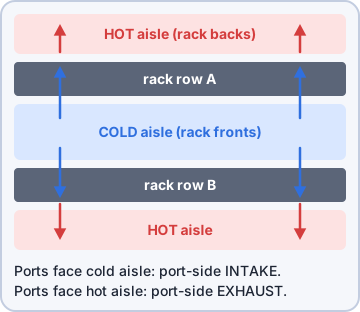
Exam tip Switch ports face the cold aisle? You need port-side intake. Ports face the hot aisle (back of rack)? Port-side exhaust.
Cabling: patch panels and fiber distribution panels
A patch panel is where horizontal copper runs from wall jacks terminate (punched down on the back). Short patch cables on the front connect each port to the switch, so moves happen in the closet, not in the wall. A fiber distribution panel does the same for fiber: it terminates and protects trunk fibers and splices and gives LC/SC adapters for patching to switches. Label both ends and use cable managers.
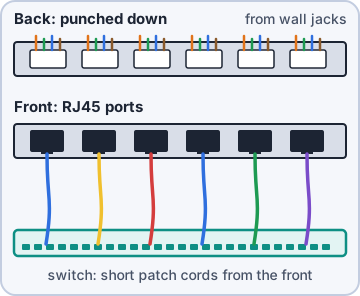
Exam tip Never run a wall cable straight into a switch; terminate on a patch panel so the permanent cable is never handled.
Lockable racks and rooms
Network gear should be physically secured: lockable rack doors and side panels, locked closets with badge or key control, and logs of who entered. A person with physical access can reset a switch, plug in a rogue device or walk out with a drive. The warehouse IDFs get locking cabinets because they sit near the loading dock.
Exam tip Physical security is part of installation, not an afterthought: lock the room, the rack, or both.
Objective 2.4
Physical installation: power and environment
UPS and PDU
A UPS (uninterruptible power supply) keeps equipment running from batteries during an outage or sag, long enough for a generator to start or for a clean shutdown. Types: standby, line-interactive, online (double conversion, the cleanest power). A PDU (power distribution unit) is the rack power strip that feeds each device; metered and switched PDUs show the load and can remotely power-cycle outlets. Use dual PDUs on separate A/B circuits for dual-PSU gear.
Exam tip UPS = backup power. PDU = power distribution in the rack. A PDU alone gives no protection from an outage.
Power load and voltage
Add up the power load of everything in the rack (watts) and keep it under the rating of the UPS, PDU and circuit, with headroom (a common rule is 80% of a circuit). UPS ratings come in VA and watts; size by the watt rating. Check voltage: US offices use 120 V; data centers often use 208 V or 230 V, which needs matching PDUs, plugs and power supplies.
IDF-WH-A load
  2 x 48-port PoE switch
    2 x 740 W               1480 W
  fiber switch                60 W
  total                     1540 W
UPS A: 1500 VA/1000 W -> overloaded
UPS B: 3000 VA/2700 W -> 57% load
Exam tip PoE switches draw a lot more power than plain switches. Count the PoE budget when sizing the UPS.
Environmental factors
Temperature: keep intake air cool and steady; ASHRAE recommends about 18-27 C (64-81 F); watch hot spots. Humidity: too dry causes static discharge, too humid causes condensation and corrosion; keep it moderate (commonly about 40-60% relative humidity) and monitor it. Fire suppression: use clean agent gas systems (inert gas or chemical agents) or pre-action/dry-pipe sprinklers in equipment rooms, not just wet pipes over the racks.
Exam tip Put temperature and humidity sensors in every IDF and alert on them. Closets with no cooling are the classic outage.
Check yourself 2Which room holds the ISP demarc, the core switches and the uplinks to every floor closet?
- IDF
- Hot aisle
- Fiber distribution panel
- MDF
Show the answer
Answer: D. MDF
The MDF is the main distribution frame: the central point for the demarc, core gear and links to each IDF. IDFs are the smaller closets near users.
Practice questions
Answer in your head, then open the answer. Ranger's Packet Trail has 483 questions like these for Network+, with mock exams.
Question 1A technician in the United States is installing three 2.4 GHz access points in adjoining rooms, each using 20 MHz channels. Which channels should be used so the APs do not overlap?
- 3, 6 and 9
- 1, 6 and 11
- 2, 6 and 10
- 1, 5 and 9
Show the answer
Answer: B. 1, 6 and 11
2.4 GHz channels are only 5 MHz apart but each is about 20-22 MHz wide, so in the US only 1, 6 and 11 avoid overlapping. Closer spacing causes adjacent-channel interference.
Question 2Refer to the exhibit, which shows a 2.4 GHz scan taken where a new Corp AP will be mounted. Which channel should the new AP use?
- 11
- 6
- 1
- 3
Show the answer
Answer: A. 11
Only 1, 6 and 11 avoid overlap, and channel 11 has just one weak neighbor at -84 dBm. A channel between them, such as 3, overlaps two busy channels and is the worst choice.
Question 3A dense office has 40 APs on 5 GHz, each set to a 160 MHz channel width. Clients show strong signal but poor throughput, and the survey shows heavy co-channel interference. Which change will most likely help?
- Raise transmit power on every AP
- Move all clients to the 2.4 GHz band
- Reduce the channel width to 20 or 40 MHz
- Increase the channel width to 320 MHz
Show the answer
Answer: C. Reduce the channel width to 20 or 40 MHz
Wide channels leave only a few non-overlapping channels, so many APs end up sharing one. Narrower 20 or 40 MHz channels give more separate channels to spread 40 APs across.
Question 4A home user changes their 5 GHz AP from a 20 MHz to an 80 MHz channel width. What is the main trade-off of this change?
- Stronger encryption, but slower roaming
- Longer range per AP, but lower throughput per client
- Less interference, but fewer clients can connect
- More throughput, but fewer non-overlapping channels
Show the answer
Answer: D. More throughput, but fewer non-overlapping channels
Bonding channels into a wider one carries more data per transmission, but it uses more spectrum, leaving fewer separate channels for nearby APs. Range does not improve.
Question 5An AP near an airport is set to 5 GHz channel 100. Several times a week it logs 'radar detected' and moves to a different channel, briefly disconnecting clients. Which feature is causing this behavior?
- DFS, defined in 802.11h
- Channel bonding
- Transmit beamforming
- Band steering
Show the answer
Answer: A. DFS, defined in 802.11h
802.11h added DFS and transmit power control so 5 GHz Wi-Fi can share spectrum with radar. On DFS channels the AP must leave when it detects radar, which is why some admins avoid DFS channels near airports.
CompTIA, A+, Network+, Security+ and Linux+ are trademarks of CompTIA, Inc. Ranger Gamez is not affiliated with or endorsed by CompTIA. The practice questions are written to the published exam objectives; they are not real exam questions.