 RANGER
 CompTIA Network+ (N10-009) · chapter 9 of 29
Weeks 6-8: Warehouse build, routes and VLANs
In this chapter Objectives 2.1, 2.2
Objective 2.1
Routing: how routers choose a path
Static routing
A static route is typed in by an admin: "to reach network X, send to next hop Y." It uses no CPU or bandwidth for updates, is predictable and secure, but does not react to failures and does not scale. Perfect for a stub site with one way out, like a default route (0.0.0.0/0) to the ISP. A floating static route has a higher administrative distance so it is used only if the main route disappears.
ip route 0.0.0.0 0.0.0.0 203.0.113.1
 ! default route
ip route 10.20.0.0 255.255.0.0 10.0.0.2
 ! warehouse
ip route 10.20.0.0 255.255.0.0 10.9.9.2 250
 ! floating: AD 250 = backup only
Exam tip Gateway of last resort = the default route. Static routes have an administrative distance of 1.
Dynamic routing: OSPF, EIGRP, BGP
Dynamic protocols learn routes from neighbors and reroute around failures automatically.
- OSPF: open-standard link-state protocol. Every router builds a map and runs Dijkstra SPF. Metric = cost (based on bandwidth). Uses areas, with area 0 as the backbone. Interior (inside one organization).
- EIGRP: Cisco-developed advanced distance-vector (often called hybrid). Metric from bandwidth and delay; DUAL keeps backup routes ready for very fast convergence. Interior.
- BGP: path-vector exterior protocol that routes between autonomous systems; the routing protocol of the internet. Chooses by path attributes (AS path and more). Runs over TCP 179.
Exam tip Inside the company: OSPF or EIGRP. Between the company and ISPs or across the internet: BGP.
Route selection: prefix length, AD, metric
When several routes could match, a router decides in this order. (1) Prefix length: the longest (most specific) match wins, always. (2) Administrative distance (AD): if the same prefix is learned from different sources, the most trusted (lowest AD) is installed. (3) Metric: between routes from the same protocol, the lowest metric (OSPF cost, EIGRP composite) wins.
Source              AD (Cisco default)
Connected           0
Static              1
eBGP                20
EIGRP (internal)    90
OSPF                110
RIP                 120
iBGP                200
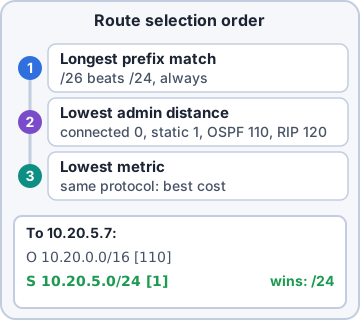
Exam tip Trap: a /26 route beats a /24 even if the /24 has a better AD. Prefix length is checked first.
Objective 2.1
NAT, FHRP and subinterfaces
NAT and PAT
NAT translates IP addresses as packets cross a router or firewall, usually private (RFC1918) inside to public outside. Static NAT: one private to one public, permanent; used to publish a server. Dynamic NAT: private hosts borrow addresses from a public pool. PAT (port address translation, "NAT overload"): many private hosts share one public IP, kept apart by unique source port numbers. PAT is what home routers and most offices do.
PAT table on WH-EDGE (public 203.0.113.20)
Inside local        Inside global
10.20.0.15:51544 -> 203.0.113.20:1024
10.20.0.88:51544 -> 203.0.113.20:1025
10.20.0.130:6211 -> 203.0.113.20:1026
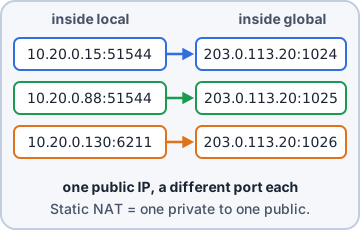
Exam tip Many hosts, one public IP, different ports = PAT. Web server needs a fixed public IP = static NAT.
FHRP and the virtual IP
Hosts have one default gateway. If that router dies, they are stranded. A First Hop Redundancy Protocol (FHRP) lets two or more routers share a virtual IP (VIP) and virtual MAC. Hosts use the VIP as their gateway; one router is active, another standby, and the standby takes over in seconds if the active fails. Protocols: HSRP (Cisco), VRRP (open standard), GLBP (Cisco, also load-balances).
Hosts gateway: 10.20.0.1 (VIP)
  WH-R1 10.20.0.2  priority 110  ACTIVE
  WH-R2 10.20.0.3  priority 100  STANDBY
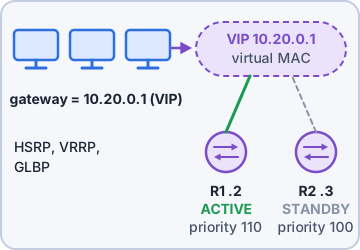
Exam tip Clients point to the VIP, never to a router's real address, or failover does not help them.
Subinterfaces (router on a stick)
A subinterface is a logical interface carved out of one physical interface. Connect one router port to a switch trunk, create one subinterface per VLAN, tag each with 802.1Q, and give it the gateway IP for that VLAN. The router now routes between VLANs over a single cable: "router on a stick". Cheap, but all inter-VLAN traffic shares one link.
interface Gi0/0.20
 encapsulation dot1Q 20
 ip address 10.20.0.1 255.255.255.128
interface Gi0/0.30
 encapsulation dot1Q 30
 ip address 10.20.0.129 255.255.255.192
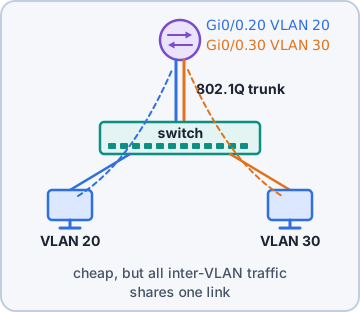
Exam tip Subinterface number (.20) is just a label; the dot1Q VLAN ID is what must match the switch.
Objective 2.2
VLANs, SVIs and trunks
VLANs and the VLAN database
A VLAN splits one physical switch into separate logical networks; each VLAN is its own broadcast domain and IP subnet. Moving traffic between VLANs needs a router or Layer 3 switch. VLAN IDs 1-4094 are usable (1 is the default VLAN; 1002-1005 reserved on Cisco). The switch keeps VLAN IDs and names in its VLAN database (vlan.dat on Cisco); a port cannot carry a VLAN that does not exist there.
vlan 20
 name FLOOR-SCANNERS
vlan 30
 name OFFICE
vlan 50
 name VOICE
Exam tip Assigning a port to VLAN 40 before VLAN 40 exists in the database leaves the port inactive.
Switch virtual interface (SVI)
An SVI is a virtual Layer 3 interface for a VLAN on a switch ("interface vlan 30"). On a Layer 3 switch, the SVI IP becomes the default gateway for that VLAN and the switch routes between VLANs at wire speed: faster than router on a stick. On a Layer 2 switch, one SVI is usually just the management IP.
ip routing
interface vlan 30
 ip address 10.20.0.129 255.255.255.192
 no shutdown
Exam tip An SVI is up/up only if the VLAN exists and at least one port in that VLAN is up.
Access ports, trunks, 802.1Q and the native VLAN
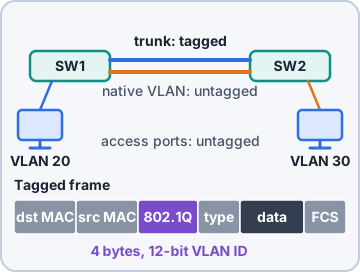
An access port belongs to one VLAN and sends untagged frames to the device. A trunk carries many VLANs between switches (or to a router or AP). 802.1Q tagging inserts a 4-byte tag with a 12-bit VLAN ID into each frame on the trunk. Frames in the native VLAN cross the trunk untagged. Both ends must agree on the native VLAN, or traffic leaks between VLANs and you see mismatch errors.
interface Gi1/0/48
 switchport mode trunk
 switchport trunk native vlan 999
 switchport trunk allowed vlan 20,30,40,50
Exam tip Security best practice: change the native VLAN from 1 to an unused VLAN and allow only needed VLANs on trunks.
Voice VLAN
A desk phone usually sits between the wall jack and the PC. A voice VLAN lets one access port carry two VLANs: the phone tags its voice traffic with the voice VLAN (learned via CDP/LLDP), and the PC plugged into the phone sends untagged data VLAN traffic. Voice is kept separate so QoS can prioritize it.
interface Gi1/0/10
 switchport mode access
 switchport access vlan 30
 switchport voice vlan 50
Exam tip Port with an IP phone and a PC behind it: access VLAN for the PC, voice VLAN for the phone. Not a full trunk.
Objective 2.2
Interfaces, spanning tree and MTU
Link aggregation
Link aggregation bundles several physical links into one logical link (port channel / EtherChannel): more bandwidth and redundancy, and spanning tree sees it as one link so nothing gets blocked. LACP (IEEE 802.3ad, now 802.1AX) negotiates the bundle. All member ports must match: speed, duplex, VLANs and trunk settings.
Exam tip Two 10G uplinks to the warehouse distribution switch in one LACP bundle = 20G and survives a single link failure.
Speed and duplex
Each port has a speed (10/100/1000/10G) and duplex: full duplex sends and receives at once; half duplex takes turns and can collide. Leave both ends on auto-negotiation or hard-code both ends the same. A duplex mismatch (one full, one half) still links up, but is painfully slow: the half-duplex side logs late collisions and the full side logs CRC/runt errors.
Exam tip Hard-coding one side and leaving the other on auto often causes a duplex mismatch: the auto side falls back to half duplex.
Spanning tree (STP)
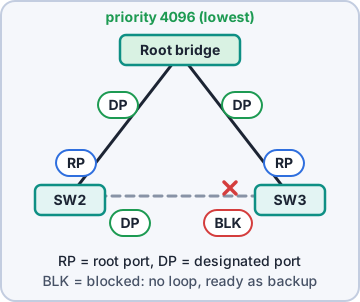
Redundant switch links create Layer 2 loops: broadcasts circle forever (broadcast storm) and MAC tables flap. Spanning tree (802.1D; Rapid STP 802.1w) blocks redundant paths. Switches elect a root bridge (lowest bridge ID = priority, default 32768, then lowest MAC). Each switch picks a root port (best path to root); each segment gets a designated port; the rest are blocked, ready to take over if a link fails.
802.1D port states:
  blocking -> listening -> learning
  -> forwarding  (plus disabled)
RSTP: discarding, learning, forwarding

spanning-tree vlan 20,30 priority 4096
  ! make this switch the root
Exam tip Set the root bridge on purpose (low priority on the core/distribution switch). Use PortFast + BPDU guard on access ports.
MTU and jumbo frames
The MTU (maximum transmission unit) is the largest payload a link carries in one frame: 1500 bytes by default on Ethernet. Jumbo frames (up to about 9000 bytes) cut overhead for storage (iSCSI), backups and VM migration. Every device on the path must support the same jumbo MTU; a mismatch causes drops or fragmentation, often seen as "small pings work, big transfers hang".
Exam tip Jumbo frames help SAN/iSCSI traffic inside the data center. They are not used across the internet.
Check yourself 1Two warehouse routers must share one default gateway address so hosts keep working if one router fails. What should be configured?
- A floating static route on each host
- PAT on both routers
- Subinterfaces for each VLAN
- An FHRP with a virtual IP
Show the answer
Answer: D. An FHRP with a virtual IP
An FHRP such as VRRP or HSRP gives the routers a shared virtual IP. Hosts use the VIP as their gateway, and the standby router takes over if the active one fails.
Check yourself 2A link between a switch and a server runs at 1 Gbps but transfers are very slow. The switch port shows many late collisions. What is the MOST likely cause?
- Duplex mismatch
- Native VLAN mismatch
- Spanning tree blocking
- MTU set to 1500
Show the answer
Answer: A. Duplex mismatch
Late collisions on a link that is up but slow are the classic sign of a duplex mismatch: the half-duplex side sees collisions caused by the full-duplex side.
Practice questions
Answer in your head, then open the answer. Ranger's Packet Trail has 483 questions like these for Network+, with mock exams.
Question 1A branch office has one router with a single WAN link back to headquarters, and no other paths exist. The admin wants the least CPU and bandwidth overhead. How should the branch router learn the way to the HQ networks?
- A static default route to the HQ router
- OSPF with the branch router in a stub area
- BGP peering with the HQ router
- EIGRP with a feasible successor
Show the answer
Answer: A. A static default route to the HQ router
A stub site with one exit needs only a static default route, which uses no routing-protocol traffic or CPU. A dynamic protocol such as OSPF adds overhead and gives no benefit when there is no alternate path.
Question 2A security-minded admin is deciding between static routes and a dynamic routing protocol for a small, stable network that rarely changes. Which of the following are advantages of static routing? Choose two.
- It scales easily to hundreds of routers
- New subnets are learned without any admin work
- No update traffic or extra CPU load on the routers
- The admin controls exactly which path each network uses
- Routes adjust automatically when a link fails
Show the answer
Answers: C. No update traffic or extra CPU load on the routers, D. The admin controls exactly which path each network uses
Static routes cost no protocol overhead and give predictable, admin-chosen paths, and no routing updates can be spoofed. They do not adapt to failures or new subnets on their own, which is the job of dynamic routing.
Question 3A company is getting a second internet connection from a different ISP and has its own public address block and autonomous system number. Which routing protocol will its edge router use to exchange routes with both ISPs?
- OSPF
- BGP
- EIGRP
- RIP
Show the answer
Answer: B. BGP
BGP is the exterior gateway protocol that exchanges routes between autonomous systems, such as an enterprise and its ISPs. OSPF and EIGRP are interior protocols used within a single organization.
Question 4A network team runs routers from three different vendors across 12 sites. They want an open-standard protocol that floods link-state updates, builds a full topology map and can be divided into areas around a backbone area 0. Which protocol fits?
- RIPv2
- EIGRP
- BGP
- OSPF
Show the answer
Answer: D. OSPF
OSPF is an open-standard link-state protocol that uses areas, with area 0 as the backbone, and runs on most vendors' routers. EIGRP is Cisco-originated and distance-vector based, so it is the tempting but wrong pick.
Question 5An admin wants OSPF to prefer the 10 Gbps fiber link between two sites over a 1 Gbps backup link. Which value does OSPF compare to choose its best path?
- Cost, based on interface bandwidth
- A composite of bandwidth and delay values
- The length of the AS path
- Hop count to the destination
Show the answer
Answer: A. Cost, based on interface bandwidth
OSPF's metric is cost, calculated from reference bandwidth divided by interface bandwidth, so faster links get a lower cost. A bandwidth-and-delay composite describes EIGRP.
CompTIA, A+, Network+, Security+ and Linux+ are trademarks of CompTIA, Inc. Ranger Gamez is not affiliated with or endorsed by CompTIA. The practice questions are written to the published exam objectives; they are not real exam questions.