 RANGER
 CompTIA Network+ (N10-009) · chapter 22 of 29
Week 22: Lock it down
In this chapter Objectives 4.3, 5.5
Objective 4.3
Device hardening and NAC
Device hardening
Hardening removes easy ways in:
- Disable unused ports: shut them down (and park them in an unused VLAN)
- Disable unused services: Telnet, HTTP management, CDP on edge ports, unused SNMP
- Change default passwords: admin/admin and 'public' are in every attacker's list
Exam tip Each unneeded open port or service is attack surface. Less running = less to break into.
Port security
Port security limits which and how many MAC addresses may use a switch port. Learned MACs can be 'sticky' (saved to config). On a violation the port can shutdown (err-disabled), restrict (drop and log) or protect (drop silently).
interface Gi1/0/12
 switchport mode access
 switchport port-security
 switchport port-security maximum 1
 switchport port-security mac-address sticky
 switchport port-security violation shutdown
Exam tip Stops MAC flooding and casual 'I plugged in my own switch' problems.
802.1X
IEEE 802.1X is port-based NAC. Three roles: the supplicant (client), the authenticator (switch or AP) and the authentication server (usually RADIUS). Until the user or device authenticates with EAP, the port only passes authentication traffic.
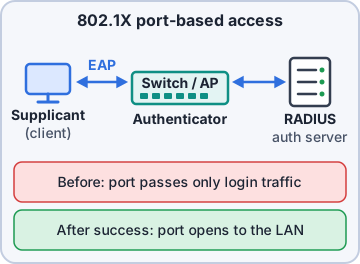
Exam tip 802.1X = log in before the port opens. Works on wired ports and WPA2/WPA3-Enterprise Wi-Fi.
MAC filtering
MAC filtering allows or blocks devices by MAC address on a switch or AP. It is easy to set up but weak: MAC addresses are visible on the wire and easy to spoof. Use it as an extra layer, never the only control.
Exam tip Exam trap: MAC filtering is not strong authentication. 802.1X is.
Key management
Key management is the life of cryptographic keys: generate, store securely, distribute, rotate, revoke and destroy. Weak handling (keys in emails, never rotated, shared everywhere) breaks even perfect encryption. Use secure storage (HSM or key vault), limit who can access keys, and rotate on schedule or after staff leave.
Objective 4.3
Security rules and zones
ACLs
An access control list (ACL) is an ordered list of permit/deny rules matched on IPs, ports and protocols. Rules are checked top to bottom; the first match wins, and an implicit deny at the end drops anything not permitted.
10 permit tcp 10.20.5.0/24
     host 10.1.8.20 eq 443
20 deny   ip 10.20.5.0/24 10.1.0.0/16
30 permit ip 10.20.5.0/24 any
(implicit deny any)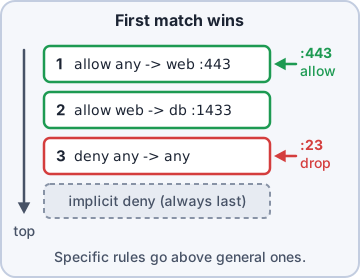
Exam tip Order matters: put specific rules above general ones.
URL and content filtering
URL filtering allows or blocks web access by address or category (gambling, malware sites). Content filtering inspects what is actually in the traffic: file types, keywords, malicious scripts. Both usually live on a proxy or next-generation firewall.
Exam tip Block a whole category of websites → URL filtering. Block .exe downloads or keywords → content filtering.
Zones and the screened subnet
Firewalls group interfaces into zones. Trusted zones are internal networks you control; untrusted is the internet. A screened subnet (formerly DMZ) sits between them for public-facing servers like the web shop: reachable from the internet, but walled off from the internal network.
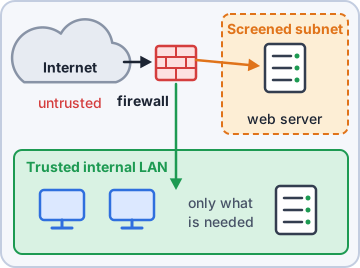
Exam tip Public web server goes in the screened subnet, never on the internal LAN.
Objective 5.5
Tools: Nmap and netstat
Nmap
Nmap scans hosts and ports: which devices are up, which ports are open, which services and versions run. Use it to verify hardening (did Telnet really get turned off?) and find unknown devices. Only scan networks you are authorized to scan.
$ nmap -sV 10.30.0.2
PORT    STATE SERVICE VERSION
22/tcp  open  ssh     OpenSSH 8.0
23/tcp  open  telnet  Cisco telnetd
80/tcp  open  http    Cisco http config
443/tcp open  https
netstat
netstat shows a host's own connections and listening ports. 'netstat -an' lists all, numerically; on Windows '-b' shows the program (admin) and '-o' the process ID. Use it to spot unexpected listeners or connections to strange addresses. On Linux, 'ss' is the modern replacement.
C:\> netstat -ano
Proto  Local Address
       Foreign Address    State     PID
TCP    0.0.0.0:3389
       0.0.0.0:0          LISTENING 1044
TCP    10.10.4.57:50122
       203.0.113.80:443   ESTABLISHED 7712
Check yourself 1Priya wants laptops to prove the user's identity to a RADIUS server before a wired port forwards any normal traffic. Which should she use?
- Port mirroring
- URL filtering
- MAC filtering
- 802.1X
Show the answer
Answer: D. 802.1X
802.1X keeps the port closed to normal traffic until the supplicant authenticates through the switch to RADIUS.
Practice questions
Answer in your head, then open the answer. Ranger's Packet Trail has 483 questions like these for Network+, with mock exams.
Question 1A new branch switch has 48 ports, but only 20 are cabled to desks. What hardening step BEST prevents someone from plugging into the spare ports in the lobby?
- Change the switch's hostname and banner
- Enable jumbo frames on unused ports
- Configure the unused ports as trunks
- Administratively shut down the unused ports
Show the answer
Answer: D. Administratively shut down the unused ports
Disabling unused ports (and placing them in an unused VLAN) stops unauthorized devices from getting network access.
Question 2A technician installs a new wireless controller. What is the FIRST hardening step after powering it on?
- Turn on Telnet as a backup access path
- Enable SNMPv1 for monitoring tools
- Change the default admin password
- Put management on default VLAN 1
Show the answer
Answer: C. Change the default admin password
Default credentials are publicly documented, so they should be changed immediately.
Question 3A security audit of a router finds these services enabled. Which TWO should be disabled as part of device hardening? (Choose two.)
- Syslog to the SIEM
- HTTP management server
- NTP client
- Telnet server
- SSH version 2
Show the answer
Answers: B. HTTP management server, D. Telnet server
Hardening removes unneeded or insecure services. Telnet and plain HTTP management send credentials in cleartext; SSHv2, NTP and logging are needed and secure.
Question 4A switch port in a public area should allow only the one kiosk PC attached to it and shut down if any other device is plugged in. Which feature does this?
- Link aggregation using LACP on the kiosk port
- 802.1Q tagging with a dedicated kiosk VLAN
- Spanning Tree Protocol with PortFast and BPDU guard enabled
- Port security with a maximum of one MAC address
Show the answer
Answer: D. Port security with a maximum of one MAC address
Port security limits which and how many MAC addresses a port accepts; with violation mode shutdown, it err-disables the port on a violation.
Question 5In an 802.1X deployment, what role does the switch play?
- Certificate authority
- Supplicant
- Authenticator
- Authentication server
Show the answer
Answer: C. Authenticator
802.1X has three roles: the supplicant (client), the authenticator (switch or AP) that controls the port, and the authentication server (usually RADIUS).
CompTIA, A+, Network+, Security+ and Linux+ are trademarks of CompTIA, Inc. Ranger Gamez is not affiliated with or endorsed by CompTIA. The practice questions are written to the published exam objectives; they are not real exam questions.