 RANGER
 CompTIA Network+ (N10-009) · chapter 26 of 29
Week 26: Loops and lanes
In this chapter Objectives 5.3, 5.5
Objective 5.3
Spanning tree issues
Network loops
Ethernet frames have no TTL, so in a Layer 2 loop broadcasts circle forever and multiply: a broadcast storm. Symptoms: all port lights blazing, CPU at 100%, MAC addresses flapping between ports, network unusable. Spanning Tree Protocol (STP, 802.1D) prevents loops by blocking redundant paths.
Exam tip Protect edge ports with PortFast + BPDU guard: a looped or rogue switch port goes err-disabled instead.
Root bridge selection
STP first elects a root bridge: the switch with the lowest bridge ID (priority, default 32768, plus VLAN, then MAC address as tie-breaker). If you don't set priority, the oldest switch (lowest MAC) may win, forcing traffic through a slow closet switch. Set the core's priority low on purpose.
VLAN0030
 Root ID    Priority 24606
            Address  0011.2233.4401
 Bridge ID  Priority 32798
            Address  00aa.bb12.3456
Interface  Role Sts Cost Prio.Nbr
Gi1/0/49   Root FWD 4    128.49
Gi1/0/50   Altn BLK 4    128.50
Port roles and states
Roles: root port (each non-root switch's best path to root), designated port (forwarding port on each segment), blocked ports (RSTP: alternate/backup) that stand by. 802.1D states: blocking → listening → learning → forwarding (plus disabled). RSTP (802.1w) uses discarding, learning, forwarding and converges much faster.
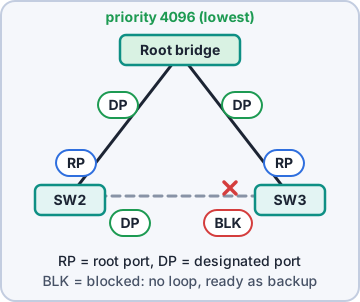
Exam tip Listening/learning delays (~30 s in 802.1D) explain why a PC 'takes ages' to get a link. PortFast skips them on edge ports.
Objective 5.3
VLAN and ACL issues
Incorrect VLAN assignment
A port in the wrong VLAN puts the device in the wrong subnet: it may get a DHCP address from the wrong scope, or no address, and can't reach what it needs. Also check trunks: a VLAN missing from a trunk's allowed list stops at that link.
Exam tip Device gets an IP from the wrong subnet → check the port's access VLAN first.
ACLs blocking traffic
A misordered or overly broad ACL on a switch or router interface can silently drop legit traffic. Remember: first match wins, and the implicit deny drops anything not explicitly permitted. Check hit counters to see which line matched.
Exam tip Ping works but the app doesn't? An ACL may permit ICMP while denying the app's port.
Objective 5.5
Tools: show vlan, MAC table, LLDP/CDP, show config
Where is that device?
show vlan lists VLANs and their access ports. show mac-address-table shows which MAC is learned on which port and VLAN. LLDP (vendor-neutral, IEEE 802.1AB) and CDP (Cisco) let neighbors announce name, model, port and IP: great for mapping links without walking to the closet. show config (show running-config) shows the active config.
SW# show mac address-table address
      3c52.82aa.197e
Vlan  Mac Address     Type     Ports
30    3c52.82aa.197e  DYNAMIC  Gi1/0/30
SW# show lldp neighbors
Device ID  Local Intf  Hold  Port ID
WH-SW2     Gi1/0/50    120   Gi1/0/52
Exam tip Exam: identify the neighbor switch and port connected to an interface → LLDP/CDP.
Check yourself 1After a loop, Dev wants an edge port to shut down immediately if a switch is plugged into it. Which feature?
- BPDU guard
- DHCP snooping
- Root guard on the core
- Port mirroring
Show the answer
Answer: A. BPDU guard
BPDU guard err-disables an edge port that receives a BPDU, which only switches send.
Practice questions
Answer in your head, then open the answer. Ranger's Packet Trail has 483 questions like these for Network+, with mock exams.
Question 1Minutes after a visitor connected a patch cable between two wall jacks in a conference room, the whole floor slowed to a crawl. Switch CPUs hit 100%, and broadcast traffic is extremely high. Spanning tree is disabled on the access switches. What is the MOST likely cause?
- DHCP address pool exhaustion
- A duplicate IP address on the network
- A layer 2 switching loop
- A routing loop between two routers
Show the answer
Answer: C. A layer 2 switching loop
Joining two switch ports with no STP creates a loop; broadcasts circulate forever because Ethernet frames have no TTL, causing a broadcast storm and high CPU.
Question 2Users in VLAN 10 report very slow access, and the switch log fills with the messages in the exhibit. What should the technician do FIRST to restore service?
- Clear the switch's ARP cache
- Shut down Gi1/0/12 and trace where it connects
- Assign the host a new static IP address
- Raise the spanning tree priority value on this switch
Show the answer
Answer: B. Shut down Gi1/0/12 and trace where it connects
The same MAC appearing on two ports over and over means frames are looping. Shutting one of the looped ports stops the storm; then the technician finds the cause and makes sure STP is enabled.
Question 3All switches in a campus use the default STP priority. An old access switch in a wiring closet has the lowest MAC address, so it became the root bridge, and traffic now takes poor paths. What is the BEST fix?
- Set a lower STP priority on the core switch
- Set a higher STP priority on the core switch
- Disable spanning tree on the access switch
- Replace the access switch with a newer model
Show the answer
Answer: A. Set a lower STP priority on the core switch
The root bridge is the switch with the lowest bridge ID (priority, then MAC). Lowering the core switch's priority (for example to 4096) makes it the root.
Question 4A switch has two uplinks toward the root bridge. Long after 802.1D spanning tree has converged, the redundant uplink only receives BPDUs: it sends none, learns no MAC addresses and forwards no user frames. Which state is it in?
- Listening
- Learning
- Forwarding
- Blocking
Show the answer
Answer: D. Blocking
In 802.1D, a redundant port that would cause a loop stays in blocking: it listens for BPDUs so it can take over if the active path fails, but it doesn't learn MACs or forward frames. Listening and learning are short transition states.
Question 5On each non-root switch, spanning tree picks one port that offers the lowest-cost path back to the root bridge. What is this port's role?
- Root port
- Designated port
- Alternate port
- Edge port
Show the answer
Answer: A. Root port
Every non-root switch has exactly one root port, its best path to the root bridge. Designated ports forward onto each segment; alternate ports are blocked backups.
CompTIA, A+, Network+, Security+ and Linux+ are trademarks of CompTIA, Inc. Ranger Gamez is not affiliated with or endorsed by CompTIA. The practice questions are written to the published exam objectives; they are not real exam questions.