 RANGER
 CompTIA Network+ (N10-009) · chapter 27 of 29
Week 27: Lost packets, wrong turns
In this chapter Objectives 5.3, 5.5
Objective 5.3
Route selection
The routing table
A router picks the route with the longest prefix match (most specific). If two sources offer the same prefix, the lower administrative distance wins (connected 0, static 1, OSPF 110, RIP 120); then the lower metric.
R1# show ip route
Gateway of last resort is 203.0.113.1
  to network 0.0.0.0
S*  0.0.0.0/0 [1/0] via 203.0.113.1
C   10.1.8.0/24 is directly connected,
      Vlan8
O   10.20.0.0/16 [110/20] via 10.1.0.2
S   10.20.5.0/24 [1/0] via 10.1.0.9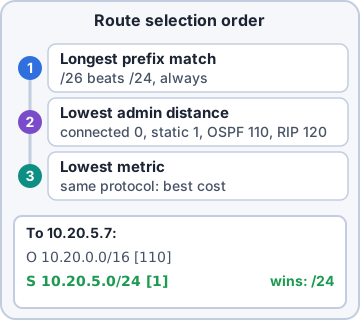
Exam tip Traffic to 10.20.5.7 uses the /24 static via 10.1.0.9, not the /16 OSPF route: longest prefix wins.
Default routes
A default route (0.0.0.0/0, IPv6 ::/0) is used when nothing more specific matches: the 'gateway of last resort', usually toward the ISP. A missing default route means local subnets work but the internet does not.
Exam tip 'Gateway of last resort is not set' in show ip route = no default route.
Objective 5.3
Addressing problems
Address pool exhaustion
When a DHCP scope runs out, new clients get no lease and fall back to APIPA (169.254.x.x). Common on guest Wi-Fi with long leases. Fixes: shorten the lease, enlarge the scope/subnet, or remove stale leases.
Exam tip Old devices fine, NEW devices get 169.254 → suspect pool exhaustion.
Incorrect default gateway
Wrong gateway: the host talks to its own subnet fine but nothing beyond it. The gateway must be a router address IN the host's subnet.
Exam tip Can ping local hosts, can't ping anything remote → check the default gateway.
Incorrect IP address: duplicate IP
Two devices with the same IP fight: intermittent connectivity, and Windows reports an address conflict. Usually a static IP inside a DHCP range without an exclusion. arp -a or the switch's ARP table shows which MAC owns the IP now.
Exam tip Prevent with DHCP exclusions/reservations and IPAM.
Incorrect subnet mask
A wrong mask makes the host misjudge what is local. Mask too large (/16 instead of /24): it ARPs for remote hosts as if they were local and fails to reach them. Mask too small: it sends local traffic to the gateway, or can't reach part of its own subnet.
Exam tip Some hosts reachable, others in the same subnet not? Compare masks.
Objective 5.5
Command-line tools
ping and traceroute/tracert
ping sends ICMP echo requests: is it reachable, how fast, any loss? tracert (Windows) / traceroute (Linux/macOS) lists each router hop to a destination, showing where the path stops or slows.
C:\> tracert -d 8.8.8.8
 1   1 ms   1 ms   1 ms  10.30.0.1
 2   9 ms   8 ms   9 ms  203.0.113.1
 3    *      *      *    Request timed out.
 4  14 ms  13 ms  14 ms  198.51.100.9
Exam tip One row of * then later hops answer = that router just ignores ICMP/TTL probes, not a failure.
ipconfig, ip, ifconfig and arp
ipconfig (Windows; /all for MAC, DHCP, DNS; /release, /renew, /flushdns). ip (Linux: 'ip addr', 'ip route') replaces the older ifconfig. arp -a shows the IP-to-MAC cache, handy for duplicate IPs and ARP poisoning.
$ ip addr show eth0
  inet 10.30.0.45/24 brd 10.30.0.255
    scope global eth0
$ ip route
default via 10.30.0.1 dev eth0
show route and show arp
On network devices: show route (Cisco: show ip route) prints the routing table and default route; show arp (show ip arp) lists IP-to-MAC mappings the router has learned, so you can find who is using an address.
Exam tip Find a duplicate IP: show arp on the gateway gives the MAC; show mac-address-table gives the switch port.
Check yourself 1Store 3 guest Wi-Fi: returning guests connect fine, but new guests get 169.254.x.x. The /24 scope has an 8-day lease. What is the most likely issue?
- Missing default route
- Rogue DHCP server
- Incorrect subnet mask on the AP
- DHCP address pool exhaustion
Show the answer
Answer: D. DHCP address pool exhaustion
254 addresses with 8-day leases fill up quickly with walk-in visitors. New clients get no lease and fall back to APIPA.
Practice questions
Answer in your head, then open the answer. Ranger's Packet Trail has 483 questions like these for Network+, with mock exams.
Question 1Desktops on one switch get APIPA addresses right after booting, then get a DHCP lease about 30 seconds later. The ports are access ports running classic 802.1D spanning tree. What causes the delay?
- The DHCP server waits 30 seconds before sending an offer
- The switch must learn the DHCP server's MAC before forwarding
- The PCs' NICs take 30 seconds to negotiate speed and duplex
- STP holds each new port in listening and learning first
Show the answer
Answer: D. STP holds each new port in listening and learning first
Classic STP keeps a newly connected port in listening (15 s) and learning (15 s) before forwarding, so the PC's first DHCP Discovers are dropped and it falls back to APIPA. Enabling PortFast on edge ports skips those states.
Question 2A user connected a small managed switch to his desk port, and the port immediately went err-disabled. Port security is not configured on that switch. Which feature MOST likely disabled the port?
- Root guard
- BPDU guard
- Loop guard
- DHCP snooping
Show the answer
Answer: B. BPDU guard
BPDU guard err-disables an edge port as soon as it receives a BPDU, which a managed switch sends. Root guard only blocks a port that would claim a better root.
Question 3After moving desks, a user can browse the internet but can't reach the file servers. His PC now gets a 10.99.0.x address, which is the guest subnet, instead of the staff 10.20.0.x range. What is the MOST likely cause?
- The DHCP scope for staff is exhausted
- The PC has an incorrect default gateway
- The new switch port is in the guest VLAN
- The file server has a duplicate IP address
Show the answer
Answer: C. The new switch port is in the guest VLAN
Getting a lease from another subnet means the port belongs to the wrong VLAN. Assigning the port to the staff VLAN fixes it.
Question 4An Accounting user on switch port Gi0/4 can't reach the accounting application server, which is in VLAN 20. Other Accounting users are fine. Based on the exhibit, what should the technician do?
- Change Gi0/4's access VLAN to 10
- Configure Gi0/4 as a trunk port
- Change Gi0/4's access VLAN to 20
- Run no shutdown on Gi0/4
Show the answer
Answer: C. Change Gi0/4's access VLAN to 20
Gi0/4 is listed under VLAN 10 (Sales), but the user belongs in VLAN 20 (Accounting). switchport access vlan 20 on Gi0/4 fixes the assignment.
Question 5A new VLAN 40 was created on the core and on an access switch, and the access ports were assigned. Clients on that access switch get APIPA addresses; the DHCP server is reached through the core. Other VLANs work. What is the MOST likely cause?
- VLAN 40 isn't allowed on the trunk to the core
- The access ports are administratively down
- The core switch is the STP root bridge
- The clients have an incorrect subnet mask
Show the answer
Answer: A. VLAN 40 isn't allowed on the trunk to the core
If the trunk's allowed VLAN list omits VLAN 40, its DHCP broadcasts never reach the core, so clients fall back to APIPA. Adding VLAN 40 to the trunk fixes it.
CompTIA, A+, Network+, Security+ and Linux+ are trademarks of CompTIA, Inc. Ranger Gamez is not affiliated with or endorsed by CompTIA. The practice questions are written to the published exam objectives; they are not real exam questions.