 RANGER
 CompTIA Network+ (N10-009) · chapter 28 of 29
Week 28: Slow is the new down
In this chapter Objectives 5.4, 5.5
Objective 5.4
Network performance issues
Bandwidth vs. throughput
Bandwidth is a link's capacity (a 100 Mbps circuit). Throughput is what you actually get through it, after overhead, errors and contention. A speed tester measures throughput, latency and sometimes jitter to a test server.
Exam tip Paying for 100 Mbps but measuring 40? Compare at different times and points to find where capacity is lost.
Congestion/contention and bottlenecking
Congestion happens when more traffic arrives than a link or device can forward: queues fill, latency climbs, packets drop. Contention is many devices competing for the same shared medium or link. A bottleneck is the single slowest point in the path, such as a 1 Gbps uplink feeding a 10 Gbps core.
Exam tip Fix congestion with more capacity, QoS for priority traffic, or moving bulk jobs off-peak.
Latency, packet loss, jitter
Latency: time for a packet to travel (ms). Packet loss: packets that never arrive (congestion, errors). Jitter: VARIATION in latency between packets. Voice and video hate jitter and loss: aim for under about 30 ms jitter, under 1% loss and under 150 ms one-way latency.
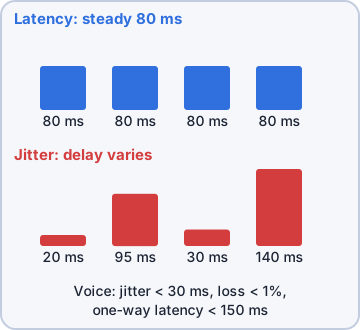
Exam tip Steady 80 ms = latency. 20, 95, 30, 140 ms = jitter. Robot voice = jitter or loss.
Objective 5.5
Tools: speed tester, protocol analyzer, tcpdump
Protocol analyzer and tcpdump
A protocol analyzer (Wireshark) decodes captured packets so you can see retransmissions, resets, slow handshakes and which app floods the link. tcpdump is the command-line capture tool on Linux and network appliances; save with -w and open the file in an analyzer.
$ tcpdump -i eth0 -nn udp \
    portrange 16384-32767
10:02:11.4 IP 10.20.6.14.16502 >
  10.1.30.5.21040: UDP
$ tcpdump -i eth0 -w wan.pcap \
    host 10.1.8.40
Exam tip Speed tester = how fast. Analyzer = why slow.
Check yourself 1A VoIP ping test shows replies of 22, 140, 31, 118 and 25 ms with no loss. Which issue does this best describe?
- High bandwidth
- Jitter
- Attenuation
- Packet loss
Show the answer
Answer: B. Jitter
Delay varies widely from packet to packet: that is jitter, which makes calls choppy.
Practice questions
Answer in your head, then open the answer. Ranger's Packet Trail has 483 questions like these for Network+, with mock exams.
Question 1Every weekday from 9 to 10 a.m., users complain the internet is slow. The monitoring graph for the 200 Mbps WAN link shows 98% utilization during that hour and about 30% the rest of the day. What is the MOST likely issue?
- Congestion on the WAN link
- Attenuation on the WAN cable
- An incorrect default gateway
- A duplicate IP address on the WAN
Show the answer
Answer: A. Congestion on the WAN link
The link is saturated at peak, so traffic contends for limited bandwidth and slows. QoS, scheduling or more bandwidth would address it.
Question 2Servers and workstations all have 10 Gbps NICs, but large file copies between two floors never exceed about 940 Mbps. The floor switches are linked by a 1 Gbps uplink. What is the MOST likely issue?
- High jitter on the inter-floor uplink
- Packet loss from a bad NIC
- The 1 Gbps uplink is a bottleneck
- Wireless channel overlap
Show the answer
Answer: C. The 1 Gbps uplink is a bottleneck
The slowest link in the path caps end-to-end throughput. The transfers top out near the 1 Gbps uplink's practical limit, so upgrading or aggregating it removes the bottleneck.
Question 3A business buys a 500 Mbps internet plan. A speed test during business hours shows 320 Mbps actually delivered. Which term describes the 320 Mbps figure?
- Bandwidth
- Latency
- Jitter
- Throughput
Show the answer
Answer: D. Throughput
Bandwidth is the theoretical maximum of a link; throughput is the data rate actually achieved, which is reduced by overhead, contention and other factors.
Question 4A remote site connects over a geostationary satellite link with plenty of bandwidth, but interactive apps over the VPN feel sluggish, and ping times to headquarters are about 600 ms. What is the MOST likely cause?
- High latency inherent to the satellite link
- Insufficient bandwidth on the satellite link
- A duplex mismatch at the remote site
- Channel overlap on the site's Wi-Fi
Show the answer
Answer: A. High latency inherent to the satellite link
Geostationary satellites orbit about 35,786 km up, so each round trip takes roughly 500-600 ms. That latency hurts interactive traffic even with plenty of bandwidth.
Question 5VoIP users at a branch say calls sound choppy. A technician runs a ping to the call server and gets the results in the exhibit. Which issue is MOST likely?
- Packet loss
- Jitter
- Incorrect default gateway
- Address pool exhaustion
Show the answer
Answer: B. Jitter
Reply times swing between about 20 ms and 187 ms. That variation in delay is jitter, which makes real-time voice choppy even with no loss.
CompTIA, A+, Network+, Security+ and Linux+ are trademarks of CompTIA, Inc. Ranger Gamez is not affiliated with or endorsed by CompTIA. The practice questions are written to the published exam objectives; they are not real exam questions.