 RANGER
 CompTIA Network+ (N10-009) · chapter 29 of 29
Week 29: Rosa's Wi-Fi
In this chapter Objectives 5.4, 5.5
Objective 5.4
Wireless issues
Interference and channel overlap
Interference comes from other Wi-Fi and from non-Wi-Fi sources (microwaves, cordless phones, motors) in the same frequency. Channel overlap: in 2.4 GHz only channels 1, 6 and 11 don't overlap (in the US). APs on channels 3 or 9 bleed into neighbors. In 5 GHz there are many more non-overlapping channels.
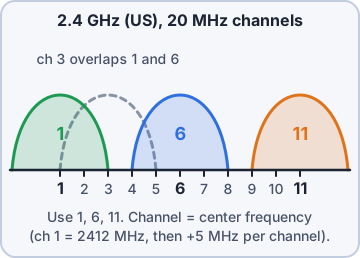
Exam tip Two nearby APs both on channel 6 = co-channel contention. APs on 1 and 3 = adjacent-channel interference (worse).
Signal degradation and coverage
Signal degradation or loss: walls, metal racks, water (and stacked pallets of pet food!) absorb or reflect signal; RSSI falls (-67 dBm is a common minimum for voice/scanners; -80 is weak). Insufficient wireless coverage: areas with no usable signal at all, found with a site survey and heat map.
Exam tip Fix coverage with AP placement and more APs, not by cranking every AP to max power.
Client disassociation and roaming
Client disassociation issues: clients drop off an AP: weak signal, interference, power-saving bugs, or deauthentication attacks. Roaming misconfiguration: clients should move between APs seamlessly. Problems: different SSIDs or security settings per AP, APs set to max power so clients 'stick' to a far AP, or missing fast-roaming (802.11r) support.
Exam tip Same SSID, same security, overlapping cells (~15-20%) and sensible power = smooth roaming.
Objective 5.5
Tool: Wi-Fi analyzer
Wi-Fi analyzer
A Wi-Fi analyzer shows nearby SSIDs/BSSIDs, channels, signal strength (RSSI), noise and channel use. Walk the area with it to spot overlap, rogue APs, dead zones and the AP each client prefers.
2.4 GHz scan
SSID        BSSID              Ch  RSSI
Kibble-WH   a8:42:01:11:00:0a   1  -58
Kibble-WH   a8:42:01:11:00:1b   3  -61
Kibble-WH   a8:42:01:11:00:2c   6  -79
Kibble-WH2  a8:42:01:11:00:3d  11  -66
Cafe-Free   f0:9f:c2:7a:01:5e   6  -70
Exam tip Analyzer = live snapshot where you stand. Site survey/heat map = coverage across the whole floor.
Check yourself 1An analyzer shows warehouse APs on 2.4 GHz channels 1, 4, 6 and 9. What should Dev change?
- Increase every AP to maximum power
- Hide the SSID
- Move all APs to channel 6
- Use only channels 1, 6 and 11
Show the answer
Answer: D. Use only channels 1, 6 and 11
Channels 4 and 9 overlap their neighbors. In 2.4 GHz, 1, 6 and 11 are the non-overlapping set.
Practice questions
Answer in your head, then open the answer. Ranger's Packet Trail has 483 questions like these for Network+, with mock exams.
Question 1Video calls freeze for a second at a time. A continuous ping of 100 packets to the video server shows 12 "Request timed out" lines, and the replies that arrive have steady, low times. Which issue does this show?
- Jitter
- High latency
- Bottlenecking
- Packet loss
Show the answer
Answer: D. Packet loss
12 of 100 pings with no reply is 12% packet loss. Steady reply times rule out jitter and latency.
Question 2A small office has three 2.4 GHz APs set to channels 1, 3 and 6. Users near the APs see slow speeds even though signal strength is strong. What change would BEST help?
- Set the APs to channels 1, 2 and 3
- Raise all three APs to maximum power
- Set the APs to channels 1, 6 and 11
- Set all three APs to channel 6
Show the answer
Answer: C. Set the APs to channels 1, 6 and 11
In 2.4 GHz, channels 1, 6 and 11 are the only non-overlapping set in North America. Channel 3 overlaps both 1 and 6, which causes interference.
Question 3Users in a break room lose Wi-Fi throughput every day around noon, but only on the 2.4 GHz band. The 5 GHz clients are unaffected. What is the MOST likely cause?
- A roaming misconfiguration between APs
- Interference from a microwave oven
- DHCP address pool exhaustion
- An incorrect subnet mask on the AP
Show the answer
Answer: B. Interference from a microwave oven
Microwave ovens operate near 2.45 GHz and interfere with 2.4 GHz Wi-Fi while in use. Moving clients to 5 GHz or relocating the AP helps.
Question 4An AP was mounted on one side of a concrete stairwell. Users on the other side of the stairwell see signal around -80 dBm and frequent slowdowns, while users on the AP's side are fine. What is the MOST likely issue?
- Signal loss through the concrete structure
- Channel overlap with a neighboring AP
- Roaming misconfiguration on the client
- Incorrect VLAN assignment on the AP
Show the answer
Answer: A. Signal loss through the concrete structure
Dense materials like concrete absorb RF and weaken the signal behind them. Relocating the AP or adding one on the far side restores a usable signal.
Question 5A company opened a new office wing. A site survey heat map shows most of the wing below -85 dBm, and the closest AP is in the original building. What is the BEST fix?
- Change the existing AP to channel 11
- Shorten the DHCP lease time
- Install additional APs in the new wing
- Enable 802.11w on the existing AP
Show the answer
Answer: C. Install additional APs in the new wing
The survey shows a coverage gap: no AP is close enough. Adding APs (with planned channels and power) gives the wing a usable signal.
CompTIA, A+, Network+, Security+ and Linux+ are trademarks of CompTIA, Inc. Ranger Gamez is not affiliated with or endorsed by CompTIA. The practice questions are written to the published exam objectives; they are not real exam questions.