 RANGER
 CompTIA Network+ (N10-009) · chapter 6 of 29
Week 3: Shapes on the whiteboard, numbers on the hosts
In this chapter Objectives 1.6, 1.7
Objective 1.6
Topologies and architectures
Star / hub and spoke
In a star every device connects to one central device (a switch). One cable failing takes down only that device, but the center is a single point of failure. The WAN version is hub and spoke: every branch (spoke) connects to HQ (hub), and branch-to-branch traffic goes through the hub. Kibble's stores are spokes of HQ.
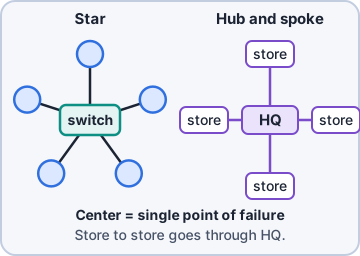
Exam tip Hub and spoke is cheap and simple to manage, but the hub is a bottleneck and single point of failure.
Mesh
In a full mesh, every node links to every other node: maximum redundancy and direct paths, but links grow fast: n(n-1)/2. Five sites = 10 links. A partial mesh links only the important sites redundantly. Wireless mesh and SD-WAN overlays use mesh ideas too.
Full mesh links = n(n-1)/2
  4 sites -> 4*3/2 = 6 links
  6 sites -> 6*5/2 = 15 links
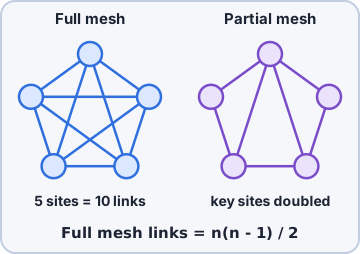
Exam tip Exam: "most fault tolerant WAN" = full mesh. "Most cost-effective with some redundancy" = partial mesh.
Point to point and hybrid
Point to point is a direct link between exactly two endpoints: a leased line, a fiber between two buildings, a wireless bridge. Simple and private. A hybrid topology mixes two or more types: Kibble is a star inside each building, hub and spoke to the stores, and point to point to the warehouse. Most real networks are hybrid.
Exam tip Warehouse to HQ over one dedicated fiber pair = point to point.
Three-tier hierarchical model
Campus networks are often built in three layers. Access layer: switches users and APs plug into (PoE, port security, VLANs). Distribution layer: aggregates access switches, routes between VLANs, applies policy. Core layer: a fast, redundant backbone that moves traffic between distribution blocks and to the data center/WAN. Keep the core simple and quick: no heavy filtering there.
      [Core A]====[Core B]
       /    \      /    \
  [Dist 1] [Dist 2] ...
   /   \     /   \
[Acc] [Acc] [Acc] [Acc]
  users, APs, phones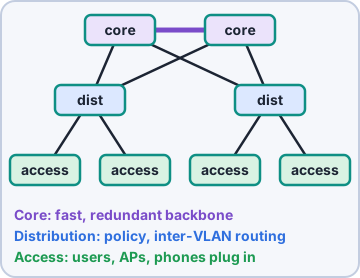
Exam tip Core = speed. Distribution = policy and routing. Access = where endpoints connect.
Collapsed core
A collapsed core merges the core and distribution layers into one pair of switches. It is a two-tier design: access plus a combined core/distribution. Common in small and mid-size sites like a Kibble store or the warehouse, where a separate core would be overkill. Saves money and rack space; grow into three tiers later.
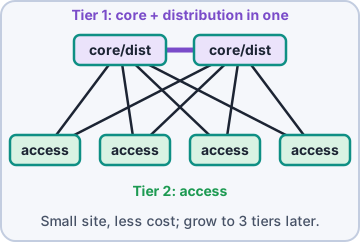
Exam tip Stem says "small office, reduce cost, two tiers": collapsed core.
Spine and leaf
Modern data centers use spine and leaf. Every leaf switch (top of rack, servers plug in) connects to every spine switch; leaves never connect to leaves and spines never to spines. Any server reaches any other in the same number of hops (leaf-spine-leaf), giving predictable low latency. Add capacity by adding spines; add ports by adding leaves.
   [Spine1]        [Spine2]
    |  \  \      /  /  |
    |   \  \    /  /   |
 [Leaf1] [Leaf2] [Leaf3]
  srv     srv     srv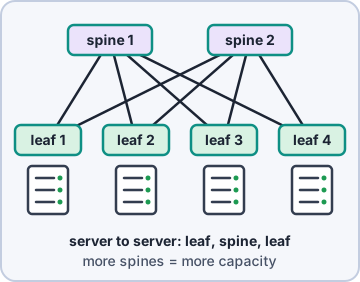
Exam tip Spine and leaf is built for heavy server-to-server traffic.
Traffic flows: north-south vs east-west
North-south traffic enters or leaves the data center: users or the internet talking to servers (crossing the edge firewall). East-west traffic moves between servers inside the data center: the web tier calling the app tier, database replication, VM migration. Virtualization and microservices made east-west the majority, which is why spine and leaf and internal segmentation matter.
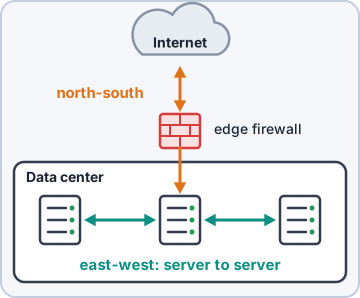
Exam tip Picture the data center map: the internet is "north". Server to server is sideways: east-west.
Objective 1.7
IPv4 addresses: the basics
Binary in 60 seconds
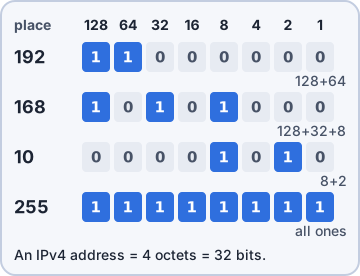
An IPv4 address is 32 bits, written as four 8-bit octets in dotted decimal. Each bit in an octet has a place value. Add the values of the 1 bits.
Place: 128 64 32 16  8  4  2  1
192 =    1  1  0  0  0  0  0  0
168 =    1  0  1  0  1  0  0  0
 10 =    0  0  0  0  1  0  1  0
255 =    1  1  1  1  1  1  1  1

192.168.10.25 =
11000000.10101000.00001010.00011001
Exam tip Each octet ranges 0-255. If you see 256 or more in an "IP address" on the exam, it is invalid.
Network part and host part
Every address has a network portion (which network) and a host portion (which device). The subnet mask shows the split: 1 bits = network, 0 bits = host. 255.255.255.0 = 24 network bits, so in 192.168.10.25/24 the network is 192.168.10.0 and the host is .25. Two special addresses in every subnet: network address (all host bits 0) and broadcast address (all host bits 1). Neither can be given to a device.
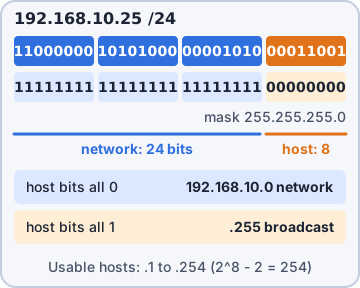
Exam tip Two hosts talk directly only if they are on the same network. Otherwise traffic goes to the default gateway (router).
Classful addressing: Classes A to E
Before CIDR, the first octet decided the class and a fixed default mask. Classes are mostly history now, but the exam still asks: Class A (huge, /8), Class B (/16), Class C (/24), Class D (multicast) and Class E (experimental).
Cl 1st oct Default mask      Use
A  1-126   255.0.0.0 /8      huge
B  128-191 255.255.0.0 /16   medium
C  192-223 255.255.255.0 /24 small
D  224-239 (none)            multicast
E  240-255 (none)            experimental
127 = loopback (between A and B)
Exam tip Class D = multicast. Class E = experimental/reserved. Neither is assigned to hosts.
Public vs private (RFC1918)
Public addresses are globally unique and routable on the internet; ISPs and registries assign them. Private addresses (RFC1918) can be used by anyone internally and are not routed on the internet; NAT translates them to a public address on the way out. Kibble uses 10.x internally and one public block at the edge.
RFC1918 private ranges
10.0.0.0/8      10.0.0.0-10.255.255.255
172.16.0.0/12   172.16.0.0-172.31.255.255
192.168.0.0/16  192.168.0.0-192.168.255.255
Exam tip Trap: 172.32.0.5 is PUBLIC. The private 172 range stops at 172.31.255.255.
APIPA and loopback/localhost
APIPA (Automatic Private IP Addressing) gives a host an address in 169.254.0.0/16 when it is set for DHCP but gets no answer. The host can talk only to other APIPA hosts on the same link, with no gateway. Loopback is 127.0.0.0/8; 127.0.0.1 (name localhost) always means "this machine". Pinging it tests the local TCP/IP stack without touching the network.
Exam tip See 169.254.x.x? Think DHCP failure: server down, scope full, wrong VLAN, unplugged cable or a blocked relay. Not a DNS problem.
Check yourself 1A new data center will host many VMs that mostly talk to each other. Dev wants every server to be the same number of hops from every other server. Which design fits BEST?
- Hub and spoke
- Three-tier hierarchical
- Point to point
- Spine and leaf
Show the answer
Answer: D. Spine and leaf
In spine and leaf, every leaf connects to every spine, so any two servers are leaf-spine-leaf apart with consistent latency. It is built for heavy east-west traffic.
Check yourself 2Which address is a private RFC1918 address?
- 172.32.10.5
- 169.254.20.7
- 172.20.4.9
- 192.169.1.10
Show the answer
Answer: C. 172.20.4.9
172.16.0.0/12 covers 172.16.0.0 to 172.31.255.255, so 172.20.4.9 is private. 172.32.x.x is just outside the range.
Practice questions
Answer in your head, then open the answer. Ranger's Packet Trail has 483 questions like these for Network+, with mock exams.
Question 1A retail chain connects each store directly to the headquarters data center, and stores don't connect to each other. Traffic between stores passes through headquarters. Which topology is this?
- Spine and leaf
- Hub and spoke
- Point to point
- Full mesh
Show the answer
Answer: B. Hub and spoke
In hub and spoke (star), every site connects to a central hub and traffic between spokes passes through it. In a full mesh every site links directly to every other site.
Question 2A company wants a full mesh WAN connecting its 6 offices so that every office has a direct link to every other office. How many links are required?
- 12
- 30
- 6
- 15
Show the answer
Answer: D. 15
A full mesh needs n(n-1)/2 links: 6 x 5 / 2 = 15. The answer 30 counts each link twice.
Question 3A university uses a star layout of switches inside each building, and the buildings' main switches are linked to each other in a partial mesh. How is the overall campus topology described?
- Star
- Hybrid
- Mesh
- Point to point
Show the answer
Answer: B. Hybrid
A hybrid topology combines two or more topologies, here star inside buildings and mesh between them. Calling it star or mesh only describes part of the network.
Question 4A data center redesign needs predictable, low-latency server-to-server traffic. Every access switch will connect to every backbone switch, so any two servers are always the same number of hops apart. Which architecture is this?
- Hub and spoke
- Collapsed core
- Three-tier hierarchical
- Spine and leaf
Show the answer
Answer: D. Spine and leaf
In spine and leaf, every leaf connects to every spine, so traffic between any two leaves crosses exactly one spine. The three-tier model adds a distribution layer, and path lengths vary more.
Question 5Two buildings across a parking lot are joined by a pair of directional wireless bridges aimed at each other, forming a single dedicated link. Which topology type is this?
- Mesh
- Point to point
- Star
- Hybrid
Show the answer
Answer: B. Point to point
A single dedicated link between exactly two endpoints is point to point. Star and mesh involve multiple nodes and links.
CompTIA, A+, Network+, Security+ and Linux+ are trademarks of CompTIA, Inc. Ranger Gamez is not affiliated with or endorsed by CompTIA. The practice questions are written to the published exam objectives; they are not real exam questions.