 RANGER
CompTIA Tech+ (FC0-U71) · chapter 1 of 18
The kid who fixes the label printer
In this chapter Objectives 1.1, 2.1
Objective 1.1
What every computer does
Four jobs: in, work, out, keep
Every computer, from a phone to the label printer, does four basic jobs. Input brings data in. Processing works on that data. Output shows or sends the result. Storage keeps data so it's still there later, even after the power goes off. People often say it in order: input, processing, output, storage. Once you see these four jobs, every gadget in the building starts to make sense.
Maya: Even Ranger does it. Smells a treat: input. Thinks hard: processing. Barks: output.
You: And storage is remembering where the treats are kept.
Exam tip Exam trick: name the job, not the gadget. Ask "is this bringing data in, working on it, showing it, or keeping it?"
Input and output devices
An input device sends data into the computer: a keyboard, a mouse, a barcode scanner, a microphone, a webcam. An output device brings results out to people: a monitor, a printer, speakers, a headset. Some devices do both. A touchscreen shows a pick list (output) and reads your taps (input). A headset with a microphone has speakers for output and a mic for input.
Rosa: So my warehouse tablet is both?
Maya: Yes. It shows you the list, and it takes your taps.
Processing and storage
Processing happens in the central processing unit (CPU), which follows a program's instructions: adding up a total, looking up an item, sorting a list. While it works, open programs and data sit in memory (RAM), which needs power. Storage, such as a drive, keeps saved data with the power off. That's why unsaved work disappears in a power cut: it was only in memory, never written to storage.
Rosa: That explains the order I lost when the lights went out last spring.
Maya: Save early, save often. Storage can only keep what you give it.
Exam tip More storage space does not make the math faster. Speed of processing comes from the CPU, not from a bigger drive.
Follow one scan
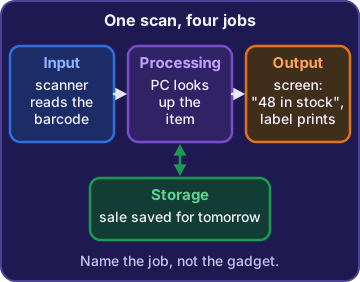
Watch one barcode scan go through all four jobs:
- Input: the scanner reads the barcode on a bag of kibble.
- Processing: the PC looks up that code and finds the item.
- Output: the monitor shows "48 bags in stock" and the printer makes a shipping label.
- Storage: the sale is saved to the inventory records for tomorrow.
Ranger: sniffs the scanner, hoping it found a treat
Check yourself 1Rosa scans a barcode, the PC finds the item, and the monitor shows the stock count. Which basic computing job is the monitor doing?
- Input
- Storage
- Output
- Processing
Show the answer
Answer: C. Output
The monitor shows the result of the lookup to Rosa, so it is doing output. The scanner did the input, and the PC's CPU did the processing.
Check yourself 2The power goes out while Rosa is typing a long order she has not saved. When the PC restarts, the order is gone. Why?
- It was only in memory, which needs power
- The keyboard forgot the order when the power went off
- The monitor did not store it
- The CPU deleted it on purpose
Show the answer
Answer: A. It was only in memory, which needs power
Open work sits in memory (RAM), which loses its contents without power. Only saving writes the order to storage, which keeps data with the power off.
Objective 2.1
Computers come in many shapes
Phones, tablets, e-readers and laptops
A smartphone is a pocket computer: calls, apps, camera, GPS and internet. A tablet is a bigger touchscreen device for apps, photos and video calls, handy on the dock. An e-reader is built for one job, reading. Its e-ink screen is easy on the eyes, and the battery can last for weeks. A laptop is a full computer with a keyboard and a battery that you can carry from desk to desk.
Rosa: Could the dock team use e-readers for orders? Those batteries last forever.
Maya: Great for manuals. But for apps, photos and video calls, they need tablets.
Workstations and servers
A workstation is a powerful desktop computer for one person doing heavy work: 3D design, video editing, big data jobs. A server is a computer that provides services to many users over a network, such as shared files, printing, email, a database or a website. Servers often run day and night in a locked room. The word is about the job: a server serves others, and a workstation serves the person sitting at it.
You: So the online store runs on a server?
Maya: Right. Hundreds of shoppers at once. A desk computer was never built for that.
Exam tip Power alone doesn't make a server. Ask who it serves: many users over the network (server) or one person at a desk (workstation).
Consoles, VR and AR
A gaming console is a computer built to run games on a TV with handheld controllers. Virtual reality (VR) uses a headset that covers your view and puts you in a world made entirely by the computer. Augmented reality (AR) keeps the real world in view and adds digital images on top of it, like an arrow floating over the right shelf. VR replaces what you see; AR adds to it.
Rosa: Smart glasses that point at the right bag? I'd love that.
Maya: That's AR. You still see the real shelves, plus a helpful arrow.
Check yourself 3The online store's order database must serve hundreds of shoppers at once, all day and night. Which kind of computer is built for that job?
- A gaming console
- A workstation
- An e-reader
- A server
Show the answer
Answer: D. A server
A server provides services, such as a database, to many users over a network, around the clock. A workstation is powerful too, but it is built for one person's own work.
Objective 2.1
The Internet of Things
Everyday things on the network
The Internet of Things (IoT) means everyday objects that have sensors or controls and a network link. Home appliances, like a fridge that tells you the milk is low, are IoT. So is home automation: smart thermostats, security systems, home assistants (the speakers you talk to), deadbolts and door locks you can open from a phone, and video doorbells that show who's at the door.
Rosa: I want to see who's at the side door and lock it from my phone.
Maya: A video doorbell and a smart deadbolt. Two IoT devices.
Exam tip IoT = a normal thing plus a network link. A laptop is a general computer, not IoT. A thermostat that joins Wi-Fi is IoT.
IoT is everywhere, not just at home
IoT shows up in many places. Modern vehicles report their location and engine health. IP cameras (security cameras on the network) send video to a phone or a recorder. Streaming media devices plug into a TV to play shows. Medical devices, like a heart monitor, can send readings to a doctor. Exercise equipment, like a treadmill, uploads your workouts. Wearable devices, like fitness trackers and smartwatches, count steps and heartbeats.
You: The delivery vans are IoT too?
Maya: They send their location back to the warehouse every minute. So yes.
Small devices, real computers
Every IoT device is a small computer on the network, so it needs the same care. Change the default password it came with, because default logins are widely known. Keep its software (firmware) updated so known holes get fixed. And keep a list of every IoT device you own, so nothing is forgotten in a corner.
Maya: "It works out of the box" is not the same as "it's done."
Ranger: growls at the new door camera, just to be safe
Check yourself 4Dev is listing Kibble & Co.'s IoT devices. Which two belong on that list? Choose two.
- The smart thermostat in the office
- Maya's laptop
- The video doorbell at the side door
- The design workstation
- The online store server
Show the answer
Answers: A. The smart thermostat in the office, C. The video doorbell at the side door
A smart thermostat and a video doorbell are everyday things with a network link, so they are IoT. Laptops, workstations and servers are general-purpose computers, not IoT.
Go deeper
More on the objectives in this chapter, in the same exam-ready detail.
Objective 1.1 · Input, Processing, Output, Storage
The four jobs every computer does
Input, processing, output, storage
Every computer, from a phone to a server, does the same four jobs. Input is data coming in. Processing is the CPU working on that data by following a program. Output is the result coming out where people can use it. Storage keeps data so it is still there later. People call this the IPOS cycle. Here is one scan at the warehouse register:
INPUT       scanner reads a barcode
PROCESSING  CPU looks up the price
OUTPUT      screen shows $24.99
STORAGE     sale is saved to records
Exam tip Order matters: a device can't show an answer (output) before it works the answer out (processing).
Input devices and output devices
An input device sends data into the computer: a keyboard, mouse, barcode scanner, microphone or webcam. An output device shows or delivers results: a monitor, printer, speakers or a headset. Some devices do both. A touchscreen shows the pick list (output) and reads Rosa's taps (input). A voice assistant hears you through its microphone (input), works out the answer (processing) and says it through its speaker (output).
Exam tip Ask which way the data flows. Into the computer = input. Out to a person = output. Both ways = both.
Processing is not storage
The CPU does the processing: math, comparing, sorting. Storage only keeps data. So a bigger drive gives more room for files, but it does not make a report calculate faster. Open work sits in memory (RAM), which needs power to hold anything. If the power fails before you save, that unsaved work is lost. Once you save it to storage, like an SSD, it survives a restart.
Exam tip 'Saved' = in storage and safe without power. 'Open but not saved' = only in memory, and lost if the power goes out.
Spot the step
Exam questions often describe one moment and ask which step it is. Look at what is happening right then:
- A barcode is read or a key is pressed: input
- The total is added up or a price is looked up: processing
- A receipt prints or a screen shows a count: output (even paper is output, because it presents a result)
- The sale is written to the store's records: storage
Exam tip A printed receipt is a record on paper, but it is still output. Storage is data the computer keeps for later.
Objective 2.1 · Smartphones; Tablets; E-readers; Laptops; Workstations; Servers; Gaming consoles; Virtual reality systems…
Picking the right device for the job
Handheld and portable devices
Match the device to the work:
- Smartphone: a pocket computer for calls, apps, photos and maps, with a cellular link.
- Tablet: a bigger touchscreen that runs apps, takes photos and joins video calls. Good for dock staff.
- E-reader: built for reading, often with an e-ink screen and a battery that lasts weeks. It can't do the app, photo and video work a tablet does.
- Laptop: a portable computer with a keyboard and screen built in, for one person's work on the go.
Exam tip Battery life alone doesn't pick the device. Check what the person actually needs to do.
Workstations vs. servers
A workstation is a powerful computer that one person uses at a desk for heavy work, like 3D design or video editing. A server provides services, such as shared files, email, a database or a website, to many users over a network, often all day and night. Both can be powerful, so look at who uses it. The web store's order database, used by hundreds of shoppers at once, belongs on a server, not on a spare design workstation.
Exam tip One person doing demanding work = workstation. Many users reaching a service = server.
Gaming consoles
A gaming console is built to run games on a TV with handheld controllers. A streaming media device also plugs into a TV, but its job is playing streamed shows and music, not running console games. If the break room wants games with controllers, it needs a console.
Virtual reality vs. augmented reality
Virtual reality (VR) uses a headset that covers your view and replaces it with a world made fully by the computer. It's used for games and training simulations. Augmented reality (AR) keeps the real world in view and adds digital images on top, through a phone camera or smart glasses. Smart glasses that float a glowing arrow over the right warehouse shelf are AR.
Exam tip Can you still see the real room? Yes = AR. No = VR.
Objective 2.1 · Internet of Things (IoT)
The Internet of Things: everyday things on the network
What makes something IoT
The Internet of Things (IoT) means everyday objects that have sensors or controls plus a network link. They are not general-purpose computers like laptops or servers. Home appliances are a big group: a fridge that reports its temperature, a washer that texts you when it's done, or a robot vacuum you start from an app. If the device has no network link, it isn't part of the IoT.
Exam tip Exam clue: an ordinary object that 'connects to an app' or 'uploads data' is IoT.
Home automation devices
Home automation devices control parts of a home or building, often from a phone:
- Thermostats: set or schedule the heat and cooling from an app.
- Security systems: sensors, alarms and alerts sent to your phone.
- Home assistants: voice speakers that answer questions and control other smart devices.
- Deadbolts/door locks: lock, unlock or check a door from anywhere.
- Video doorbells: a live camera view of the door on your phone.
Exam tip Rosa wants to see who is at the side door and lock it from her phone: a video doorbell plus a smart deadbolt.
More IoT you'll see
IoT reaches far beyond the house:
- Vehicles: cars that get updates, share location and call for help.
- IP/security cameras: send video over the network from their own IP address.
- Streaming media devices: boxes or sticks that play shows on a TV.
- Medical devices: glucose monitors or heart monitors that send readings to a doctor.
- Exercise equipment: treadmills and bikes that upload workouts.
- Wearable devices: smartwatches and fitness trackers.
IoT devices need care too
An IoT device sits on the network like any computer, so an attacker can use a weak one as a way in. When Dev installs IP cameras, 'they work out of the box' isn't the finish line. He changes the maker's default password, because default logins are widely known, and keeps the firmware updated. Many companies also put IoT devices on their own separate network.
Exam tip New IoT device checklist: change the default login, update the firmware, keep it updated.
Practice questions
Answer in your head, then open the answer. Ranger’s First Byte has 455 questions like these for Tech+, with mock exams.
Question 1In the basic steps of computing, which step is the CPU working on data, like adding up numbers?
- Input
- Processing
- Output
- Storage
Show the answer
Answer: B. Processing
Processing is the step where the CPU works on data, such as adding numbers. Input is tempting because it comes first, but input only brings the data in; the CPU does the work in processing.
Question 2Rosa types a new shipping address on the warehouse keyboard. In basic computing terms, what is the keyboard?
- An output device
- A processing device
- A storage device
- An input device
Show the answer
Answer: D. An input device
A keyboard is an input device: it sends what Rosa types into the computer. It is not an output device, because output devices, like a monitor, show results to the user.
Question 3Which basic computing function keeps data so it is still there after the computer is turned off?
- Storage
- Processing
- Output
- Input
Show the answer
Answer: A. Storage
Storage keeps data for later, so a saved file is still there after a restart. Processing is tempting because the CPU handles all data, but it only works on data; it does not keep it once power is off.
Question 4Rosa scans a bag of kibble with the handheld scanner. The PC looks up the item, and the monitor shows 48 bags in stock. Which basic computing step is the monitor showing the count?
- Input
- Processing
- Output
- Storage
Show the answer
Answer: C. Output
The monitor showing the count is output: the result of the lookup comes out where Rosa can see it. Input is the tempting choice, but the input happened earlier, when the scanner read the barcode.
Question 5Rosa is typing a long order on the office PC. The power goes out before she clicks Save. What most likely happened to the order?
- It is safe, because typed text goes straight to storage
- It is safe on the monitor until the power comes back
- It was lost, because it was only in memory, not saved
- It was sent to the printer as output to keep it safe
Show the answer
Answer: C. It was lost, because it was only in memory, not saved
Open work sits in memory, which needs power to hold data. Without a save to storage, the order is lost when the power goes out. It is not safe on its own, because typed text does not go to storage until it is saved.
CompTIA, Tech+, A+, Network+, Security+ and Linux+ are trademarks of CompTIA, Inc. Ranger Gamez is not affiliated with or endorsed by CompTIA. The practice questions are written to the published exam objectives; they are not real exam questions.