 RANGER
CompTIA Tech+ (FC0-U71) · chapter 2 of 18
Counting like a computer
In this chapter Objectives 1.2, 1.3
Objective 1.2
Four ways to write a number
Decimal: the one you already know
Decimal is base 10. It uses ten digits, 0 through 9, and each place is worth ten times the place to its right: ones, tens, hundreds. When you count 48 bags of kibble, you count in decimal. Every other number system works the same way, just with a different base. The base tells you how many digits there are, and the highest digit is always one less than the base.
Dev: Base 10 because people have ten fingers. Computers don't have fingers.
Ranger: holds up one paw
Binary: only 0 and 1
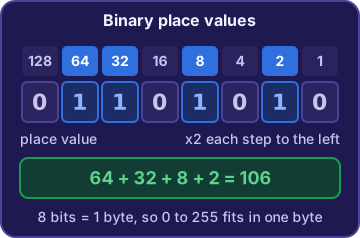
Binary is base 2. It uses only 0 and 1, because a computer's circuits are either off or on. Each place is worth twice the one to its right. Reading right to left, the places are 1, 2, 4, 8, 16, 32, 64 and 128. To read a binary number, add up the places that hold a 1. So 1010 has 1s in the 8 and 2 places: 8 + 2 = 10.
128 64 32 16  8  4  2  1
  0  0  0  0  1  0  1  0
= 8 + 2 = 10
Exam tip Going the other way: 5 = 4 + 1, so put 1s in the 4 and 1 places: 101.
Hexadecimal: base 16
Hexadecimal (hex) is base 16. It needs sixteen symbols, so after 0 to 9 it uses the letters A to F for ten to fifteen. One hex digit stands for exactly four bits, so two hex digits make one byte. That's why hex is a short way to write long binary values. You'll see it in web colors like #FF6600 and in MAC addresses like 00:1A:2B:3C:4D:5E.
You: So the scanner's sticker with the letters on it is hex?
Dev: That's its hardware address, written in hex pairs.
Exam tip Letters A to F in a number give hex away. F = 15, so FF = 255, the biggest one-byte value.
Octal: base 8
Octal is base 8. It uses only the digits 0 to 7. Each place is worth eight times the one to its right: ones, eights, sixty-fours. So octal 14 is one 8 plus four ones: twelve. Any number with an 8 or a 9 in it can't be octal. You'll see octal less often than hex, mostly in Linux file permissions like 755.
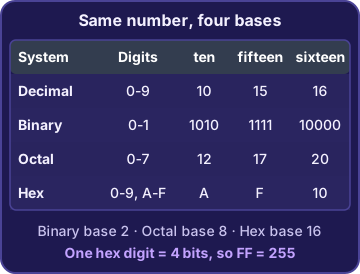
Exam tip "10" means one of the base plus nothing: binary 10 = 2, octal 10 = 8, decimal 10 = 10, hex 10 = 16.
Check yourself 1Dev writes the binary number 0110 on the whiteboard. What is it in decimal?
- 6
- 110
- 4
- 12
Show the answer
Answer: A. 6
Reading right to left, the places are 1, 2, 4 and 8. 0110 has 1s in the 4 and 2 places, so 4 + 2 = 6.
Check yourself 2The online store's banner color is #3A7BD5. Which notational system is that color written in?
- Binary
- Octal
- Decimal
- Hexadecimal
Show the answer
Answer: D. Hexadecimal
Web colors are written in hex pairs, and the letters A, B and D prove it: only hex uses A to F as digits.
Objective 1.3
Units of measure
Bits and bytes
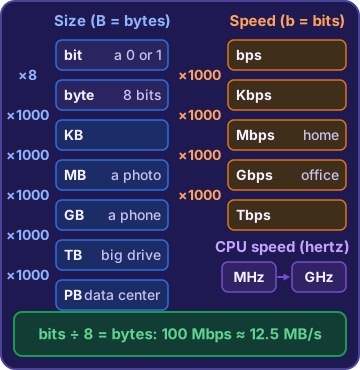
A bit is the smallest unit of data: a single 0 or 1. A byte is 8 bits, enough to store one letter like "A". File sizes and drive sizes are counted in bytes. Bigger units go up by about a thousand each step: a kilobyte (KB), a megabyte (MB), a gigabyte (GB), a terabyte (TB) and a petabyte (PB). A photo is a few MB, a phone holds GB, a big drive holds TB, and a huge data center holds PB.
1 byte = 8 bits
KB -> MB -> GB -> TB -> PB
(each step is about 1,000 times bigger)
Why 1 TB shows as 931 GB
Drive makers count in thousands: 1 TB = 1,000,000,000,000 bytes. Windows counts each step as 1,024 instead. The same bytes then show up as about 931 GB. Nothing is broken and no space is missing. It's the same amount, counted two ways.
Rosa: So my drive is fine?
Sam: Perfectly fine. It's like measuring a bag of kibble in pounds or kilos. Same bag.
Exam tip For the exam, think "about 1,000": 1 GB is about 1,000 MB, and 1 TB is about 1,000 GB.
Throughput: bits per second
Throughput is how much data moves each second, and it's counted in bits. The units are bits per second (bps), kilobits per second (Kbps), megabits per second (Mbps), gigabits per second (Gbps) and terabits per second (Tbps). Each step is 1,000 times bigger, so 1 Gbps = 1,000 Mbps. Watch the letter: a small b means bits, a big B means bytes.
Dev: Internet plans are sold in megabits. Downloads show megabytes. That's why they never match.
You: Sneaky.
Exam tip A link is in bits; a file is in bytes. Divide bits by 8 to get bytes: 100 Mbps moves at most about 12.5 MB each second.
Processing speed: hertz
A processor runs on a clock that ticks billions of times a second. One tick per second is one hertz (Hz). A megahertz (MHz) is a million ticks a second, and a gigahertz (GHz) is a billion. So a 3.2 GHz CPU ticks about 3.2 billion times a second, and 2.4 GHz is the same as 2,400 MHz. But GHz isn't the whole story: a newer chip with more cores can get more done at a lower clock speed.
Rosa: Our old label printer says 600 MHz. Is that fast?
Sam: The new PC runs at 2.4 GHz. That's 2,400 MHz, four times the clock.
Check yourself 3Rosa's photos folder is 6,000 MB. About how big is that in gigabytes?
- About 60 GB
- About 6 GB
- About 6,000 GB
- About 0.6 GB
Show the answer
Answer: B. About 6 GB
Each step up is about 1,000 times bigger, so 6,000 MB is about 6 GB.
Check yourself 4The warehouse internet plan is 200 Mbps. At best, about how many megabytes can it download each second?
- 200 megabytes
- 1,600 megabytes
- 25 megabytes
- 2 megabytes
Show the answer
Answer: C. 25 megabytes
Mbps counts megabits, and there are 8 bits in a byte, so 200 / 8 = 25 megabytes per second at best.
Go deeper
More on the objectives in this chapter, in the same exam-ready detail.
Objective 1.2 · Binary, Hexadecimal, Decimal, Octal
Four ways to write a number
Decimal and the idea of a base
A notational system is a way of writing numbers. Its base is how many digits it uses. Everyday numbers are decimal, base 10, with the digits 0 to 9. Each place is worth ten times the one to its right: ones, tens, hundreds. In every base, the highest digit is one less than the base, and '10' always means one of the base plus zero ones. So 10 is ten in decimal, but two in binary and sixteen in hex.
Exam tip Highest digit = base minus 1. Base 10 tops out at 9, base 8 at 7, base 2 at 1, base 16 at F (fifteen).
Binary: only 0 and 1
Binary is base 2, so it uses only 0 and 1. Computers use it because a circuit is either off or on. Each place is worth twice the one to its right. To read a binary number, add the place values that hold a 1:
- 1010 = 8 + 2 = 10
- 101 = 4 + 1 = 5
- 00001001 = 8 + 1 = 9 (leading zeros add nothing)
128  64  32  16   8   4   2   1
  0   1   1   0   0   1   0   0
= 64 + 32 + 4 = 100
Exam tip Binary 1010 is ten, not one thousand ten. Never read binary digits as a decimal number.
Hexadecimal: 0 to 9, then A to F
Hexadecimal (hex) is base 16. It needs sixteen symbols, so after 0 to 9 it uses A to F for ten to fifteen. F is 15, the highest single hex digit. One hex digit stands for exactly 4 bits (0000 to 1111), so two hex digits make one byte. That is why hex is a short way to write binary. You see it in MAC addresses, like 3C-07-71-A2-9E-14, and web colors, like #FF6600 (red, green and blue amounts from 00 to FF).
Exam tip Letters A to F mixed with numbers almost always mean hex. Decimal never uses letters.
Octal: 0 to 7
Octal is base 8, so its digits are 0 to 7, and each place is worth eight times the one to its right. Twelve is one 8 and four left over, so octal writes it 14. A number with an 8 or 9 in it, like 128, cannot be octal. Here is 12 in all four systems:
Decimal  12
Binary   1100  (8 + 4)
Octal    14    (one 8 + 4)
Hex      C     (A=10, B=11, C=12)
Exam tip '10' in binary = 2, in octal = 8, in hex = 16. Always check which base you're in before you read the number.
Objective 1.3 · Storage unit; Throughput unit; Processing speed
Bits, bytes, speeds and hertz
Bits and bytes
A bit is the smallest unit of data: one 0 or 1. A byte is 8 bits, enough for one simple character like the letter A. File sizes and drive sizes are counted in bytes. Network speeds are counted in bits. Watch the letter case: a lowercase b means bits and an uppercase B means bytes. So Mb is megabits and MB is megabytes.
Exam tip 1 byte = 8 bits. One hex digit = 4 bits, which is only half a byte.
The storage ladder: KB to PB
Each step up the ladder is about 1,000 times bigger than the one before:
- Kilobyte (KB): about 1,000 bytes. A short text note.
- Megabyte (MB): about 1,000 KB. One phone photo is a few MB.
- Gigabyte (GB): about 1,000 MB. RAM and phone storage.
- Terabyte (TB): about 1,000 GB. Hard drives and backup drives.
- Petabyte (PB): about 1,000 TB. Big company and cloud data.
Exam tip Kilo, mega, giga, tera, peta: 'King Mike Gets Ten Pizzas' is one way to remember the order, smallest to largest.
Why a 1 TB drive shows 931 GB
Drive makers count in 1,000s: 1 TB = 1,000,000,000,000 bytes. Windows counts each step as 1,024. The same bytes then show up as about 931 GB. No space is missing; it is two ways of counting. For quick sizing, use 1,000. Rosa has 2,000 photos of about 3 MB each: 2,000 x 3 MB = 6,000 MB, about 6 GB. A 4 GB card is too small, and an 8 GB card is the smallest that fits.
Exam tip Exam math uses 'about 1,000' per step unless a question says otherwise.
Throughput: bits per second
Throughput is how much data moves each second. It is counted in bits per second, using the same prefixes:
- bps: bits per second
- Kbps: thousands (an old alarm panel at 56 Kbps)
- Mbps: millions (a 100 Mbps internet plan)
- Gbps: billions (1 Gbps = 1,000 Mbps)
- Tbps: trillions, terabits per second, for the biggest network backbones
Exam tip Compare units before numbers. 1 Gbps beats 500 Mbps, because 1 Gbps is 1,000 Mbps. 1 Tbps is about 1,000 Gbps.
Bits vs. bytes in download math
Internet speed is in bits, but files are in bytes, so divide by 8. A 100 Mbps link moves at most 100 / 8 = 12.5 megabytes per second. To time a download, turn the file into bits first:
File: 400 MB   Link: 80 Mbps
400 MB x 8 = 3,200 megabits
3,200 / 80 = 40 seconds (at best)
Exam tip The classic trap is 400 / 80 = 5 seconds. That treats megabits as megabytes.
Processing speed: MHz and GHz
A processor's clock ticks billions of times a second. Its speed is measured in hertz (cycles per second). Megahertz (MHz) is millions of cycles, and gigahertz (GHz) is billions. 1 GHz = 1,000 MHz, so a 2.4 GHz PC chip (2,400 MHz) is clocked four times faster than a 600 MHz printer chip. Clock speed is not the whole story: a newer 8-core chip at 2.6 GHz can get more done than an older 2-core chip at 3.0 GHz.
Exam tip GHz = speed. GB = size. A spec sheet line like 'CPU: 1.8 GHz' is speed; '4 GB memory' is an amount.
Practice questions
Answer in your head, then open the answer. Ranger’s First Byte has 455 questions like these for Tech+, with mock exams.
Question 1Which notational system uses only the digits 0 and 1?
- Decimal
- Hexadecimal
- Octal
- Binary
Show the answer
Answer: D. Binary
Binary is base 2, so it uses only 0 and 1. Octal is a common wrong pick because it also has fewer digits than decimal, but octal uses eight digits, 0 through 7.
Question 2Which set of symbols does the hexadecimal system use?
- 0 through 9 and A through F
- 0 through 7 only
- 0 through 9 only
- 0 and 1 only
Show the answer
Answer: A. 0 through 9 and A through F
Hexadecimal is base 16, so it needs sixteen symbols: 0 through 9, then A through F for ten through fifteen. Picking 0 through 9 only is the common slip; that is decimal, which has just ten symbols.
Question 3The numbers we use every day, like 48 bags of kibble, are written in which base?
- Base 2 (binary)
- Base 8 (octal)
- Base 10 (decimal)
- Base 16 (hexadecimal)
Show the answer
Answer: C. Base 10 (decimal)
Everyday numbers are decimal, which is base 10 and uses the digits 0 through 9. Binary is the tempting pick because computers use it, but people count and write prices and counts in decimal.
Question 4Which digits can appear in an octal number?
- 0 through 8
- 0 through 9
- 0 through 7
- 0 through 9 and A through F
Show the answer
Answer: C. 0 through 7
Octal is base 8, so it has eight digits: 0 through 7. 0 through 8 is the tempting answer, but that would be nine digits; in any base, the highest digit is one less than the base.
Question 5Dev writes the binary number 1010 on the whiteboard. What is it in decimal?
- 10
- 8
- 12
- 1,010
Show the answer
Answer: A. 10
Binary places from the right are 1, 2, 4 and 8. 1010 has 1s in the 8 and 2 places, so 8 + 2 = 10. Answering 1,010 is the trap: those digits are binary, not decimal.
CompTIA, Tech+, A+, Network+, Security+ and Linux+ are trademarks of CompTIA, Inc. Ranger Gamez is not affiliated with or endorsed by CompTIA. The practice questions are written to the published exam objectives; they are not real exam questions.