 RANGER
CompTIA Tech+ (FC0-U71) · chapter 3 of 18
Inside the box
In this chapter Objectives 2.2, 2.3
Objective 2.2
The parts inside
The motherboard and the CPU
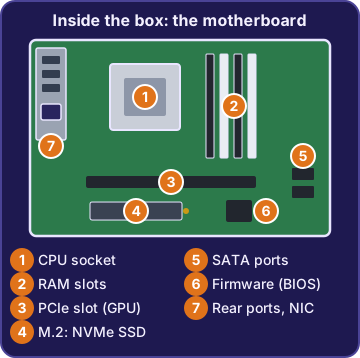
The motherboard (also called the system board) is the main circuit board. Everything plugs into it or talks through it: the CPU, memory, storage, expansion cards and the ports on the back. The central processing unit (CPU) sits in a socket on the motherboard. It's the part that runs program instructions, like adding up thousands of orders. When the CPU is at 100%, it's the part holding the computer back.
You: So the motherboard is like the warehouse floor, and the CPU is the busiest worker on it.
Sam: Ha! Exactly.
Firmware and the BIOS
Firmware is software built into the hardware. On a PC, the firmware called the basic input/output system (BIOS), or its modern version UEFI, runs first when you press the power button. It starts and checks the hardware, then loads the operating system. If a PC says "No boot device found" before Windows appears, only the firmware is running, so its setup screen is where you check which drive it starts from.
Sam: Firmware wakes everything up and hands off to Windows. Like the opening shift unlocking the doors.
RAM and the GPU
Random-access memory (RAM) is fast, short-term working memory. It holds the programs and files you have open right now, and it's cleared when the power goes off. More RAM lets you keep more programs open without slowing down. The graphics processing unit (GPU) is a processor built to draw images. It does many small math jobs at once, which is perfect for 3D models, video and games.
Rosa: My PC slows down with email, the inventory app and twenty browser tabs open.
Sam: Classic. You're out of RAM.
Exam tip Many apps open and the PC crawls? Think RAM. 3D drawings redraw slowly? Think GPU. Totaling orders at 100% CPU? Think CPU.
Storage and the NIC
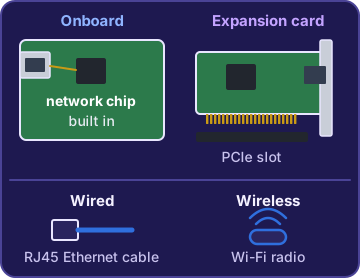
Storage is where files and programs live when they aren't open: a drive that keeps data with the power off. The network interface card (NIC) connects the computer to a network. A NIC can be wired (an Ethernet port) or wireless (Wi-Fi). It can be onboard, built into the motherboard, or an expansion card you add into a slot. Most PCs today have an onboard NIC, and many have both a wired and a wireless one.
You: The NIC on the warehouse PC died. Do we need a new motherboard?
Sam: Nope. Add an expansion card NIC in a free slot. Problem solved.
Check yourself 1Theo's PC freezes while it totals thousands of orders. Task Manager shows CPU 100%, memory 40%, GPU 2%, disk 5%. Which part is holding it back?
- The GPU
- The CPU
- The RAM
- The storage drive
Show the answer
Answer: B. The CPU
The CPU runs the program's instructions, and at 100% it has nothing left to give. The other parts are nearly idle.
Check yourself 2A desk at the warehouse has no network cable, and the PC must join the warehouse Wi-Fi. Which part does the PC need?
- A GPU
- More RAM
- A bigger drive
- A wireless NIC
Show the answer
Answer: D. A wireless NIC
A NIC connects a computer to a network, and with no cable it must be a wireless NIC to join Wi-Fi.
Objective 2.3
Storage types
Volatile vs. non-volatile
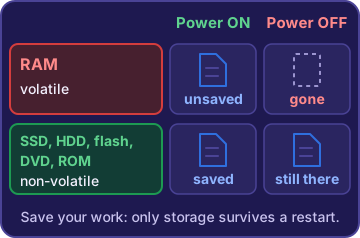
Volatile memory loses its data when the power goes off. RAM is volatile, which is why unsaved work disappears. Non-volatile storage keeps its data with no power. Drives, USB flash drives, DVDs and read-only memory (ROM) are all non-volatile. ROM holds firmware that's read when the computer starts and is kept safe without power.
Ranger: stares at the chew toy he buried. Non-volatile.
Exam tip Volatile = vanishes. If the question says "lost when the power goes off", the answer is RAM.
Hard drives and solid-state drives
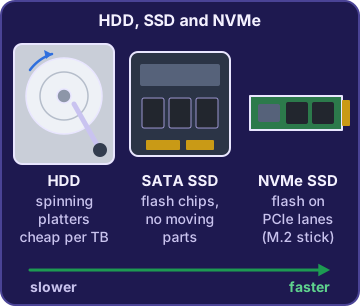
A hard disk drive (HDD) stores data magnetically on spinning platters, read by an arm that moves across them. HDDs are cheap for lots of space, but moving parts are slower and can break if dropped. A solid-state drive (SSD) stores data on flash memory chips with no moving parts. It's faster and handles bumps better. Non-volatile memory express (NVMe) SSDs connect over fast PCIe lanes and are much faster than SSDs that use the older SATA connection.
Rosa: The dock laptops get dropped every day.
Sam: Then they get SSDs. No platters to scratch.
Optical discs and flash drives
Optical storage, like CDs, DVDs and Blu-ray discs, uses a laser to read and write data on a disc. It's older but still shows up for old training videos and software. External flash drives, like USB thumb drives, store data on flash chips in a tiny case you carry in your pocket. Both are local storage: they're right there with you, not on the network.
Rosa: I found an old safety video on a DVD.
Sam: Optical. I think we still have a drive for that somewhere. Maybe.
Local network and cloud storage
Some storage lives on the network instead of inside your PC. A network-attached storage (NAS) device is a box on the local network that shares folders with everyone there. A file server is a computer running a server operating system that shares files and can do other jobs, like handling sign-ins. A cloud storage service keeps files in a provider's data centers, reached over the internet from anywhere, with no hardware to buy.
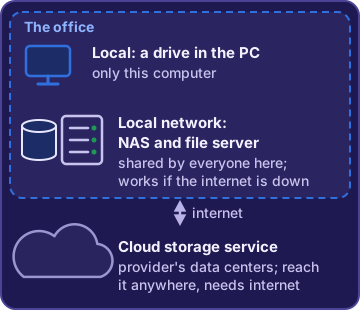
You: So if the internet dies, the NAS still works?
Sam: As long as the office network is up. The cloud needs the internet.
Exam tip Internet down but the office network works? NAS and file server still work. Cloud storage needs the internet.
Check yourself 3Sam is sorting storage into volatile and non-volatile. Which two keep their data when the power is off? Choose two.
- RAM
- An SSD
- A USB flash drive
- Unsaved work in an open app
- Video memory on the GPU
Show the answer
Answers: B. An SSD, C. A USB flash drive
SSDs and USB flash drives are non-volatile, so they keep data with no power. RAM, video memory and unsaved work in memory are volatile and are cleared at power-off.
Go deeper
More on the objectives in this chapter, in the same exam-ready detail.
Objective 2.2 · Internal computing components
What's inside the box
Motherboard and firmware
The motherboard (system board) is the main circuit board. The CPU, RAM, storage and expansion cards all connect to it, so they can work together. Firmware is software stored on a chip on the board. The BIOS, or its modern form UEFI, runs first when you press the power button. It checks the hardware, then hands control to the operating system. An error like 'No boot device found' appears before Windows loads, so you fix the startup drive in the BIOS/UEFI setup, not in Windows.
Exam tip Before the OS loads, only firmware is running.
RAM vs. storage
RAM (random-access memory) is fast, short-term working memory for the programs and files you have open. It is volatile: it empties when the power goes off. Storage (an SSD or HDD) keeps files when the power is off. They fix different problems:
- Slow with many apps and tabs open, memory near full: add RAM.
- 'Low disk space' when saving files: add a bigger storage drive.
- Both are measured in GB, which is why people mix them up.
CPU vs. GPU
The CPU (central processing unit) runs a program's instructions and does the general work, like totaling thousands of orders. The GPU (graphics processing unit) is built to draw images and do many simple math jobs at once, which 3D graphics and video need. If 3D drawings redraw slowly, the GPU is the part built for that. If Task Manager shows the CPU at 100% and the GPU at 2% while totaling orders, the CPU is the bottleneck.
CPU     100%  <- maxed out
Memory   40%
GPU       2%
Disk      5%
The network interface card (NIC)
A NIC connects a computer to a network. It comes in two pairs of flavors:
- Wired: an Ethernet port that takes a cable.
- Wireless: a Wi-Fi adapter for desks no cable reaches.
- Onboard: built onto the motherboard, as in most PCs.
- Expansion card: added in a slot such as PCIe, for example when the onboard port dies.
Exam tip Many PCs have two onboard NICs: one wired (Ethernet) and one wireless (Wi-Fi).
Objective 2.3 · Volatile vs. non-volatile; Local storage; Local network storage
Where data lives: storage types
Volatile vs. non-volatile
Volatile memory needs power to hold data. RAM is volatile, so a half-made label that was never saved is gone after a power cut. Non-volatile storage keeps data with no power: SSDs, HDDs, flash drives, optical discs and ROM. Read-only memory (ROM) holds the startup firmware that is read at power-on, and it keeps its contents with the power off.
Exam tip Saved PDF on the SSD: safe after the power cut. Unsaved label in RAM: lost.
Storage drives: HDD, SSD and NVMe
A hard disk drive (HDD) stores data magnetically on spinning platters read by a moving arm. It is cheap and roomy, but slower, and drops can damage it. A solid-state drive (SSD) uses flash chips with no moving parts, so it is faster and handles bumps, which suits laptops that get knocked around. NVMe SSDs talk to the computer over fast PCIe lanes and are much faster than SATA SSDs, even when both fit the same M.2 slot.
Exam tip M.2 is a shape. NVMe is the fast way of talking. Pick NVMe for speed.
Optical discs and flash drives
Optical storage means CDs, DVDs and Blu-ray discs: a laser reads and writes the data. They're mostly used now for old software, videos and archives. External flash drives (USB sticks) are small, portable flash memory that plugs into a USB port. Both are non-volatile. Optical discs have no flash chips and no magnetic platters.
Sharing storage: NAS, file server, cloud
Three ways to share files. The exam objectives list all three together as local network storage, because each one is reached over a network instead of sitting inside your PC:
- Network-attached storage (NAS): a storage box on the company's own local network. It still works when only the internet link is down.
- File server: a computer running a server operating system that shares files and can also do other server jobs, like handling sign-ins.
- Cloud storage service: a provider's data centers, reached over the internet. Nothing to buy and reachable from anywhere, but it needs the internet.
Exam tip Internet down, office network up: the NAS works and the cloud doesn't.
Practice questions
Answer in your head, then open the answer. Ranger’s First Byte has 455 questions like these for Tech+, with mock exams.
Question 1Which internal component is the main circuit board that the CPU, RAM, storage and expansion cards all connect to?
- The CPU
- The motherboard
- The storage drive
- The NIC
Show the answer
Answer: B. The motherboard
The motherboard (system board) is the main circuit board: it links the CPU, RAM, storage and expansion cards so they can work together. The CPU sits on the motherboard and does the processing, but it is not the board everything connects to.
Question 2What is the main job of a computer's firmware (BIOS or UEFI) when the power button is pressed?
- It starts and checks the hardware, then loads the operating system
- It runs the user's apps and windows after sign-in
- It keeps the user's saved files and photos
- It sends and receives data on the network
Show the answer
Answer: A. It starts and checks the hardware, then loads the operating system
Firmware such as BIOS or UEFI runs first: it starts and checks the hardware, then hands control to the operating system. Running apps and windows is the operating system's job, which comes after the firmware is done.
Question 3Which component is the fast, short-term working memory that holds open programs and loses its contents when the computer turns off?
- An SSD
- ROM
- RAM
- The GPU
Show the answer
Answer: C. RAM
Random-access memory (RAM) is the working memory that holds the programs and files you have open, and it is cleared when power is off. An SSD is the tempting choice, but it is storage that keeps files when the power is off.
Question 4What does a network interface card (NIC) do?
- It draws the images shown on the monitor
- It starts the hardware when the PC powers on
- It only adds a wired port and never works over Wi-Fi
- It connects the computer to a network, by cable or wirelessly
Show the answer
Answer: D. It connects the computer to a network, by cable or wirelessly
A NIC is the part that connects a computer to a network. It can be wired (an Ethernet port) or wireless (Wi-Fi), and it can be built onto the motherboard or added as an expansion card. Thinking a NIC is only a wired port is the common mix-up.
Question 5The new designer's 3D drawings of kibble bags turn and redraw slowly on screen. Which internal component is built mainly to draw graphics like these?
- The CPU
- The GPU
- A larger storage drive
- The NIC
Show the answer
Answer: B. The GPU
The graphics processing unit (GPU) is built to draw images and do many simple math jobs at once, which is what 3D graphics need. The CPU runs general program instructions; it can draw graphics, but it is not the part built for that work.
CompTIA, Tech+, A+, Network+, Security+ and Linux+ are trademarks of CompTIA, Inc. Ranger Gamez is not affiliated with or endorsed by CompTIA. The practice questions are written to the published exam objectives; they are not real exam questions.