 RANGER
CompTIA Tech+ (FC0-U71) · chapter 13 of 18
Variables, loops and a whiteboard flowchart
In this chapter Objectives 4.3, 4.4
Objective 4.3
Building blocks of code
Identifiers: variables and constants
An identifier is the name you give something in code. A variable is a named place that holds a value the program can change, like bag_count. A constant is a named value that must not change while the program runs, like HEAVY_LB = 50. Names can't contain spaces or start with a digit, so bag_count works and 2bags doesn't. Python marks constants with capital letters by habit; some languages enforce them.
HEAVY_LB = 50     # constant
bag_count = 3     # variable
bag_count = bag_count + 1
print(bag_count)  # 4
Arrays
An array is an ordered list of values stored under one name. Instead of store1, store2 and so on up to store20, keep one array and reach each item by its position, called its index. Most languages count from 0, so the first item is [0], and the last of five items is [4]. (Python calls its arrays lists.)
flavors = ["Salmon", "Turkey", "Lamb"]
print(flavors[0])    # Salmon
print(flavors[2])    # Lamb
print(len(flavors))  # 3
You: So flavors[3] would be...?
Theo: An error. Three items: 0, 1 and 2.
Functions
A function is a named block of steps you write once and call wherever you need it. It can take inputs, called parameters, and hand back a result. If the label-weight steps live in one function, a bug fix happens in one place instead of three.
def label_weight(bags, lb_each):
    return bags * lb_each

print(label_weight(3, 12.5))  # 37.5
Objects: properties, attributes, methods
An object bundles data and actions about one thing, like one bag of kibble. Its properties, also called attributes, are the data that describe it, like flavor and weight. (JavaScript says properties; Python says attributes.) Its methods are actions it can do, written with parentheses. Reading bag.weight gets a property; calling bag.restock() runs a method.
const bag = {
  flavor: "Lamb",
  weight: 12.5,
  stock: 4,
  restock() { this.stock += 10; }
};
bag.restock();
console.log(bag.stock);  // 14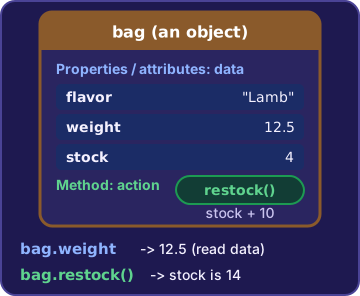
Check yourself 1Theo writes the heavy-box limit, 50 pounds, once at the top of his code as HEAVY_LB and uses that name everywhere. The limit never changes while the app runs. What is HEAVY_LB?
- A constant
- An array
- A method
- A Boolean value
Show the answer
Answer: A. A constant
A constant is a named value that doesn't change while the program runs. Defining it once means a new limit later is a one-line change.
Check yourself 2Theo's Printer object has a paperSize and a print() action. Which line runs one of the printer's methods?
- printer.paperSize = "4x6"
- size = printer.paperSize
- printer.print()
- PAPER = "4x6"
Show the answer
Answer: C. printer.print()
Methods are actions an object can do, and calling one uses parentheses: printer.print(). paperSize is a property (attribute) that describes the printer.
Objective 4.4
Planning and logic
Pseudocode
Pseudocode is a plan for a program written in plain, code-like steps. It isn't a real programming language and can't run. It's for people, so everyone can agree on the logic before anyone writes real code. Here is Rosa's box job:
REPEAT until Rosa taps Done
  scan box
  IF weight > 50 THEN
    print HEAVY label
  ELSE
    print STANDARD label
  END IF
END REPEAT
Flowcharts and sequence
A flowchart draws the same plan as shapes joined by arrows. An oval marks start and end, a rectangle is a step, a diamond is a yes/no decision, and a slanted box (a parallelogram) is input or output. Sequence means steps run one after another in order, top to bottom, unless a branch or loop changes the flow.
( Start )
    |
[ Scan box ]
    |
< Over 50 lb? >--yes--> [ HEAVY label ]
    | no                       |
[ STANDARD label ]             |
    |<-------------------------+
< Done tapped? >--no--> back to Scan box
    | yes
(  End  )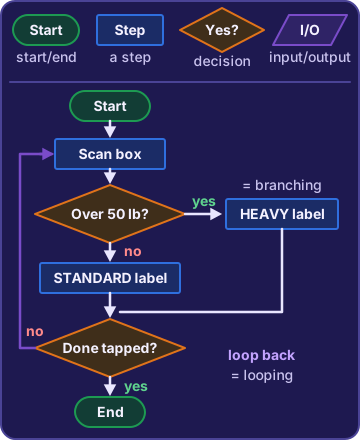
Branching and looping
Two logic concepts change plain top-to-bottom order. Branching picks a path: IF a condition is true, do this, ELSE do that. Looping repeats steps, either a set number of times (for each of 5 boxes) or while a condition stays true. Every loop needs a way to end. If nothing ever changes the condition, it becomes an infinite loop.
bags = 3
while bags > 0:
    print("pack bag", bags)
    bags = bags - 1
print("done")
Exam tip That loop prints pack bag 3, pack bag 2, pack bag 1, then done. Remove bags = bags - 1 and it never stops.
Comments, documentation and objects
Comments are notes in code for people; the computer skips them (# in Python, // in JavaScript). Documentation explains how to use or change a program: a readme, setup steps, what each function expects. Object-oriented methods organize code around objects. A class is the blueprint, like Product, and each object made from it keeps its own data and methods together.
Theo: Comment why, not what. 'Skip Sundays: the warehouse is closed' saves the next person an hour.
Check yourself 3Theo traces this on the whiteboard: count = 1. WHILE count < 6: print count, then count = count + 2. What gets printed?
- 1 2 3 4 5
- 1 3
- 2 4 6
- 1 3 5
Show the answer
Answer: D. 1 3 5
count starts at 1 and goes up by 2: it prints 1, 3 and 5. At 7 the test count < 6 is false, so the loop stops.
Go deeper
More on the objectives in this chapter, in the same exam-ready detail.
Objective 4.3 · Identifiers; Arrays; Functions; Objects
Building blocks: variables, arrays, functions and objects
Identifiers: variables and constants
An identifier is the name you give something in code. Most languages ban spaces, a digit as the first character, and reserved words like if, so bagCount works and bag count doesn't. A variable is a named value the program can change, like the bag count read from the scanner every minute. A constant is a named value set once that can't change while the program runs, like MAX_BAGS = 10. If the limit changes later, you edit one line.
Exam tip Value changes while running = variable. Fixed rule used in many places = constant. Declaring a changing count as a constant causes an error.
Arrays
An array stores many values in order under one name. Each item has a numbered position called an index, and most languages count from 0. Twenty-four store counts belong in one array, not twenty-four separate variables.
flavors = ["Salmon", "Turkey", "Lamb"]
flavors[0]  ->  Salmon
flavors[1]  ->  Turkey
flavors[2]  ->  Lamb
Exam tip Five items sit at indexes 0 to 4, so the last one is [4]. [5] is past the end.
Functions
A function is a named, reusable block of code that does one job. You write it once and call it from many places. If the same 15 label-formatting lines are copied into three parts of the web store, every bug fix has to be made three times. Moving them into one function means each part calls it and a fix happens once.
Objects: properties and methods
An object bundles data about one thing with the actions it can do. Properties, also called attributes, describe it: name, weight, stock. Methods are its actions, written with parentheses:
bag = {
  name: "Salmon Crunch",   // property
  weightLb: 12.5,          // property
  restock() { ... }        // method
}
bag.weightLb = 15    // set a property
bag.restock() // call a methodObjective 4.4 · Organizational techniques; Logic concepts
Planning code: pseudocode, flowcharts and logic
Pseudocode, comments and documentation
Pseudocode writes a program's logic as plain, code-like steps so people can plan and discuss it. It isn't a real language, so pasting it into a code file won't run, and no compiler understands it. Comments are notes inside real code, like // Skip Sundays: the warehouse is closed. The computer ignores them; they explain why the code does what it does. Documentation is the longer write-up of what the code does and how to use it, for whoever maintains it later.
Object-oriented methods
Object-oriented programming organizes code into objects that keep their own data (properties) and actions (methods) together, usually built from a class, a template. A Product class means each product object holds its name, weight and stock plus restock() and printLabel(). The older way, three separate lists of names, weights and counts plus loose functions, spreads one product across many places.
Flowcharts and sequence
A flowchart draws a process with shapes joined by arrows. Ovals start and end, rectangles are steps, and diamonds are decisions with yes/no exits. Without a decision or loop, steps run in sequence, top to bottom, so order matters: printing a label before reading the weight prints a blank label.
(Start)
   |
[Scan box]
   |
<Label readable?>--No-->[Print new label]
   | Yes                      |
[Put box on truck] <-----------
   |
 (End)
Branching and looping
Two logic concepts change the plain top-to-bottom flow. Branching picks one path from a condition, and only one path runs. Looping repeats steps until a condition is met:
IF weight > 50 THEN label = "HEAVY"
ELSE label = "STANDARD"

WHILE bags > 0
   pack one bag
   bags = bags - 1
Exam tip A 35-pound box gets STANDARD. If nothing inside a loop changes its condition (forgetting bags = bags - 1), it never stops.
Practice questions
Answer in your head, then open the answer. Ranger’s First Byte has 455 questions like these for Tech+, with mock exams.
Question 1What is a variable?
- A named block of code that does a job
- A list of many values kept under one name
- A named place that stores a value the program can change
- A value that is set once and can never change while the program runs
Show the answer
Answer: C. A named place that stores a value the program can change
A variable is a name that refers to a stored value, and the program can assign it a new value later. A constant is the close mix-up: it also has a name, but its value cannot change once set.
Question 2Which kind of identifier names a value that cannot change while the program runs?
- A function
- A method
- A variable
- A constant
Show the answer
Answer: D. A constant
A constant is set once and keeps the same value for the whole run, like the number of days in a week. A variable also has a name, but its value can change.
Question 3What is an array?
- A named block of code that can be reused
- An action that an object can perform
- An ordered list of values stored under one name
- A single value stored under one name
Show the answer
Answer: C. An ordered list of values stored under one name
An array stores many values in order under one name, and each item has a numbered position called an index. A plain variable holds just one value, which is the usual mix-up.
Question 4In an object, what is a method?
- A value that can never change
- A value that describes the object, like its color
- An action the object can do, like printLabel()
- The name given to any variable
Show the answer
Answer: C. An action the object can do, like printLabel()
A method is a function that belongs to an object: something the object can do, such as printLabel(). Properties (or attributes) describe the object, like its color or weight, which makes them the tempting mix-up.
Question 5Theo uses the most bags allowed in one order, 10, in twelve places in the web store's code. Maya tells him to define it once, with a name like MAX_BAGS that cannot be reassigned. What will MAX_BAGS be?
- A function
- An array
- A variable
- A constant
Show the answer
Answer: D. A constant
MAX_BAGS is a constant: one named value that is set once and cannot be reassigned. If the limit ever changes, Theo edits one line. A variable could be changed by mistake while the program runs.
CompTIA, Tech+, A+, Network+, Security+ and Linux+ are trademarks of CompTIA, Inc. Ranger Gamez is not affiliated with or endorsed by CompTIA. The practice questions are written to the published exam objectives; they are not real exam questions.