 RANGER
 Microsoft 365 Certified: Endpoint Administrator (MD-102) · chapter 4 of 12
Week 4: Compliant or not, here I come
In this chapter Objectives 1.3
Objective 1.3
Compliance policies
What a compliance policy does
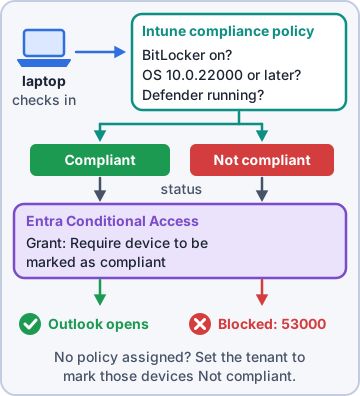
A compliance policy is a list of conditions a device must meet, like BitLocker on, minimum OS version, firewall and antivirus active, or no jailbreak. Intune evaluates each device and marks it Compliant or Not compliant. Compliance doesn't fix anything by itself. Configuration profiles and endpoint security policies change settings; compliance only reports whether the device measures up.
Dev: Configuration profile: "turn BitLocker on." Compliance policy: "is BitLocker on? Prove it."
Settings per platform
Each platform has its own compliance settings. Windows: BitLocker, Secure Boot and code integrity (Device Health Attestation), minimum OS build, firewall, antivirus, password rules, and the Microsoft Defender for Endpoint machine risk score. iOS/iPadOS: jailbroken devices, minimum OS, passcode. Android Enterprise: Play Integrity verdict, rooted devices, OS version, passcode. macOS: FileVault, System Integrity Protection, firewall. Linux works with custom settings.
KC-Win-Compliance (Windows)
 Require BitLocker            Require
 Require Secure Boot          Require
 Minimum OS version           10.0.26200
 Firewall                     Require
 Microsoft Defender Antimalware Require
Tenant-wide compliance settings
Under Endpoint security > Device compliance > Compliance policy settings: Mark devices with no compliance policy assigned as Compliant or Not compliant. Choose Not compliant so unassigned devices don't slip through. Compliance status validity period (default 30 days) marks a device noncompliant if it stops reporting.
Exam tip Exam trap: with the default "Compliant", a device with no policy at all passes Conditional Access. Secure choice: Not compliant.
Actions for noncompliance
Every policy includes Mark device noncompliant, by default immediately (0 days). Add a schedule to create a grace period. Other actions: send email to the user (using a notification message template), remote lock, and retire the noncompliant device (adds it to a retire list that an admin must act on), plus push notifications on mobile platforms.
Action                       Schedule
Mark device noncompliant      1 day
Send email to end user        0 days
Send email to end user        3 days
Add device to retire list     30 days
Exam tip Grace period = delay "Mark device noncompliant". The device stays "In grace period" and keeps access until the timer runs out.
Objective 1.3
Conditional Access that requires compliance
Building the policy
In the Microsoft Entra admin center (or Intune: Endpoint security > Conditional Access), create a policy. Assignments: users or groups, target resources (cloud apps like Office 365), and conditions such as device platforms or client apps. Grant: Require device to be marked as compliant. With several grant controls, choose Require all the selected controls or Require one of the selected controls.
CA02 Require compliant device
 Users:   All users
  Exclude: KC-BreakGlass
 Apps:    Office 365
 Platform: Windows, iOS, Android, macOS
 Grant:   Require device to be marked
          as compliant
 State:   Report-only
Exam tip Always exclude emergency access (break-glass) accounts, and start in Report-only mode to see the effect before you enforce.
How the pieces connect
1) The device enrolls in Intune. 2) Intune evaluates compliance policies and writes the result onto the device object in Entra. 3) At sign-in, Conditional Access checks that flag. A device that isn't enrolled can't be compliant, so the grant fails. Compliance plus Conditional Access needs Intune and Microsoft Entra ID P1.
Exam tip In a browser on Windows, sign in to Microsoft Edge with the work profile so the device identity is sent; otherwise CA can't see the device.
Reading the sign-in log
When access is blocked, open Entra ID > Monitoring & health > Sign-in logs and select the sign-in. The Conditional Access tab lists each policy as Success, Failure or Not applied. The device info shows whether Entra saw the device as compliant and managed. Error 53000 means the device isn't in the required compliant state.
Exam tip Report-only results show as "Report-only: Failure" in the same log, so you can find who would be blocked before enforcing.
Check yourself 1Dev wants personal devices with no compliance policy to fail the Conditional Access check instead of slipping through. What should he change?
- Raise the compliance status validity period to 90 days
- Add a Retire action to every compliance policy
- Set devices with no policy assigned to Not compliant
- Switch the Conditional Access policy to Report-only
Show the answer
Answer: C. Set devices with no policy assigned to Not compliant
The tenant setting "Mark devices with no compliance policy assigned as" decides how unassigned devices are treated. Not compliant closes the gap.
Check yourself 2Store staff often miss the encryption rule for a day after their laptop is reimaged. Kibble wants them to keep access for 2 days while BitLocker finishes. What should Dev set?
- Schedule "Mark device noncompliant" for 2 days
- Turn off the BitLocker requirement for store laptops
- Exclude the store users from Conditional Access
- Add "Send email to end user" at 0 days
Show the answer
Answer: A. Schedule "Mark device noncompliant" for 2 days
Delaying the mark-noncompliant action creates a grace period. The device shows In grace period and keeps access until the schedule runs out.
Practice questions
Answer in your head, then open the answer. Ranger's Desktop Duty has 374 questions like these for MD-102, with mock exams.
Question 1Kibble & Co. has offices in Denver and Austin. Denver's IT admins must see only Denver devices and the policies made for Denver, using the Policy and Profile Manager role. What should Dev use with the role assignment?
- A Denver administrative unit in Microsoft Entra ID
- A separate Intune tenant for Denver
- An assignment filter that includes only Denver devices
- A Denver scope tag on objects and the role assignment
Show the answer
Answer: D. A Denver scope tag on objects and the role assignment
Intune scoped administration uses role assignments with Members (admin groups), Scope groups (users/devices they manage) and Scope tags. Admins only see objects that carry a scope tag in their role assignment.
Question 2Dev assigned the Help Desk Operator role to KC-Austin-IT with scope group KC-Austin-Devices, but left Scope (Tags) empty. What can the Austin admins see?
- Only objects tagged Default
- No objects until a scope tag is added
- All objects that the role's permissions allow
- Only devices in KC-Austin-Devices and nothing else
Show the answer
Answer: C. All objects that the role's permissions allow
If a role assignment has no scope tag, the admin can see all objects their permissions allow; admins without scope tags effectively have all of them. To restrict visibility, add the right scope tags to the assignment.
Question 3A Kibble & Co. regional admin with the Policy and Profile Manager role can't create a new scope tag. Which role is required to create, update or delete scope tags?
- The Help Desk Operator built-in Intune role
- The Intune Administrator Microsoft Entra role
- The Cloud Device Administrator Microsoft Entra role
- The Intune Role Administrator built-in Intune role
Show the answer
Answer: B. The Intune Administrator Microsoft Entra role
Creating, updating or deleting scope tags requires the Intune Administrator (Intune Service Administrator) Entra role. Admins scoped by a tag can't change the master list of scope tags.
Question 4A Kibble & Co. finance analyst needs to view Cloud PC information in the Windows 365 node of the Intune admin center but must not change anything. Which built-in role should Dev assign?
- Cloud PC Reader
- Read Only Operator
- Windows 365 Administrator
- Cloud PC Administrator
Show the answer
Answer: A. Cloud PC Reader
Windows 365 adds Cloud PC built-in roles in Intune: Cloud PC Administrator manages images, Azure network connections and provisioning, and Cloud PC Reader views Cloud PC data without making changes.
Question 5Kibble & Co. wants one person to provision and manage all Cloud PCs and also create the security groups used by provisioning policies, without Intune Administrator or Global Administrator. Which Microsoft Entra role fits?
- Windows 365 Administrator
- Groups Administrator
- Cloud PC Reader
- Cloud Device Administrator
Show the answer
Answer: A. Windows 365 Administrator
The Windows 365 Administrator Entra role manages all aspects of Windows 365 Cloud PCs and can create and manage security groups, so it's a narrower alternative to Intune Administrator or Global Administrator for Cloud PC work.
Microsoft, Azure, Intune and Windows are trademarks of the Microsoft group of companies. Ranger Gamez is not affiliated with or endorsed by Microsoft. The practice questions are written to the published exam objectives; they are not real exam questions.