 RANGER
 Microsoft 365 Certified: Endpoint Administrator (MD-102) · chapter 6 of 12
Month 2: One setting, every device
In this chapter Objectives 2.2
Objective 2.2
Configuration profiles for Windows
Profile types
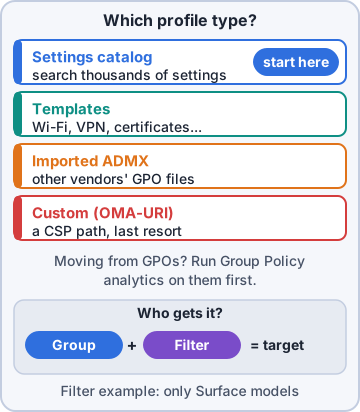
A configuration profile pushes settings to devices. For Windows, the settings catalog is the main tool: thousands of settings you search and pick, generated from Windows configuration service providers (CSPs). Templates group common jobs: Wi-Fi, VPN, certificates, Delivery Optimization, Domain Join, kiosk, custom OMA-URI. Administrative templates (ADMX) are in the settings catalog too.
Exam tip First choice on the exam for most Windows settings: settings catalog. Custom OMA-URI only when nothing else exposes the setting.
Importing custom ADMX files
Some apps ship their own Group Policy templates (an ADMX file plus a language ADML file). Upload them under Devices > Configuration > Import ADMX, uploading any ADMX they depend on first. Then create a profile with the Imported Administrative templates type and configure the app's settings like any other policy.
Import ADMX
 1. kibblepos.admx  + en-US\kibblepos.adml
 2. Status: Available
Create profile > Windows 10 and later
 > Templates > Imported Administrative
   templates
Group Policy analytics
Group Policy analytics shows how your GPOs translate. Export each GPO as XML from the Group Policy Management Console and import it under Devices > Group Policy analytics. The report shows the MDM support percentage and which settings have a matching CSP, which are deprecated and which have no MDM equivalent. You can then migrate supported settings into a settings catalog policy.
Exam tip Settings with no MDM equivalent need a different approach: a script, a remediation, or dropping the setting.
Objective 2.2
Profiles for Android, Apple and specialty devices
Android Enterprise profiles
Android profiles depend on the enrollment type. Fully managed, dedicated and corporate-owned work profile devices get device restrictions (camera, screen capture, system updates, kiosk mode for dedicated devices), Wi-Fi, VPN and certificates. Personally owned work profile devices get settings that apply inside the work profile only. OEMConfig profiles carry vendor settings, such as Zebra's or Samsung's.
Exam tip Kiosk mode (single app or multi-app) is a dedicated-device setting. You won't find it for BYOD work profiles.
iOS/iPadOS and macOS profiles
iOS/iPadOS: device restrictions (many need a supervised device from ADE), device features (home screen layout, wallpaper, AirPrint), Wi-Fi, VPN, email, and the settings catalog, including Apple's declarative device management (DDM) settings. macOS: settings catalog, device restrictions, extensions, privacy permissions, Platform SSO, shell scripts and custom .mobileconfig files.
Exam tip "Setting needs a supervised iPad" means the iPad must come through Automated Device Enrollment (or Apple Configurator).
Specialty devices
Microsoft Teams Rooms on Windows are Windows devices: enroll them (often with Autopilot self-deploying) and target device-based profiles. HoloLens 2 runs Windows Holographic for Business: enroll through Autopilot for HoloLens and use Windows profiles that support Holographic. Zebra Android devices enroll as dedicated or fully managed, and Zebra's own settings arrive through the Zebra OEMConfig app.
Exam tip Intune's specialty device management (Plan 2 or Suite) covers AR/VR headsets, large smart screens and some meeting room devices.
Objective 2.2
Assignment filters and enrollment time grouping
Include, exclude and conflicts
Assign a profile to included groups and optionally excluded groups. Don't mix user and device groups across include and exclude. If two profiles set the same setting to different values on one device, the report shows Conflict and the device may keep an older value. Fix it by removing the duplicate setting.
Exam tip A Conflict status is never fixed by waiting. One setting, one source of truth.
Assignment filters
An assignment filter narrows a group assignment by device properties. Intune checks the filter when the device checks in, so you don't wait for group membership to update. A filter is Include or Exclude and uses rules like device.model, device.manufacturer, device.osVersion, device.deviceName, device.deviceOwnership or device.enrollmentProfileName.
Filter: KC-POS-Terminals (Windows)
(device.deviceName -startsWith
   "KC-PC-POS")

Assignment: All devices
  Filter mode: Exclude
  Filter: KC-POS-Terminals
Exam tip "All devices except" or "only one model, quickly" = filter. "Use the same set for Conditional Access too" = group.
Enrollment time grouping
With enrollment time grouping, the device is added to a chosen static device group during enrollment, so the policies and apps assigned to that group arrive while the device is still setting up. Autopilot device preparation uses it. Dynamic groups can take minutes or longer to pick up a new device, which is too late for setup.
Exam tip Dynamic group = membership updates eventually. Enrollment time grouping = member from the first minute.
Check yourself 1Dev must apply a Wi-Fi profile to every Windows device except the POS terminals, and new POS terminals must be excluded from the moment they check in. What's the best approach?
- Create a dynamic group of POS terminals and wait for it to fill
- Add a custom OMA-URI setting that skips POS devices
- Assign it to a user group of store employees
- Assign to All devices with an Exclude filter for the POS names
Show the answer
Answer: D. Assign to All devices with an Exclude filter for the POS names
Assignment filters are evaluated at check-in from device properties, so an Exclude filter on the POS naming pattern keeps new terminals out immediately.
Check yourself 2Sam exported 42 GPOs as XML. He wants to know which settings Intune can deliver before he moves anything. Which feature should he use?
- Import ADMX
- Group Policy analytics
- A custom OMA-URI profile
- The settings catalog search
Show the answer
Answer: B. Group Policy analytics
Group Policy analytics imports GPO XML exports and reports MDM support per setting, then can migrate supported settings into a settings catalog policy.
Practice questions
Answer in your head, then open the answer. Ranger's Desktop Duty has 374 questions like these for MD-102, with mock exams.
Question 1Dev needs to configure several Microsoft Edge security settings on Kibble & Co. Windows devices. Microsoft recommends one profile type that lists thousands of settings with search. Which should he use?
- Templates > Custom
- Templates > Device restrictions
- Imported ADMX templates
- Settings catalog
Show the answer
Answer: D. Settings catalog
The settings catalog lists available settings in one searchable place and is the recommended way to build most Windows profiles. Custom OMA-URI and imported ADMX are for settings the catalog doesn't include.
Question 2A new Windows policy setting exists in the Policy CSP but isn't in the settings catalog yet. Kibble & Co. needs it now. What should Dev create?
- An imported ADMX file for the Policy CSP
- A Device restrictions template profile
- A compliance policy with a custom script
- A Custom profile with the OMA-URI
Show the answer
Answer: D. A Custom profile with the OMA-URI
Templates > Custom lets you enter an OMA-URI (for example ./Device/Vendor/MSFT/Policy/Config/<Area>/<Policy>), a data type and a value, to configure any CSP setting that isn't exposed in the UI.
Question 3Dev writes a custom OMA-URI for a Policy CSP setting that must apply to the signed-in user, not the whole device. How should the OMA-URI begin?
- HKEY_CURRENT_USER\Software\Policies\
- ./Vendor/MSFT/Policy/Result/
- ./User/Vendor/MSFT/Policy/Config/
- ./Device/Vendor/MSFT/Policy/Config/
Show the answer
Answer: C. ./User/Vendor/MSFT/Policy/Config/
Policy CSP settings use ./Device/Vendor/MSFT/Policy/Config/... for device scope and ./User/Vendor/MSFT/Policy/Config/... for user scope, where the setting supports it.
Question 4Dev imports firefox.admx and firefox.adml into Intune, but the import fails with a missing namespace error. The Mozilla files are in the same download. What should he do?
- Delete Windows.admx from the imported templates
- Import the Mozilla ADMX/ADML pair first, then Firefox
- Import the files as a Custom OMA-URI profile instead
- Rename firefox.adml to a different language folder
Show the answer
Answer: B. Import the Mozilla ADMX/ADML pair first, then Firefox
Some ADMX files depend on other namespaces (listed under using prefix in policyNamespaces). Import the dependency first and wait for Available status; for Firefox that's the Mozilla ADMX/ADML pair.
Question 5Dev imports a vendor's custom ADMX file and gets: ADMX file referenced not found NamespaceMissing:Microsoft.Policies.Windows. What must he do first?
- Upload Windows.admx and its ADML file
- Remove all combo box settings from the ADML
- Convert the ADML file to a language other than en-us
- Split the ADMX into files under 100 KB
Show the answer
Answer: A. Upload Windows.admx and its ADML file
Some imported ADMX files need the Windows namespace (Microsoft.Policies.Windows). Upload Windows.admx first; the error names the missing namespace.
Microsoft, Azure, Intune and Windows are trademarks of the Microsoft group of companies. Ranger Gamez is not affiliated with or endorsed by Microsoft. The practice questions are written to the published exam objectives; they are not real exam questions.