 RANGER
 Apple Device Support · chapter 4 of 12
Week 4: New phones for the drivers
In this chapter Objectives 3.2, 3.3, 3.4
Objective 3.2
Troubleshooting iPhone and iPad setup
Activation and Activation Lock
Setup must activate the device with Apple over Wi-Fi or cellular (active SIM or eSIM). "Unable to activate" usually means no internet, a SIM or carrier issue, or a busy activation service: check the connection and Apple's System Status page, then retry. A screen saying the device is locked to the owner is Activation Lock: Find My was still on when it was erased.
- Activation Lock: enter the previous owner's Apple Account and password
- Company devices: MDM can bypass Activation Lock on supervised devices
- No access at all: proof of purchase to Apple Support
Exam tip Before handing a device on: sign out of the Apple Account (turns off Find My), then erase. That prevents Activation Lock.
Quick Start and data transfer problems
Quick Start sets up a new iPhone from an old one nearby. If the devices don't see each other: keep them close, plugged in, with Bluetooth and Wi-Fi on, and restart both. If transfer stops, finish setup, then erase the new phone (Settings > General > Transfer or Reset iPhone) and start again. Company devices assigned in Apple Business may not allow device-to-device transfer.
Exam tip Apps look dimmed after a restore? They're still downloading in the background. Keep the device on Wi-Fi and power.
Restore and version problems
A backup made on a newer iOS version can't be restored to a device running an older one. Setup then says the device needs a software update: update during setup, or set up as new, update iOS, erase and restore again. A Remote Management screen on a phone you bought used means it is still assigned to an organization; only that organization can release it.
Priya: Activation Lock or Remote Management on a used device? You can't bypass it. The owner has to let go.
Check yourself 1A driver's new iPhone says the backup "requires a newer version of iOS" during setup. What should you do?
- Restore the backup in recovery mode instead
- Turn off Find My on the new iPhone first
- Make the backup again with encryption on
- Update iOS first, then restore
Show the answer
Answer: D. Update iOS first, then restore
Backups can only be restored to the same or a newer iOS version than the one that made them. Update the new phone (during setup or after setting up as new and erasing), then restore.
Objective 3.3
What iPhone and iPad backups don't include
Three ways to back up
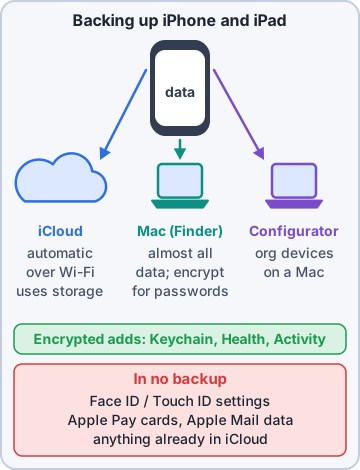
An iPhone or iPad can back up to iCloud, to a Mac (in Finder), or to a Mac with Apple Configurator (which uses the same backup format as Finder). None of them is a full disk image: each leaves out data that is stored elsewhere or protected on purpose.
Rosa: Three ways, and none of them saves everything? Sneaky.
Ranger: hides a treat, unbacked-up
iCloud Backup leaves out
iCloud Backup saves the data and settings that don't already sync to iCloud. So it skips:
- Data already in iCloud: Contacts, Calendars, Notes, iCloud Photos, Messages in iCloud
- Data in other cloud services, such as Gmail or Exchange mail
- Apple Mail data, Apple Pay information and settings, Face ID or Touch ID settings
- iCloud Music Library and App Store content (downloaded again)
- Offline maps
Exam tip Trap: "Photos are missing from the iCloud backup." If iCloud Photos is on, they were never in the backup; they're in iCloud Photos.
Mac and Apple Configurator backups leave out
A backup to a Mac includes almost all device data and settings, but not:
- Content from the App Store and Apple's media stores, and content synced from the Mac (music, videos, photos)
- Data already synced to iCloud (iCloud Photos, iMessages and SMS/MMS in iCloud)
- Face ID or Touch ID settings, Apple Pay information, Apple Mail data, offline maps
- Activity, Health and Keychain data unless the backup is encrypted
Exam tip Want saved passwords, Health and Activity data in a Mac backup? Turn on Encrypt local backup and keep that password safe.
Check yourself 2A driver's iPhone is backed up to a Mac without encryption. Which of these will NOT be in that backup? Choose two.
- Photos stored only on the iPhone
- Home Screen layout
- Health and Activity data
- Face ID settings
- Text messages not synced to iCloud
Show the answer
Answers: C. Health and Activity data, D. Face ID settings
Unencrypted Mac backups skip Health, Activity and Keychain data. Face ID and Touch ID settings are never backed up; the user sets them up again.
Objective 3.4
Troubleshooting iCloud, Mac and Apple Configurator backups
iCloud Backup problems
Most failures are space or network. Check Settings > [name] > iCloud > iCloud Backup for the last successful backup and the size of the next one.
- Not enough iCloud storage: delete old backups, exclude big apps from the backup, or upgrade to iCloud+
- "Couldn't be completed": confirm Wi-Fi, try another network, install pending updates
- Automatic backup needs: Back Up This iPhone on, power, Wi-Fi and the screen locked
- Option dimmed: a restore is still running, or an MDM profile restricts iCloud Backup
Exam tip Turned off iCloud Backup? Existing iCloud backups are kept 180 days, then deleted.
Mac (Finder) and Apple Configurator problems
Connect with a cable, unlock the device, and tap Trust and enter the passcode when asked. The Mac needs enough free disk space for the backup and a current macOS. Try another cable or port if the device disconnects. Apple Configurator backups follow the same rules and show errors in its activity log.
- Device not shown in Finder: unlock it, Trust this computer, try another cable
- "Not enough space": free space on the Mac's startup disk
- Session failed or device disconnected: restart both, update macOS
Forgotten encrypted backup password
Apple can't recover the password of an encrypted local backup, and that backup can't be restored without it. To make new encrypted backups, use Reset All Settings on the device (Settings > General > Transfer or Reset > Reset): it removes the backup encryption password without erasing data. Then make a fresh encrypted backup with a new password.
Exam tip Reset All Settings resets settings like Wi-Fi passwords and wallpaper, but keeps apps, photos and data.
Check yourself 3A shop iPad's iCloud Backup option is dimmed. The iPad was not recently restored. What's the most likely reason?
- The iPad is low on local storage
- Bluetooth is turned off
- The iPad has no SIM card
- An MDM restriction
Show the answer
Answer: D. An MDM restriction
A dimmed iCloud Backup option means a restore is still in progress or a profile restricts it. On a managed shop iPad, check VPN & Device Management for the restriction.
Practice questions
Answer in your head, then open the answer. Ranger's Device Doctor has 538 questions like these for Apple Device Support, with mock exams.
Question 1A used iPad from a closed store shows "iPad Locked to Owner" during setup. What is happening?
- Activation Lock is on; the owner's account is needed
- The iPad is still enrolled in the store's MDM service
- The iPad needs an iPadOS update before setup can continue
- The iPad is stuck in recovery mode
Show the answer
Answer: A. Activation Lock is on; the owner's account is needed
"Locked to Owner" means Activation Lock is on. The Apple Account that turned on Find My must be entered, or, for an organization-linked lock, the bypass code or the administrator's credentials.
Question 2A company iPhone returned by a former driver is Activation Locked to Kibble & Co. through the MDM service. How can IT get past the lock?
- Restore the iPhone in recovery mode with a Mac
- Enter the bypass code from the MDM service
- Remove the SIM card and restart
- Set it up as new without Wi-Fi
Show the answer
Answer: B. Enter the bypass code from the MDM service
For organization-linked Activation Lock, enter the bypass code from the device management service, or an administrator with Manage Devices rights in Apple Business or Apple School Manager can turn the lock off.
Question 3A new driver's iPhone stays on "Unable to Activate" during setup. Which step should you try first?
- Erase the iPhone with Apple Configurator on a Mac
- Replace the SIM card
- Check Apple System Status, restart, retry
- Turn on Airplane Mode and continue offline
Show the answer
Answer: C. Check Apple System Status, restart, retry
Start with the simple, non-destructive checks: confirm the activation service is up on the System Status page, restart the iPhone and use a reliable network (Wi-Fi preferred). You can also activate it through a Mac.
Question 4A Quick Start transfer to a new iPhone stopped halfway and will not resume. What does Apple recommend?
- Put the new iPhone in recovery mode and restore it
- Turn off Bluetooth on both iPhones and retry
- Finish setup, then erase it and start over
- Back up the old iPhone to a Mac, then retry Quick Start
Show the answer
Answer: C. Finish setup, then erase it and start over
If a transfer is interrupted, complete setup on the new device, erase it (Settings > General > Transfer or Reset iPhone > Erase All Content and Settings) and run the transfer again.
Question 5Rosa's new iPhone and her old iPhone do not find each other for Quick Start. Which should she check?
- That both have Wi-Fi and Bluetooth on
- That both are signed out of iCloud
- That both run the exact same iOS version
- That the old iPhone is in Airplane Mode
Show the answer
Answer: A. That both have Wi-Fi and Bluetooth on
Quick Start needs the devices close together, powered, with Wi-Fi and Bluetooth turned on. Airplane Mode can turn those radios off.
Apple, iPhone, iPad and Mac are trademarks of Apple Inc. Ranger Gamez is not affiliated with or endorsed by Apple. The practice questions are written to the published exam objectives; they are not real exam questions.