 RANGER
 CompTIA A+ Core 1 (220-1201) · chapter 10 of 15
Week 10: Into the cloud
In this chapter Objectives 4.1, 4.2
Objective 4.1
Virtualization concepts
Why virtual machines?
A VM is a full computer in software: virtual CPU, RAM, disk and NIC on a shared physical host. A sandbox VM is isolated: open a suspicious file or test risky software without touching the host, then roll back with a snapshot. Test/development: build and test patches, updates and apps on VMs that copy production before rolling them out.
Exam tip Need to try an update safely and undo it? VM + snapshot.
Legacy, cross-platform and application virtualization
Legacy software/OS: an old app that needs an unsupported OS runs in an isolated VM instead of on an old PC. Cross-platform virtualization: run a different OS, e.g. a Windows VM on a Mac, to use apps built for it. Application virtualization: a single app is packaged or streamed from a server and runs isolated from the local OS with no normal install; VDI, by contrast, delivers a whole desktop.
Exam tip Old inventory app only runs on an old OS = put that OS in a VM and isolate it.
Hypervisors: Type 1 and Type 2
The hypervisor creates and runs VMs. Type 1 (bare metal) installs directly on the hardware: efficient and used for servers and data centers. Type 2 (hosted) runs as an application on top of a normal OS (Windows, macOS, Linux): easy for desktops, labs and testing, but with more overhead.
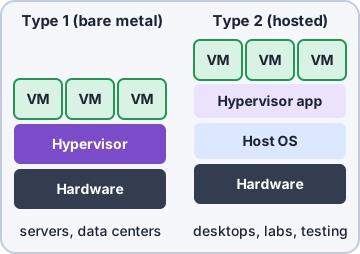
Exam tip Type 1 = on the hardware (1st layer). Type 2 = on top of an OS (2nd layer).
VM requirements: storage, network, security
The host needs a CPU with virtualization support enabled (VT-x/AMD-V), plus enough RAM and cores for every VM at once. Storage: room for each virtual disk file and its snapshots; fast SSD storage. Network: virtual switches; VMs can be bridged (on the real LAN), NAT (share the host IP), internal/host-only or isolated. Security: patch every guest OS like a real PC, use antivirus, and watch for VM escape; a compromised host exposes all its VMs.
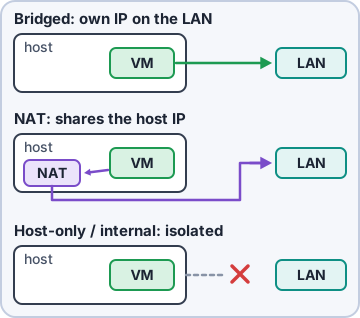
Exam tip Every VM is a real OS to secure and patch. Virtual does not mean safe.
Desktop virtualization (VDI)
VDI (virtual desktop infrastructure) runs users' desktops as VMs in the data center or cloud. Users connect from thin clients, old PCs or tablets. Data stays central, desktops are easy to rebuild, and a lost laptop holds no data. Needs good network bandwidth and strong servers.
Exam tip Store clerks need the same desktop from any terminal = VDI.
Containers
A container packages an app with its libraries and settings, but shares the host OS kernel. No guest OS per app, so containers are small, start in seconds and run the same anywhere. VMs isolate whole operating systems; containers isolate applications.
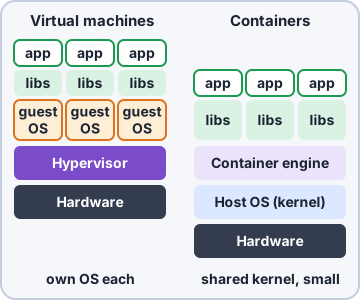
Exam tip Each VM has its own OS. Containers share the host's kernel.
Check yourself 1Sam wants to run copies of the shop app without a full guest OS for each one. Each copy should start in seconds and share the host's kernel. What should he use?
- Containers
- A Type 1 hypervisor
- VDI desktops
- A sandbox VM
Show the answer
Answer: A. Containers
A container packages an app with its libraries but shares the host OS kernel. With no guest OS per app, containers are small and start in seconds.
Objective 4.2
Cloud computing concepts
Service models: IaaS, PaaS, SaaS
IaaS (infrastructure): rent VMs, storage and networks; you manage the OS and up. PaaS (platform): the provider runs OS and runtime; you deploy your code and data (developers). SaaS (software): a complete app over the internet, e.g. hosted email or office suites; you just use it and manage users.
Who manages?  IaaS   PaaS   SaaS
Application   You    You    Prov.
Data          You    You    You *
Runtime/OS    You    Prov.  Prov.
Virtualiz.    Prov.  Prov.  Prov.
Hardware      Prov.  Prov.  Prov.
Prov. = provider
* you still own data and user accounts
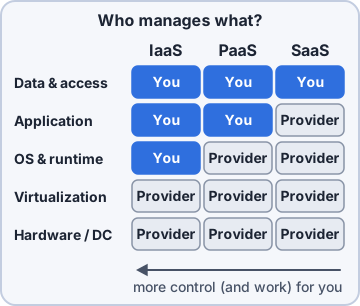
Exam tip Most control = IaaS. Least management = SaaS.
Deployment models
Public cloud: provider-owned, shared by many customers, pay as you go. Private cloud: used by one organization only (on-site or hosted). Hybrid: mix of private/on-site and public, e.g. keep sensitive data on-site and burst to public cloud. Community: shared by several organizations with common needs (e.g. a group of clinics or schools with the same compliance rules).
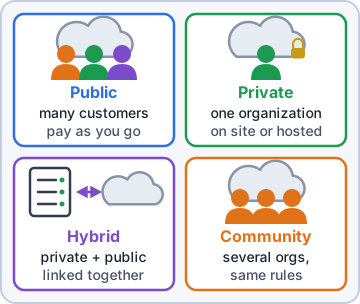
Exam tip Several organizations, same rules, share one cloud = community.
Shared vs. dedicated resources, multitenancy
Shared resources: your VMs run on hardware other customers use too: cheaper. Dedicated resources: hardware reserved for you alone (dedicated hosts): costs more, helps compliance and licensing. Multitenancy: many customers (tenants) share one platform or app instance while their data stays logically separated.
Exam tip Compliance says "no shared hardware" = dedicated resources.
Metered utilization, ingress and egress
Metered utilization: you pay for what you use: compute hours, storage GB per month, requests. Ingress is data going into the cloud (usually free). Egress is data going out (usually billed per GB). Big downloads or moving away from a provider can cost a lot.
Exam tip Surprise cloud bill after backing up TO the cloud is unlikely; restoring FROM it costs egress.
Elasticity and availability
Elasticity: resources scale up and down automatically with demand, e.g. more web servers on sale day, fewer at night. Availability: the service stays up, through redundancy across zones/regions; given in the provider's SLA, e.g. 99.99% ("four nines", about 52 minutes of downtime a year).
Exam tip Scales out on Black Friday, back down Monday = elasticity.
File synchronization
File synchronization keeps files the same across devices and the cloud: change a file on the laptop and it updates on the phone and web. Watch for sync conflicts (two edits at once), storage quotas and data caps on mobile.
Exam tip Sync is not backup: a deleted or encrypted file syncs too. Use version history.
Check yourself 2Kibble's developers want to deploy the online shop code without managing servers, operating systems or runtimes. Which cloud model fits?
- PaaS
- IaaS
- SaaS
- Private cloud
Show the answer
Answer: A. PaaS
PaaS provides the platform (OS, runtime, scaling); developers bring only code and data.
Practice questions
Answer in your head, then open the answer. Ranger's Help Desk has 436 questions like these for A+ Core 1, with mock exams.
Question 1A data center installs a hypervisor directly on new server hardware, with no general-purpose operating system underneath. What type of hypervisor is this?
- Type 2
- Container engine
- Type 1
- Application virtualization
Show the answer
Answer: C. Type 1
A Type 1 (bare-metal) hypervisor runs directly on the hardware. That gives it better performance and makes it the norm in data centers.
Question 2A developer installs a desktop virtualization application on a Windows 11 laptop to run a Linux test VM alongside other apps. What type of hypervisor is this?
- Type 2
- Type 1
- Bare-metal
- VDI broker
Show the answer
Answer: A. Type 2
A Type 2 (hosted) hypervisor runs as an application on an existing OS. It is common for desktop testing and labs.
Question 3An administrator is choosing a hypervisor to install directly on a new host server. Which of the following is a Type 1 hypervisor?
- Oracle VirtualBox
- VMware ESXi
- VMware Workstation
- Parallels Desktop
Show the answer
Answer: B. VMware ESXi
ESXi installs directly on server hardware, which makes it a Type 1 hypervisor. The other three run as applications on a desktop OS.
Question 4A user installs a Type 2 hypervisor, but creating a 64-bit VM fails with "VT-x/AMD-V hardware acceleration is not available." What should the technician do?
- Add more RAM to the host computer
- Enable virtualization support in UEFI
- Switch the VM's network to bridged mode
- Turn on Secure Boot in the BIOS/UEFI
Show the answer
Answer: B. Enable virtualization support in UEFI
Hardware virtualization extensions (Intel VT-x, AMD-V) must be turned on in the firmware for most hypervisors to run 64-bit guests.
Question 5A help desk technician needs to open a suspicious email attachment to see what it does without risking the workstation. Which use of a virtual machine fits BEST?
- A legacy OS VM for old software
- A VDI desktop shared with the user
- A sandbox VM that is reverted afterward
- A container on the production file server
Show the answer
Answer: C. A sandbox VM that is reverted afterward
A sandbox VM isolates untrusted code from the host. A snapshot or revert removes any changes afterward.
CompTIA, A+, Network+, Security+ and Linux+ are trademarks of CompTIA, Inc. Ranger Gamez is not affiliated with or endorsed by CompTIA. The practice questions are written to the published exam objectives; they are not real exam questions.