 RANGER
 CompTIA A+ Core 2 (220-1202) · chapter 14 of 17
Ops: Tickets, assets, changes and backups
In this chapter Objectives 4.1, 4.2, 4.3
Objective 4.1
Ticketing systems
What a good ticket holds
Every request gets a ticket so nothing is lost and work is measured.
- User information and device information
- Description of issues, categories and severity (impact and urgency)
- Escalation levels: Tier 1 to Tier 2/3 or a vendor when needed
Ticket #1120  Hardware > Printer
User:     Rosa M., Warehouse x4410
Device:   WH-PRN-02 (asset KC-00412)
Severity: High (labels blocked)
Escalate: Tier 1 -> Tier 2, 10:40
Issue:    Label printer 'offline'
          on 3 PCs
Notes:    10:15 power-cycled, no change
          10:35 cable OK; queue stuck
Resolved: Cleared queue, restarted
          spooler. Rosa confirmed 10:52.
Clear, concise written communication
Write tickets so the next tech, or an auditor, understands them:
- Issue description: what the user sees, in plain words, with error text
- Progress notes: what you tried, when, and the result
- Issue resolution: the actual fix and how you confirmed it with the user
Exam tip 'Fixed it' is not a resolution. Say what was wrong, what you changed and how you verified it.
Objective 4.1
Asset management and documents
Asset management
Know what you own and who has it:
- Inventory lists: every device, its model and serial number
- Configuration management database (CMDB): assets plus their configurations and relationships (this PC uses that printer and that license)
- Asset tags and IDs: barcode or RFID labels on each device
- Procurement life cycle: request, purchase, deploy, maintain, retire, dispose
- Warranty and licensing: expiry dates and license counts
- Assigned users: who is responsible for each device
Types of documents
The documents a help desk keeps:
- Incident reports: what happened, impact, timeline and follow-up
- Standard operating procedures (SOPs): step-by-step instructions, e.g. a software package custom installation procedure
- New user/onboarding setup checklist: accounts, groups, devices, licenses
- User off-boarding checklist: disable accounts, collect devices, reclaim licenses, transfer data
- Service-level agreements (SLAs): internal (IT to departments) and external/third-party (vendors to us): response and resolution times
- Knowledge base/articles: known issues and fixes that users and techs can search
Exam tip Same problem solved three times this month? Write a knowledge base article.
Check yourself 1A vendor promises to replace a failed store router within 4 hours. Where is that commitment documented?
- Internal SLA
- Standard operating procedure
- External/third-party SLA
- Knowledge base article
Show the answer
Answer: C. External/third-party SLA
An SLA with an outside provider sets their required response or repair times. Internal SLAs cover IT's commitments to departments.
Objective 4.2
Change management
Documented business processes
Before any change, have these ready:
- Rollback plan: how to undo the change if it fails
- Backup plan: a backup taken right before the change
- Sandbox testing: try it first in an isolated test environment
- Responsible staff members: who does the work and who owns the result
The change request
A request form captures: purpose of the change (why), scope of the change (what and how much), date and time, affected systems/impact, risk analysis and risk level. Change type: standard (pre-approved, routine, low risk), normal (reviewed and approved by the board), emergency (urgent fix, fast-tracked approval).
Exam tip Password reset or monthly patch from an approved template = standard change. Fixing an active outage = emergency change.
Approval and implementation
The change board (change advisory board) reviews and approves normal changes. Work happens inside a maintenance window, and nothing changes during a change freeze (e.g. holiday sales). Implementation follows the plan; a peer review has another qualified tech check the change (the plan or script before it goes live, or the result); end-user acceptance confirms it works for the people who use it.
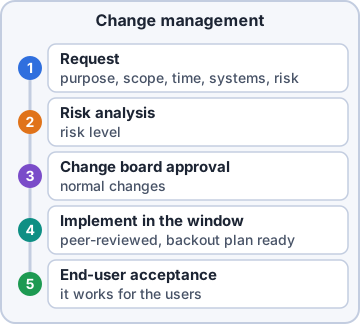
Exam tip Order to remember: request > risk analysis > board approval > implement in the window (peer-reviewed) > end-user acceptance.
Objective 4.3
Backup and recovery
Backup types
Know what each backs up and what a restore needs:
Type          Backs up         Restore needs
Full          everything       full only
Incremental   changes since    full + every
              LAST backup      incremental
Differential  changes since    full + last
              last FULL        differential
Synthetic     full built on    synthetic
 full         the server from  only
              full + incr.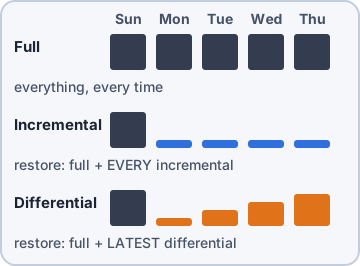
Exam tip Incremental: fastest backups, slowest restore. Differential: grows daily, restore needs only two sets.
Recovery and testing
Recovery options: in-place/overwrite (restore to the original location, replacing current files) or alternative location (restore elsewhere to compare or avoid overwriting). Backup testing: restore test files regularly; set a frequency (e.g. monthly) and record the results. An untested backup is only a hope.
Exam tip User wants yesterday's version but keep today's too? Restore to an alternative location.
Rotation schemes
Where and how long backups live:
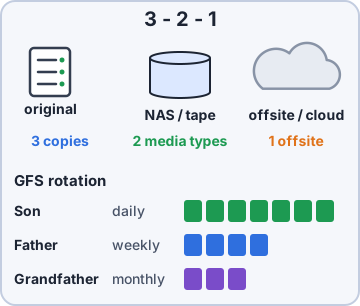
- Onsite vs. offsite: onsite restores fast; offsite (or cloud) survives fire, flood or theft
- Grandfather-father-son (GFS): daily backups (son), weekly (father), monthly (grandfather), each kept for its own period
- 3-2-1 backup rule: 3 copies of data, on 2 different media types, with 1 copy offsite
Practice questions
Answer in your head, then open the answer. Ranger's Help Desk has 444 questions like these for A+ Core 2, with mock exams.
Question 1Two tickets arrive at once: a single user's mouse is erratic, and the whole billing department cannot reach the payment system. Which ticket field tells the help desk which one to handle first?
- Device information
- Severity
- Issue resolution
- Category
Show the answer
Answer: B. Severity
Severity rates the business impact and urgency of an issue. A department-wide outage is more severe than one user's mouse, so it is handled first.
Question 2A manager reviews the closed ticket in the exhibit. Which part of the ticket does NOT meet the standard for clear, concise written communication?
- The device information
- The category
- The user information
- The issue resolution
Show the answer
Answer: D. The issue resolution
'Fixed it' does not say what was wrong or what was done, so the next technician learns nothing. A good resolution states the cause and the exact fix.
Question 3A Tier 1 technician has followed every knowledge base step for a user's VPN error with no success. The issue appears to be on the VPN concentrator, which only the network team can access. What should the technician do?
- Escalate to the next tier with full notes
- Ask the user to try a different VPN client
- Reset the user's password and close the ticket
- Close the ticket and ask the user to call back later
Show the answer
Answer: A. Escalate to the next tier with full notes
Escalation levels exist for issues beyond a tier's access or skill. Passing the ticket up with clear notes on what was tried saves the next tier from repeating work.
Question 4Before rebooting a database server, a technician needs to know which business applications and other servers rely on it. Where should the technician look?
- The user off-boarding checklist
- The help desk's knowledge base
- The configuration management database (CMDB)
- The server's warranty certificate and purchase record
Show the answer
Answer: C. The configuration management database (CMDB)
A CMDB stores configuration items and the relationships between them, so it shows which services depend on the server.
Question 5During a yearly audit, the technician scans a barcode label on each laptop to match it with the company's records. What is this label called?
- A splash screen
- A service-level agreement
- A license key
- An asset tag
Show the answer
Answer: D. An asset tag
Asset tags carry a unique ID that links a device to its inventory record, assigned user, and warranty information.
CompTIA, A+, Network+, Security+ and Linux+ are trademarks of CompTIA, Inc. Ranger Gamez is not affiliated with or endorsed by CompTIA. The practice questions are written to the published exam objectives; they are not real exam questions.