 RANGER
 CompTIA A+ Core 2 (220-1202) · chapter 2 of 17
Week 2: Install day
In this chapter Objectives 1.2
Objective 1.2
Boot methods
Where setup boots from
To install an OS, the PC must boot from install media. Set the order in UEFI/BIOS or press the one-time boot menu key at startup.
- USB: a bootable flash drive made with the Media Creation Tool; the most common method
- Network: PXE (Preboot eXecution Environment) boot pulls setup from a deployment server; no media needed
- Solid-state/flash drives: any bootable SSD or flash media
Exam tip Network boot needs PXE enabled in UEFI and a deployment server answering on the network.
More places to boot setup from
Three more sources, for when there is no USB stick or deployment server handy.
- Internet-based: download and reinstall from the vendor's cloud (Windows 'Cloud download' reset, macOS Recovery over the internet)
- External/hot-swappable drive: a USB or eSATA drive holding the installer or an image
- Internal hard drive (partition): setup files or a recovery image on a separate partition of the internal drive
Exam tip A recovery partition on the internal drive reinstalls the OS without any outside media.
Multiboot
Multiboot puts two or more OSs on one computer, each on its own partition. A boot manager asks which OS to start. Useful for testing (Windows plus Linux), but each OS needs its own space, and installing Windows after Linux can overwrite the Linux boot loader.
Exam tip Install Windows first, then Linux, so GRUB can list both.
Objective 1.2
Types of installations
Clean install vs. upgrade
Clean install: format the drive and install fresh. Nothing old comes along, so back up first. Upgrade (in-place): run setup inside the old OS; files, settings and apps stay. Faster for the user but carries old clutter forward.
Exam tip Malware-infected or very messy PC? Clean install. Happy user with lots of apps? In-place upgrade.
Deploying many PCs
One PC at a time doesn't scale.
- Image deployment: build one reference PC, generalize it (Sysprep), capture an image, then copy that image to many PCs
- Remote network installation: PCs boot from the network (PXE) and pull setup or an image from a deployment server
- Zero-touch deployment: the PC ships straight to the user; on first sign-in it enrolls in management and installs apps and policies itself (e.g. Windows Autopilot)
Fixing instead of replacing
Sometimes the OS needs a reset, not a rebuild.
- Recovery partition: a hidden partition with the maker's factory image or Windows RE tools; restores the PC without outside media
- Repair installation: reinstall Windows over itself, keeping files and apps; fixes corrupted system files when sfc can't
- Third-party drivers: if setup can't see the drive (RAID, VMD or some NVMe controllers), click Load driver and supply the storage driver from a USB stick
Exam tip 'Setup shows no drives' on a new laptop = load the storage controller driver. The drive is usually fine.
Check yourself 1Sam wants Windows and Linux on one test laptop, each on its own partition. In what order should you install them?
- Linux first, then Windows
- Windows first, then Linux
- Either order; Windows keeps GRUB
- Image both onto one partition
Show the answer
Answer: B. Windows first, then Linux
Installing Windows after Linux can overwrite the Linux boot loader. Install Windows first, then Linux, so GRUB can list both systems.
Objective 1.2
Partitioning, formatting and upgrades
MBR vs. GPT
A partition table describes how the disk is divided.
- MBR (master boot record): legacy, 2 TB limit, four primary partitions
- GPT (GUID Partition Table): modern, huge disks, many partitions, a backup copy of the table, needed to boot Windows 11 on UEFI
             MBR            GPT
Max disk     2 TB           far over 2 TB
Partitions   4 primary (or  128 (Windows)
             3 + extended)
Firmware     legacy BIOS    UEFI
Backup table no             yes (disk end)
Windows 11   not supported  required (UEFI)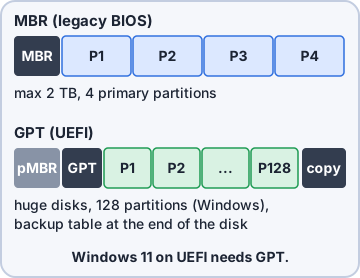
Exam tip Error 'On EFI systems, Windows can only be installed to GPT disks' = convert the disk to GPT (diskpart clean + convert gpt, or MBR2GPT).
Drive format
After partitioning, each volume is formatted with a filesystem. Windows installs to NTFS. A quick format just writes a new empty filesystem. A full format also checks every sector and (since Windows Vista) writes zeros over the volume, so it takes much longer.
Exam tip For disposal, follow 2.9: a quick format leaves data recoverable, and a format is no proof of erasure. Use a wiping tool or destruction and document it.
Upgrade considerations
Before any upgrade, check three things:
- Backup files and user preferences: back up data, browser bookmarks, desktop items and settings first, even for an in-place upgrade
- Application and driver support/backward compatibility: confirm every business app and driver has a version for the new OS
- Hardware compatibility: CPU, TPM, firmware, RAM, storage; run PC Health Check or the vendor's compatibility list
Feature updates and product life cycle
Windows 11 gets a feature update once a year (versions like 23H2 or 24H2). It adds features and restarts the support clock. Home and Pro versions get 24 months of support; Enterprise and Education get 36 months. Monthly quality updates (Patch Tuesday) fix bugs and security issues. Track the product life cycle so no PC drifts off support.
Exam tip Feature update = new version, yearly. Quality update = patches, monthly.
Check yourself 2Kibble & Co. is buying 40 laptops for remote staff who never visit HQ. Maya wants each laptop shipped straight to the user and to configure itself on first sign-in. Which installation type fits?
- Image deployment
- Repair installation
- Remote network installation
- Zero-touch deployment
Show the answer
Answer: D. Zero-touch deployment
Zero-touch deployment lets the vendor ship the device to the user; it enrolls and configures itself at first sign-in. Imaging and PXE network installs need a tech or the office network.
Check yourself 3Which TWO are true of GPT compared with MBR? Choose two.
- Supports disks larger than 2 TB
- Limited to four primary partitions
- Works only with legacy BIOS
- Keeps a backup copy of the partition table
- Is required to install Windows on FAT32
Show the answer
Answers: A. Supports disks larger than 2 TB, D. Keeps a backup copy of the partition table
GPT supports very large disks and stores a backup partition table at the end of the disk. MBR has the four-primary-partition and 2 TB limits and is the legacy BIOS style.
Practice questions
Answer in your head, then open the answer. Ranger's Help Desk has 444 questions like these for A+ Core 2, with mock exams.
Question 1A technician will install Windows on 40 new desktops. The NICs are set to boot from a deployment server on the LAN using PXE. Which boot method is being used?
- Internet-based
- Internal hard drive (partition)
- Network
- Solid-state/flash drive
Show the answer
Answer: C. Network
PXE (Preboot Execution Environment) is a network boot method: the NIC gets an address and boot image from a server on the LAN. Internet-based boot downloads from the vendor over the internet instead.
Question 2A company ships new Windows laptops directly from the manufacturer to remote employees. When a user signs in with a work account, the laptop enrolls in management and installs company apps and settings with no hands-on work by IT. Which installation type is this?
- Zero-touch deployment
- Image deployment
- Upgrade
- Remote network installation
Show the answer
Answer: A. Zero-touch deployment
Zero-touch deployment (for example, Windows Autopilot) provisions a device from the cloud the first time the user signs in, so IT never touches it. Image deployment still requires IT to lay down an image.
Question 3A technician is preparing a new 4 TB drive as the boot drive for a UEFI-based PC that will run Windows 11. Which partitioning scheme should be used?
- GPT
- Dynamic disk
- Extended partition
- MBR
Show the answer
Answer: A. GPT
GUID Partition Table (GPT) supports drives larger than 2 TB and is required for UEFI boot, which Windows 11 needs. MBR is limited to 2 TB and four primary partitions.
Question 4A user's Windows 11 PC has corrupted system files that sfc cannot fix. The user wants to keep installed apps, settings and personal files. Which installation type should the technician perform?
- Repair installation
- Clean install
- Recovery partition restore
- Image deployment
Show the answer
Answer: A. Repair installation
A repair installation (in-place reinstall of the same version) replaces Windows system files while keeping apps, settings and data. Clean installs and factory restores wipe what the user wants to keep.
Question 5During a Windows 11 clean install on a workstation with a RAID controller, setup shows no drives on the 'Where do you want to install Windows?' screen. The array is healthy in the controller's configuration utility. What should the technician do?
- Change the boot order to start from the array
- Convert the disk to MBR with diskpart
- Run chkdsk /r on the array from a command prompt
- Load the controller's storage driver in setup
Show the answer
Answer: D. Load the controller's storage driver in setup
Windows setup includes drivers for common controllers only; RAID and some NVMe controllers need the vendor's driver loaded with 'Load driver'. Converting partition styles cannot help when the disk is invisible.
CompTIA, A+, Network+, Security+ and Linux+ are trademarks of CompTIA, Inc. Ranger Gamez is not affiliated with or endorsed by CompTIA. The practice questions are written to the published exam objectives; they are not real exam questions.